The Differences Between AutoCount Item Package Module and Stock Assembly (BOM) Module
Discover which AutoCount module is the right fit for managing your bundled items or production processes. Make informed decisions for your inventory and sales operations.
Introduction
For businesses using AutoCount, selecting the right module to manage grouped or bundled items can significantly impact inventory and sales operations. Two commonly used modules are the Item Package Module and the Stock Assembly (BOM) Module. Though both are designed for handling grouped items, their functionalities, use cases, and inventory management approaches differ.

This article will dive into the key differences between these two modules and help you decide which module best suits your business needs.
What is the AutoCount Item Package Module?
The AutoCount Item Package Module is designed for businesses that sell bundled items, such as promotional sets, hampers, and product combos. It allows users to create a “package item” by grouping multiple individual items together and selling them as one.
This module is ideal for businesses that offer promotions or product bundles without altering individual item stock levels during the bundling process.
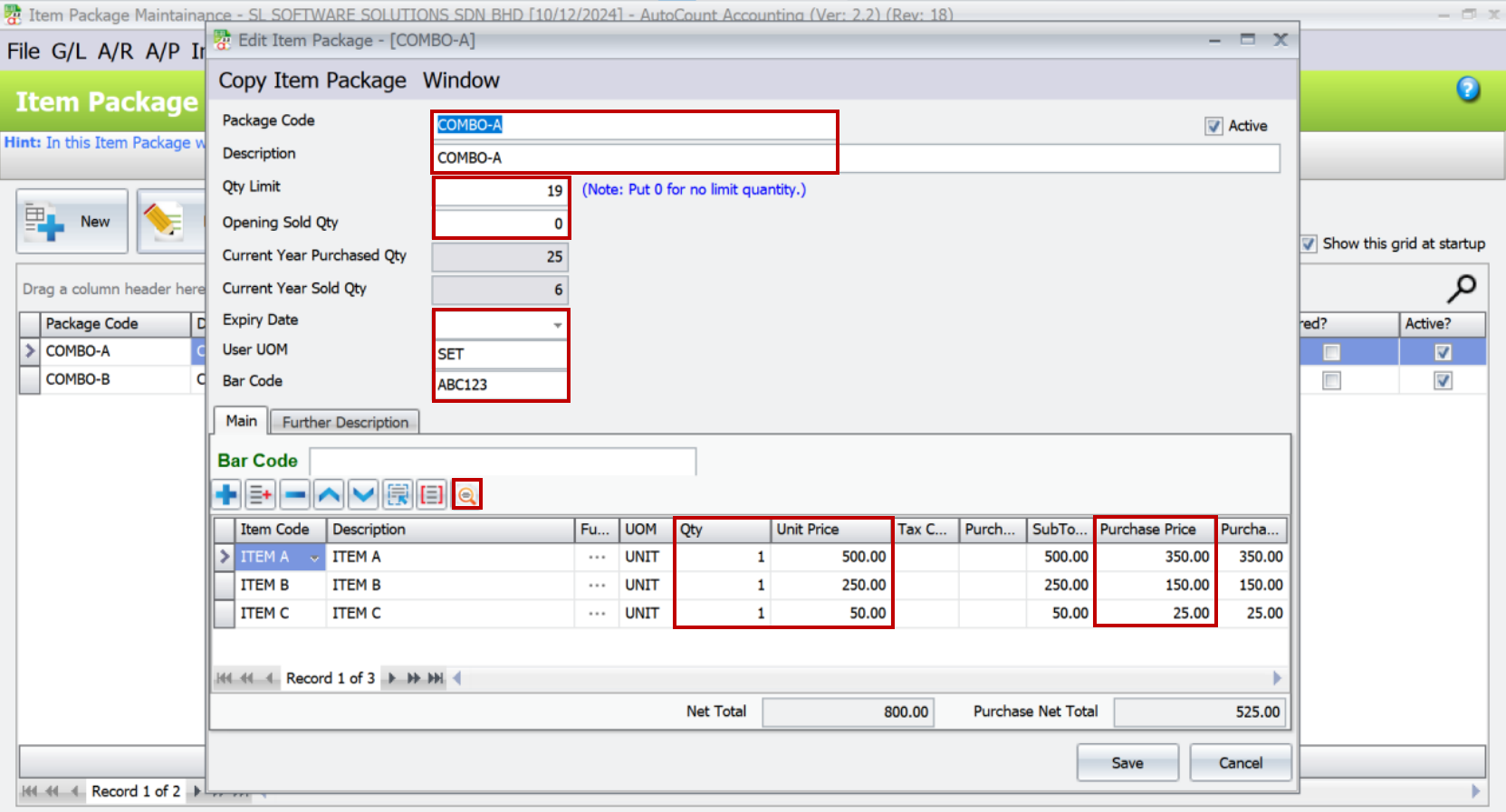
Key Features of the Item Package Module
This module is mainly used by retail, wholesale, and e-commerce businesses that need to sell products in different combinations without impacting the stock structure of individual items.
Check expiry dates for package items
Generate reports for total package sales
Calculate maximum packages based on available sub-item stock
Inquire about the supplier and customer for each package item
Set quantity limits for package sales
What is the AutoCount Stock Assembly (BOM) Module?
The Stock Assembly (BOM) Module, also known as Bill of Materials (BOM), is tailored for manufacturing and production-based businesses. This module is used to convert raw materials into a finished product.
It enables companies to define the components required to produce a final product, track raw material consumption, and monitor inventory levels. Upon assembly, the module deducts raw material stock and increases finished goods inventory, reflecting the manufacturing process accurately.

Key Features of the Stock Assembly (BOM) Module
This module is ideal for businesses involved in production or assembly, such as manufacturers or fabricators.
Manage complex assembly processes with multiple sub-assemblies
Track production stages and manage work-in-progress (WIP) inventory
Calculate detailed costings for each assembly
Generate detailed reports for raw material usage and finished goods production
Support for batch production and assembly scheduling
Key Differences Between AutoCount Item Package Module and Stock Assembly (BOM) Module
| Feature | Item Package Module | Stock Assembly (BOM) Module |
|---|---|---|
| Purpose | Selling bundled items without changing individual item's stock levels | Manufacturing or assembling items, converting raw materials into finished goods |
| Stock Control | Tracks stock levels for individual items without altering inventory count | Deducts raw materials and increases finished goods inventory |
| Sales & Pricing | Set bundled prices for product combinations | Focuses on costing and assembly, not used for sales bundling |
| Inventory Impact | No assembly or production impact on inventory | Production process changes inventory levels |
| Use Case | Retail promotions, gift sets, product bundles | Manufacturing, production, and assembly of products |
Explore more advanced assembly features, you can learn more about the Multi-Level Assembly Module and how it integrates with the Stock Assembly (BOM) Module.
Real-World Use Cases: Which Module Should You Use?
- Computer Shop
For a retail computer shop, where you offer ready-made computer sets or promotional combos (e.g., a desktop set with a monitor, keyboard and mouse), the Item Package Module is the best choice.
This module allows you to bundle multiple components into a set without altering individual stock levels. You can also easily offer promotions and combo deals to attract customers.
- Laptop Manufacturer
If you are a laptop manufacturer assembling components like processors, RAM, storage drives, and casings into a finished laptop, then the Stock Assembly (BOM) Module is the right fit.
This module enables you to track raw materials, calculate production costs, and manage finished goods inventory effectively. It supports the entire manufacturing process from raw material consumption to product assembly.
Choosing the Right Module for Your Business
Selecting the right module depends on whether you need to manage retail bundles or production processes:
Use the Item Package Module if your business involves selling bundled items or promotional sets without any assembly or manufacturing.
Use the Stock Assembly (BOM) Module if your business involves production, assembly, or the conversion of raw materials into finished goods.
Conclusion
The AutoCount Item Package Module and Stock Assembly (BOM) Module serve different purposes in inventory management and sales operations. While the Item Package Module is suitable for bundling and promotions, the Stock Assembly Module is built for manufacturing and production management. Understanding the differences between these two modules will help you streamline your business processes and improve inventory control.
If you need more information or guidance on selecting the right module for your business, feel free to reach out to an AutoCount reseller or consult with your AutoCount software provider for expert advice.
Need Help Deciding?
Contact our experts to analyze your business needs and recommend the right AutoCount module for you.