
Foreign Currency Accounting in Malaysia: Manage Exchange Gains and Losses with AutoCount
Buying from overseas suppliers or invoicing international customers? This foreign currency accounting guide explains foreign exchange differences, unrealized gains and losses, and the AutoCount multi-currency functions worth reviewing.

Foreign currency accounting tracks overseas transactions in their original currency while maintaining their value in the company's reporting currency. Exchange-rate movements can create realized or unrealized gains and losses.
Three challenges when your business trades internationally
Even a straightforward overseas invoice can make foreign currency accounting difficult to reconcile when the exchange rate changes before payment.
Invoices in different currencies
Customers and suppliers may transact in USD, SGD or other currencies while your books report in MYR.
Value changes before settlement
Outstanding receivables and payables may need to be reviewed at a different exchange rate.
Clear financial reporting
Finance teams need to distinguish open foreign-currency balances from differences recognized upon settlement.
Realized vs. unrealized foreign exchange gain or loss
The key question is whether the foreign-currency amount has been settled.
Unrealized exchange difference
A foreign-currency balance is still open, but its MYR value changes when evaluated using a newer exchange rate. The difference may be recognized through revaluation, subject to the applicable accounting policy.
Realized exchange difference
The customer pays, or the business settles a supplier invoice. Comparing the recognized amount with settlement value identifies the realized exchange gain or loss.
How an unrealized exchange gain can arise
Suppose your business issues a USD1,000 invoice while the reporting currency is MYR. The rate increases before the customer pays.
If the invoice is later settled, the realized difference depends on the exchange rate and amounts actually received. This simplified example excludes fees and assumes the full USD amount remains outstanding.
Manage foreign-currency sales and customer records
AutoCount's Multi-Currency Module supports foreign currency accounting with transaction functions that help businesses record transactions with overseas customers and suppliers.
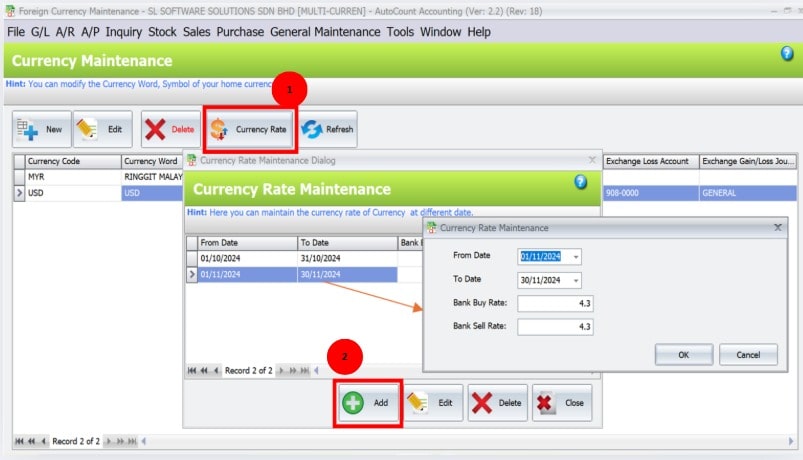
- Maintain relevant foreign currencies and exchange-rate information
- Work with foreign-currency debtor and creditor records
- Issue invoices and review transaction values in the appropriate currency
- Review foreign-currency reporting needs with your accounting team
Available workflows depend on the AutoCount edition, licensed module and company configuration.

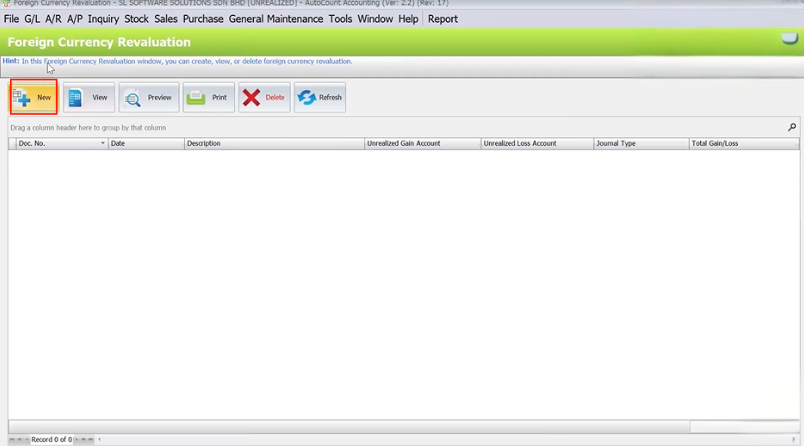
Understand foreign-currency revaluation
In foreign currency accounting, open balances may need to be reviewed at period end to reflect exchange-rate movements in financial reporting. Bank Negara Malaysia publishes reference exchange rates that finance teams can use when checking review-date rates.
- Identify outstanding foreign-currency balances
- Confirm the relevant date and exchange rate
- Review the potential unrealized difference
- Check the resulting accounts and reporting treatment
Confirm module availability, posting rules and accounting policy before carrying out a revaluation.
Why a structured multi-currency process helps
Keep original-currency documents, reporting values and exchange-rate differences easier to review across your accounts.
More consistent records
Keep original-currency amounts and MYR reporting values easier to follow.
Clearer collection tracking
Review outstanding overseas customer balances before and after payment.
Better supplier reconciliation
Compare the recorded payable with the actual amount used to settle it.
More informed reviews
Help finance staff identify rate differences that need attention at period end.

What to check before choosing a foreign currency accounting system
Use these four questions to confirm which functions your Malaysian business actually needs.
Your currencies
Which customer, supplier and bank currencies do you handle most often?
Rate management
How are transaction and review-date rates maintained and checked?
Gain/loss treatment
Do the required settlement and revaluation workflows fit your policy?
Reconciliation
Can your staff verify currency balances, MYR values and relevant postings?
Foreign currency accounting FAQs
What is an unrealized foreign exchange gain?
It is an increase in the reporting-currency value of an unsettled foreign-currency asset or liability, measured using the applicable exchange rate. Whether and how it is recognized depends on the accounting treatment.
When does a foreign exchange difference become realized?
Generally, when the relevant foreign-currency amount is settled. The difference is calculated using the applicable recorded and settlement values.
Can AutoCount issue invoices in foreign currencies?
AutoCount offers foreign-currency invoicing functionality through its relevant Multi-Currency Module. Availability depends on your edition and licensed configuration.
Does foreign-currency revaluation automatically use live rates?
Do not assume that. Confirm how rates are maintained, selected or updated in your actual AutoCount setup before processing revaluation.
Which AutoCount multi-currency module does my business need?
It depends on whether you only need routine foreign-currency transactions or also require additional revaluation and reporting functions. Check the current module scope with SL Software.
Manage overseas transactions with clearer accounting records.
Speak with SL Software Solutions about the AutoCount module combination that fits your currencies, billing workflow and foreign currency accounting needs.