
Archives: Report Template
-
How to Pay for Recurring Bills?
—
by
AutoCount Cloud Accounting: How to Pay for Recurring Bills? Introduction to AutoCount Cloud Accounting for Recurring Bills AutoCount Cloud Accounting is a powerful software that simplifies managing your business finances, including paying for recurring bills. Whether you’re handling multiple invoices or a single bill, AutoCount provides an efficient and streamlined process. This article will walk…
-
AutoCount E-Invoicing Tutorial
—
by
AutoCount E-Invoicing Tutorial Videos The AutoCount E-Invoicing tutorial videos guide users in efficiently setting up and using the system for seamless compliance with invoicing requirements, covering setup, invoice creation, and special cases like e-commerce and government transactions. or The AutoCount E-Invoicing tutorial video provides detailed steps for using AutoCount’s e-invoicing system. It includes guides on…
-
Employee Handbook Template for E-Invoicing
—
by
AutoCount E-Invoice: Employee Handbook Template for E-Invoicing Compliance in Malaysia Navigating e-Invoicing compliance in Malaysia can be complex as regulatory standards evolve. To support businesses, we’ve developed a comprehensive employee handbook template to help align internal policies with e-Invoicing requirements. This template serves as a reference guide, but it’s important for each company to tailor…
-
Barcode Printing
—
by
AutoCount Accounting: Barcode Printing This user guide will walk you through the steps to enable and use the Barcode Printing feature in AutoCount Accounting 2.0. To clarify, this features helps in allowing efficient printing, management, and export of barcodes for stock items and documents. Introduction to AutoCount Barcode Printing Firstly, this feature is an AutoCount…
-
View Documents Flow
—
by
AutoCount Accounting: View Documents Flow Introduction to AutoCount View Documents Flow Firstly, AutoCount View Documents Flow is an innovative feature embedded within the AutoCount accounting software. To clarify, it is designed to enhance the traceability of documents within the system. In addition, this feature allows users to track the flow of documents, such as sales…
-
Documents Numbering Format
—
by
AutoCount Accounting: Document Numbering Format Introduction to Document Numbering Format Documents numbering is a fundamental aspect of managing accounting and inventory systems. To clarify, in the context of AutoCount, a widely-used accounting software, proper document numbering ensures that all transactions are systematically recorded, easy to track, and compliant with regulatory requirements. In addition, AutoCount’s flexible…
-
Search Lookup Edit
—
by
AutoCount Accounting: Search Lookup Edit Introduction to AutoCount Search Lookup Edit AutoCount Accounting 2.0 introduces a modern and enhanced way of searching for accounts and items through the Search Lookup Edit. To clarify, this new feature makes it easier and more personalized for users to find the information they need. In addition, it offers a…
-
Schedule Backup
—
by
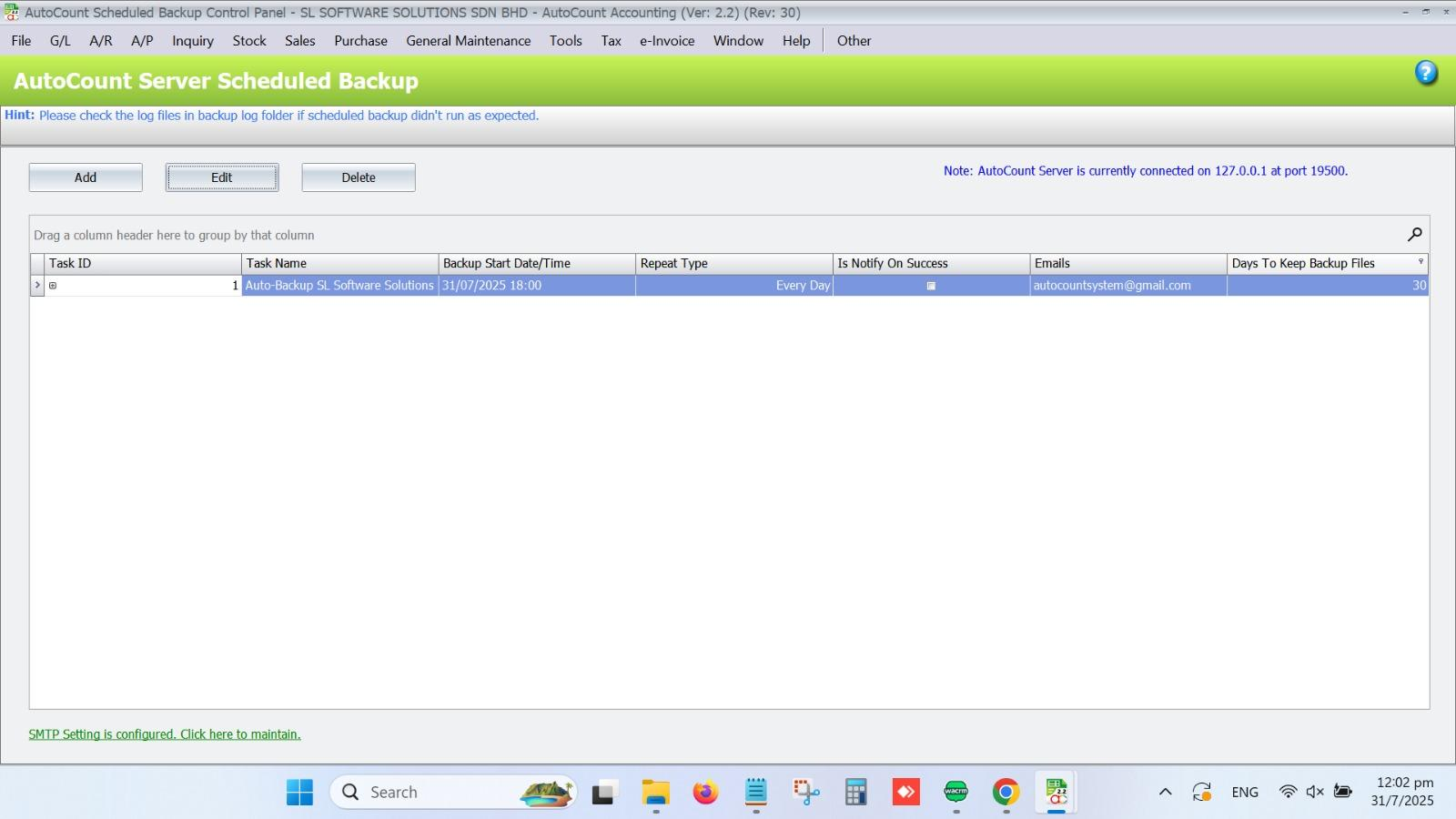
AutoCount Accounting: Schedule Backup Introduction to AutoCount Schedule Backup Setting up scheduled backups in AutoCount Accounting ensures your data is regularly backed up without manual intervention. This guide will walk you through configuring the backup settings, setting up an SMTP server, and automating backup tasks. With scheduled backups, you can rest assured knowing your financial…
-
Sales and Services Tax
—
by
AutoCount Accounting: Sales & Service Tax Introduction to Sales and Service Tax (SST) Firstly, Sales and Service Tax (SST) is a crucial component of Malaysia’s tax system. Reintroduced in 2018, SST consists of Sales Tax, which applies to the manufacturing and import of goods, and Service Tax, which is levied on specific services. To summarize,…
-
Recurrence (GL)
—
by
AutoCount Accounting: Recurrence (GL) Introduction to AutoCount Recurrence (GL) This AutoCount Recurrence module allows authorized users to define recurring transactions and create them manually or automatically. In additions, payments can be daily, weekly, monthly, and yearly. AutoCount Recurrence (GL) Video Guide AutoCount Recurrence (GL) (EN) Recurrence (GL) Setup Integration & Recurrence (GL) Setup AutoCount Recurrence…
-
Multi Pricing
—
by
AutoCount Accounting: Multi-Pricing Introduction to AutoCount Multi-Pricing AutoCount Multi-Pricing is a robust feature within the AutoCount software suite, designed to enhance business pricing strategies by allowing the management of multiple price levels. This functionality is essential for businesses that need to cater to diverse customer segments, adjust prices dynamically, or implement complex pricing structures. This…
-
Layout Customization
—
by
AutoCount Accounting: Layout Customization Firstly, welcome to the AutoCount Accounting Layout Customization Guide. To clarify, this guide is designed to help you understand and utilize the various customization features available in AutoCount Accounting. Thus, allowing you to tailor your interface according to your preferences. In addition, these tools ensure that your workspace is efficient, organized,…
-
Informative Charts and Analytical Data
—
by
AutoCount Accounting: Informative Charts and Analytical Data Introduction to AutoCount Informative Charts and Analytical Data The Informative Charts and Analytical Data feature in AutoCount Accounting 2.0 offers a visual representation of your accounting activities, helping you better understand your business’s financial health through charts and graphs. This guide will walk you through enabling, customizing, and…
-
Import Data to AutoCount Accounting Using Excel
—
by
AutoCount Accounting: Import Data to AutoCount Accounting Using Excel Quick Start Guide 1 Download Template Get the pre-formatted Excel template 2 Prepare Data Fill in your data without altering headers 3 Import Use AutoCount’s import function Get All Available Excel Template Here AutoCount Import Data to AutoCount Accounting Using Excel Video Guide Watch these comprehensive…
-
Full Transfer and Partial Transfer
—
by
AutoCount Accounting: Full Transfer and Partial Transfer Introduction to AutoCount Full Transfer and Partial Transfer AutoCount Accounting 2.0 offers users a highly flexible document transfer system, allowing both Full Transfers and Partial Transfers between sales and purchase documents. These features streamline the transfer process, making it easier for users to move data between documents while…
-
Document Template
—
by
AutoCount Accounting: Document Template Introduction To AutoCount Document Template Firstly, efficient document management using document template is crucial for businesses of all sizes. AutoCount Accounting offers a powerful feature that allows users to create and manage document templates. Thus, streamlining the process of generating invoices, purchase orders, and other essential documents. Therefore, in this article,…
-
Document Lock
—
by
AutoCount Accounting: Document Lock In today’s fast-paced business environment, ensuring the integrity and security of your accounting data is paramount. For companies using AutoCount Accounting 2.0, the Document Lock and Document Lock Monitor features play a critical role in safeguarding data integrity. But what exactly are these features, and how do they benefit your business?…
-
AutoCount Contra Account
—
by
AutoCount Accounting: Contra Account Introduction to AutoCount Contra Account Firstly, in accounting, contra account play a vital role in presenting a company’s true financial position by offsetting balances in related accounts. AutoCount, a powerful accounting software, simplifies the management of contra accounts, particularly when dealing with both receivables and payables involving the same entity. Therefore,…
-
Deposit Tracking & Management
—
by
AutoCount Accounting: Deposit Tracking & Management Module Introduction to AutoCount Deposit Module In today’s fast-paced business environment, accurate financial management is more crucial than ever. AutoCount Deposit module offers a comprehensive solution for managing deposits in both Accounts Receivable (A/R) and Accounts Payable (A/P). Whether you’re dealing with customer deposits or managing advance payments to…
-
Auto Save in Draft Folder
—
by
AutoCount Accounting: Auto Save in Draft Folder Introduction to AutoCount's Auto Save Feature Firstly, AutoCount’s auto save feature is a crucial tool. Its design protect your ongoing work by automatically saving documents into a draft folder. As a result, this feature ensures that in the event of an unexpected interruption—such as a power outage or…