A Simple To-Do-List for Your AutoCount
Transform AutoCount Accounting into a productivity powerhouse with a simple built-in to-do list plugin that keeps tasks, deadlines and priorities organised inside the system you use every day — so nothing important slips through the cracks.
The “Shocking Truth” Hook
You walk into the office, open AutoCount, and suddenly you’re juggling five things at once: “Did anyone check yesterday’s deliveries? Who approved that urgent invoice? Why is the stock count for Item A suddenly negative?” Before you know it, it’s 5 PM and the critical tasks are still undone. Month-end arrives, and the panic begins.
If this sounds familiar, you’re not alone. Most SME owners don’t realize that the chaos isn’t caused by their software – it’s caused by the lack of a simple to-do-list inside their software. The good news? AutoCount now has a built-in solution that fixes exactly that.

1. The Hidden Cost of a Messy Workday
Running a business means wearing many hats. But when daily accounting tasks are scattered across sticky notes, WhatsApp messages, or memory, things slip through the cracks. An invoice gets paid late, stock isn’t reordered in time, a tax deadline sneaks up on you.
The real cost isn’t just the errors – it’s the stress.
You end up spending weekends fixing preventable mistakes instead of growing your business. Your team wastes time asking “what should I do next?” instead of just doing it.
The problem isn’t that your team isn’t working hard. It’s that they don’t have a clear, shared to-do-list tied directly to your daily AutoCount operations.
2. What If Your AutoCount Could Remind You?
Imagine opening AutoCount and seeing a clear, simple to-do-list waiting for you.
Check stock levels for fast-moving items.
Follow up on unpaid customer bills.
Verify today’s supplier invoices
Each task has a colour:
- red means urgent
- orange is medium
- black is low priority
- If a task is due today, it turns yellow
- so nothing catches you by surprise.
That’s exactly what the AutoCount To-Do-List Plugin does. It turns your accounting software from a passive record-keeper into an active daily assistant. No more spreadsheets, no more chasing people – just a clean checklist inside the system you already use.
3. How a Simple To-Do-List Changes Everything
This isn’t about learning complicated new features. It’s about bringing simple, proven organisation into your daily routine. Here’s how it works in plain English:
Colour-Coded Priorities
You know immediately what needs your attention. Red tasks come first, black tasks can wait. Your team can’t miss urgent deadlines because the colour grabs their eye.
Reminders That Don’t Annoy
When a task is due, a reminder pops up as soon as someone logs in. If they’re in the middle of something else (like processing payroll), they can click “Notify Me in 5 Minutes”. The task doesn’t disappear – it just politely waits.
Calendar View – See the Whole Month at a Glance
Switching to calendar view shows every deadline on a single screen. You can even drag and drop to assign new tasks directly on the calendar. No complicated Gantt charts, just a simple visual plan.
Everyone Knows Their Job
As the boss, you can see everyone’s tasks. Your staff only see their own. You decide who can edit tasks and who can only view them. This means no more “I thought you were doing it” excuses.
4. Real Businesses, Real Relief
A retail shop owner uses a daily to-do-list to check stock levels every morning. Result? Never again tell a customer “sorry, we’re out” when the stock is actually in the back room.
A small construction firm schedules site inspections and material deliveries through the to-do-list. The site supervisor gets reminders, the office knows what’s happening – no more double bookings.
A marketing agency tracks campaign deadlines, client feedback, and content approvals. The team meets deadlines without last-minute panic.
A dental clinic assigns daily cleaning duties and appointment follow-ups. The admin staff never miss a patient reminder call.
5. Say Goodbye to Month-End Panic
Here’s the best part: when you use a daily to-do-list, month-end closing becomes almost boring.
Why? Because everything is already done.
Invoices are verified daily, not piled up for a weekend marathon.
Stock adjustments are made as errors happen, not discovered weeks later.
Tax figures are reviewed little by little, not frantically checked at 11 PM on deadline day.
Your accountant will thank you. Your stress levels will thank you.
6. Getting Started Takes Minutes
You don’t need an IT consultant or weeks of training.
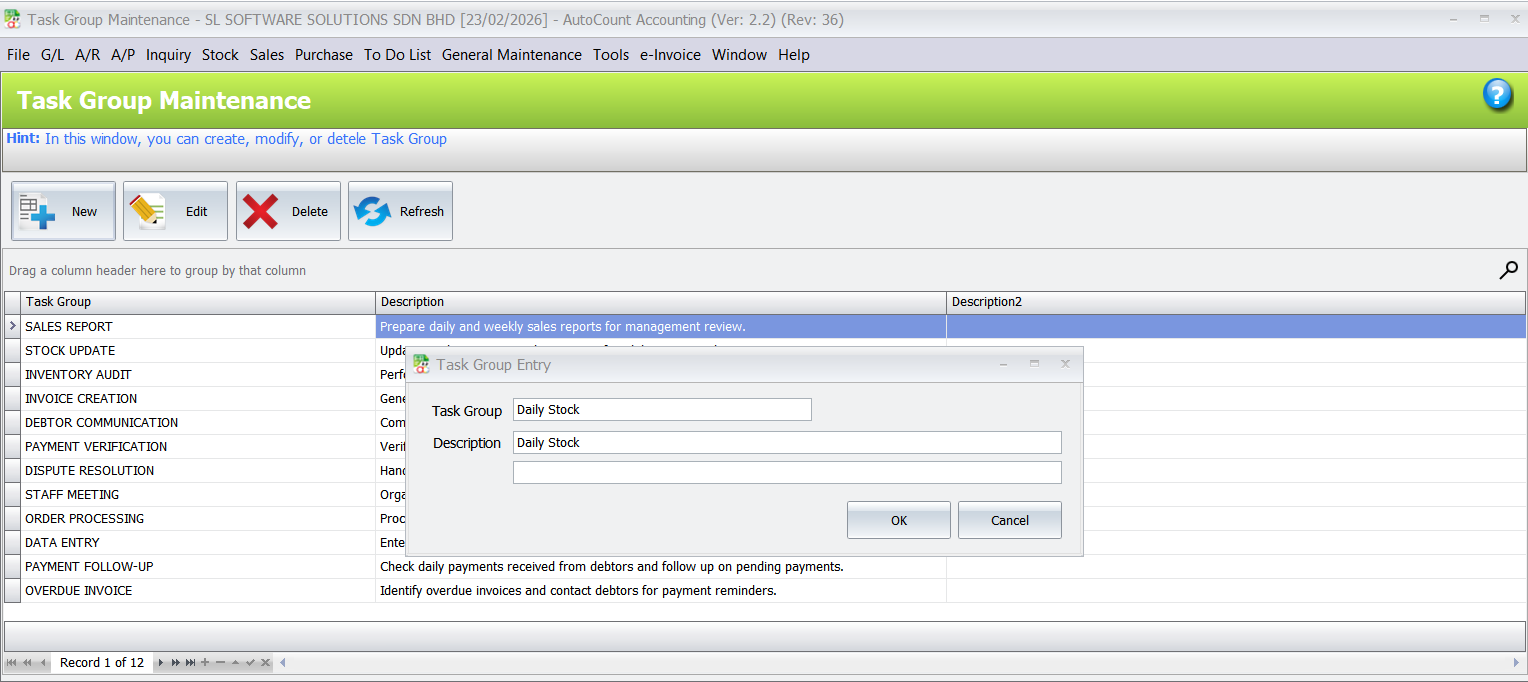
First, create a few task groups. For example “Daily Stock”, “Invoices”, “Payments”.
Then, add your recurring tasks and assign them to the right people.
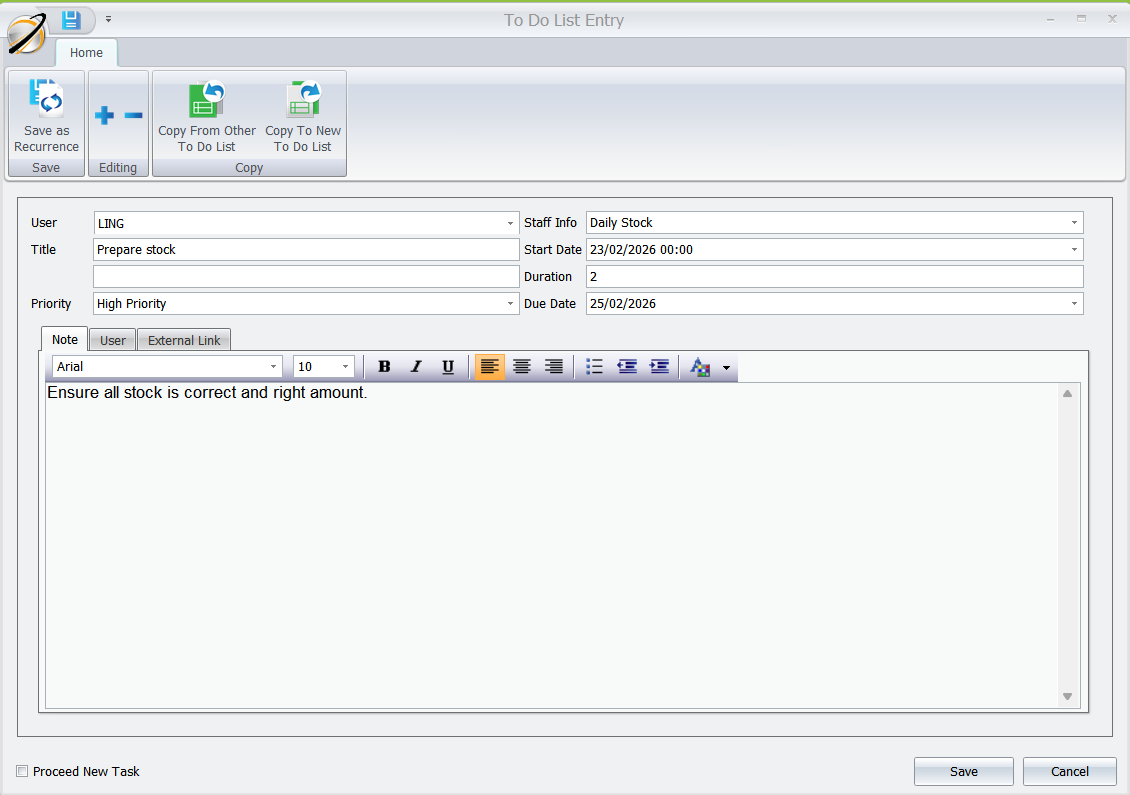
That’s it. Your to-do-list is live.
You can always adjust later. Add new tasks, mark completed ones as done, or print a simple report to see what was accomplished last week.
Conclusion
The AutoCount To-Do-List Plugin isn’t a flashy new module. It’s a practical tool that brings calm and order to your daily operations. It works the way you think – in tasks, priorities, and deadlines.
If you’re tired of the “what did I forget today?” feeling, this is your solution.
Ready to turn AutoCount into your daily assistant?
Contact our sales team today – we’ll show you how simple it is to get started. No jargon, no pressure, just a clearer way to run your business.