Introduction

In today’s fast-paced business world, efficiency and compliance are crucial, especially for Malaysian businesses submitting e-invoices to LHDN. Integrating SAP Software and ERP Software with AutoCount software simplifies this process by automating e-invoice generation, validation, and submission, ensuring compliance while saving time and resources. SAP Software and ERP Software's enterprise management capabilities, combined with AutoCount’s financial management tools, streamline the entire e-invoicing process, making it faster and error-free. In this article, we’ll explore the benefits of this integration, how to set it up, and best practices for smooth e-invoice submissions to LHDN, ensuring a hassle-free experience. Looking for more insights on e-invoicing? We’ve got you covered.

How does SAP Software and ERP Software integrate into AutoCount software to Do E-Invoice submissions To LHDN?

SAP Software and ERP Software integrates with AutoCount software to facilitate e-invoice submissions to the LHDN (Inland Revenue Board of Malaysia) through the AutoCount e-Invoice Solution. This integration enables businesses to automate their e-invoicing processes, ensuring compliance with LHDN regulations and enhancing efficiency. Here are two examples:

AutoCount API

SAP Software and ERP Software integrates with the AutoCount API through various methods, including:

API Integration

SAP Software and ERP Software can directly interact with the AutoCount API using .NET Framework, which allows developers to include and reference AutoCount assemblies in their projects. This method requires the "API Module" license for both systems.

Plug-In Integration

SAP Software and ERP Software can also integrate with AutoCount API using a plug-in that runs as an attached process to the parent application. This method involves writing a plug-in for AutoCount Accounting that performs batch updates of transactions or data into the account book. The plug-in uses AutoCount Accounting API to interact with the system.

Sharing of E-Invoice to Buyers

The purpose of sharing e-invoices with buyers is to facilitate a transparent, efficient, and seamless transaction process. E-invoices ensure that buyers receive accurate, timely, and easily accessible billing information, which helps in verifying purchases, processing payments promptly, and maintaining precise financial records. Additionally, e-invoices reduce the risk of errors associated with manual data entry, enhance overall transaction security, and support eco-friendly practices by minimizing the use of paper. This streamlined communication fosters better business relationships and operational efficiency for both parties. Below are a few examples of sharing E-Invoice to Buyers:

– Export to PDF
– Send by Whatsapp
EasyEmail (Plugin)

How does the AutoCount E-Invoicing Platform (AIP) work?

The AutoCount E-Invoice Platform is designed to streamline the invoicing process, making it more efficient and compliant with regulatory requirements such as those of Malaysia’s Inland Revenue Board (LHDN). Here’s how it works:

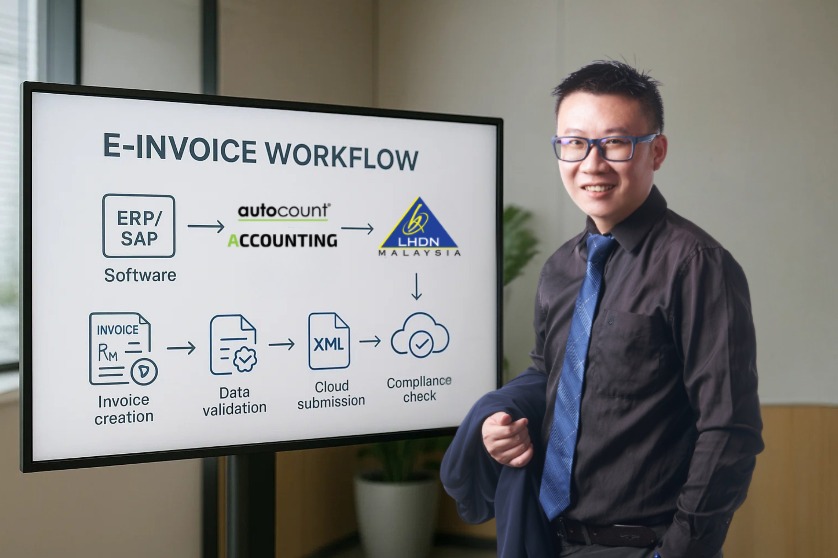
Invoice Creation

Users create invoices within the AutoCount software, leveraging its robust accounting and financial management features. The software allows for detailed input of product or service descriptions, quantities, prices, and tax information.

Data Validation

Before an invoice is sent, the platform validates all necessary data to ensure accuracy and compliance with LHDN requirements. This includes checking for correct tax codes, client information, and adherence to invoicing standards.

Conversion to E-Invoice Format

Once validated, the invoice is converted into an electronic format (e-invoice) that is compatible with LHDN’s systems. This ensures that the invoice meets all regulatory specifications for digital submission.

Submission to LHDN

The e-invoice is then automatically submitted to LHDN through a secure, electronic channel. This direct submission process reduces the risk of errors and delays compared to manual submissions.

Tracking and Confirmation

After submission, the platform provides tracking capabilities, allowing users to monitor the status of their e-invoices. Confirmation of receipt from LHDN is also captured within the system, ensuring that the invoice has been successfully delivered and acknowledged.

Integration with SAP Software and ERP Software

For businesses using SAP Software and ERP Software, the AutoCount platform can seamlessly integrate, enabling automatic synchronization of financial data between the two systems. This integration ensures that all invoicing information is up-to-date and consistent across both platforms.

Archiving and Reporting

The platform securely stores all e-invoices, making them easily retrievable for future reference, audits, and reporting purposes. This centralized archive supports compliance and efficient record-keeping.

By automating the e-invoicing process and ensuring compliance with LHDN regulations, the AutoCount E-Invoice Platform helps businesses save time, reduce errors, and maintain better financial control

AutoCount E-Invoice Platform: Interaction with LHDN API and Server

Invoice Creation:

Users create invoices in the AutoCount software, entering all necessary details such as product descriptions, quantities, prices, and applicable taxes.

Data Validation:

The platform checks the invoice data for completeness and compliance with LHDN requirements. It ensures that all mandatory fields are filled and that the data adheres to the specified format.

Conversion to E-Invoice Format:

The validated invoice is converted into an XML or JSON format that meets LHDN’s e-invoicing standards. This format includes all required fields and data structures as mandated by LHDN.

Submission to LHDN via API:

AutoCount uses the LHDN API to securely transmit the e-invoice to LHDN’s servers. The API provides a direct and secure communication channel, ensuring that the data is transmitted accurately and efficiently. During this process, the platform handles authentication and authorization, ensuring that the connection to LHDN’s server is secure.

Processing by LHDN:

Once received, LHDN’s servers process the e-invoice. They verify the data against their records and perform various checks to ensure compliance and accuracy. LHDN’s system generates a unique validation code for each successfully processed invoice. This code is embedded in a QR code, which serves as a proof of validation and compliance.

Receiving the Validation QR Code:

Lorem ipsum dolor sit amet, consectetur adipiscing elit. Ut elit tellus, luctus nec ullamcorper mattis, pulvinar dapibus leo.

Incorporation of QR Code into Invoice:

The AutoCount platform receives the QR code and attaches it to the respective invoice. This can be included in the printed or digital version of the invoice, ensuring that it’s easily accessible for verification purposes. The platform also logs this QR code and the associated validation status, updating the invoice records to reflect its validated state.

Tracking and Confirmation:

Users can track the submission status of their invoices within the AutoCount platform, viewing the confirmation and validation details provided by LHDN. The system ensures that all e-invoices are archived with their corresponding QR codes, providing a comprehensive record for future reference, audits, and reporting.

Challenges

New Customer Code:

Data Validation: Ensure that the new customer code is correctly validated and integrated into the SAP Software and ERP Software system to avoid errors in invoicing and payment processing

New Item Code:

Inventory Management: Update the inventory management system to reflect the new item code, ensuring accurate tracking and reporting of inventory levels and movements

Sharing Documents:

The probability of LHDN sending a copy is very low.

Conclusion:

In conclusion, integrating SAP Software and ERP Software with AutoCount for e-invoice submissions to LHDN significantly enhances operational efficiency and ensures regulatory compliance. This powerful combination automates the invoicing process, reduces errors, and provides real-time validation and tracking. By leveraging these technologies, businesses can streamline their financial operations, maintain accurate records, and focus on strategic growth. Embracing such integration not only simplifies compliance with LHDN requirements but also positions companies for future advancements in digital financial management. If you are willing to gain increased knowledge and skill on E-Invoicing, We at AutoCount organize seminars for you to attend and gain more knowledge. Register now and oin!

news-0112

yakinjp


sabung ayam online

yakinjp

yakinjp

yakinjp

rtp yakinjp

yakinjp

yakinjp

yakinjp

yakinjp

yakinjp

yakinjp

yakinjp

yakinjp

yakinjp

judi bola online

slot thailand

yakinjp

yakinjp

yakinjp

yakinjp

yakinjp

4020

4021

4022

4023

4024

4025

4026

4027

4028

4029

4030

4031

4032

4033

4034

4035

4036

4037

4038

4039

5046

5047

5048

5049

5050

5051

5052

5053

5054

5055

5061

5062

5063

5064

5065

5066

5067

5068

5069

5070

8076

8077

8078

8079

8080

8081

8082

8083

8084

8085

4055

4056

4057

4058

4059

3126

3127

3128

3129

3130

3131

3132

3133

3134

3135

8051

8082

8113

8144

8175

4090

4091

4092

4093

4094

4095

4096

4097

4098

4099

5036

5037

5038

5039

5040

5071

5072

5073

5074

5075

4100

4101

4102

4103

4104

4105

4106

4107

4108

4109

4110

4111

4112

4113

4114

4115

4116

4117

4118

4119

5026

5027

5028

5029

5030

5031

5032

5033

5034

5035

5076

5077

5078

5079

5080

5081

5082

5083

5084

5085

8041

8042

8043

8044

8045

8046

8047

8048

8049

8050

5001

5002

5003

5004

5005

5006

5007

5008

5009

5010

5011

5012

5013

5014

5015

5056

5057

5058

5059

5060

5086

5087

5088

5089

5090

5091

5092

5093

5094

5095

5016

5017

5018

5019

5020

5021

5022

5023

5024

5025

5096

5097

5098

5099

5100

8001

8002

8003

8004

8005

8006

8007

8008

8009

8010

8011

8012

8013

8014

8015

8016

8017

8018

8019

8020

8021

8022

8023

8024

8025

8026

8027

8028

8029

8030

8031

8032

8033

8034

8035

8036

8037

8038

8039

8040

news-0112