
AutoCount Accounting Software Malaysia: 6 Powerful Benefits
AutoCount Accounting Software Malaysia SMEs use covers sales invoices, financial reports, inventory, SST and e-Invoicing to support day-to-day business operations.

What to expect from AutoCount Accounting Software Malaysia
When comparing AutoCount Accounting Software Malaysia options, a good system should help staff record transactions consistently, review financial results and manage the operational details that matter to their business. Compare the software’s actual edition, modules and workflows rather than relying on “best” rankings alone.
Clear accounting records
Track invoicing, receipts, payments and financial reporting in an organised process.
Better stock visibility
Review purchases, stock quantities and sales movements using supported inventory features.
Room to expand
Assess available modules, integrations and customisations for your company’s actual needs.
6 reasons businesses choose AutoCount
General ledger & financial reports
Work with GL, AR, AP and related reports for daily bookkeeping and management review.
Malaysian SST handling
Configure relevant tax codes and reports for supported SST transactions; ensure settings match the company’s obligations.
LHDN e-Invoicing workflows
Prepare and track applicable MyInvois submissions through the available AutoCount integration and version.
Sales, purchasing & stock
Connect documents with the relevant item balances and transaction reports for supported stock operations.
POS, payroll & cloud options
Explore related AutoCount products and supported integrations as separate products or modules where applicable.
Plugins & customisation
Consider approved plugins and tailored workflows after confirming compatibility, licensing and support scope.
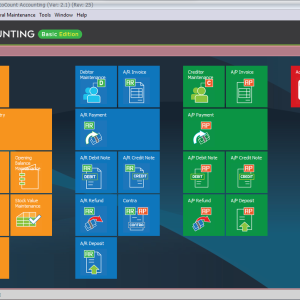
See an existing AutoCount Accounting screen
Explore the genuine AutoCount interface rather than relying only on marketing illustrations. Menus and available features can differ by version, selected modules and assigned access rights.
For a full description of the accounting functions, visit the dedicated AutoCount Accounting overview.

Think beyond bookkeeping
Retail and wholesale: Assess POS, sales documents and stock operations.
Manufacturing: Explore relevant inventory, BOM and production-related modules where needed.
Service businesses: Review invoicing, receivables and cost reporting.
Growing companies: Evaluate multiple account books, roles, add-ons and cloud options.
Check each workflow with a real product demonstration and confirm the modules required.
How to choose the right accounting system
List the work you do
Document sales, purchasing, tax, stock, user roles and reporting requirements.
Test using examples
Ask to see relevant documents, reports, integrations and exception handling using sample data.
Check full ownership cost
Include setup, license, modules, data migration, training and after-sales support in the evaluation.
Software only helps when staff know the workflow
SL Software Solutions supports businesses with AutoCount implementation, training, troubleshooting and selected customisation work.
Align the implementation with the actual accounting process and confirm responsibilities for master-data preparation, migration, user access, reporting and tax configuration.
AutoCount Accounting Software Malaysia FAQs
Is AutoCount suitable for a small Malaysian company?
Potentially. Select the edition and modules based on transaction volume, users, reports and budget. Compare your needs through a demonstration.
Does AutoCount support SST and Malaysian e-Invoicing?
AutoCount has supported tax and e-Invoicing functions, but availability and requirements depend on the version, setup and applicable LHDN and Customs rules. Software does not guarantee automatic compliance. See the official LHDN e-Invoice guidance for current requirements.
Are POS and payroll included with every accounting licence?
No. Different AutoCount products and optional modules may be separately licensed. Confirm the scope of your quotation.
Can AutoCount be customised?
Custom plugins and supported extensions are available for suitable workflows, subject to technical assessment, compatibility and licensing.
Explore AutoCount Accounting with SL Software
Get local help to set up AutoCount Accounting Software Malaysia for your workflows. Review the full AutoCount Accounting product overview or learn about AutoCount Cloud Accounting to compare available deployment options.
Explore AutoCount AccountingA better purchasing decision starts with a demo
Check actual reports, tax workflows, user roles, inventory requirements, integration compatibility and training before selecting a package.