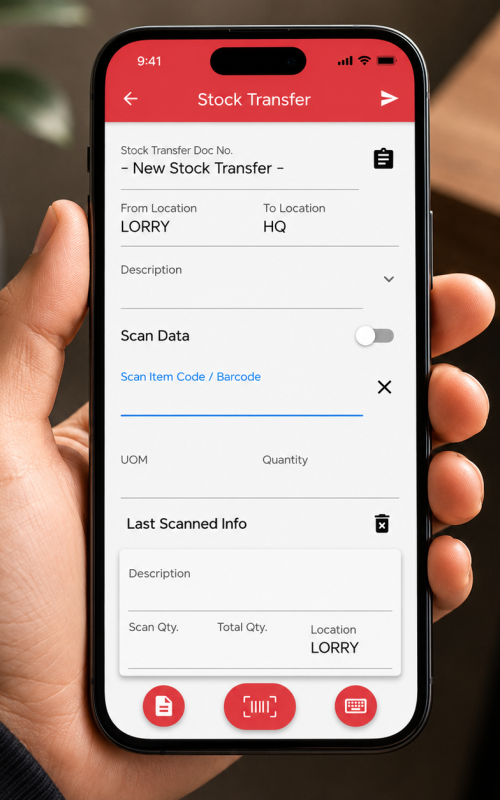
In today’s fast-paced retail environment, efficient inventory management is critical. The AutoCount Stock Transfer system is designed to streamline the process of transferring stock between various locations, such as from headquarters to retail branches or vice-versa.
This guide will provide comprehensive insights into using AutoCount for stock transfers, ensuring that your inventory management practices are seamless and efficient. In this article, we will explore each step of the stock transfer process in detail, from defining routing to generating documentation, and provide tips for best practices. For related inventory setup, see our AutoCount Multi-Location Module guide. You can also visit the official AutoCount website for product information.
Executing inter-branch or inter-warehouse transfers seamlessly with AutoCount Stock Transfer is vital for maintaining optimal inventory levels at each location.
With the right procedures in place, you can move stock from headquarters to retail branches or vice-versa while ensuring that physical loading occurs without any hitches. This process not only saves time but also helps prevent stockouts and overstock situations, which can severely impact sales and customer satisfaction.
By utilizing the AutoCount Stock Transfer system, businesses can enhance their operational efficiency and ensure that inventory is where it needs to be, when it needs to be there.
The AutoCount Stock Transfer procedure begins with a clear understanding of the steps involved. Staff should be familiar with the locations, items, and quantities involved before starting a transfer to minimize avoidable errors.
Follow each AutoCount Stock Transfer step carefully, from planning the movement to documenting the completed transfer. Accurate records help maintain reliable inventory balances for decision-making and financial reporting.
Carefully selecting the From Location (where stock is currently) and the To Location (destination) is important for an accurate AutoCount Stock Transfer.
Consider the specific needs of each location and any potential supply chain disruptions that could affect the transfer. For instance, if a retail branch is experiencing a high volume of sales, it might be prudent to prioritize stock transfers to that location.
Additionally, understanding the lead times and transportation logistics involved in the transfer will further ensure that stock is moved efficiently, minimizing downtime and maximizing product availability.
In defining the routing, it may also be beneficial to create a visual map of the transfer process. This can include detailing the routes that vehicles will take and any cross-docking locations that may be necessary along the way.
For AutoCount Stock Transfer planning, having a clear route mapped out helps staff understand the flow of goods, which can aid in quicker loading and unloading processes. Furthermore, incorporating technology such as GPS tracking can enhance the accuracy of transfer routes, providing real-time data on the location of stock during transit.
Scanning the items being loaded onto the transfer vehicle and specifying the exact quantities is a critical step in ensuring that the correct items are sent to the right location.
Utilizing barcode scanners linked to the AutoCount system allows for real-time updates to inventory levels and helps avoid discrepancies. Each item should be scanned as it is loaded, and double-checking quantities against the internal shipping manifest can further reduce errors.
Providing training for staff on how to use scanning equipment effectively is essential to minimize delays and ensure a smooth transfer process.
Additionally, consider implementing a verification step where a second staff member cross-checks the scanned items against the transfer list.
This practice not only enhances accuracy but fosters a culture of accountability among team members. It’s important to document any discrepancies immediately and address them to avoid complications later in the process.
Implementing best practices in stock transfer is essential for achieving optimal inventory management. Here are several recommendations:
By adhering to these best practices, businesses can enhance their stock transfer processes and ensure customer satisfaction.
In conclusion, the AutoCount Stock Transfer system is a powerful tool for enhancing inventory management across various locations.
By understanding and following the procedures outlined in this guide, businesses can ensure that stock transfers are executed smoothly and efficiently.
From defining routing to generating documentation, each step plays a critical role in maintaining accurate inventory levels and facilitating seamless operations.
By investing in staff training, leveraging technology, and adhering to best practices, companies can maximize the benefits of their stock transfer processes, ultimately leading to improved customer satisfaction and increased profitability.
Once the inventory has been scanned, the next step is to generate the necessary documentation for the transfer.
Posting the document generates a formal “Stock Transfer” record in AutoCount instantly, maintaining an accurate audit trail. This documentation is vital for both internal tracking and external compliance.
It should contain detailed information about the items being transferred, their quantities, and both the sending and receiving locations.
Moreover, it is crucial to store these records in a way that they can be easily accessed for future reference.
Effective documentation not only assists in inventory management but is also essential for auditing processes.