AutoCount B2B Customer Portal & Dashboard

TD B2B Portal and Dashboard

Give Business Customers One Place to Manage Their Orders. The B2B Portal and Dashboard provides registered business customers with an organised online portal for viewing products, submitting orders, reordering frequently purchased items and checking invoices. Product pricing, descriptions and stock availability can be presented through a catalogue connected to AutoCount..

What Is TD B2B Portal and Dashboard?

The B2B Portal is the customer-facing section of the B2B Ordering System. Instead of contacting a salesperson each time they need product information or want to place an order, customers can log in and access their ordering information from one location. The portal includes a dashboard, order records, order templates, an item catalogue and invoices. Customers can browse products using the information provided by the supplier and submit orders using their assigned catalogue and pricing.

Key Features

Simplified Customer Dashboard

Customers can quickly view submitted, confirmed and unpaid orders, together with important payment information, from one dashboard.

Multiple Ordering Options

Customers can place orders through the Customer Portal, mobile ordering page or WhatsApp based on their preferred method.

Reusable Order Templates

Frequently purchased items can be saved as templates, helping customers prepare recurring and replenishment orders more quickly.

Product Catalogue

Customers can browse available products with images, descriptions, prices and stock status before adding items to their order.

Invoice Access

Customers can view their invoices in the same portal, keeping order and billing information organised in one place.

AutoCount Order Integration

Portal orders can be received in AutoCount for staff review and processed as Sales Orders or Sales Invoices without entering the order details again.
B2B Customer Portal Features

B2B Customer Dashboard

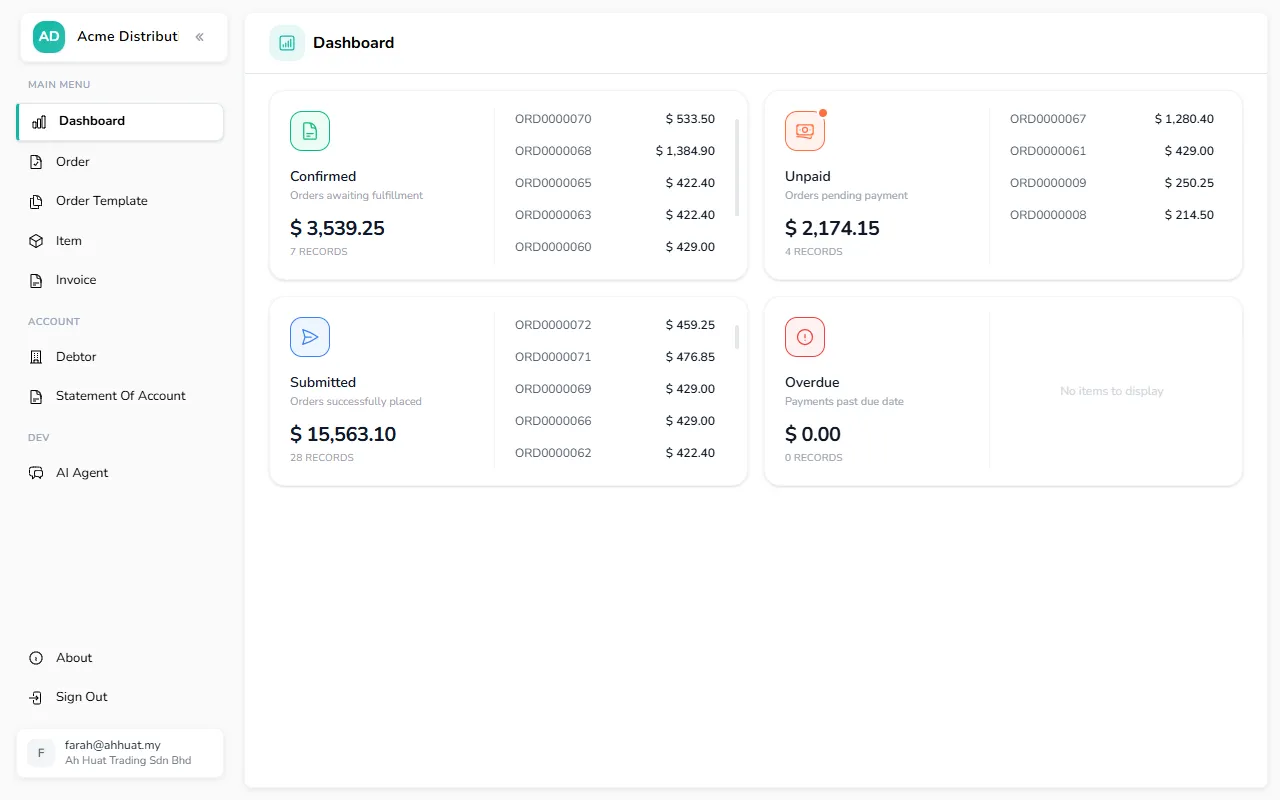
The customer dashboard provides a quick summary of current ordering and payment activity. Customers can review important information without opening every order individually.
B2B customer dashboard showing confirmed, submitted, unpaid and overdue order totals.
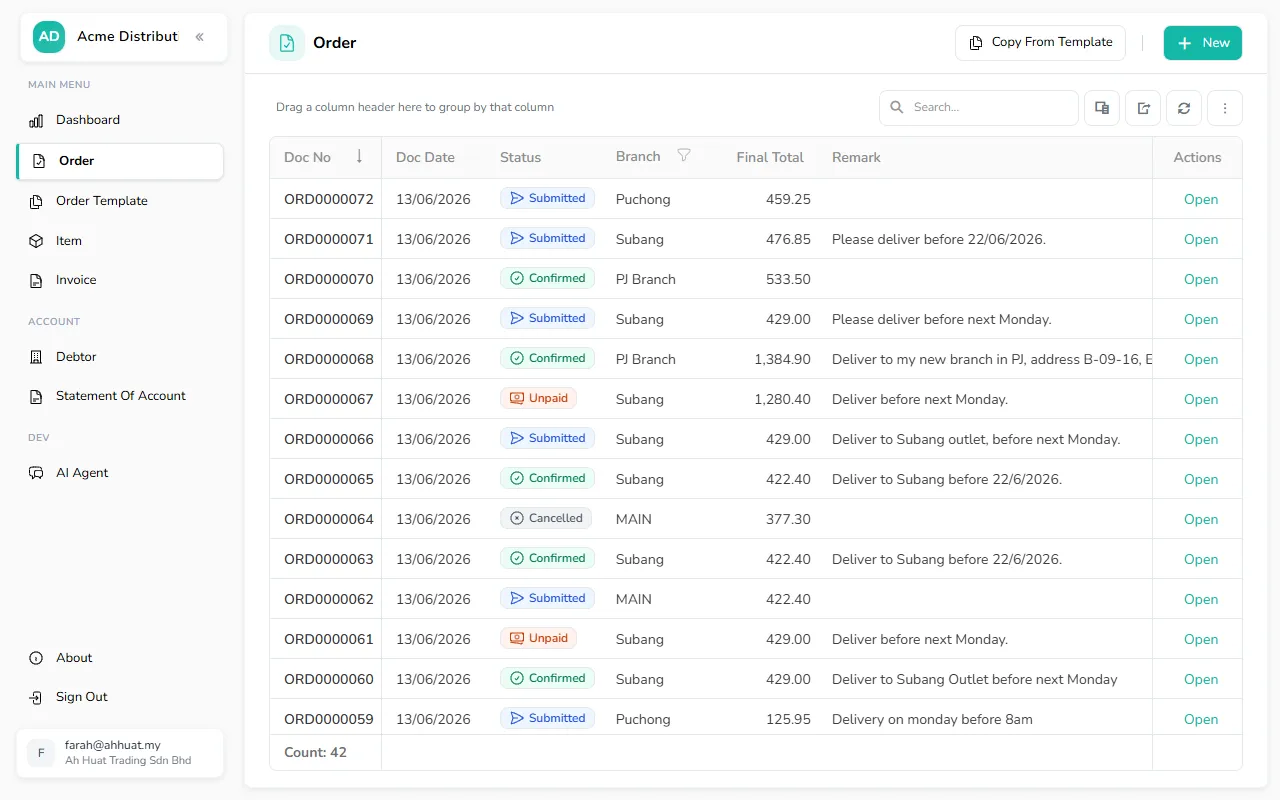
B2B portal order list showing order numbers, dates, branches, totals, remarks and order status.

B2B Order Management

The Orders section keeps submitted orders organised in one place. Customers can review their order history, check the latest status and open individual orders when more information is required.

B2B Product Catalogue and Stock Availability

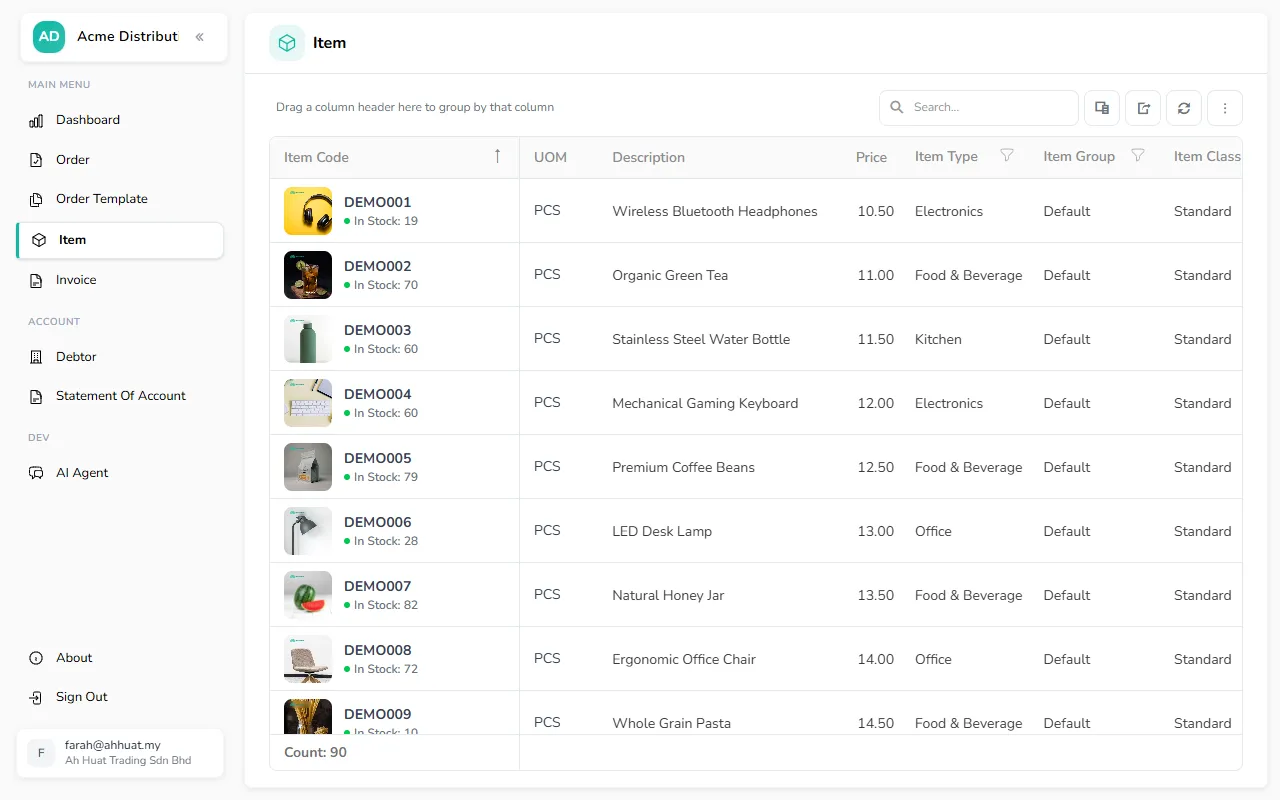
The Product Catalogue allows customers to review available products before placing an order. Important item information is presented clearly to make product selection easier.
B2B product catalogue showing item images, codes, descriptions, prices and stock availability.

B2B Customer Portal Features

Control how stock availability is shown to customers based on the accuracy and workflow of each product.

AutoCount Stock Balance

Use the available inventory balance in AutoCount to automatically show whether an item is in stock or out of stock.

Manual Stock Status

Manually set an item as in stock or out of stock when the recorded quantity does not reflect its actual availability.

Item-Level Control

Choose the preferred stock-status method for each item, allowing different products to follow different availability rules.

A More Organised Customer Ordering Workflow

Customers log in to their portal, review their catalogue and pricing, select the required items and submit the order. The order is then received in AutoCount, where staff can review and confirm it before creating the appropriate sales document. Customers can return to the portal later to check their orders and invoices.

Frequently Asked Questions

What can customers access through the portal?

Customers can access the dashboard, orders, order templates, product catalogue and invoices from one account.
The catalogue can display product pricing, descriptions and stock status. The products and information shown are controlled by the supplier.
Stock status can be based on the item balance in AutoCount or manually defined by an authorised user. The appropriate method can be selected for each item.

Customers can refer to their order history and use prepared order templates for recurring purchases.

Yes. Orders submitted through the B2B Ordering System can be received in AutoCount for staff review and posting as a Sales Order or Sales Invoice.

Provide Customers with a More Organised Ordering Portal

Let customers check products, submit orders and review important account information through one connected B2B portal.