AutoCount AI Agent | AI Workflow Automation for SMEs

AutoCount AI Agent

Turn AutoCount Data Into Faster Business Action AutoCount AI Agent is an intelligent business assistant that helps SMEs manage customer enquiries, order preparation, inventory coordination, finance checking and daily follow-up. It connects business requests with AutoCount data, prepares the appropriate action and keeps staff in control through review and approval workflows.

What Is AutoCount AI Agent?

AutoCount AI Agent helps businesses use the information already stored in AutoCount more effectively. Instead of requiring staff to search through customer accounts, item records, invoices, stock balances and payment information separately, the AI assistant can review the relevant data and prepare the next action. It can understand customer messages, read selected business documents, check business rules and prepare replies, transaction drafts, alerts or follow-up lists. Staff review the result before they post, approve or send it to the customer. This makes it more than a general chatbot. It works alongside AutoCount as part of a controlled business workflow for customer service, sales, inventory, finance and management.

Key Features

AI Chatbot & Order Automation

Understand customer enquiries from WhatsApp, email or website chat. The AI checks product availability, customer pricing and order details before preparing a reply or Sales Order draft for staff approval. Learn More

AI Sales Follow-Up & Recovery

Identify inactive customers, likely repeat buyers and important accounts that require attention. The AI prepares reorder reminders, payment follow-ups and daily action lists for the sales team. Learn More

Inventory, Delivery & Stock Broadcasting

Check stock availability before confirming orders, notify warehouse teams when goods are ready and support partial deliveries. Categorised stock reports can also be prepared for scheduled sharing with customers. Learn More

Payment Reconciliation & AR Automation

Read payment slips or bank statement information and match payments against customers and invoices. Matched transactions can be prepared as AR receipt drafts, while exceptions are flagged for finance review. Learn More

Credit Control & Approval

Check customer credit limits, payment terms, outstanding balances and overdue invoices before processing an order. Transactions outside company policy can be stopped or routed for approval. Learn More

Intelligent Document Processing

Read Purchase Orders, receiving documents, payment slips and uploaded business files. The AI extracts important details and prepares transaction drafts while highlighting missing or uncertain information. Learn More

Real-Time Business Dashboard

View pending approvals, overdue orders, stock risks, customer follow-ups and finance exceptions in one dashboard. Management can focus on the issues that require action instead of checking multiple reports. Learn More
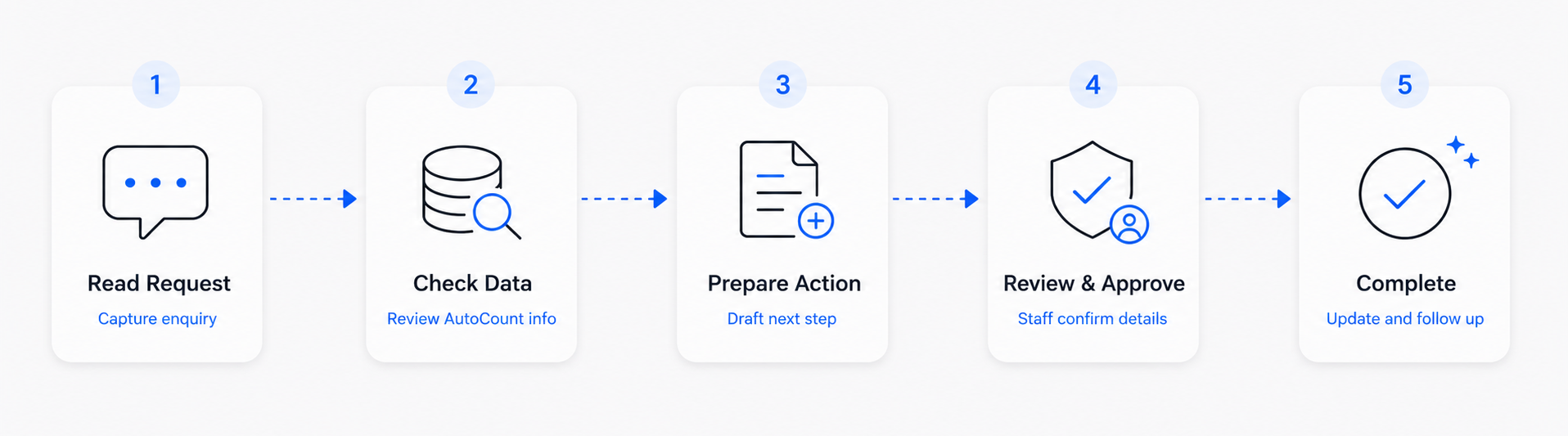
How the AI Workflow Works

From receiving a request to completing the next action, the AI works with AutoCount data while your staff remain in control.
The AI reads the request, checks the relevant customer, stock, pricing and business information, then prepares the appropriate action. As a result, staff can review and approve the details before the system updates AutoCount.
AI reads and prepares. Staff reviews and approves. AutoCount remains the trusted business system.

Connected AutoCount Integration

Secure Local Connector

Install the connector on a Windows machine that can access the selected AutoCount account book. It communicates outward to the cloud service without directly exposing the local database.

Controlled Access Rights

Administrators can limit each workflow to the business functions and information it requires.

Draft-First Transaction Control

The AI prepares documents as drafts, allowing staff to check customer, item, quantity and pricing information before confirming the final transaction.

Visible Command and Activity History

The system records each command’s type, status and queued time. This gives staff a clear history of completed, pending and failed actions.

Frequently Asked Questions

What can AutoCount AI Agent do?

It can support customer enquiries, order preparation, stock checking, delivery coordination, credit control, payment matching, document processing, sales follow-up and management dashboards. The exact workflow depends on the company’s requirements and approved AutoCount access.

The solution can prepare documents or execute configured commands through the AutoCount connection. Draft-first and approval workflows can be used so that staff check important information before final posting.

Yes. The supplied workflows include customer enquiries and order information received through channels such as WhatsApp and email. Other digital channels may also be connected depending on the implementation scope.
A Local Connector is installed on a Windows machine that can access AutoCount Accounting and the relevant account book. Approved requests are sent through the cloud API to the connector, which carries out the permitted AutoCount command.
Yes. Administrators can limit access by business area and permission level, including read-only, create and edit access.
Yes. Configure the business workflow, AutoCount mapping, access permissions, AI instructions and approval process according to your company’s requirements. Then, complete testing, user acceptance and staff training before launching the workflow.

Bring AI Into Your Daily AutoCount Workflow

Start with one practical workflow, such as customer enquiries, order preparation or sales follow-up, and expand according to your business requirements.