
AutoCount Basic Multi-UOM vs Advanced Multi-UOM
Sell by piece, box or carton? This guide to AutoCount Basic Multi-UOM vs Advanced Multi-UOM explains how the two options differ in stock reporting—and when it makes sense to upgrade.

What is Multi-UOM?
Multi-Unit of Measure (Multi-UOM) lets a business handle the same inventory item in different quantities, such as PCS and BOX. This is useful when goods are purchased, stored or sold in different packaging units. Both sides of AutoCount Basic Multi-UOM vs Advanced Multi-UOM build on this idea.
Buy in cartons
Receive goods in bulk packaging without losing the relationship to the smallest unit.
Sell in pieces
Handle different sales units for the same stock item where configured.
See the right balance
Choose the module whose quantity presentation best fits your stock-reporting needs.
AutoCount Basic Multi-UOM vs Advanced Multi-UOM: 5 key differences
Both support inventory handling in different units. In AutoCount Basic Multi-UOM vs Advanced Multi-UOM, the critical distinction is how the stock reports present quantities.
Simple stock reporting
Stock reporting is presented in the smallest unit of measure. This suits businesses that are comfortable checking their stock as one base quantity.
Separate UOM visibility
Stock reporting can display quantities by their individual units, such as BOX and PCS, making packaging-level reporting easier to review.
| Comparison | Basic Multi-UOM | Advanced Multi-UOM |
|---|---|---|
| Multiple item units | Supports multi-UOM transactions | Supports multi-UOM transactions |
| Stock report presentation | Reports stock in the smallest UOM | Reports stock in multiple UOMs |
| BOX and PCS visibility | Combined into smallest-unit reporting | UOM-level reporting for relevant transactions |
| Suitable need | Straightforward inventory reporting | More detailed UOM-based stock analysis |
| Upgrading historical stock | Not applicable | Earlier transactions may require reposting to recategorise stock by UOM |
Choose based on your reporting needs
Basic Multi-UOM: A smaller retailer that only needs a simple base-unit stock balance may find this sufficient.
Advanced Multi-UOM: Wholesalers, distributors and businesses selling both cartons and individual pieces may prefer separate UOM visibility.
When weighing AutoCount Basic Multi-UOM vs Advanced Multi-UOM, the decision is about the detail needed in stock reports—not simply the number of packaging sizes your business uses.
Upgrading to Advanced Multi-UOM
The original article explains that transactions recorded under Basic Multi-UOM may continue to appear in the smallest UOM until relevant historical sales, purchase and stock transactions are reposted.
Check current balances
Review your original Stock Card and the item UOM conversion settings before any changes.
Assess the repost
Identify relevant historical transactions. Back up your company data and confirm the appropriate repost procedure with your AutoCount consultant.
Recheck the reports
Compare balances after reposting and review how the stock transactions now appear by UOM.
See how Advanced Multi-UOM reporting works
The original article contains genuine AutoCount screenshots showing UOM reporting and the upgrade-related workflow. These are retained below for reference.


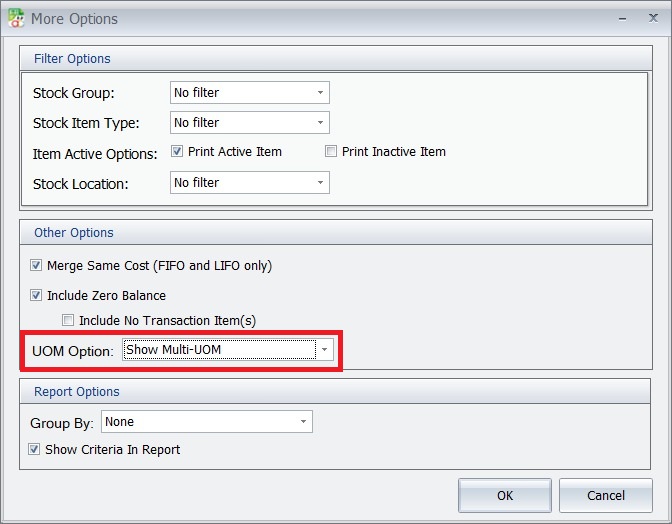
Stock Card report options
After upgrading and reposting where needed, the original guide describes these report options in More Options:
Show Multi UOM (the original default), Show Default Report UOM, and Show Smallest UOM.
Advanced Item Module video tutorial
The original article also linked to an AutoCount Advanced Item Module tutorial. You can watch it here for additional product context.
AutoCount Basic Multi-UOM vs Advanced Multi-UOM FAQs
What is the main difference between the two modules?
In AutoCount Basic Multi-UOM vs Advanced Multi-UOM, both handle items in several units. The difference is reporting: Basic shows stock in the smallest unit, while Advanced can show stock by each UOM, such as BOX and PCS.
Can Basic Multi-UOM handle boxes and pieces?
Yes. The original article describes multi-unit inventory handling in both modules. Their key difference is how stock reporting presents the units.
Why does Basic Multi-UOM show stock in the smallest unit?
Basic Multi-UOM uses smallest-unit reporting, which gives a consistent base-quantity view for stock reports.
Will historical stock automatically appear by BOX and PCS after an upgrade?
Not always. Earlier transactions may need reposting as explained in the original guide. Verify the required procedure with your AutoCount consultant before changing a live company account.
Which module should a wholesaler choose?
Consider Advanced Multi-UOM when viewing stock separately by packaging unit is important. Confirm the exact version, report requirements and module entitlement before purchase.
Find the Multi-UOM setup that fits your inventory
Compare AutoCount Basic Multi-UOM vs Advanced Multi-UOM against how your team buys, sells and counts stock. Explore AutoCount Accounting and related inventory features, see product details on the official AutoCount website, or speak to SL Software about your stock-reporting needs.
Before choosing
Check how you buy, sell and report each unit. For existing Basic Multi-UOM data, plan upgrade and repost validation carefully.