
Payroll · LHDN Compliance
EA Form filing is easier when the yearly figures come straight from payroll you already run. AutoCount Payroll prepares EA Forms from processed payroll records, so HR reviews totals instead of retyping them.

01 / The basics
The EA Form (Borang EA, C.P.8A) is the yearly statement of remuneration a private-sector employer prepares for each employee. It shows salary, bonus, allowances, benefits-in-kind and deductions such as EPF and PCB.
Employees use it to file their own tax return, so HASiL (LHDN) requires employers to issue it on or before the last day of February each year. Wrong figures mean amended forms and unhappy staff.
| Obligation | Deadline | What to know |
|---|---|---|
| EA / EC Form to each employee | Last day of February | Covers the previous year’s pay. Given to staff, not submitted to LHDN. |
| Form E with C.P.8D to LHDN | 31 March | The RF Filing Programme 2026 set 31 March 2026 for remuneration year 2025, with a one-month e-Filing grace period. |
| e-Filing of Form E (e-E) | Mandatory | For companies since remuneration year 2016, and for other employers since remuneration year 2023. |
| Payroll records | Keep for 7 years | Records must remain accessible to LHDN on request. |
Sources: HASiL Employer’s Responsibility · HASiL Employer page · RF Filing Programme 2026 · Borang E 2025 notes. Check the latest programme each year.
See the Bahasa Malaysia form for private-sector employees.
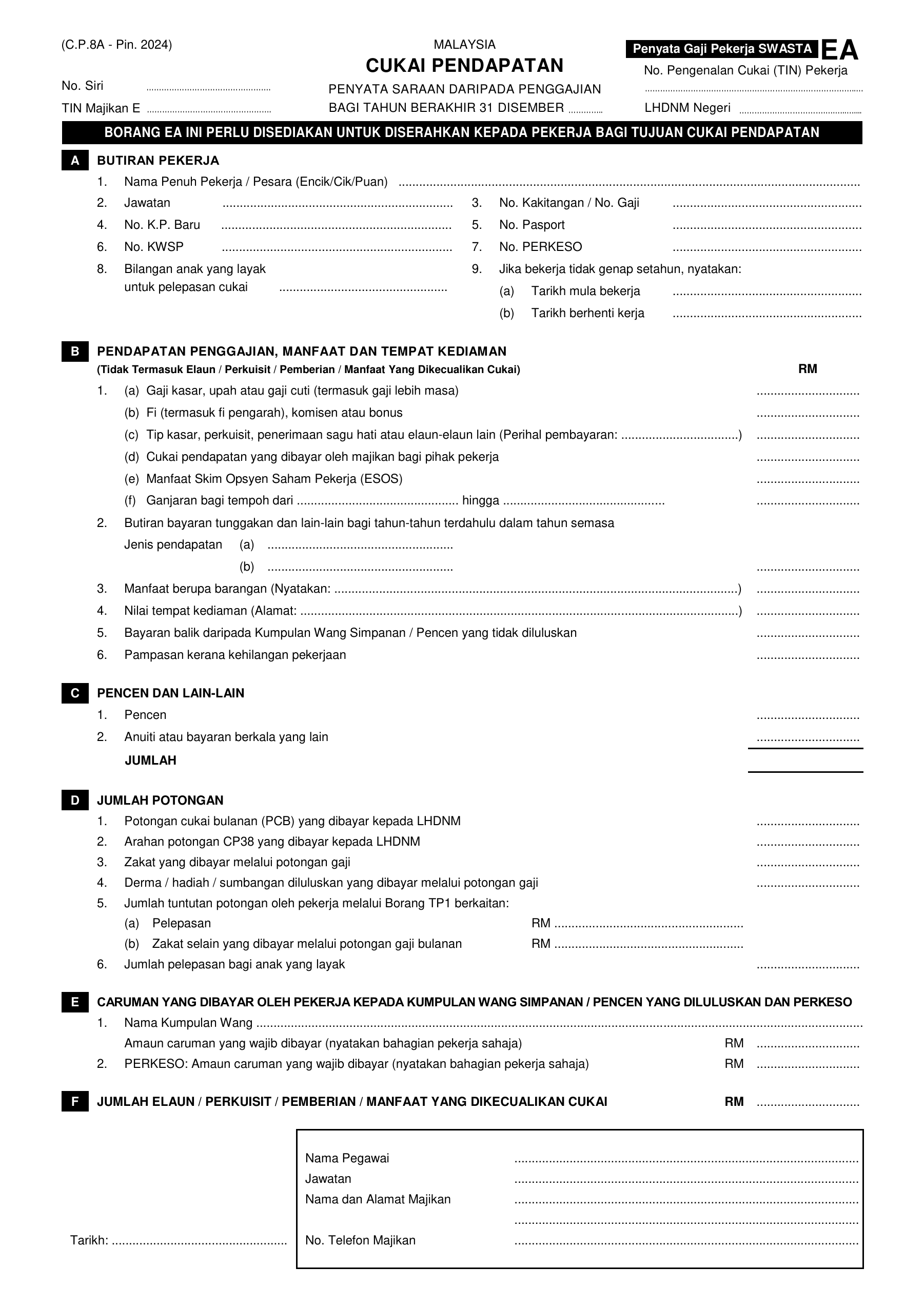
View the original Bahasa Malaysia PDF (page 4) · View the HASiL English reference PDF
Why it hurts
HR compiles 12 months of pay data per employee during the busiest season.
One missed bonus or wrong PCB total means a corrected form.
Payslips, claims and Excel files live in different places.
Tax relief and statutory rates change, and spreadsheets don’t update.
02 / How it works
Because AutoCount Payroll already processes your monthly payroll, the year-end figures are ready when you need them.
The same yearly totals help you prepare Form E and C.P.8D for LHDN. Check the output against the current year’s LHDN format before you submit. See our guide to monthly and yearly government payroll reports.
03 / Benefits
EA Form drafts come from payroll processed during the year, not from 12 months of spreadsheets.
Salary, bonus, EPF and PCB totals are drawn from the same payroll records.
Generate forms for the whole team at once, including new joiners and leavers.
The yearly totals also support your Form E and C.P.8D preparation.
User access rights help keep salary data visible only to authorised staff.
Manual vs automated
| Task | Manual | AutoCount Payroll |
|---|---|---|
| Preparation | Compiled by hand from 12 months of records | Generated in one batch from payroll records |
| Accuracy | Totals retyped, easy to slip | Figures taken from processed payroll |
| Distribution | Typed and printed one by one | Printed or exported together |
| Employer return | Form E data compiled separately | Same totals support Form E and C.P.8D |
Automation removes retyping. HR still reviews every form before it goes out.
Year-end review
Even when the figures are generated automatically, run these checks before staff receive their forms.
Names, ID and tax numbers, and the employment period, including joiners and leavers.
Salary, bonus, allowances and benefits-in-kind against approved payroll.
Each employee’s PCB on the form should match what was remitted to LHDN.
Sign off, issue by the end of February and keep the records for 7 years.
FAQ
On or before the last day of February each year, covering the previous year’s remuneration. See HASiL’s employer responsibilities.
The EA Form goes to each employee. Form E is the employer’s annual return to LHDN, and C.P.8D lists every employee’s remuneration and is submitted with Form E by 31 March.
Yes. Companies have filed Form E through e-Filing since remuneration year 2016, and other employers since remuneration year 2023.
Yes. It prepares EA Forms from processed payroll records. Confirm the current year’s prescribed format and check employee figures before issuing.
The same yearly payroll totals support Form E and C.P.8D preparation. Check the output against LHDN’s current requirements before submitting.
Yes. Automation removes retyping, but a final review of yearly totals keeps every form correct.
Get ready for year-end
Book a demo and SL Software will show you how AutoCount Payroll handles monthly payroll, PCB and year-end EA Forms for your team.