
AUTOCOUNT POS 5.0 · RETAIL SOLUTIONS
Choosing a retail POS system Malaysia retailers can rely on starts with the full shop workflow. Manage product availability, customer purchases, promotions, cashier transactions and daily sales with a structured POS workflow.
AutoCount POS 5.0 supports retail checkout, inventory, promotions, reporting and accounting integration, depending on the edition and modules selected.
For boutiques, minimarkets, hardware shops and growing multi-outlet retailers in Malaysia.

AutoCount retail cashier · official brochure photograph
A basic cash register records sales. A suitable retail POS system Malaysia businesses select should connect checkout operations with the information needed to manage a growing shop.
Manual price searches and inconsistent checkout processes slow down staff at peak hours.
Separate spreadsheets and unrecorded movements make it harder to trust available stock.
Owners need clearer sales, payment and product performance information.
Different outlets may have inconsistent prices, stock and reporting workflows.
Compare the functions that matter to your shop. Availability depends on the selected edition, modules, licences and configuration.
FEATURE 01
At the counter, barcode scanning, product searches, price and quantity adjustments, multiple configured payment methods, and hold/recall bill functions help staff process purchases more consistently.
More consistent checkout and less reliance on manually entering product details.

AutoCount POS sales screen · product UI

AutoCount stock management example · verify edition and modules
FEATURE 02
With an inventory-enabled edition, manage product codes, stock information, purchasing and replenishment workflows. Specialised batch, expiry-date, serial-number and units-of-measurement needs should be checked against your licensed modules.
Clearer stock visibility for purchasing and replenishment decisions.
FEATURE 03
Depending on your configuration, manage promotional pricing, customer membership programmes and related loyalty activities. Retailers can review recorded purchases when planning campaigns.
Organise campaigns with consistent transaction records.
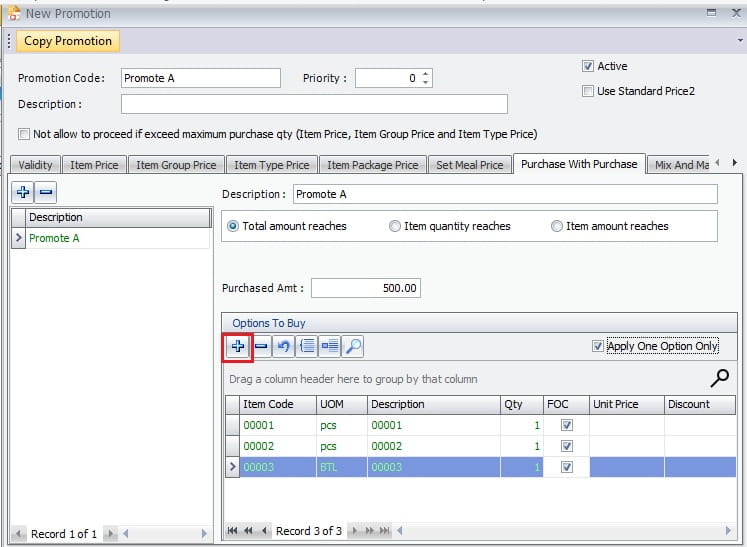
AutoCount POS promotional offer setup · product UI
FEATURE 04
A growing retailer can evaluate outlet-level sales reporting, pricing management, stock checks and supported branch synchronisation, with suitable terminal and headquarters options.
Plan expansion with better coordination between branches.
FEATURE 05
Review daily transactions, payment breakdowns and product sales performance in your configured reports. User access controls can help limit sensitive actions such as refunds and price changes.
More organised reporting and accountable cashier procedures.

AutoCount POS close-counter workflow · product UI

POS and accounting connection · illustrative workflow
FEATURE 06
AutoCount POS supports integration with AutoCount Accounting 2.0 for relevant sales and financial posting workflows, subject to configuration.
Explore AutoCount integration capabilities →
Reduce repeated administrative work between checkout and accounting.
Inspect genuine AutoCount POS screens. Click an image to enlarge it, or request a demonstration with your own products.
See how items, totals and payment choices appear on the POS sales screen.
Review a real promotional purchase configuration screenshot.
See the close-counter view used when reviewing collected amounts.
Discuss your checkout counters, stock requirements and expansion plans before purchasing.
Your POS and accounting workflow should reflect the e-Invoice obligations that apply to your business. Eligible transactions may be consolidated under prevailing HASiL guidelines.
AutoCount’s wider ecosystem provides e-Invoice capabilities, subject to the products and configuration implemented. Check current HASiL eligibility and the latest exemption guidance before making a compliance decision.
Product-specific submission workflows should be confirmed during consultation; not every retail sale requires an individual e-Invoice.
A fashion boutique using a cash register and spreadsheets may spend extra time checking item prices, reconciling stock and consolidating cash collections. With a properly configured AutoCount POS setup, barcode checkout and structured reporting can support daily operations, while additional stock and outlet capabilities can be evaluated as the business expands.
Illustrative scenario only; no guaranteed performance results are implied.
Different retail sectors need different workflows. Confirm special tracking and module requirements before deciding on a package.
High-volume checkout and inventory monitoring.
Sizes, colours, promotions and customer purchases.
Broad catalogues and different units of measurement. Explore AutoCount POS for hardware shops for sector-specific considerations.
Memberships and possible batch or expiry tracking.
Serial-number and warranty-related requirements.
Outlet-level reporting and coordinated operations.
Choose the edition based on what your business needs beyond cashier operations.
Generally suitable when a retailer primarily requires checkout and cashier functions, without broader inventory and purchasing management.
More suitable when the business needs inventory and purchasing functions alongside retail checkout.
Additional counters, branch capabilities and specialist tracking may require separate modules or licences. Confirm your package before purchase.
For your retail POS system Malaysia shortlist, evaluate the complete workflow, including the cashier screen. Ask to see your own important transactions demonstrated.
Planning a new counter or branch? Discuss your shop requirements with SL Software →
SL Software Solutions Sdn Bhd is an authorised AutoCount dealer in Malaysia. Our team supports software consultation, implementation, training, relevant customisation and ongoing assistance.
We can review your number of counters, inventory requirements, accounting workflow and potential future outlet expansion.
Helping Businesses Grow Through Technology.
See how checkout connects to the wider AutoCount ecosystem.
Retail POS software records customer purchases and supports checkout. Depending on the edition, it may also provide stock, purchasing, reporting, membership and accounting functions.
Yes. Retailers mainly needing cashier operations can evaluate POS Basic, while businesses requiring broader inventory and purchasing management can consider POS Standard.
Yes, with the appropriate edition. Special tracking for serial numbers, batches or expiry dates may require additional modules.
Multi-location arrangements are available, subject to the selected terminals, headquarters options, setup and connectivity.
AutoCount POS supports relevant posting workflows with AutoCount Accounting 2.0, depending on the implemented configuration.
Some locally deployed POS setups can continue core checkout operations without constant connectivity. Online services, remote synchronisation and certain integrations may require a connection.
Relevant promotion, pricing and membership capabilities are available. Confirm the features and modules included in your proposed package.
The answer depends on current HASiL guidelines, eligibility and your business revenue or turnover. Confirm the applicable requirements before purchasing.
It depends on the POS edition, terminal licences, hardware, optional modules and implementation. Request a quotation showing each component.
Talk to SL Software about checkout, stock, accounting and outlet requirements. We’ll help you evaluate a suitable configuration.
Customer Success is Our Success.