SME OPERATIONS / AI ACCOUNTING AUTOMATION
AI Agent for Accounting Automation:
6 Smart Workflows
for Malaysian SMEs
An AI agent for accounting automation prepares orders, stock checks and payment matches for your team to review. Staff spend less time re-keying data and more time on decisions.
- 6 practical workflows
- Staff approval built in
- Pilot-first rollout

AI prepares the work. Your team approves it.
The practical takeaway
Start with one repetitive task. Let the AI agent prepare the draft, and let your staff check exceptions and approve the result.
01 / WHAT IT DOES
What Is an AI Agent for Accounting Automation?
An AI agent for accounting automation reads a request, pulls the right records and prepares a reply, document draft or follow-up within rules you configure.
AutoCount AI Agent works with supported AutoCount Accounting setups across sales, inventory and finance. For the core software, see AutoCount’s official product overview.
1Reads requestsEnquiries from WhatsApp, email or website chat.
2Checks AutoCountStock, customer pricing, balances and credit.
3Prepares draftsReplies, orders and receipts for staff review.

Available functions depend on your AutoCount version, channels, permissions and implementation scope.
02 / SIX WORKFLOWS · STAFF CHECKPOINTS
6 Ways to Use an AI Agent for Accounting Automation
An AI agent for accounting automation works best on a repeatable process with reliable data and a named reviewer.
01
Enquiries & sales orders
Reads WhatsApp, email or chat enquiries, checks stock and customer pricing, then drafts a reply or Sales Order.
You check: Account, item, quantity, price and delivery terms.
02
Follow-ups & reorders
Spots inactive accounts and repeat buyers, then drafts reminders and daily action lists.
You check: Recipient, timing and tone of each message.
03
Inventory & delivery
Checks availability, alerts the warehouse and supports partial deliveries.
You check: Stock allocation and delivery promises.
04
Payment matching
Reads payment slips, suggests customer and invoice matches, and drafts AR receipts.
You check: Payer, amount, allocation and unclear references.
05
Credit control
Checks credit limits, terms and overdue invoices against your rules before an order proceeds.
You check: Credit exceptions and overrides.
06
Document processing
Extracts details from POs, receiving notes and payment slips into transaction drafts.
You check: Item codes, quantities, amounts and references.
ILLUSTRATIVE SCENARIO · NOT A CUSTOMER CASE
Example: From WhatsApp Message to Checked Order
A Malaysian distributor receives a repeat order enquiry. A configured workflow could run these steps:
01Read
Items and quantities from the WhatsApp message.
02Check
Customer, pricing and stock records.
03Review
Account against your credit rules.
04Draft
Reply and Sales Order, or flag an exception.
05Approve
Salesperson confirms the next action.
Each stage has its own controls. Confirm availability and sequence during implementation.
03 / ACCESS & APPROVALS
Keep Access and Approvals Under Control
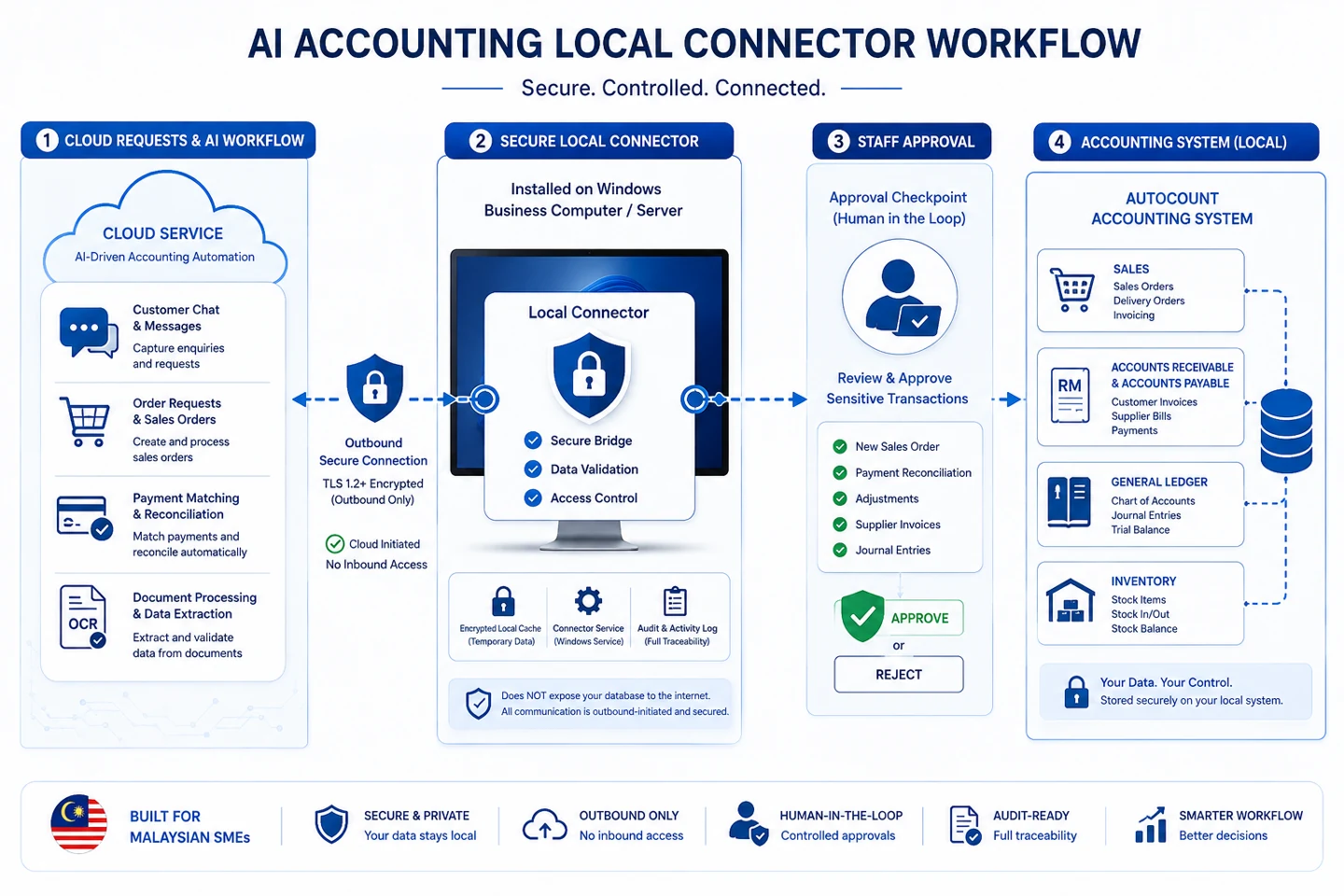
AutoCount AI Agent runs through a Local Connector on a Windows machine linked to your chosen account book. Access can be limited by business area and permission level.
AccessWhich records can the workflow read, create or edit?
ApprovalWho checks drafts and authorises exceptions?
UncertaintyWhat happens when data is missing or conflicting?
TraceabilityWho reviews failed or pending actions?
Ask your implementation team what data reaches the cloud, how long it is kept and which controls apply.
04 / PILOT & ROLLOUT
How to Implement an AI Agent for Accounting Automation
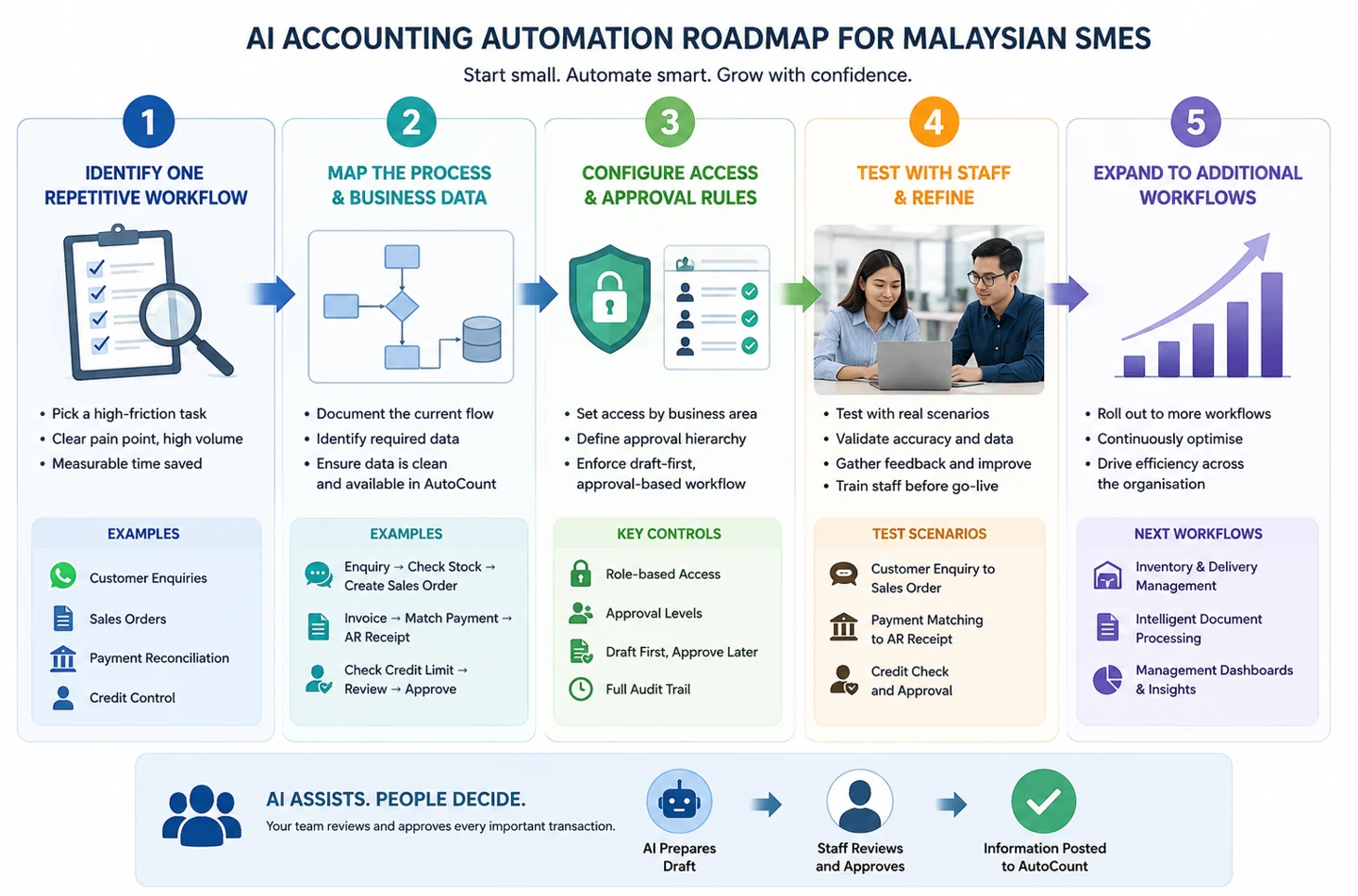
Run a small, measurable pilot before automating across departments.
- Pick one bottleneck. For example, repeat orders or payment references.
- Clean the data. Customers, item codes, prices and account details.
- Map the review. Who checks what, and when to escalate.
- Test hard cases. Missing codes, low stock, overdue accounts.
- Measure, then expand. Handling time, corrections and open exceptions.
Train staff to spot an incorrect draft and know how to fix it.
AI Agent for Accounting Automation: FAQs
Yes, if your AutoCount Accounting version is supported and a Local Connector is configured. We confirm version, account book access and system requirements first.
No. Each workflow either prepares drafts or runs permitted commands, depending on its settings. Approval and posting rights are agreed during implementation.
The published workflows include WhatsApp and email enquiries. Channel setup and account requirements are confirmed with the implementation team.
Not necessarily. Ask for a proposal listing the workflows, configuration, integrations, training and any fees.
No. It gathers and prepares information. Judgement, exception review and responsibility for your accounts stay with your team and advisers.
A frequent, well-defined task with reliable records and an available reviewer, such as repeat orders or payment matching.
See How AI Could Fit Your AutoCount Workflow
Bring one task your team repeats every day. SL Software Solutions will review your AutoCount setup and show how an AI agent for accounting automation could handle it.
Share your industry, AutoCount version and main bottleneck, or explore AutoCount AI Agent features.