How to Improve the Sales Order Workflow in Wholesale Trading
More customer orders should mean business growth. However, when orders depend on WhatsApp, repeated manual entry and printed documents, higher order volumes can create delays, mistakes and heavier workloads across Sales, Admin and warehouse teams.

More Orders Should Be Good News—So Why Is the Team Slowing Down?
More orders should be a positive sign.
They usually mean that sales are improving, customers are buying and the business is growing.
However, many wholesale and trading businesses experience a different situation. Orders continue arriving every day, but deliveries become slower. As a result, customers repeatedly ask for updates. Meanwhile, Admin employees work overtime. Sales says an order has already been submitted, while the warehouse says it has not received the information.
The problem may not be a lack of sales.
The real problem may be that customer orders are becoming stuck somewhere in the Sales Order workflow.
More orders do not always create more capacity. Instead, if the workflow remains manual, every additional order may create more data entry, follow-up messages and opportunities for error.
How a Manual Sales Order Process Works
When a company receives only a small number of orders, a manual process may still appear manageable.
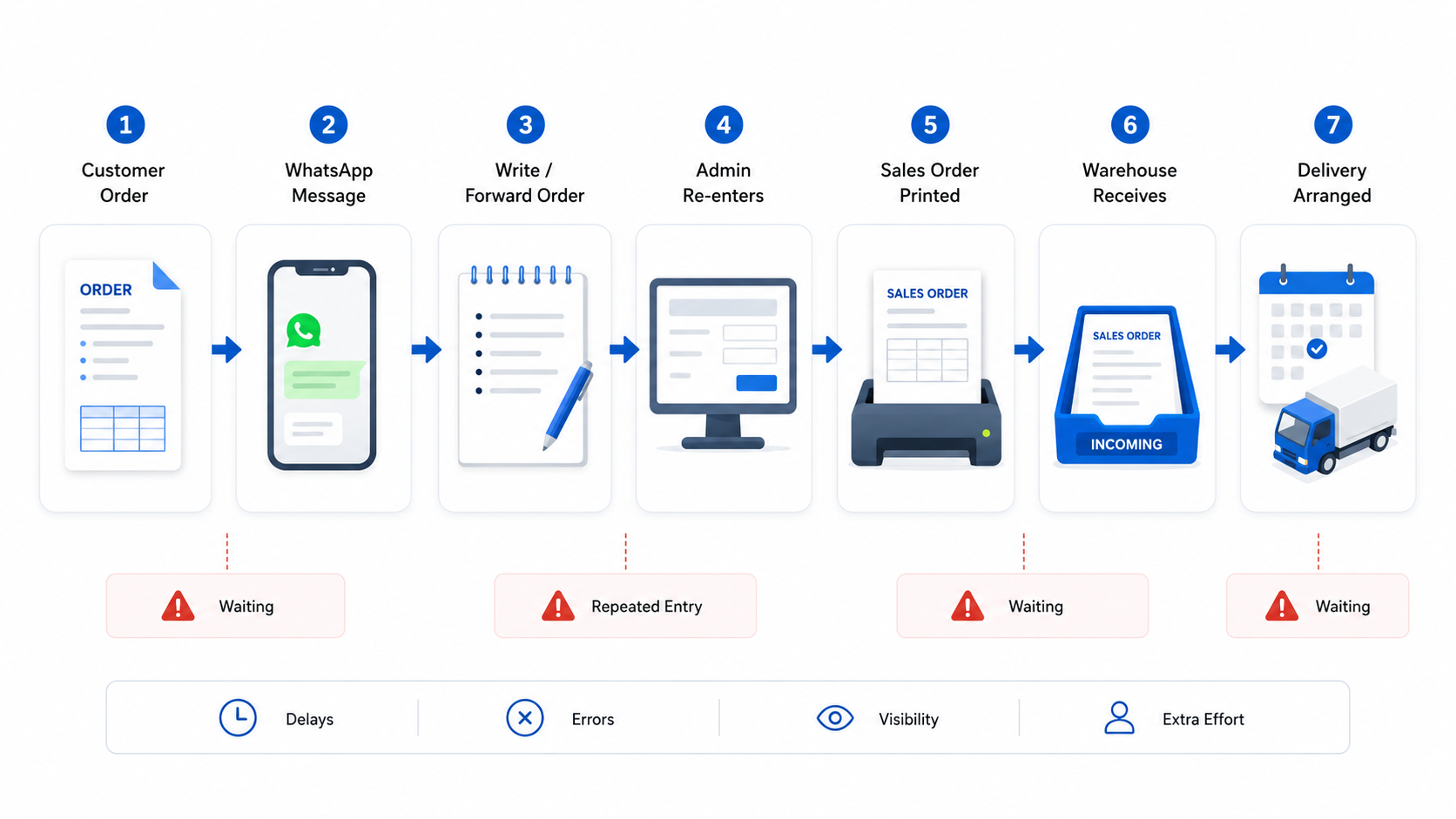
A salesperson receives the customer’s order, writes down the details and sends a photo or message through WhatsApp. Admin then reads the message and enters the same information into the accounting system. The Sales Order is printed and passed to the warehouse for packing and delivery.
A typical manual process looks like this:
- Sales receives the customer’s order.
- Sales records the order in a message, note, photograph or Excel file.
- Sales sends the order details to Admin.
- Admin enters the same order into the system.
- Admin prints or forwards the Sales Order.
- The warehouse prepares the goods.
- The delivery team arranges delivery.
This process may continue working when the business handles only a few orders each day.
However, when the volume grows from 50 orders to 100, 200 or 300 orders per day, every unnecessary step becomes a larger operational bottleneck.
As a result, the team becomes busier, but the company does not necessarily become more efficient.
- Warning
A workflow that works for 20 orders may not work for 200 orders. Growth increases the effect of every manual handover, repeated entry and missing update.
Problem 1: The Same Order Is Entered More Than Once
Repeated data entry is one of the most common bottlenecks in a manual Sales Order workflow.
Sales records the customer’s order first. Admin then enters the same information again before the warehouse can begin preparing the goods.
The Admin team may need to transfer order details from:
- WhatsApp messages
- Photographs of handwritten orders
- Excel files
- Printed documents
- Salesperson notes
- Customer chat messages
- Email attachments
When order volume is low, this additional work may not appear serious. As the number of orders grows, Admin may spend several hours every day transferring information from one place to another.
The business may eventually hire additional employees simply to handle the increasing amount of manual entry.
However, adding more people does not remove the underlying bottleneck. It only increases the number of employees working around the same inefficient process.
- Important
The problem is not only how quickly Admin can enter the orders. The larger issue is that the same information should not need to be entered twice.
Problem 2: Manual Entry Increases the Risk of Order Errors
Every time order information is copied manually, there is another opportunity for an error.
Common Sales Order mistakes include:
- Entering the letter “O” instead of the number “0”
- Entering 100 cartons instead of 10 cartons
- Selecting the wrong customer account
- Using an incorrect delivery address
- Selecting the wrong item code
- Entering the wrong selling price
- Missing an item from the order
- Entering an order twice
- Using an outdated version of the customer’s order
For example, a small entry mistake can affect several departments.
The warehouse may pack the wrong goods or quantity. The delivery team may need to rearrange transport. Admin may need to cancel and reissue documents. Sales may need to explain the mistake to the customer.
The company may also incur additional labour, delivery, return or replacement costs.
Most importantly, repeated mistakes can reduce customer confidence. Customers may accept an occasional error, but regular delays, incorrect deliveries and last-minute changes may encourage them to look for another supplier.
As order volume increases, manual entries also increase. Without a better process, the risk of human error normally grows together with the business.
- Warning
One incorrect quantity or delivery address can create extra work for Sales, Admin, warehouse, delivery and customer service.
Problem 3: Nobody Can See the Latest Order Status
Another major problem is the lack of order visibility.
A customer contacts the salesperson and asks:
“Has my order been delivered?”
Sales may not know the latest status, so Sales asks Admin. Admin then contacts the warehouse. The warehouse searches through printed Sales Orders, WhatsApp messages, packing records or delivery documents.
The question moves from the customer to Sales, from Sales to Admin and from Admin to the warehouse.
The team may eventually find the answer, but valuable time has already been lost.
The most time-consuming part is often not completing the order. It is finding the correct information.

Without a centralised and trackable process, employees may struggle to answer basic questions:
- Has the order been entered?
- Has it been approved?
- Has the warehouse received it?
- Is the stock ready?
- Is the order waiting for stock?
- Has delivery been scheduled?
- Has a Delivery Order been created?
- Has the Invoice been issued?
- Has the customer already received the goods?
When no one can see the complete status, customers receive slower replies and employees spend more time asking one another for updates.
The work may already be in progress, but without a visible status, every department still needs to ask where the order is.
WhatsApp Is Useful, but It Should Not Control the Entire Order Process
WhatsApp is a useful communication tool.
It is fast, familiar and convenient for Sales teams working outside the office. Customers can also send their order details without learning a new system.
However, WhatsApp was not designed to manage a complete Sales Order workflow.
Order information can become buried under newer messages. Photographs may be unclear. Important details may be missed. In addition, different versions of the same order may appear in the same conversation, making it difficult to identify the final confirmed order.
When an employee is on leave or leaves the company, important order history may also remain inside an individual phone or chat group.
Depending too heavily on WhatsApp creates several risks:
- Order information becomes scattered.
- The latest version may be unclear.
- Messages can be overlooked.
- Manual entry is still required.
- Order status is difficult to track.
- Management has limited visibility.
- Employees depend heavily on one another for updates.
- Important information may remain inside personal devices.
WhatsApp can support customer communication, but it should not be the main system controlling order entry, approval, warehouse preparation, delivery and billing.
- Important
Use WhatsApp for communication—not as the only record of the customer’s order and its current status.
Why the Problem Becomes More Serious as the Business Grows
A weak process may remain hidden while a company is small.
When the business receives only a few orders, employees can solve problems through phone calls, group messages and personal follow-ups.
As the business grows, the same workflow becomes harder to control. The company may have more customers, Salespeople, warehouse employees, branches, delivery locations and approval requirements.
Every additional manual handover increases the possibility of delay, missing information or incorrect entry.
The company may have enough customers and market demand, but its internal process prevents it from handling that growth efficiently.
In many businesses, the real limit to growth is not the number of available orders.
It is the company’s ability to process those orders consistently.
| Area | Lower Order Volume | Higher Order Volume |
|---|---|---|
| Order Entry | A few messages can be managed manually. | Admin receives a continuous backlog of orders. |
| Communication | Employees can ask one another directly. | Follow-up messages interrupt several departments. |
| Errors | Mistakes happen occasionally. | More manual entries create more opportunities for mistakes. |
| Order Tracking | Employees may remember the status of individual orders. | It becomes difficult to remember the status of every order. |
| Warehouse Coordination | Printed Sales Orders may still be manageable. | Missing or delayed information affects packing and delivery. |
| Management Visibility | Business owners can follow operations personally. | Management needs structured reporting and clearer order visibility. |
| Staffing | Existing employees can manage the workload. | The company may hire more employees without fixing the underlying process. |
Consequently, a company can have strong sales and still struggle to grow if its order-processing capacity does not grow with demand.
What a Better Sales Order Workflow Looks Like
A better process allows Sales to record the customer’s order directly in an authorised system or ordering application.
Instead of writing down the order and sending it to Admin for re-entry, Sales records the required customer, item, quantity, price and delivery information at the point of order.
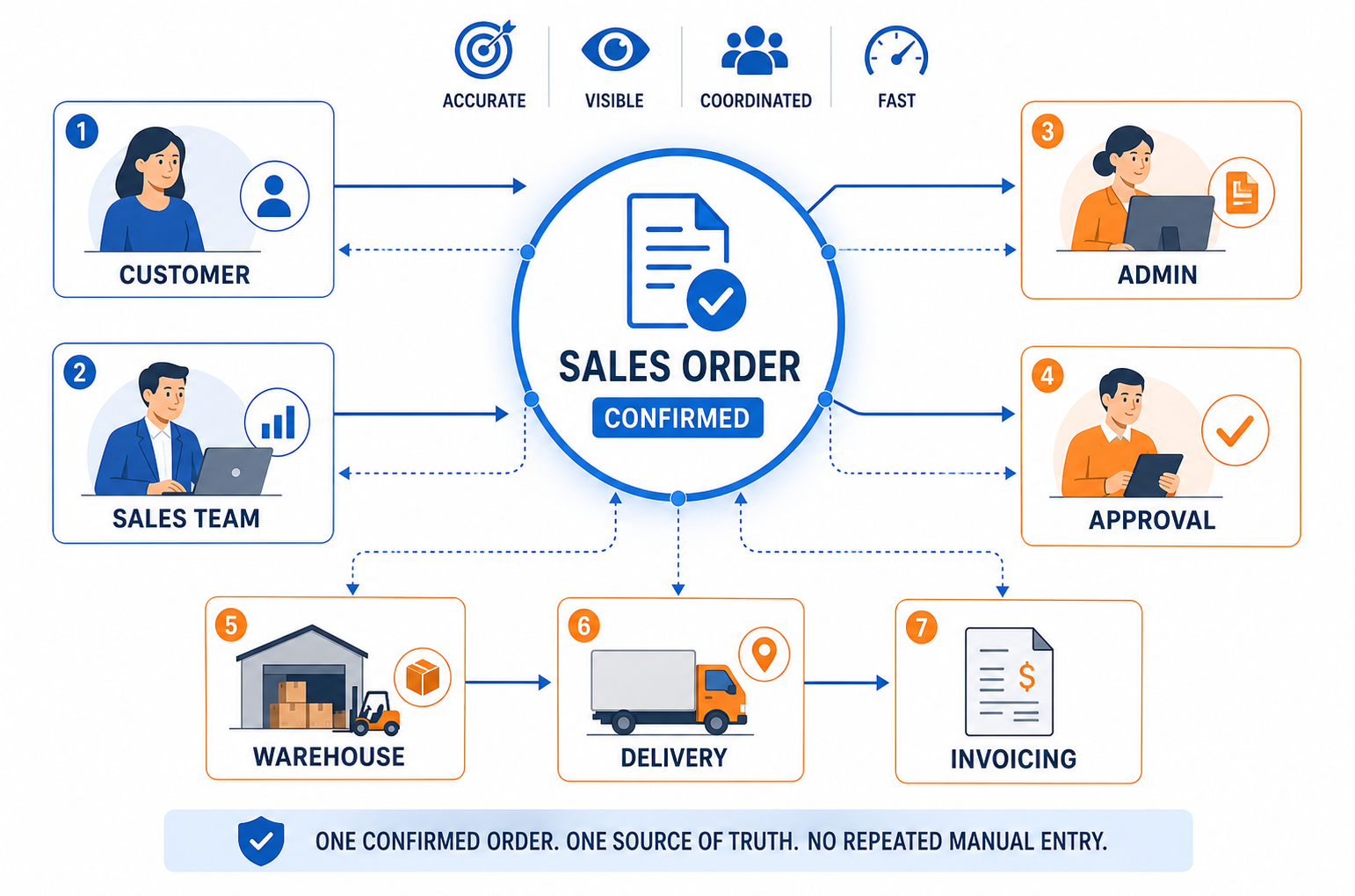
For example, a connected Sales Order workflow may follow these steps:
- The customer submits an order to Sales.
- Sales records the order directly through an authorised device or application.
- The order enters the central system.
- Next, the relevant approval or credit-control checks are completed.
- Afterward, Admin and the warehouse access the same confirmed order record.
- The warehouse prepares the goods.
- Finally, delivery and billing documents are created from the original Sales Order.
- Authorised employees review the order status when a customer requests an update.
As a result, this removes one of the main causes of delay: entering the same information several times.
Therefore, every department works from the same order record, helping the process become more structured, transparent and easier to manage.
The objective is not to add more steps. It is to remove unnecessary handovers and allow each department to work from the same information.
Manual Workflow vs Connected Sales Order Workflow
| Process Area | Manual Workflow | Connected Workflow |
|---|---|---|
| Order Capture | Customer orders are recorded through WhatsApp, paper, handwritten notes or Excel. | Orders are entered through an authorised system or ordering application. |
| Data Entry | Sales records the order before Admin enters the same information again. | The original order becomes the central record used by the relevant departments. |
| Version Control | Several messages or documents may contain different versions of the order. | Employees refer to one confirmed Sales Order record. |
| Warehouse Handover | Sales Orders are printed, forwarded or passed to the warehouse manually. | The warehouse accesses the same confirmed order information. |
| Order Status | Employees contact several departments to find the latest update. | Authorised users can review the recorded order progress more easily. |
| Error Risk | Order information is repeatedly copied between messages, documents and systems. | Repeated manual copying is reduced, lowering the risk of incorrect information. |
| Management Visibility | Management depends heavily on verbal updates and manual reports. | Orders can be reviewed through centralised system records. |
| Scalability | Administrative workload increases together with order volume. | More orders can be processed with fewer repeated tasks and handovers. |
How AutoCount Can Support the Sales Order Workflow
AutoCount can help wholesale and trading businesses organise how Sales Orders move between Sales, Admin, warehouse, delivery and billing teams.
With a properly configured workflow, Sales can record order information directly instead of relying completely on handwritten forms, Excel files or WhatsApp photographs.
In addition, the order information can then be made available to authorised employees through a central record.
Depending on the company’s operational requirements and system setup, this may help the business:
- Record customer orders more quickly
- Reduce repeated manual entry
- Reduce errors involving quantities, item codes and customer information
- Improve visibility of Sales Order records
- Pass confirmed order information to the warehouse more efficiently
- Respond to customer enquiries more quickly
- Transfer Sales Orders into subsequent delivery or billing documents
- Apply appropriate approval and user-access controls
- Give management a clearer view of daily order activity
However, the correct setup will depend on how the company currently receives, approves, packs, delivers and invoices customer orders.
The purpose of implementing a system is not to make employees perform more work. It is to remove unnecessary steps while maintaining the controls that the business requires.
- Important
AutoCount should be configured around the company’s actual Sales Order, warehouse and delivery process. A suitable workflow may be different for every business.
What Improves After the Workflow Is Connected?
Less Repeated Work
Admin no longer needs to re-enter every order that Sales has already recorded. The team can spend more time checking orders, coordinating deliveries and assisting customers.
Fewer Manual Entry Errors
Reducing repeated copying can lower the risk of incorrect quantities, prices, customer accounts, delivery addresses and item codes.
Faster Order Processing
When confirmed information reaches the warehouse earlier, employees can begin preparing the goods without waiting for Admin to enter the order again.
Faster Customer Updates
Sales and customer service employees can review available order information instead of contacting several departments whenever a customer requests an update.
Better Management Visibility
Management can obtain a clearer view of daily orders, pending work and possible delays without depending entirely on verbal updates.
Higher Capacity With the Same Team
As a result, the same number of employees may be able to handle more customer orders because less time is spent on repeated entry, information searches and internal follow-ups.
The goal is not simply to process today’s orders faster. It is to build a workflow that can continue operating when the company receives more orders in the future.
A scalable workflow allows order volume to increase without creating the same increase in administrative work.
Does Your Sales Order Process Need Improvement?
Review your current order workflow and consider the following questions:
- Does Admin need to enter an order after Sales has already recorded or submitted it?
- Does the team depend on WhatsApp photographs to process customer orders?
- Are customer order details stored across messages, paper documents and Excel files?
- When a customer requests an update, does Sales need to contact several people?
- Does Admin regularly work overtime because of order-entry backlogs?
- Does the warehouse frequently report that it has not received an order?
- Are incorrect quantities, prices or addresses becoming more common?
- Does management struggle to see which orders remain pending?
- Does the company need to hire more employees mainly to perform repeated order entry?
- Would the current workflow still work if daily orders doubled?
If your company experiences several of these problems, the issue may not be the effort of your employees.
The workflow itself may no longer be suitable for the company’s order volume.
- Warning
Hiring more employees may reduce the backlog temporarily, but it will not remove repeated entry, scattered information or poor order visibility.
The Real Goal Is a Scalable Order Process
Growing businesses need a workflow that can manage more orders without creating the same increase in administrative work.
A manual process may work today, but it may not continue working when the company receives twice as many orders, hires more Salespeople or opens additional branches.
The best time to improve the process is before delays, mistakes and overtime become normal.
A well-organised Sales Order workflow helps information move more smoothly between Sales, Admin, warehouse, delivery and management.
Employees can spend less time transferring and searching for information and more time serving customers, preparing goods and completing orders.
Therefore, the right workflow should support growth instead of becoming the reason the business cannot grow further.
Frequently Asked Questions
What is a Sales Order workflow?
A Sales Order workflow is the process used to receive, record, approve, prepare, deliver and invoice a customer’s order. A connected workflow allows the relevant departments to work from the same confirmed order information instead of repeatedly copying details between messages, documents and systems.
Why does the team become slower when order volume increases?
The team may become slower when every new order creates repeated data entry, manual handovers and additional follow-up messages. As the number of orders grows, these unnecessary tasks create a larger backlog and increase the risk of missing or incorrect information.
Can a business manage Sales Orders entirely through WhatsApp?
WhatsApp is useful for customer communication and receiving enquiries, but it is not ideal as the only Sales Order management tool. For instance, messages may be overlooked, different versions may become mixed together and employees may not be able to see the order’s current operational status.
How can AutoCount improve a Sales Order process?
AutoCount can help businesses maintain Sales Orders in a central system, reduce repeated manual entry and connect the original order with subsequent operational documents. The exact workflow should be configured according to the company’s approval, warehouse, delivery and billing requirements.
How do I know whether my Sales Order workflow needs improvement?
Common signs include Admin repeatedly entering orders, warehouse employees waiting for information, customers frequently requesting updates, increasing order mistakes and employees working overtime because of processing backlogs. The workflow should also be reviewed if it cannot support a significant increase in daily orders.
Is Your Business Ready to Improve Its Sales Order Workflow?
AutoCount can help wholesale and trading businesses organise Sales Orders, improve order visibility and reduce repetitive manual work.
Contact SL Software Solutions to discuss how an AutoCount Sales Order workflow can be configured around your company’s current ordering, approval, warehouse, delivery and billing process.