F&B POS System Malaysi: What Restaurants, Cafés and F&B Businesses Actually Need
Looking for an F&B POS system in Malaysia? This guide explains the features restaurants and cafés actually need, from QR ordering and kitchen workflow to ingredient control, accounting integration and Malaysia e-Invoice readiness.
Introduction
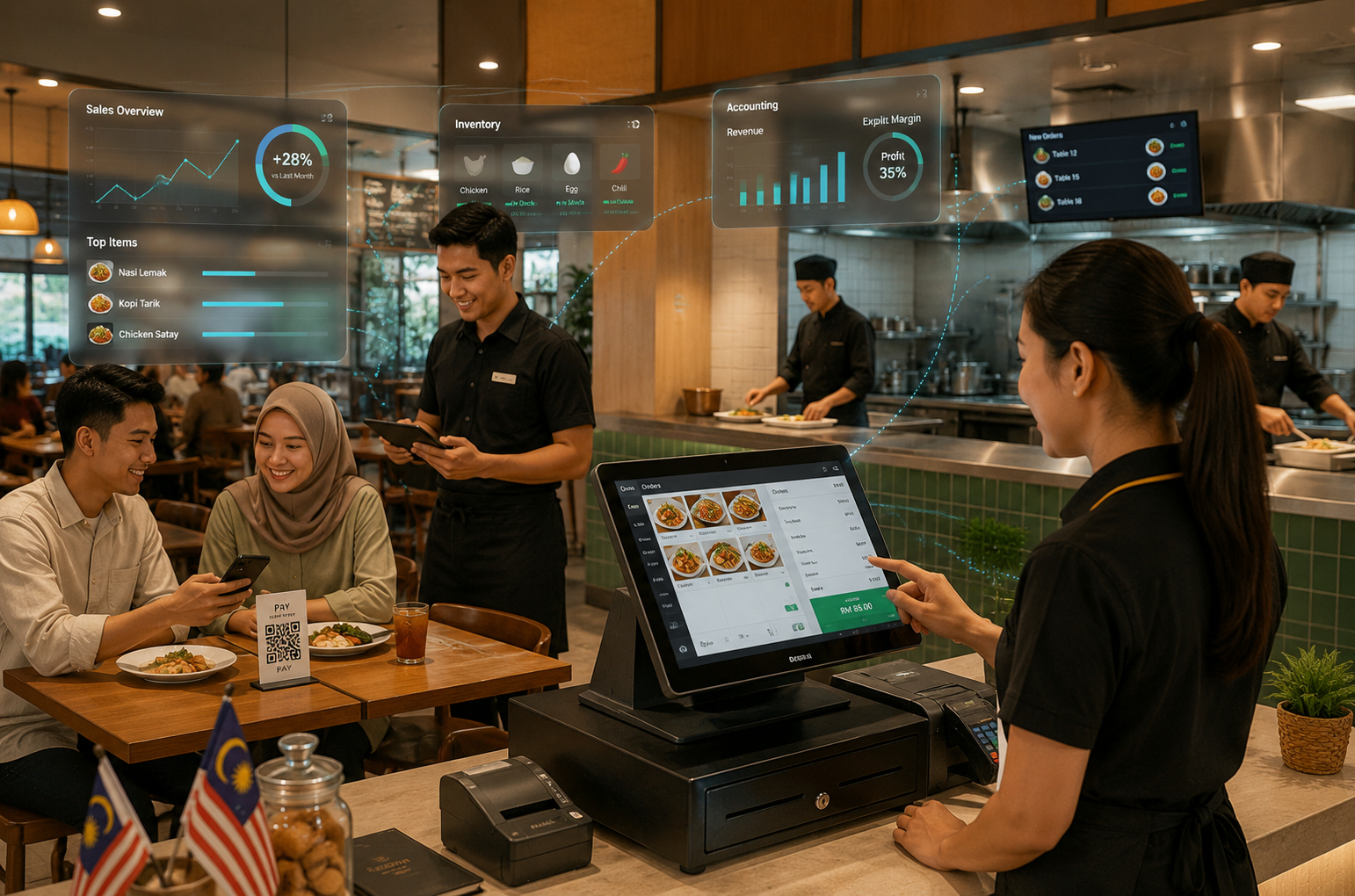
Running a food and beverage business in Malaysia involves much more than processing payments. Orders may arrive from the counter, dining tables, takeaway customers and QR self-ordering at the same time.
Kitchen staff need clear instructions immediately, bills may need to be split or combined, and stock control needs to consider ingredients used to prepare each dish.
Businesses that fall within Malaysia’s mandatory e-Invoice scope also need their sales workflow to support the relevant LHDN requirements.
This is why a normal retail POS is not always enough. A proper F&B POS system is designed around the way restaurants, cafés and other food businesses actually operate.
This guide explains what makes an F&B POS system different, which features matter most for Malaysian businesses, and what you should check before choosing one.
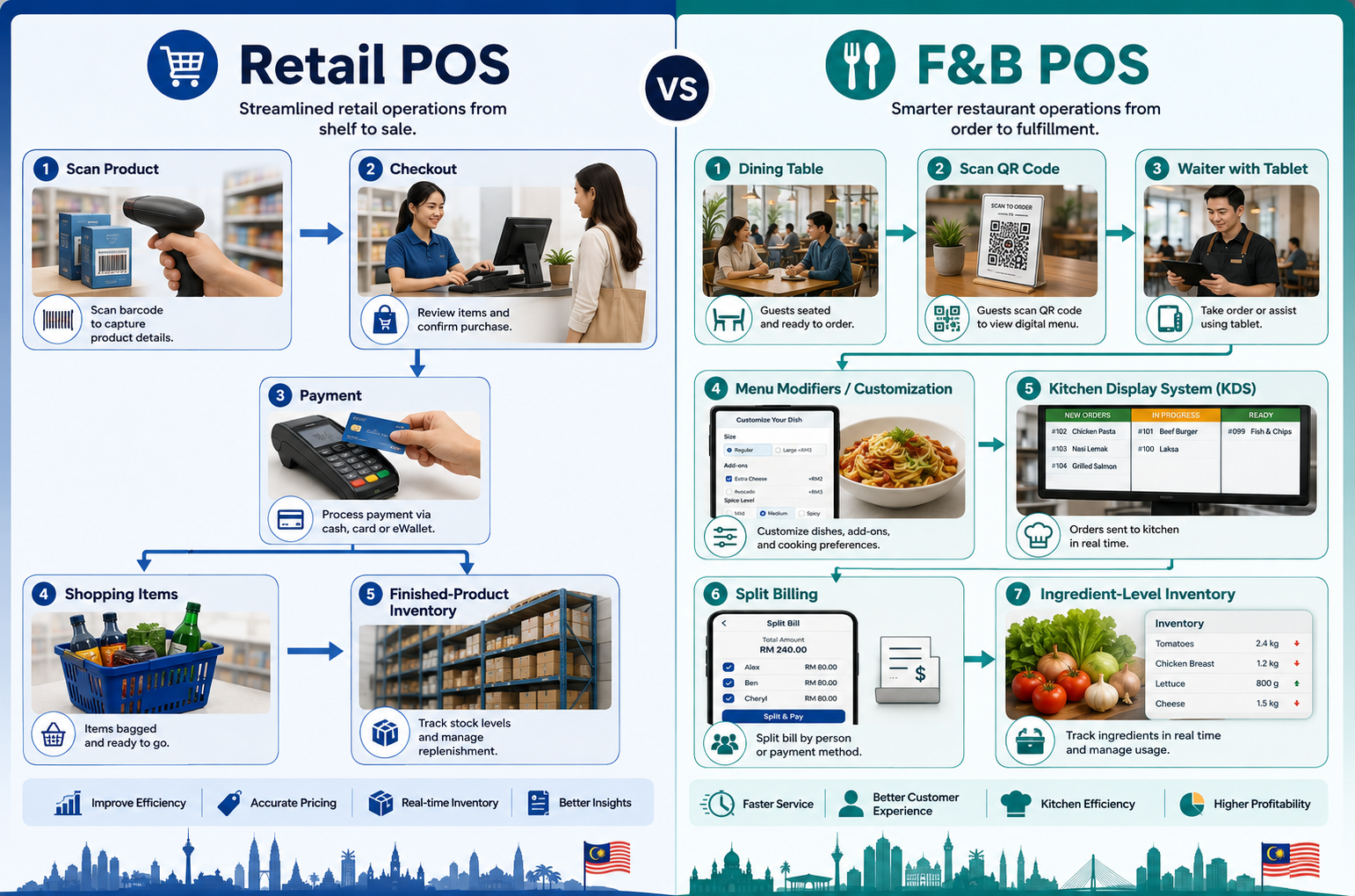
What Makes an F&B POS System Different from a Retail POS?
The basic transaction in retail is usually straightforward: a customer selects a product, pays, receives the item, and the POS records the sale.
F&B transactions involve more steps.
A single restaurant table may place several rounds of orders, request modifications to individual dishes, move tables, combine tables or split the final payment between different guests.
At the same time, each order has to reach the correct preparation area quickly.
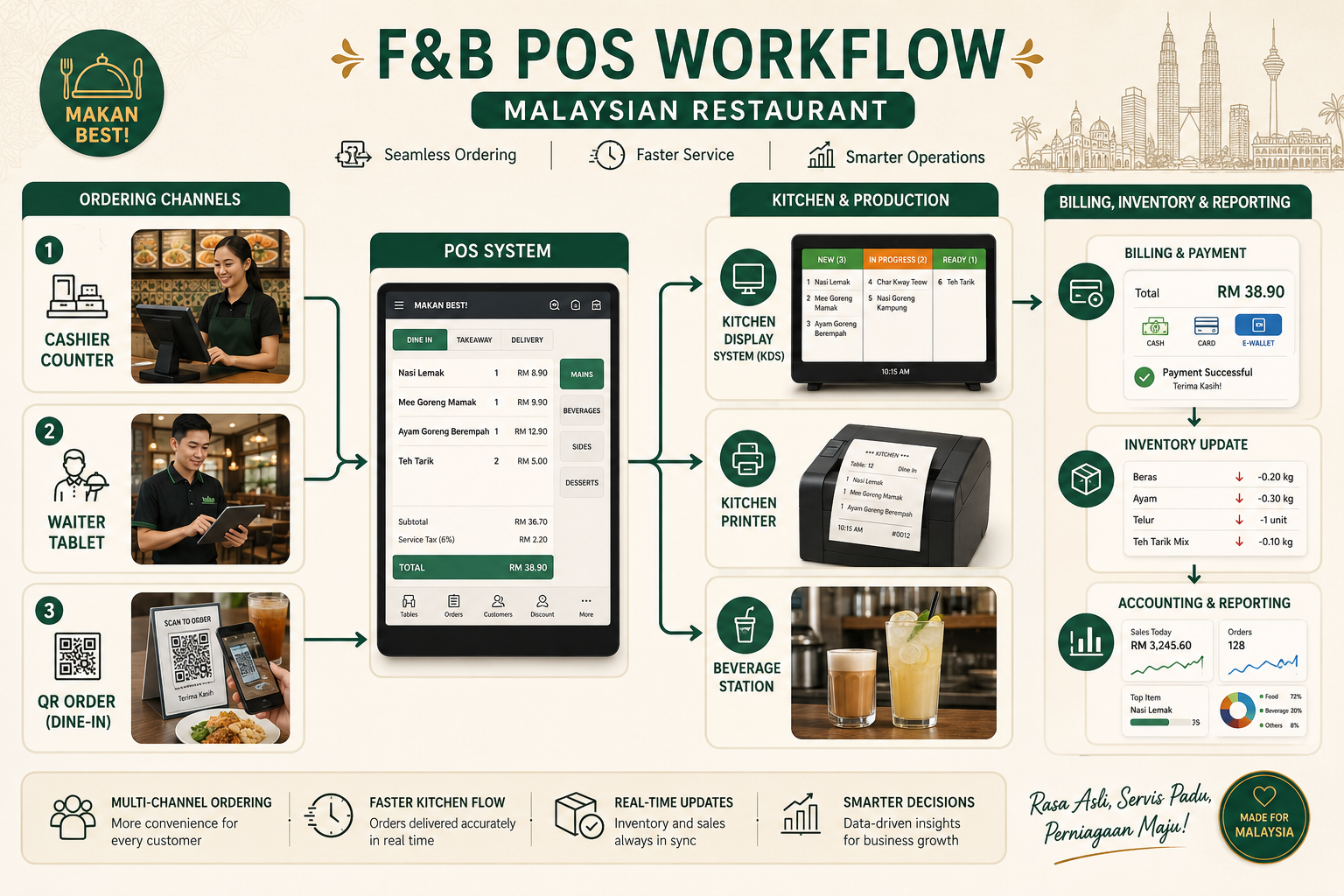
A takeaway or QR order also needs to move smoothly from customer to POS to kitchen and finally to collection or delivery.
That creates several requirements that a normal retail POS may not be designed to handle.
| Retail POS | F&B POS |
|---|---|
| Product checkout | Order and table workflow |
| Barcode-based sales | Menu-based ordering |
| Finished-product inventory | Ingredient and recipe-related inventory |
| Standard receipt | Split, merge and table billing |
| Counter-focused workflow | Counter, table, QR and kitchen workflow |
| Basic product variants | Food modifiers and add-ons |
| Stockroom communication | Kitchen printer or Kitchen Display System |
A proper F&B POS therefore becomes part of the operating system of the restaurant, not simply the place where payment is collected.
Key Features of a Good F&B POS System in Malaysia
The best POS for an F&B business is not necessarily the system with the longest feature list. It is the system that handles the workflows your staff repeat every day.
Table Management
For dine-in restaurants, staff need to know what is happening across the floor without constantly asking one another.
A good table management system should make it easy to see:
- Vacant and occupied tables
- Active orders
- Tables waiting for payment
- Reservations where applicable
- Takeaway orders
- Table transfers
- Combined tables for larger groups
- Split or combined bills
This becomes especially important during lunch and dinner peaks when several tables are ordering, paying and leaving at the same time.
AutoCount F&B POS includes floor-plan and table-management functions together with split and combined billing capabilities.
Kitchen Order Management
The kitchen does not need a complete customer receipt. It needs a clear instruction telling the preparation team exactly what to make.
A restaurant POS should be able to send orders directly to a Kitchen Order Ticket printer or Kitchen Display System so preparation can begin immediately after the order is confirmed.
For businesses with different preparation areas, orders should also be routed appropriately. For example:
- Food to The Kitchen
- Drinks to The Beverage Station
- Desserts to A Seperate Preperation Area
This removes unnecessary handwritten communication between front-of-house staff and the kitchen and reduces the risk of missed or incorrectly interpreted orders.
AutoCount F&B supports kitchen coordination, including kitchen display functionality and separate order-routing workflows.
QR Code Self-Ordering
QR self-ordering allows customers to scan a code using their own phone, view the menu and submit an order without waiting for a staff member to take it manually.
It can be particularly useful for:
- Cafés
- Kopitiams
- Casual dining restaurants
- Mamak restaurants
- Bubble tea shops
- High-volume food outlets
The main benefit is not simply replacing a waiter. It gives customers another ordering channel while allowing floor staff to spend more time delivering food, assisting customers and managing tables.
AutoCount F&B provides QR self-ordering where orders can flow from the customer’s device into the restaurant ordering workflow.
Order Modifiers and Variants
F&B orders are full of customisation.
Examples include:
- Less Sugar
- No Sugar
- No Ice
- Extra Ice
- Extra Spicy
- No Onion
- Add Cheese
- Add Egg
- Change Side Dish
A proper POS should allow these instructions to be selected during ordering instead of relying on staff to type or verbally communicate them.
Modifiers should also support additional pricing when required.
This helps the kitchen receive clearer instructions while reducing wrong orders and pricing mistakes.
Ingredient-Level Inventory Management
Inventory in F&B is different from normal retail inventory.
Selling one bowl of noodles may consume noodles, stock, meat, vegetables and several other ingredients. The business therefore needs visibility beyond the number of finished menu items sold.
Depending on the system configuration, ingredient or recipe-based tracking can help an F&B operator:
- Monitor ingredient consumption
- Understand the approximate food cost of menu items
- Identify unusual usage or wastage
- Monitor critical stock levels
- Improve purchasing decisions
- Reduce the risk of running out of important ingredients
- Compare sales with ingredient consumption
This is particularly valuable when ingredient prices change frequently and margins are tight.
AutoCount’s F&B and restaurant solutions include ingredient status, consumption and inventory-management capabilities, while some F&B configurations can also use recipe or BOM-based setups.
Malaysia e-Invoice Readiness
For businesses that fall within Malaysia’s mandatory e-Invoice scope, the POS should be capable of fitting into the business’s e-Invoice process without forcing staff to re-enter every sale manually.
For normal consumer transactions, an e-Invoice is not necessarily submitted separately for every receipt.
Under HASiL’s general process, where a buyer does not require an individual e-Invoice, the supplier may issue a normal receipt and subsequently include eligible transactions in a monthly consolidated e-Invoice.
AutoCount provides F&B POS and e-Invoice integration designed to connect the sales workflow with Malaysia’s MyInvois requirements.
Integration with Accounting
The POS should not become another isolated system that the accounts team needs to reconcile manually.
Connecting POS sales with accounting can reduce repeated entry for:
- Daily Sales
- Payment Methods
- Inventory Movements
- Sales reporting
- Financial records
AutoCount F&B can connect with AutoCount Accounting so POS and back-office financial information can be managed within the broader AutoCount ecosystem.
F&B Business Types and Their Specific Requirements
Different F&B businesses use the same basic POS technology in very different ways.
| Business Type | Important POS Requirements |
|---|---|
| Cafés and Restaurants | Table management, kitchen printing or KDS, QR ordering, modifiers, split bills and inventory control |
| Bakeries and Cake Shops | Walk-in sales, pre-orders, deposits, ingredient control, batch or expiry management and custom orders |
| Beverage and Bubble Tea Shops | Fast order entry, sugar and ice modifiers, add-ons, queue handling and high transaction volume |
| Catering Businesses | Advance orders, event-based billing, purchasing, ingredient costing and delivery coordination |
| F&B Chains and Multi-Outlet Businesses | Centralised menu and pricing control, outlet reporting, stock visibility, purchasing and consolidated management |
AutoCount provides industry-specific solutions for cafés and restaurants, bakery and cake shops, beverage and bubble tea shops, catering businesses and F&B chains.
These pages can be used when a reader wants to explore the requirements of a particular F&B business model in more detail.
AutoCount’s current industry pages describe capabilities including ingredient management, POS integration, accounting and multi-outlet operation.
Malaysia e-Invoice for F&B: What Actually Happens at the Counter?
e-Invoice is especially relevant to F&B because restaurants and cafés can process hundreds of small consumer transactions.
However, it is important to distinguish between a normal POS receipt and an individual e-Invoice.
- If a customer requires an individual e-Invoice, the business collects the required buyer information and issues the e-Invoice according to the applicable process.
- If the customer does not require an individual e-Invoice, the business can continue issuing a normal receipt. Eligible transactions can then be included in a consolidated e-Invoice.
- The consolidated e-Invoice is generally submitted monthly, within seven calendar days after the end of the relevant month.
HASiL’s latest Specific Guideline even uses a restaurant example: customers dine at “Restoran XYZ”, receive ordinary receipts, and the restaurant later aggregates the month’s receipts into a consolidated e-Invoice.
HASiL’s latest Specific Guideline also provides an interim relaxation period until 31 December 2027 for the applicable group of taxpayers with turnover or revenue up to RM5 million and implementation dates in 2026.
During this relaxation period, additional concessions for consolidated e-Invoices apply.
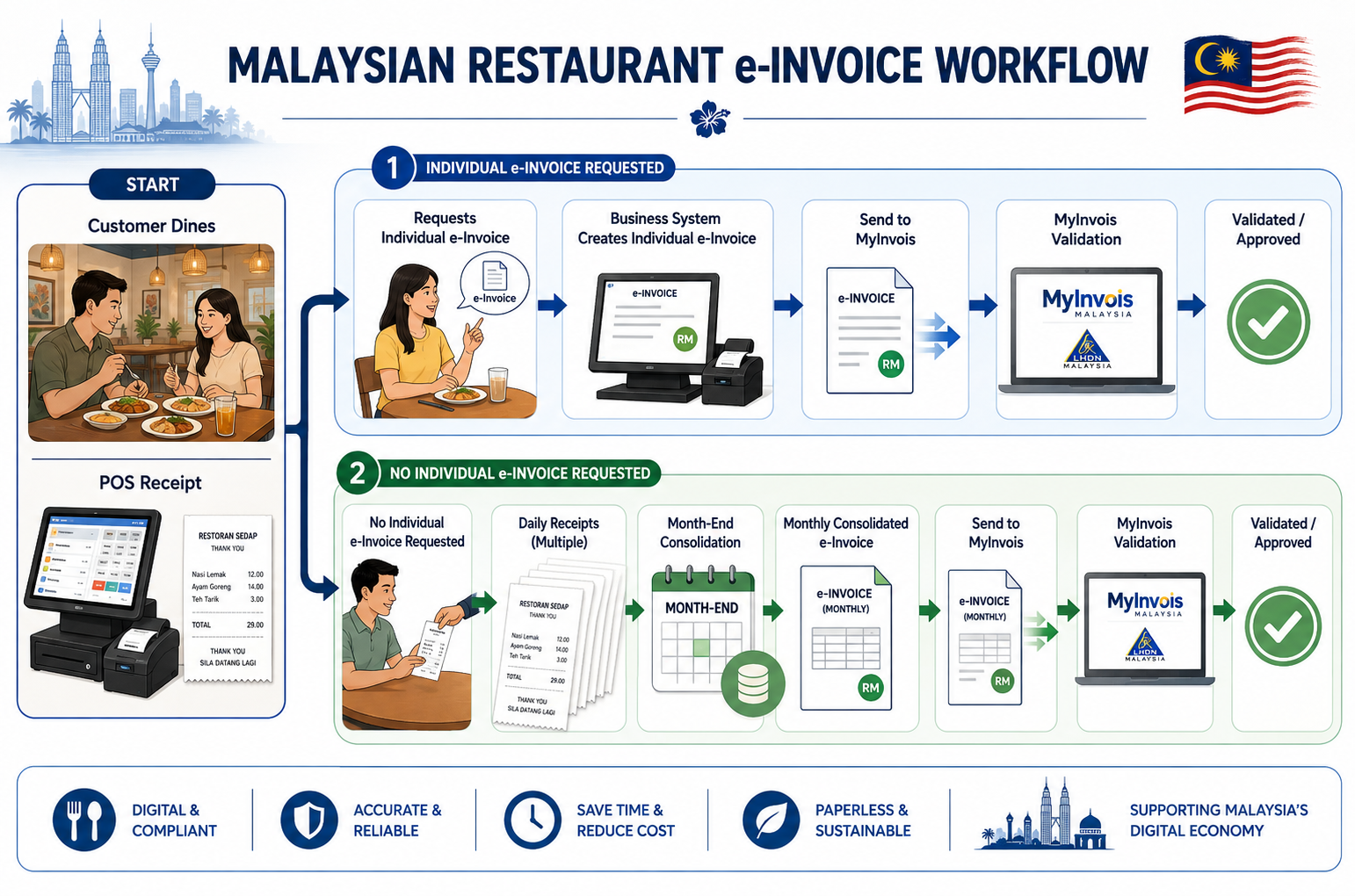
For F&B operators within the mandatory scope, system integration therefore matters because the POS can help retain the transaction information required for the later e-Invoice workflow instead of requiring staff to rebuild the information manually.
AutoCount’s F&B POS with e-Invoice is designed to connect restaurant sales with AutoCount’s e-Invoice workflow.
Businesses requiring implementation assistance can also refer to the AutoCount e-Invoice setup service.
Cloud vs On-Premise: What Matters for F&B?
Cloud versus on-premise is not simply an IT decision for a restaurant.
The more important question is:
What happens to your ordering and billing workflow if the internet connection goes down during the busiest part of service?
Consider these factors when comparing systems:
| Question | Why It Matters |
|---|---|
| Can staff continue taking orders without internet? | A connection problem should not stop restaurant service. |
| Can bills still be completed? | Customers still need to pay. |
| Can kitchen orders continue? | Preparation cannot stop while the connection is restored. |
| What happens to unsynchronised transactions? | Data needs to sync correctly once connectivity returns. |
| Can management access reports remotely? | Owners may need visibility when away from the outlet. |
| Who is responsible for backups and maintenance? | This affects long-term system management. |
There is no single deployment model that is automatically best for every F&B business.
A single café, a restaurant with unstable connectivity and a twenty-outlet chain may each have different requirements.
AutoCount F&B POS includes an offline mode intended to allow transaction processing to continue when the internet connection is unavailable, with data synchronisation when the connection returns.
For a broader comparison, read AutoCount Cloud vs On-Premise.
How to Choose an F&B POS System in Malaysia
Before choosing a system, test it against your actual restaurant workflow instead of comparing feature lists alone.
Ask these questions during a demonstration:
- Can staff manage dine-in, takeaway and QR orders from the same workflow?
- Can orders automatically reach the correct kitchen or beverage station?
- Can tables, transfers, split bills and combined bills be handled easily?
- Can modifiers such as less sugar, no ice or add-ons be configured properly?
- Can the system monitor ingredients or consumption rather than only finished menu items?
- What happens if the internet connection goes down?
- Can sales, inventory and accounting information be connected?
- Does the system support the e-Invoice workflow applicable to your business?
- Can the system grow to additional counters or outlets?
- Is local implementation, training and support available?
- Note
Do not judge an F&B POS only by how quickly it prints a receipt.
The real test is whether it connects the entire workflow:
Customer → Order → Kitchen → Bill → Inventory → Accounting → Reporting
A system that handles the cashier well but creates extra manual work everywhere else may not solve the real operational problem.
Getting Started with AutoCount F&B POS
If you are considering AutoCount F&B POS, the implementation should begin with your actual operating workflow rather than simply installing the software.
A typical setup may involve:
- Preparing the menu and item structure
- Configuring prices, packages and modifiers
- Setting up tables and floor plans
- Configuring kitchen printers or display workflows
- Setting up QR ordering where required
- Preparing ingredient and inventory records
- Configuring user access and staff permissions
- Connecting POS information with accounting
- Preparing the applicable e-Invoice workflow
- Training staff before going live
Existing businesses changing from another POS should also decide what historical and master data needs to be transferred before the new system goes live.
The AutoCount data migration service can be considered when moving existing business data into a new setup.
Choose an F&B System Around Your Operations
The right F&B POS system should do more than make the cashier faster.
It should help orders move accurately from customers to the kitchen, give staff better control over tables and bills, provide clearer visibility over ingredients and stock, and reduce repeated work between sales and accounting.
For Malaysian businesses that fall within the e-Invoice requirements, the POS should also fit naturally into the required compliance workflow.
Most importantly, choose the system around how your restaurant actually operates.
A small takeaway shop, a café, a full-service restaurant and a twenty-outlet F&B chain do not need exactly the same setup.
If you are evaluating AutoCount, request a demonstration using your own workflow and menu scenarios rather than viewing only a generic software presentation. That makes it much easier to determine whether the system genuinely fits your business.
Frequently Asked Questions
What is an F&B POS system?
An F&B POS system is a point-of-sale system designed specifically for restaurants, cafés and other food businesses. In addition to processing payments, it can manage restaurant-specific workflows such as tables, kitchen orders, menu modifiers, QR ordering, split bills and ingredient-related inventory.
What Features Should a Restaurant POS System Have?
A restaurant POS should ideally support table management, kitchen order routing, modifiers, split and combined bills, QR or table-side ordering, inventory management, reporting and accounting integration.
The exact features needed depend on whether the business is a café, takeaway outlet, full-service restaurant or multi-outlet chain.
Can an F&B POS Track Ingredients?
A suitable F&B inventory setup can track ingredient usage or consumption associated with menu items.
This gives the business better visibility over food cost, stock levels, purchasing and wastage. AutoCount’s F&B solutions include ingredient-related inventory and consumption capabilities.
Does Every Restaurant Receipt Need To Be Submitted Individually to LHDN As An e-Invoice?
No. Where a buyer does not require an individual e-Invoice, HASiL’s general process allows the supplier to continue issuing a normal receipt and include eligible transactions in a consolidated monthly e-Invoice.
The consolidated e-Invoice is generally submitted within seven calendar days after month-end.
Separate interim-relaxation rules also currently apply to certain taxpayers.
Is Cloud or On-Premise POS Better For A Restaurant?
Neither model is automatically better for every restaurant. The key considerations are internet reliability, offline operation, remote access, backups, maintenance and multi-outlet requirements.
F&B operators should specifically test whether ordering, billing and kitchen operations can continue during an internet interruption.
Need Help Choosing the Right F&B POS System?
Not sure which POS setup suits your restaurant, café or F&B business? Contact SL Software Solutions and we’ll help you review your ordering, kitchen, inventory and e-Invoice requirements to recommend the right AutoCount F&B POS setup.