Unclear outstanding baskets
Baskets leave with a delivery, but the return is recorded elsewhere. Account-level balances provide a clearer reference when checking what remains outstanding.

Track reusable baskets, manage customer and supplier balances, and record carton and weight details in AutoCount. Keep your daily basket movements organised from delivery to return.
Ask our team about plugin suitability and version compatibility before purchase.
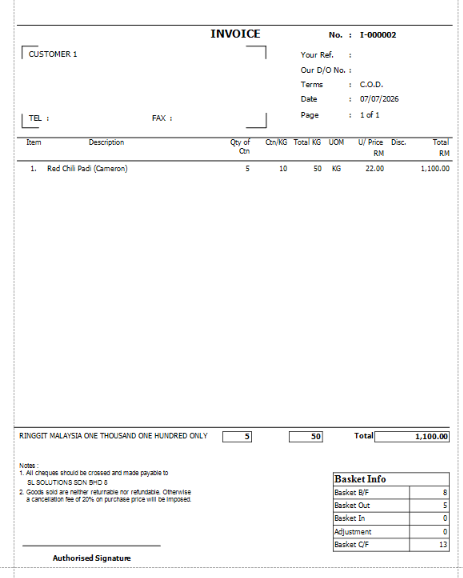
Illustrative basket workflow with no adjustment: 11 + 5 − 8 = 8 baskets outstanding.
Reusable baskets travel between your warehouse, customers and suppliers every day. When returns happen separately from deliveries, handwritten notes and separate spreadsheets can make outstanding quantities difficult to reconcile.
The AutoCount Vege Basket Plugin adds basket information to supported sales and purchase documents. Maintain an agreed starting balance, record basket movements and check the latest outstanding quantity against the relevant customer or supplier account.
These are common workflow problems the plugin can help fresh-produce businesses address.
Baskets leave with a delivery, but the return is recorded elsewhere. Account-level balances provide a clearer reference when checking what remains outstanding.
Re-entering carton quantities and weights takes time. Basket fields and optional quantity calculation support a more consistent document-entry process.
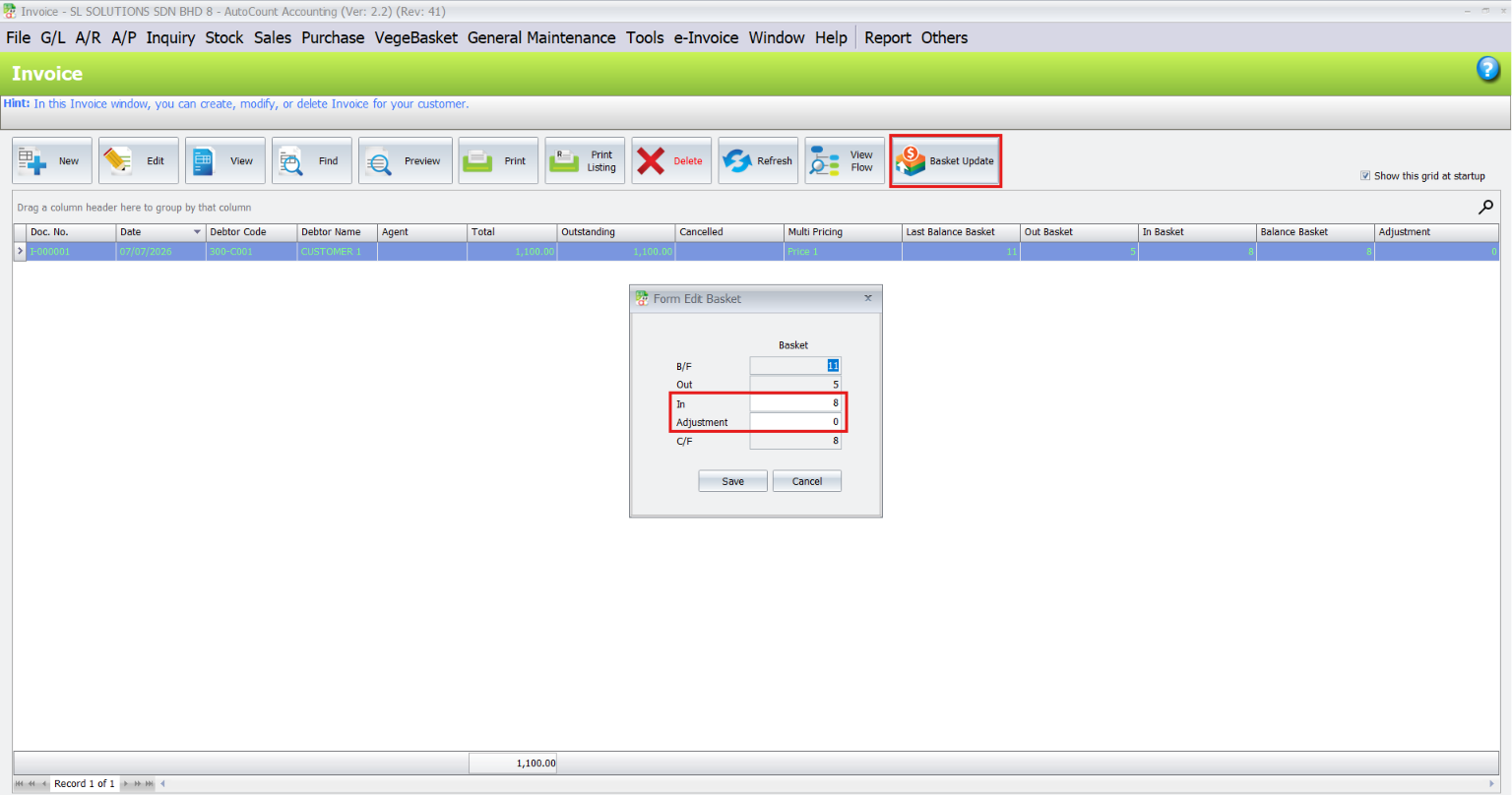
Baskets may come back after a document is saved. Basket Update lets staff record the returned quantity against the relevant saved document.
Explore the capabilities that help your team manage reusable baskets throughout daily produce trading.
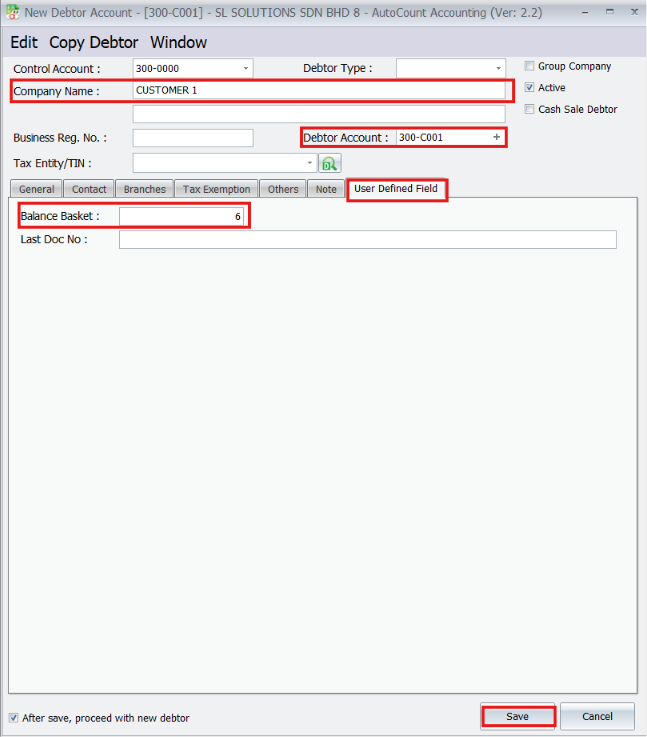
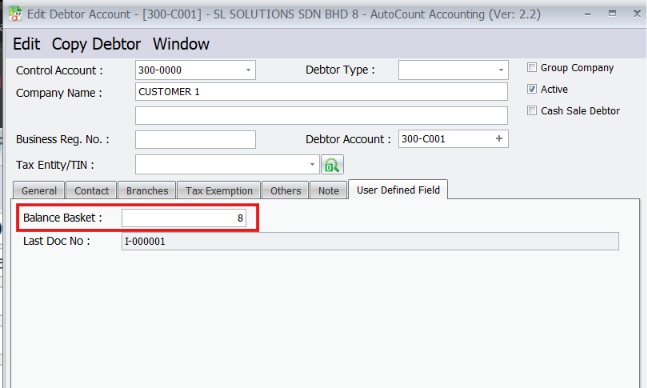
Set opening basket quantities for debtor and creditor accounts, then review the latest Balance Basket and Last Doc No after saving transactions. Keep basket records linked to the businesses you trade with.
Enter basket information in supported AutoCount sales and purchase screens. Basket Info provides a reference to the account’s basket balance while staff record the transaction.
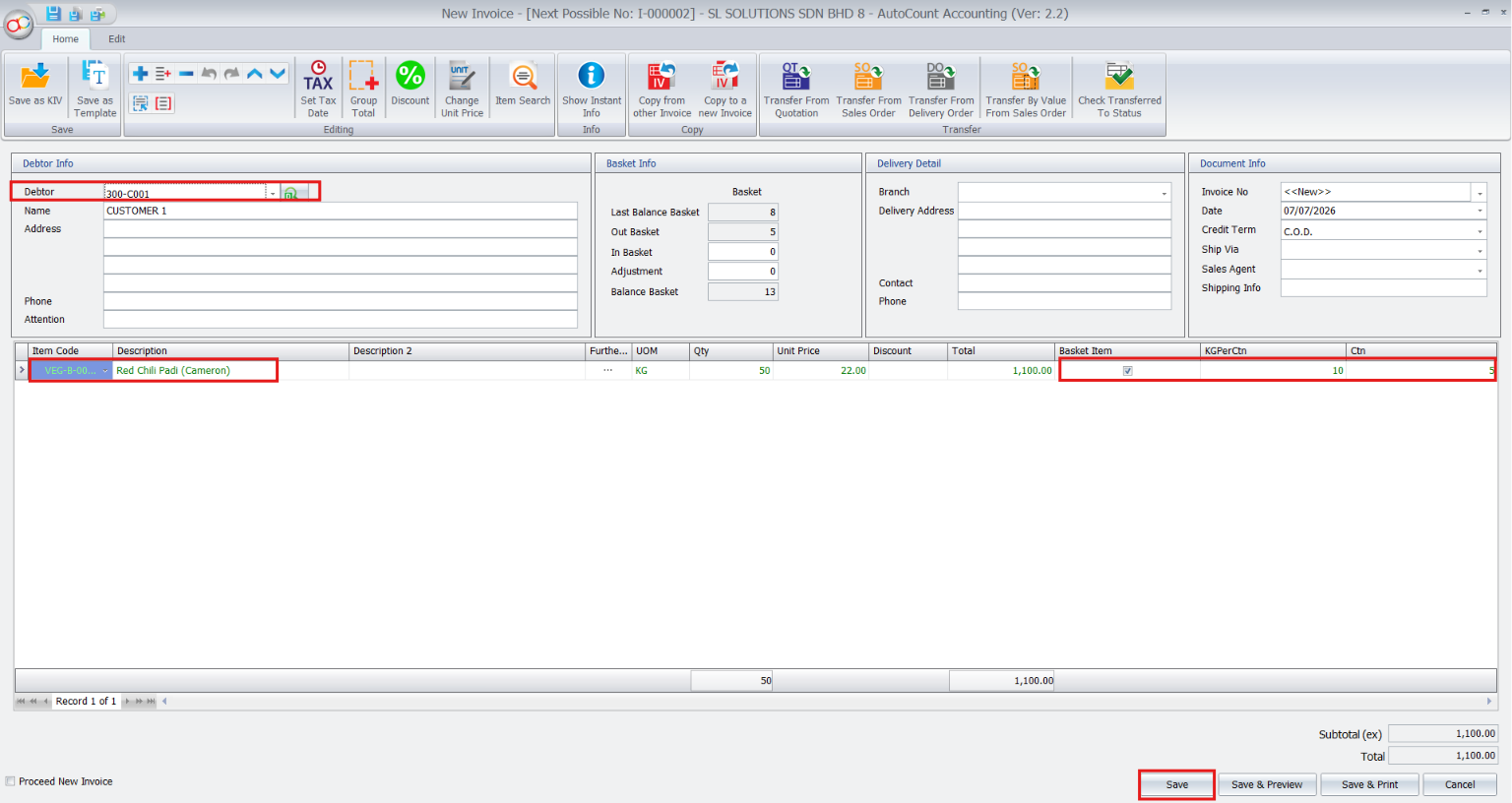
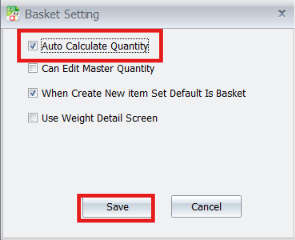
Record Basket Item, KGPerCtn and Ctn on applicable item lines. Enable Auto Calculate Quantity when it suits your process, and use the optional Weight Detail Screen for detailed weight entry.
Use Basket Update to review brought-forward quantity, baskets out, baskets in, adjustments and the carry-forward balance. Record later returns against the relevant document and check the resulting balance.
Review Balance Basket and Last Doc No in the customer or supplier record after saving. Staff can compare the latest quantity with the related document before following up on outstanding baskets.
Use Invoice With Basket or Invoice With Basket Format 2 to present item quantities, carton and weight details, basket movements, adjustments and Balance C/F together.
Tell us how your team handles deliveries, carton weights and basket returns.
An illustrative journey for a fresh-produce business. This example uses no adjustment: 11 + 5 − 8 = 8 baskets outstanding.
Start from the agreed outstanding basket quantity recorded for the customer.
Save the supported transaction with the basket, carton and item details.
Update the relevant document when the customer returns the baskets.
Review the carry-forward balance of 8 baskets and the appropriate basket print format.
Keep basket balances and carton information alongside high-volume daily trading documents.
Record baskets sent to customers and returned later without relying on separate return notes alone.
Maintain balances for both debtors and creditors when baskets move through purchasing and sales.
It records reusable basket movements and account balances, with carton and weight fields in supported sales and purchase documents.
Yes. The documented workflow includes opening Balance Basket quantities in both debtor and creditor records, plus review of the latest balance and related document number.
Yes. Basket Update supports entering returned quantities against a relevant saved document and reviewing its carry-forward basket balance.
The Auto Calculate Quantity option supports automatic quantity calculation from relevant basket or carton entries. Staff should review Basket Item, KGPerCtn and Ctn as part of document entry.
Yes. The documented formats are Invoice With Basket and Invoice With Basket Format 2. They include basket movement and balance information alongside item and weight details.
Basket tracking is documented across multiple sales and purchase documents. Contact SL Software with your installed AutoCount version and required screens so the team can confirm compatibility and configuration.
Contact SL Software for a current quotation based on your licensing, account book and implementation requirements.
Already using this plugin? Read the AutoCount Vege Basket Plugin User Guide for operating instructions.
Explore the accounting system, browse the AutoCount add-on catalogue or consult the technical user guide.
Discuss how baskets move between your warehouse, customers and suppliers with SL Software Solutions, and find out whether the AutoCount Vege Basket Plugin meets your requirements.
Product functions and compatibility should be checked against your deployed AutoCount version.