
-
AutoCount Accounting Features
-
- Approval Workflow
- Audit Trail
- Auto Save in Draft Folder
- AutoCount Contra Account
- AutoCount License Setting Guide
- Deposit Tracking & Management
- Documents Numbering Format
- Full Transfer and Partial Transfer
- Import Data to AutoCount Accounting Using Excel
- Informative Charts and Analytical Data
- Layout Customization
- Multi Pricing
- Sales and Services Tax
- Schedule Backup
- Search Lookup Edit
- View Documents Flow
- AutoCount Feature Stock Take
- Column Chooser
- Show Remaining (3) Collapse
-
AutoCount Cloud Accounting
-
AutoCount E-Invoice
-
AutoCount HRMS User Guide
-
AutoCount Modules
-
- Activity Stream
- Advanced Financial Report
- Advanced Item
- Advanced Multi-UOM
- Advanced Quotation Module
- Basic Multi-UOM
- Budget Module
- Consignment
- Filter By Salesman
- FOC Quantity
- Formula
- Item Batch
- Item Package
- Landing Cost
- Multi-Currency
- Multi-Dimensional Analysis
- Multi-Location
- Project Account
- Recurrence
- Remote Credit Control Module
- Stock Assembly
- User Defined Fields (UDF)
- AutoCount SST Hidden Functions
- AutoCount SST Submission - Service Tax
- AutoCount Scripting Module User Guide
- AutoCount Bonus Point Module User Guide
- AutoCount Service Management Plugin User Guide
- Show Remaining (12) Collapse
-
AutoCount Plugins
-
- Fixed Assets Management
- Goldsmith
- TD Ordering Mobile Apps
- TD Stock Mobile Apps
- Universal Import Plugin
- DMS Import Plugin
- AutoCount Pick List Plugin User Guide
- AutoCount Credit Memo Plugin User Guide
- AutoCount Lock Price Plugin
- AutoCount Progressive Billing
- AutoCount Easy Recurrence Plugin
- Batch Update Unit Price Plugin
- AutoCount Production order
- AutoCount Car Tint Film Plugin
-
- Event Management System
- AutoCount To-Do List Plugin
- AutoCount AutoBank Reconciliation Plugin
- Intercompany Billing Plugin User Guide
- Lead Management 2.0 Plugin
- AutoCount Service Contract Plugin User Guide
- AutoCount Optical Plugin
- AutoCount Integrator Plugin
- AutoCount Procurement Planning Plugin
- Cage Management Plugin
- AutoCount Vehicle Plugin
- AutoCount Agent Validation Plugin User Guide
- AutoCount Barcode Generator Plugin User Guide
- AutoCount Easy Batch Number Entry Plugin User Guide
- Warranty 2.0 Plugin
- AutoCount Easy Photo 2.0 User Guide
- AutoCount Recurring Invoice Plugin User Guide
- AutoCount Scale Barcode Plugin User Guide
- AutoCount Recurrence Late Interest Plugin
- AutoCount Item Visibility Control
- AutoCount Bill Remark Plugin User Guide
- AutoCount Pain Tracker User Guide
- AutoCount Easy Payment
- AutoCount Easy Deposit Plugin
- AutoCount Easy Knock Off Plugin
- AutoCount Daily Collection Summary Plugin
- Timber Log Plugins
- Batch Transfer SODO Plugin
- AutoCount Vege Basket Plugin Guide
- AutoCount Fruit Basket Plugin Guide
- Referral Management Plugin
- AutoCount Migrator Plugin
- AutoCount Email & WhatsApp Plugin
- AutoCount Multi Company Knock Off Plugin
- AutoCount Advance Aging Format Plugin
- AutoCount Payment Request Plugin
- AutoCount Vehicle Master Plugin
- AutoCount Advance Deposit Plugin
- AutoCount IC Checker Plugin
- AutoCount RMA Plugin
- AutoCount Historical Outstanding DO Listing Plugin
- AutoCount Project Department Visibility Control Plugin
- AutoCount MRP Order Plugin
- AutoCount GridToExcel Plugin
- AutoCount Stock Availability Report Plugin
- AutoCount Batch Transfer SO DO Plugin
- AutoCount Centralized Kitchen Management Plugin
- SL AutoCount API
- AutoCount InterCompany Billing Plugin
- AutoCount Sales Commission Plugin
- AutoCount Advanced Credit Term Plugin
- AutoCount Advanced Stock Assembly Plugin
- AutoCount Shipment Plugin
- AutoCount Tour Plugin
- AutoCount Smart Analysis
- AutoCount Rental Management
- Show Remaining (41) Collapse
-
-
Form Template
-
Report Template
-
- Advance Quotation
- Cash Sale
- Consignment
- Consignment Movement
- Credit Note
- Debit Note
- Delivery Order
- FOC Quantity Analysis By Document Report
- Invoice
- Item Package Sales Report
- Monthly Sales Analysis
- Outstanding Sales Order Listing
- Profit And Loss Of Documents
- Quotation
- Sales Agent Contribution Report
- Sales Order
- Top/Bottom Sales Ranking
- Show Remaining (2) Collapse
-
- Available Stock Status Report
- Expired Item Batch Listing
- Inventory Physical Worksheet
- Stock Adjustment
- Stock Aging Report
- Stock Assembly
- Stock Assembly Order
- Stock Balance By Location
- Stock Balance Report
- Stock Card Report
- Stock Disassembly
- Stock Issue
- Stock Item Profit Margin
- Stock Movement Report
- Stock Receive
- Stock Take
- Stock Transfer
- Stock Write Off
- Show Remaining (3) Collapse
-
B2B ORDERING
-
AutoCount AI Agent
AutoCount Vege Basket Plugin for Basket and Weight Tracking
What Is the Vege Basket Plugin?
The Vege Basket Plugin is designed for vegetable wholesalers who need to track basket movement together with carton and weight calculation. The main purpose of this plugin is to manage one main basket balance while supporting quantity calculation using Ctn, KG Per Ctn, basket weight, gross weight, and net weight. It helps users record basket out, basket in, adjustment, and balance basket directly inside supported AutoCount documents.
Why Use the Vege Basket Plugin?
AutoCount Vege Basket Plugin Video Guide
- Vegetable Basket Plugin (CN)
蔬菜篮插件设置
自动进行篮子追踪和余额计算
Key Features & Capabilities
Single Basket Balance Tracking
Maintain one main Balance Basket for each debtor or creditor.
Basket Item Control
Mark items as basket items so the system knows which items should be included in basket calculation.
Auto Quantity Calculation
Calculate quantity using Ctn and KGPerCtn.
Weight Detail Screen
Use the weight detail screen to record weight, quantity, basket weight, gross weight, total basket weight, and net weight.
Default Basket Weight
Maintain a default basket weight in Basket Setting for easier net weight calculation.
Document Basket Tracking
Record basket movement in supported documents such as Delivery Order, Invoice, Cash Sales, Credit Note, Goods Received Note, Purchase Invoice, Cash Purchase, and Purchase Return.
Basket Update
Update returned baskets or adjustments values after a document has been saved.
Basket Report
Preview or print basket reports showing basket quantity, weight details, and final basket balance.
How AutoCount Vege Basket Plugin Works
1. Basket Settings
- Go to VegeBasket > Basket Setting.
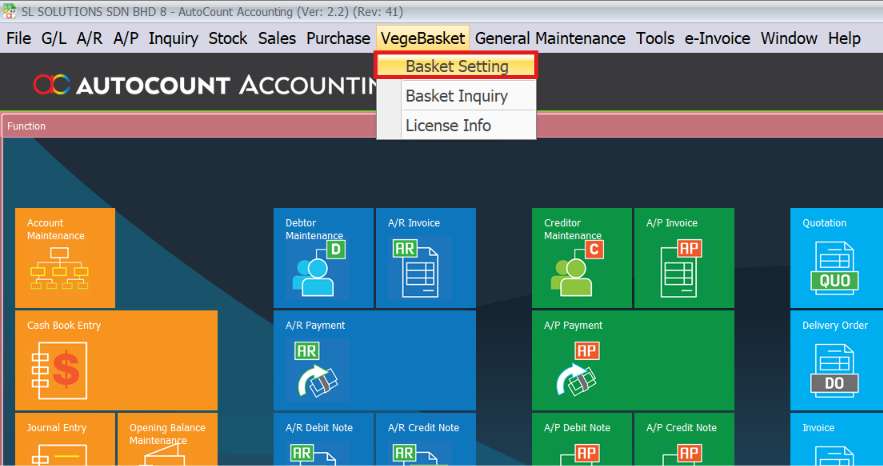
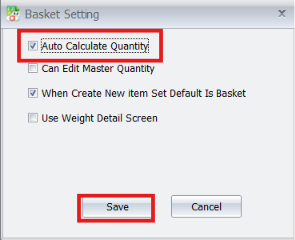
- Tick Auto Calculate Quantity if you want the system to calculate quantity automatically based on basket or carton information.
- Tick When Create New Item Set Default Is Basket if new items should be treated as basket items by default.
- Tick Use Weight Detail Screen if the company records detailed weight information.
- Click Save.
2. Maintain Debtor Basket Balance
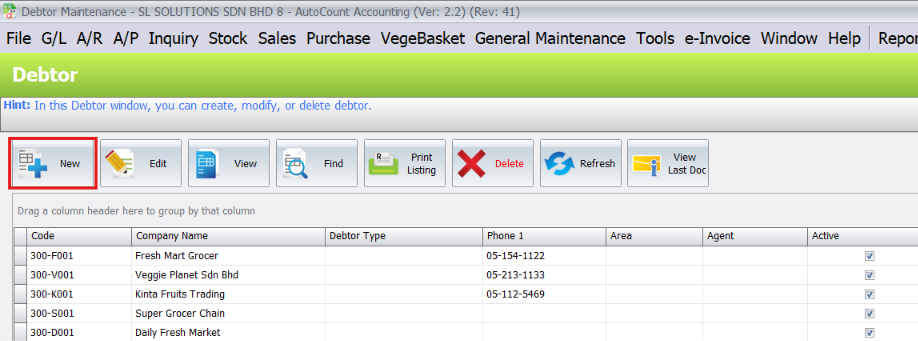
- Go to A/R > Debtor Maintenance.
- Click New or Edit.
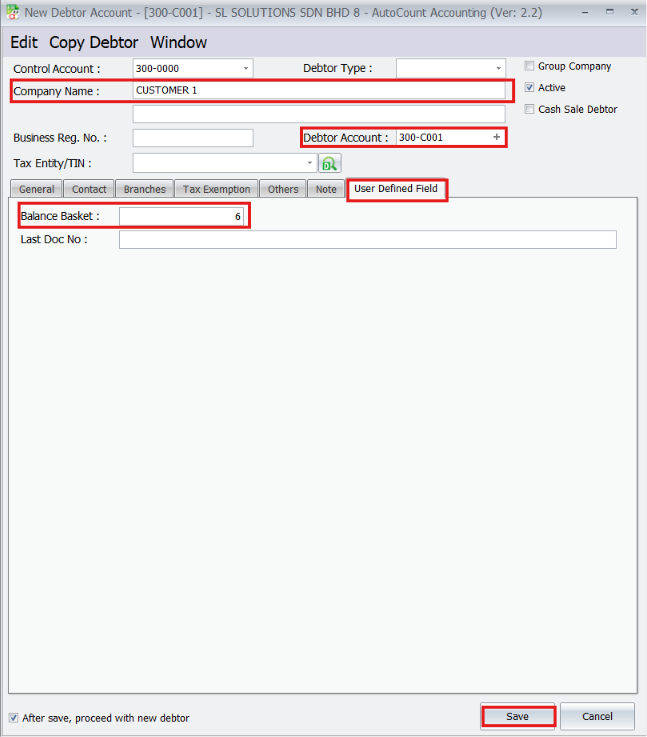
- Enter the customer information such as Company Name and Debtor Account.
- Open the User Defined Field tab.
- Enter the starting basket quantity in Balance Basket.
- Click Save.
Example:
3. Maintain Creditor Basket Balance
- Go to A/P > Creditor Maintenance.
- Click New or Edit.
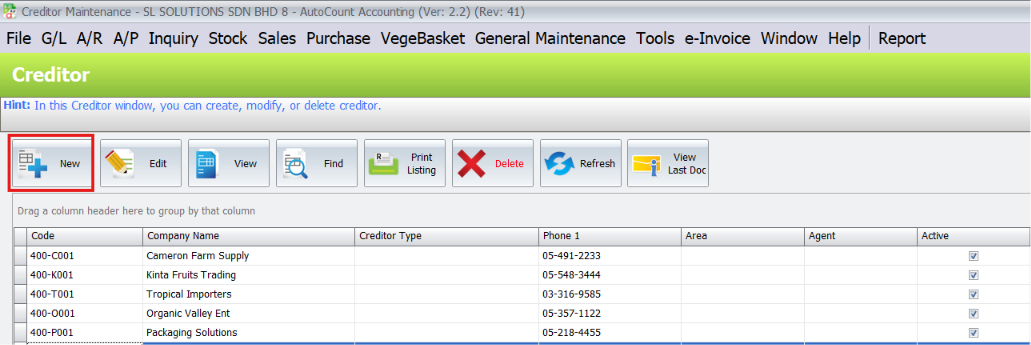
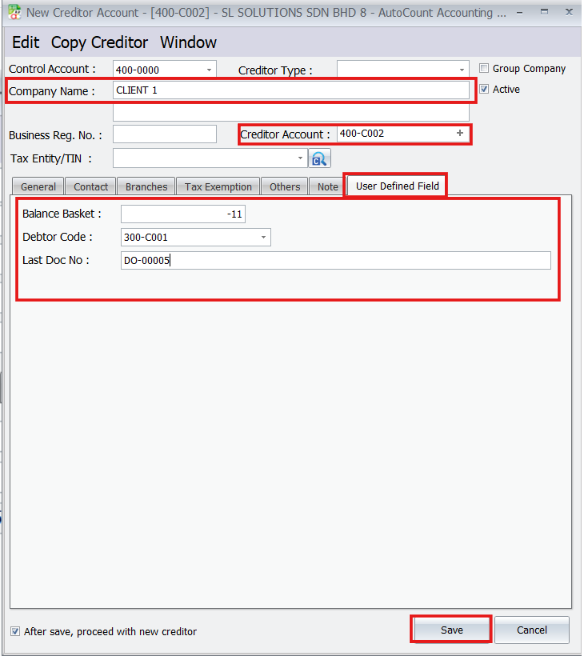
- Enter the supplier information such as Company Name and Creditor Account.
- Open the User Defined Field tab.
- Enter the Balance Basket.
- Select the related Debtor Code if this creditor is linked to a debtor account.
- Enter Last Doc No if needed for reference.
- Click Save.
4. Create Document with Basket Item
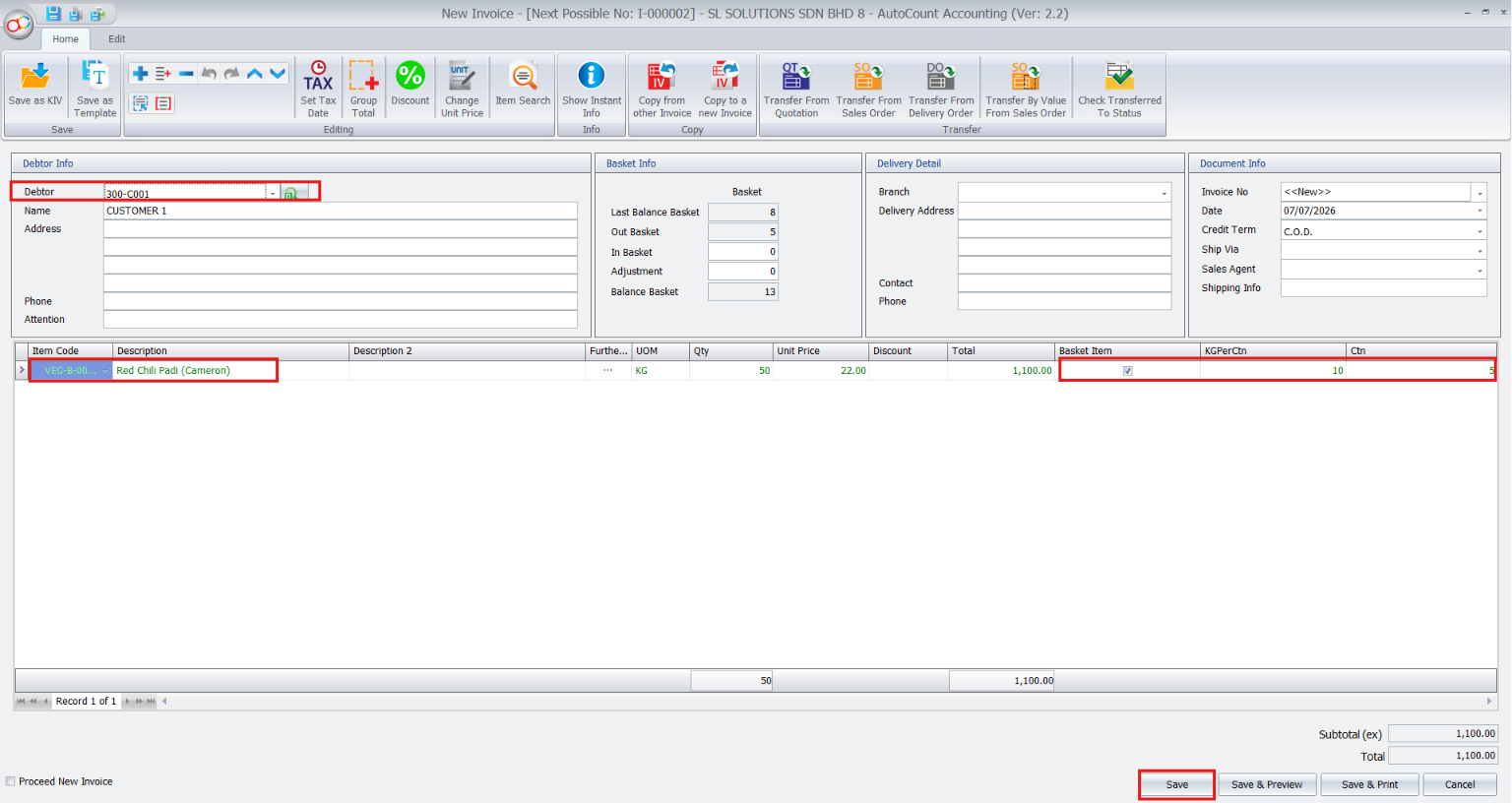
- Enter the item in the document.
- Confirm that the Basket Item option is enabled.
- Enter the KGPerCtn and Ctn values.
- The system will calculate the quantity automatically.
- After that, click Save.
Important:
5. Check Updated Basket Balance
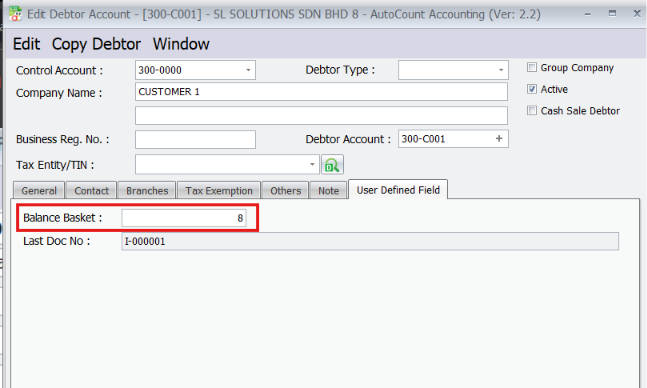
- Next, open the related debtor or creditor account.
- Go to the User Defined Field tab.
- Check Balance Basket and Last Doc No.
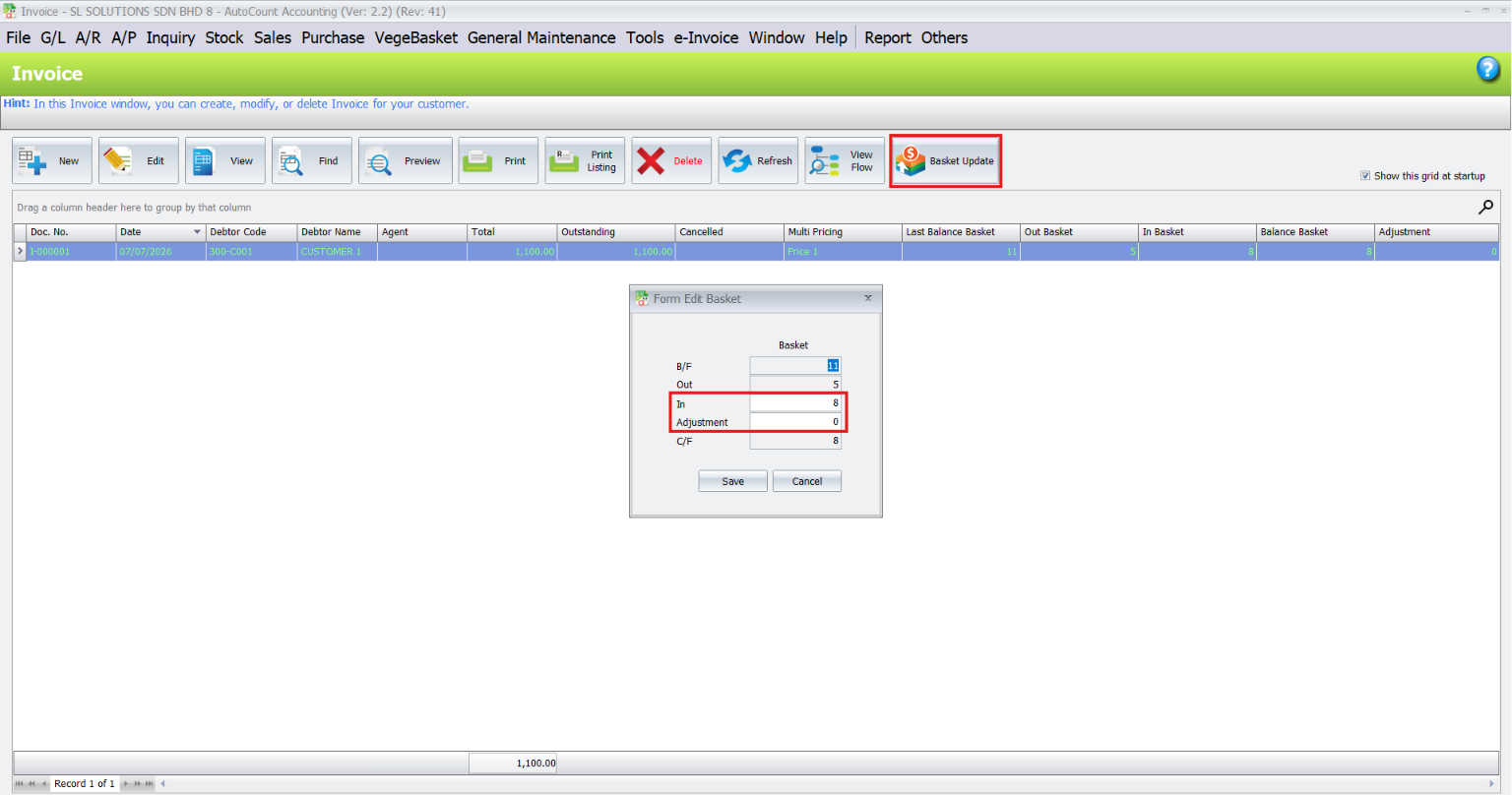
6. Update Basket Return or Adjustment
- Open the supported document list.
- Select the document.
- Click Basket Update.
- The Form Edit Basket screen will show B/F, Out, In, Adjustment, and C/F.
- Enter the returned basket quantity in In.
- Enter Adjustment if a correction is needed.
- Click Save.
7. Preview Basket Report
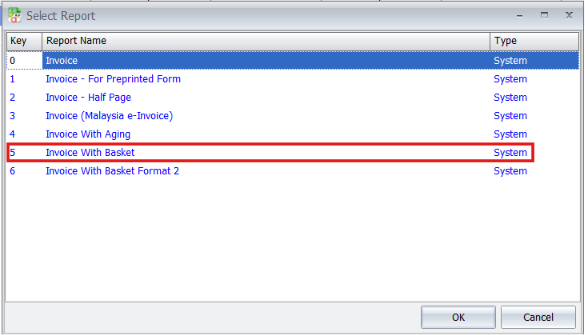
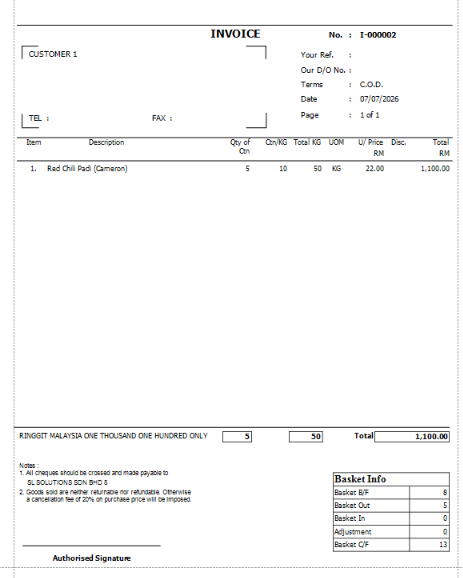
- Finally, open the document and click Preview or Print.
- For invoice printing, select Invoice With Basket or Invoice With Basket Format 2.
- Click OK.
Who Is This Plugin For?
rading and Distribution Businesses
Useful for companies that need to monitor basket movement across many daily sales and purchase documents.
Sales And Operation Teams
Helpful for users who prepare documents and need to record basket out, basket in, and adjustments during daily operations.
Accounts Teams
Useful for checking customer and supplier basket balances together with AutoCount document records.
Vegetable Wholesalers
Suitable for businesses that deliver fresh goods using reusable baskets or cartons.
Core Benefits of the Vege Basket Plugin
Better Basket And Weight Control
Track basket movement while also calculating item quantity from carton and weight information.
Reduce Manual Calculation
Use Auto Calculate Quantity and Weight Detail Screen to reduce manual quantity calculation.
Faster Document Entry
Enter Ctn, KGPerCtn, or weight detail and let the system update quantity.
More Accurate Net Weight
Deduct basket weight from gross weight to get clearer net weight records.
Clearer Reporting
Print basket reports that show basket movement and weight-related information
Easier Basket Return Update
Use Basket Update to record returned baskets or adjustment after saving documents.
Conclusion
Ready to Improve Your Basket Tracking?
Stop letting manual weighing and pricing slow you down and introduce errors. The AutoCount Vege Basket Plugin provides the automation, accuracy, and seamless integration you need to manage your weighed goods professionally and efficiently.