Scattered picking information
Reviewing separate Sales Orders makes it harder to see which outstanding lines should be prepared for the next shipment.

Organise outstanding Sales Orders, prepare Pick Orders and transfer them into Delivery Orders or Invoices. The AutoCount Shipment Plugin helps Malaysian SMEs coordinate order picking, delivery details and document preparation within AutoCount.
Ask our team about plugin suitability and version compatibility before purchase.
Illustrative quantities and workflow; actual processing depends on the configured document destination.
The AutoCount Shipment Plugin is an add-on that connects outstanding sales orders with picking and shipment document preparation. Your team can select Sales Order lines, review the quantities to pick and save a Pick Order before transferring it to the configured document type.
It also provides driver and lorry maintenance, user access rights and Pick Order reporting. This creates a clearer working reference for sales, warehouse and administrative staff as orders move towards delivery.
Support the handover between sales, warehouse staff and the team preparing delivery documents.
Reviewing separate Sales Orders makes it harder to see which outstanding lines should be prepared for the next shipment.
Teams need a clear reference for outstanding balances and the quantities selected for each Pick Order.
Preparing documents and maintaining driver or lorry details across separate files can create unnecessary manual work.
Explore the features that connect sales orders, picking preparation and delivery administration.
Filter Sales Orders by document number, date, area, location or sales agent, then choose the outstanding lines needed for picking. Staff can focus on relevant orders rather than searching through unrelated records.
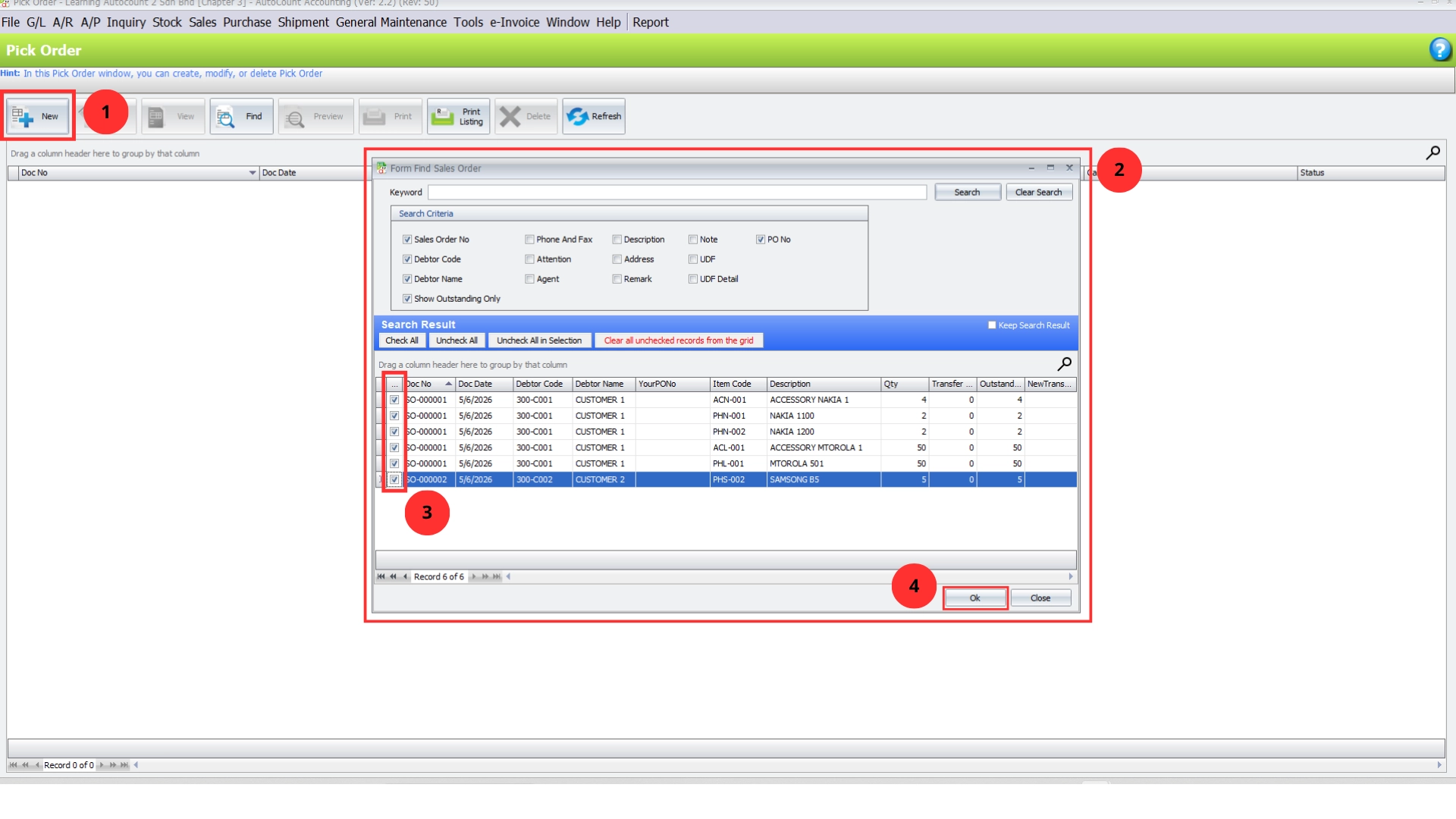
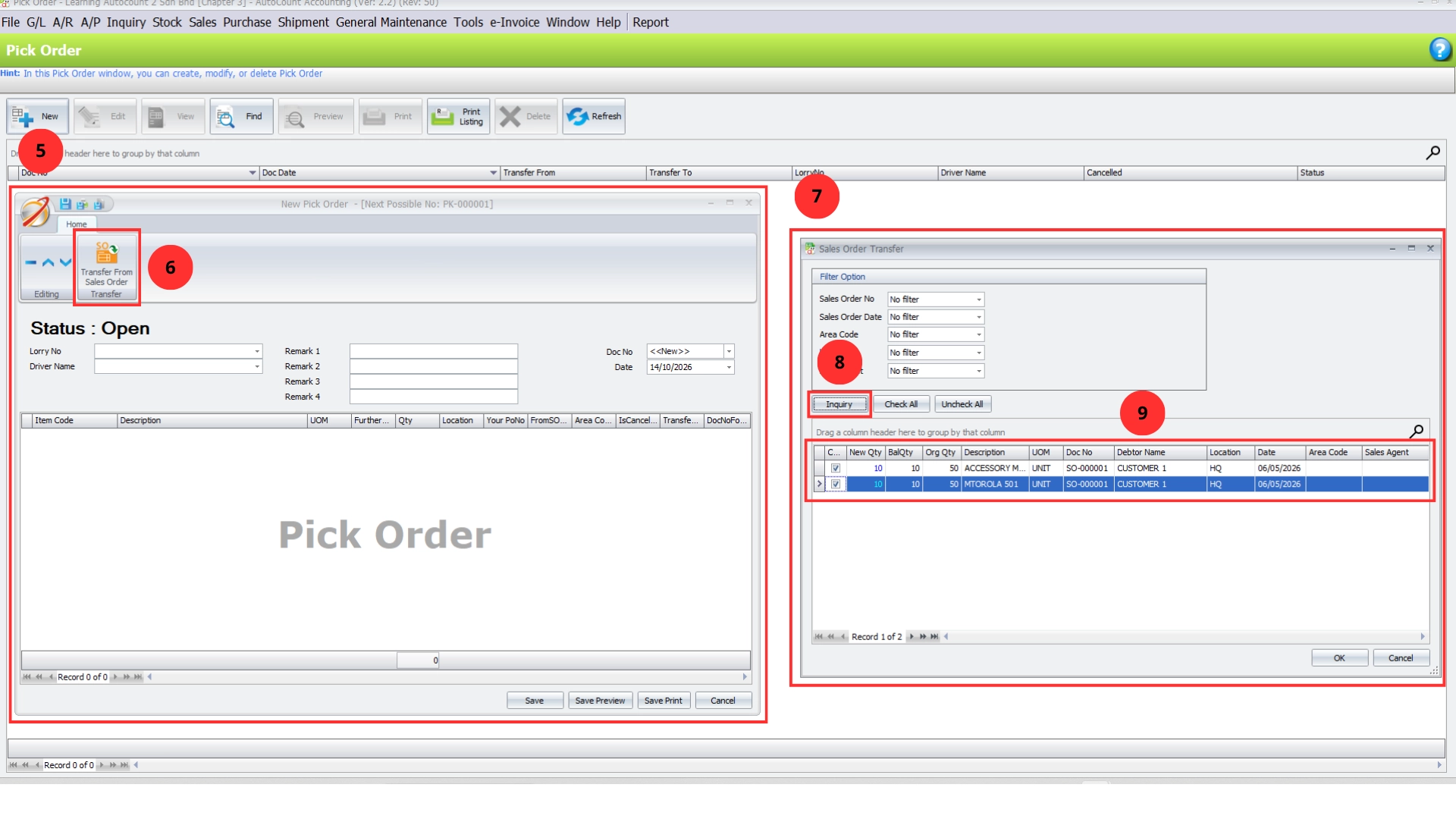
Compare the original quantity, outstanding balance (BalQty) and proposed New Qty before saving. Select the quantity required for the current Pick Order, including a smaller quantity where appropriate.
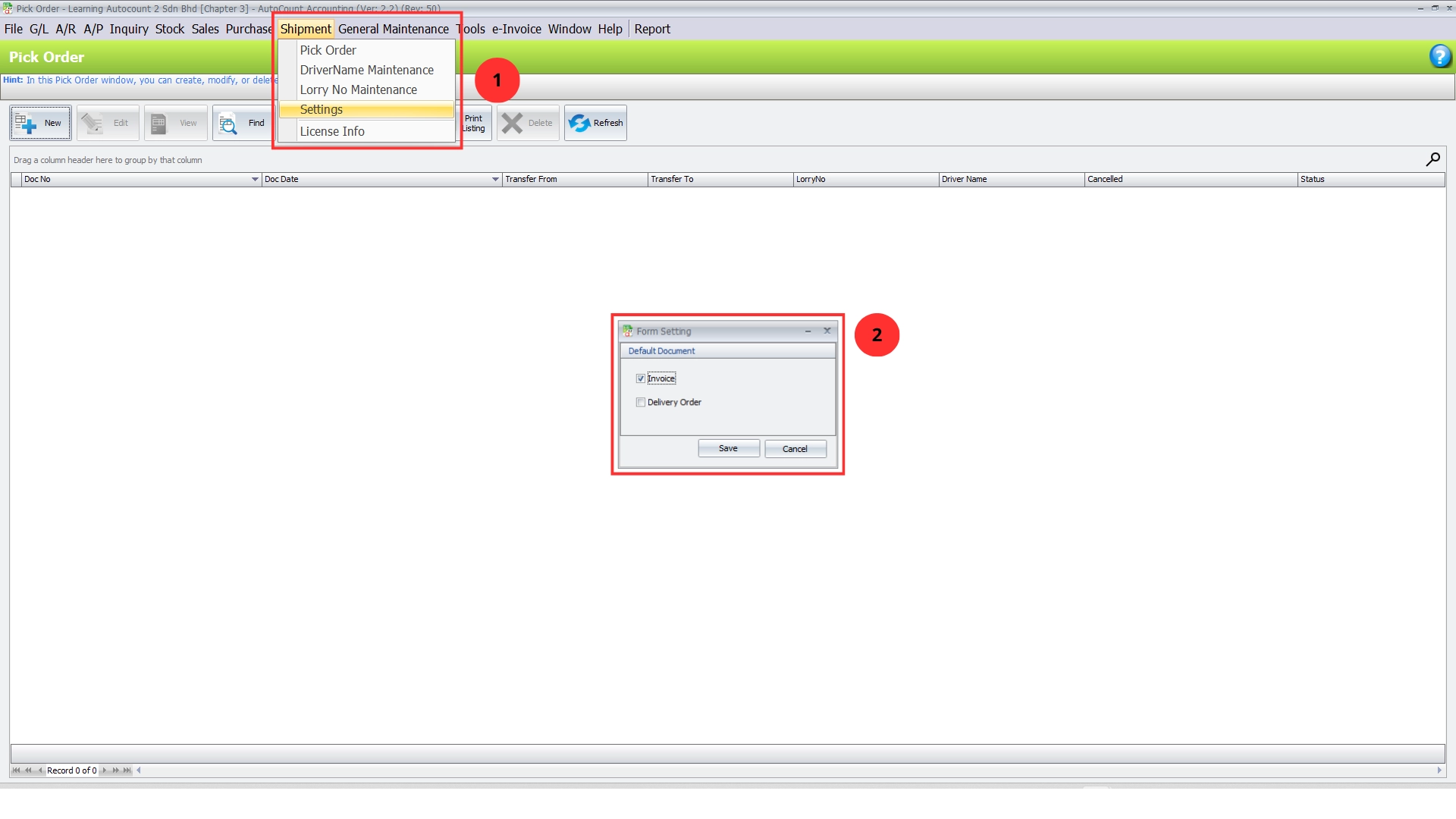
Choose Post To Delivery Order or Post To Invoice in Shipment Settings. Transfer a saved Pick Order into the selected document type and review the resulting details, including the originating Pick Order reference.
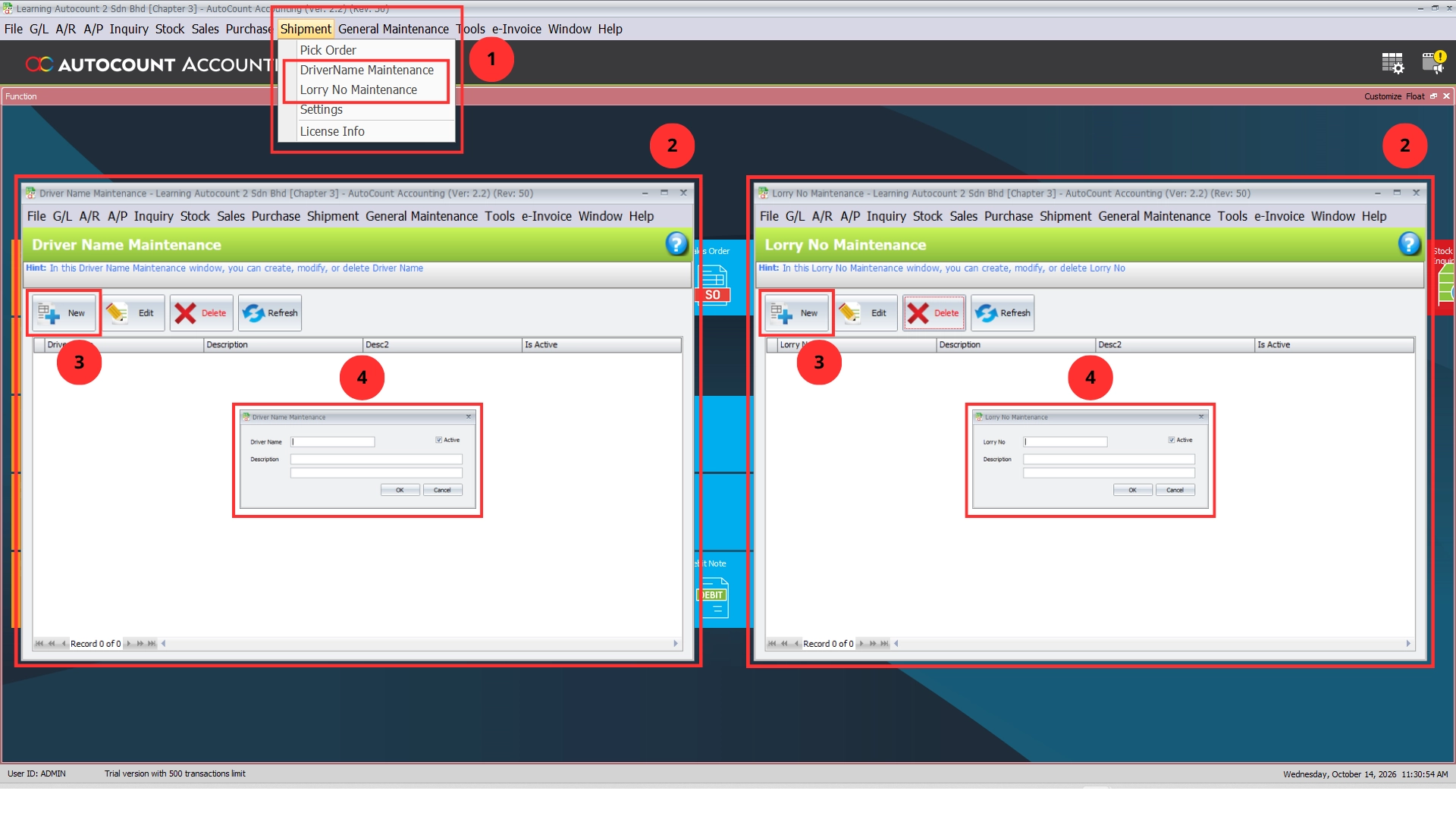
Keep driver names, lorry numbers and descriptions in the plugin’s maintenance records. Active entries can be selected on Delivery Orders when those details are required.
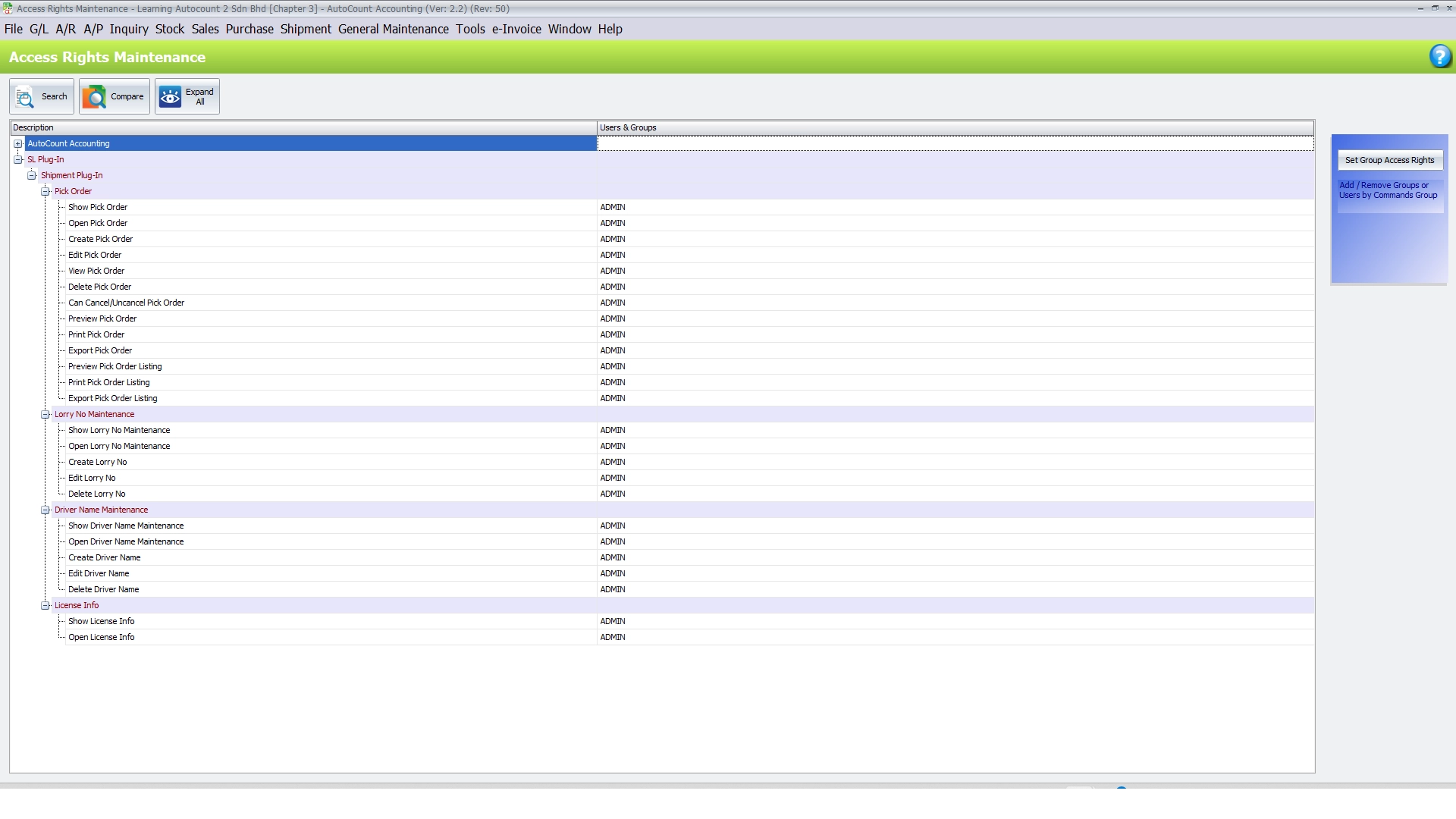
Assign permissions for Pick Order actions, maintenance screens and report output. Administrators can decide who may create, edit, view, cancel, print or export the relevant records.
Use Pick Order Listing, Pick Order Detail Listing, Outstanding Pick Order Listing and Outstanding Pick Order Detail Listing to review work. Preview, print or export reports according to assigned permissions.
Tell us how your team prepares orders and delivery documents. We can discuss suitable AutoCount options.
An illustrative workflow for a Malaysian wholesale or distribution business.
Filter outstanding Sales Orders and choose the required item lines.
Check balances, enter the quantities for this Pick Order and save.
Transfer the Pick Order to the Delivery Order or Invoice selected in settings.
For a Delivery Order, select driver and lorry details as needed; review Pick Order reports.
Coordinate outstanding customer orders, picking quantities and delivery document preparation.
Give sales and warehouse staff a shared document workflow for preparing items for dispatch.
Maintain delivery references and select the applicable driver and vehicle on Delivery Orders.
It is an AutoCount add-on for preparing Pick Orders from outstanding Sales Orders, transferring saved Pick Orders to Delivery Orders or Invoices, maintaining driver and lorry records, and reviewing Pick Order reports.
The documented quantity selection shows the outstanding balance and New Qty for the current Pick Order. Your team can review and select the quantity to prepare before saving.
Yes. Choose Post To Invoice in Shipment Settings before transferring the saved Pick Order. Alternatively, choose Post To Delivery Order.
No. The two destination settings are mutually exclusive. Select the document type required for your workflow.
Yes. Maintain active driver and lorry records, then select the applicable Driver Name and Lorry No on a Delivery Order when required.
The documented Shipment Plugin workflow covers Pick Orders, document transfers, delivery references and reports. Live GPS tracking and courier integration are not established by this guide. Discuss those requirements with SL Software.
Contact SL Software for a current quotation and an assessment of your AutoCount version, licensing and workflow requirements.
Already using this plugin? Read the AutoCount Shipment Plugin User Guide for operating instructions.
Browse the AutoCount add-on catalogue, explore the accounting system or consult the technical user guide.
Discuss your sales order, picking and delivery workflow with SL Software Solutions Sdn Bhd. Find out whether the AutoCount Shipment Plugin fits your business.
Product functions and compatibility should be checked against your installed AutoCount version.