
A sales transaction where payment is made and confirmed at the point of sale. Process transactions through cash, credit card, or multiple payment methods instantly.
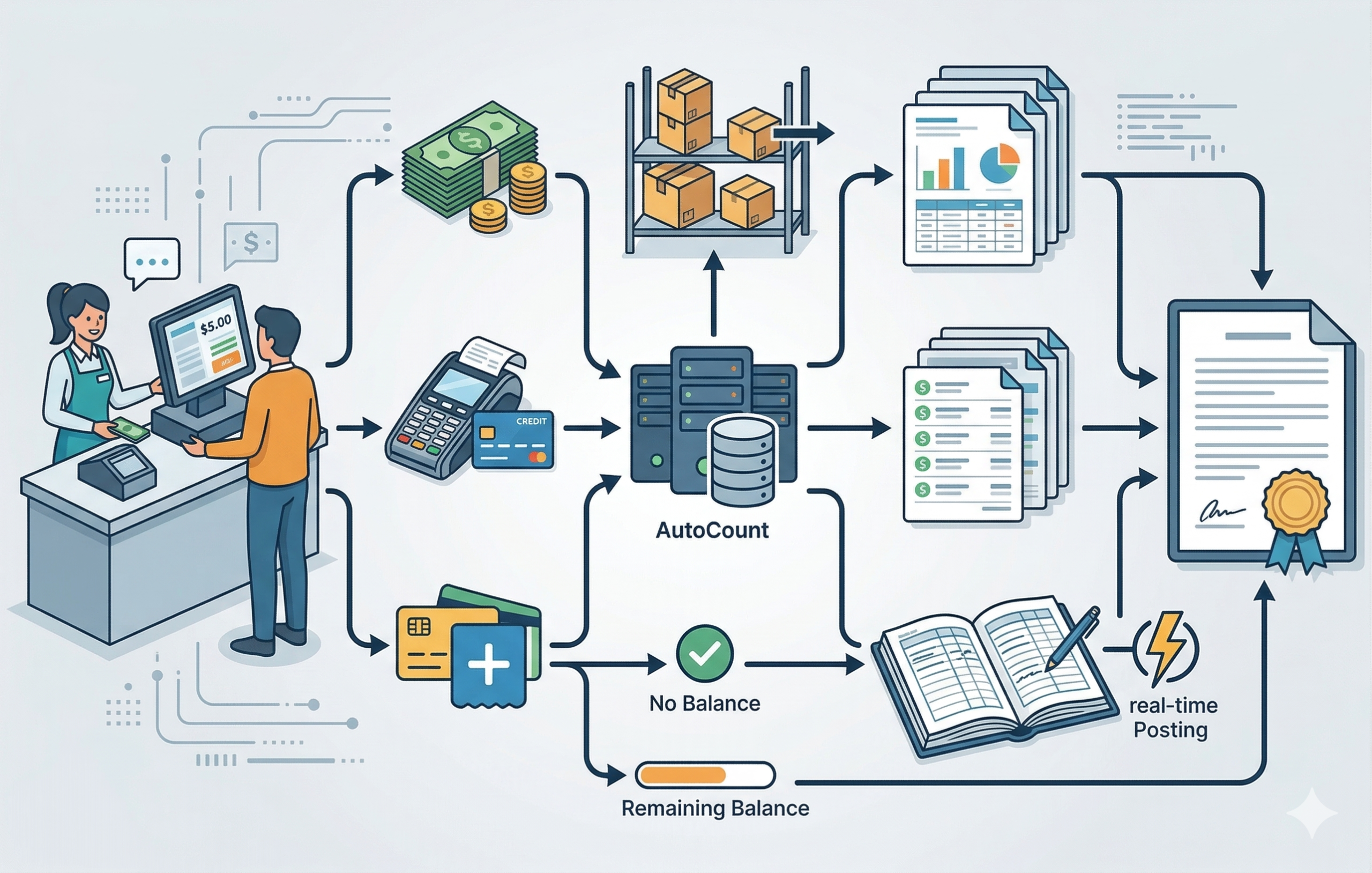
Cash Sales refers to a sales transaction where payment is made and confirmed at the point of sale. In AutoCount, this may be processed through cash, credit card, or multiple payment methods. Upon saving, the transaction is recorded immediately in the relevant sales, payment, and G/L records. Depending on payment mode and amount paid, the document may be fully settled immediately or retain an outstanding balance.
Crucial Concept
The Cash Sale does affect inventory movement (if applicable) and does post to the General Ledger immediately upon saving. It is a finalised tracking and financial record.
Cash Sales are used for any business transaction where you need to collect payment immediately. This is the standard transaction type for businesses that don’t offer credit terms to their customers.
A customer buys groceries or clothes and pays at the counter.
A diner pays for their meal after eating, or a customer pays for a coffee to go.
A hair salon takes payment immediately after a haircut, or a repair shop collects payment.
A customer pays instantly via credit card or online banking at checkout.
Selling tickets for events, movies, or transportation.
Go to the Sales module and select "New Cash Sales" or a similar option.
If the customer is in your database, select them. For walk-in customers, use a default profile like "Cash Customer" or "Walk-in".
Scan barcodes or search for the items being purchased. The system typically auto-fills the price and calculates the line total.
Confirm the items, quantities, and prices. The system will calculate the subtotal, tax, and grand total.
Select the payment method (e.g., Cash, Credit Card). If paying by cash, enter the amount tendered to calculate the change due.
Click "Save," "Post," or "Complete." The system will automatically
Records the sale and the payment in a single step, updating your cash/bank account and revenue in real time.
Prints a sales receipt or invoice for the customer immediately upon completing the transaction.
Inventory is updated when applicable. If created directly or transferred from a Sales Order/Quotation, stock is reduced. If transferred from a Delivery Order, stock is not reduced again.
Automatically posts the transaction to relevant accounts based on selected payment method and setup (sales, cash, bank, debtor entries).
Select from various payment types (Cash, Credit Card, QR Pay, etc.) within the same transaction screen.
Automatically calculates applicable taxes (e.g., SST, VAT) based on the items sold.
Option to print or preview the transaction document immediately after saving. Digital copies may also be shared based on workflow.
Scenario: A customer orders a latte (RM 15) and a muffin (RM 8). They pay with a debit card.
The Step-by-Step
Behind the Scenes
Payment is captured and recorded immediately, improving cash flow visibility and reducing collection delays.
Since payment is received upfront, there is zero risk of customers not paying later.
Reduces the need for ongoing receivable follow-up, because payment is usually collected at the point of sale.
Transactions are processed quickly at the point of sale, reducing wait times and administrative work.
Provides an up-to-the-minute view of your sales performance, inventory levels, and cash position.
It depends. If the Cash Sale is created directly or transferred from a Sales Order or Quotation, the stock is reduced. However, if it is transferred from a Delivery Order (where stock was already deducted), the stock will not be reduced again.
Yes, AutoCount allows you to select from various payment types (Cash, Credit Card, QR Pay, etc.) within the same transaction screen to settle the bill.
Depending on the payment mode and amount paid, the document can either be fully settled immediately or it can retain an outstanding balance to be tracked and collected later.
No. The system automatically posts the transaction to the relevant accounts (such as sales revenue, cash/bank, and debtor-related entries) in real-time immediately upon saving.
Manage point-of-sale transactions efficiently with AutoCount.
Process immediate payments, update inventory instantly, and integrate accounting records seamlessly with one powerful system.