Automate leave calculations, standardise company policies, and manage employee entitlements with accuracy and full transparency in AutoCount HRMS e-Leave.

Automate leave calculations, standardise company policies, and manage employee entitlements with accuracy and full transparency in AutoCount HRMS e-Leave.
Leave entitlement refers to the predefined amount of leave an employee is eligible to receive. This is typically determined by factors like their tenure with the company, their employment status (e.g., full-time, part-time, contract), or their job grade.
In a manual system, managing these variables is complex and prone to error. However, with a robust HRMS like AutoCount e-Leave, you can digitize this process. The system allows you to create entitlement groups—categories that group employees with similar leave benefits—and define precise rules for how their leave is calculated and credited. This ensures every employee automatically receives the correct number of leave days according to their specific circumstances.
A well-defined leave entitlement framework is crucial for several reasons:
It standardizes leave across employee categories, ensuring everyone is treated equally according to company policy and labor laws.
It eliminates the need for HR to manually calculate balances each month, reducing the risk of human error.
Transparent, system-enforced rules leave no room for ambiguity, minimizing misunderstandings between employees and management.
Accurate leave balances are essential for payroll calculations (e.g., paying out unused leave) and for managers to plan team capacity and schedules effectively.
Digital records of leave entitlements and history provide a clear, accessible trail for internal audits or compliance checks.
Moving from manual tracking to an automated system for managing leave entitlement offers transformative benefits:
Say goodbye to spreadsheets. Automation handles the heavy lifting, calculating entitlements instantly based on your pre-set rules. This frees your HR team from repetitive administrative tasks, allowing them to focus on strategic initiatives like talent development and employee engagement.
Every company is unique, and your leave policy should reflect that. A modern system offers the flexibility to create custom entitlement groups for different roles or departments. You can define rules for unlimited leave types (like emergency leave) and limited leave types (like annual and sick leave) with varying accrual rates based on tenure.
When entitlement details are stored in a centralized system, both HR and employees gain visibility. Employees can easily check their leave balances and accrual history through a self-service portal, fostering a culture of transparency and trust.
Reliable leave entitlement data feeds directly into workforce management. Managers can approve time-off requests with full confidence in staffing levels, and payroll processing becomes more accurate, automatically accounting for paid time off, unpaid leave, or leave encashment.
Configuring your leave entitlement rules in AutoCount e-Leave is a straightforward process. Follow this step-by-step guide to get started:
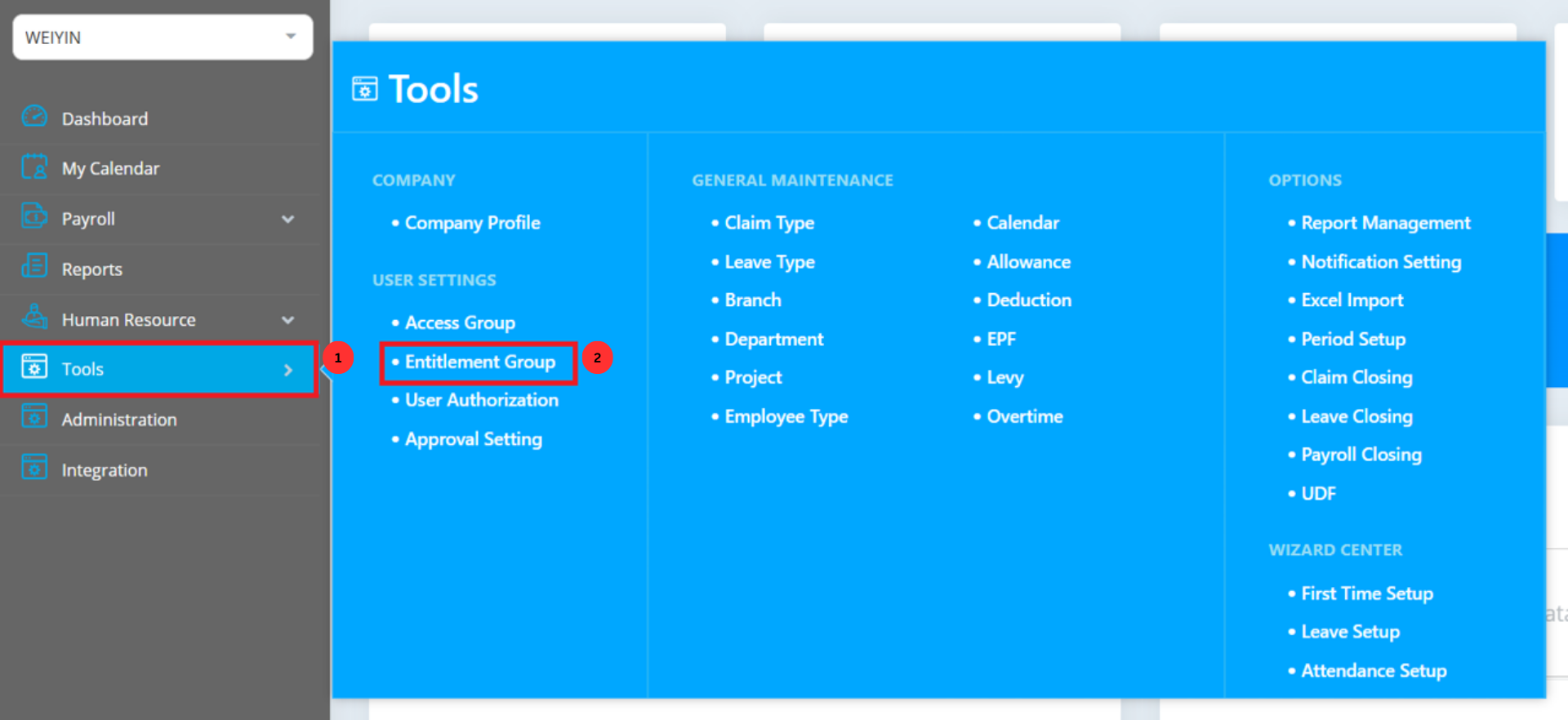
Log in to AutoCount Cloud HRMS and navigate through the left-hand menu to Tools > Entitlement Group under User Settings.
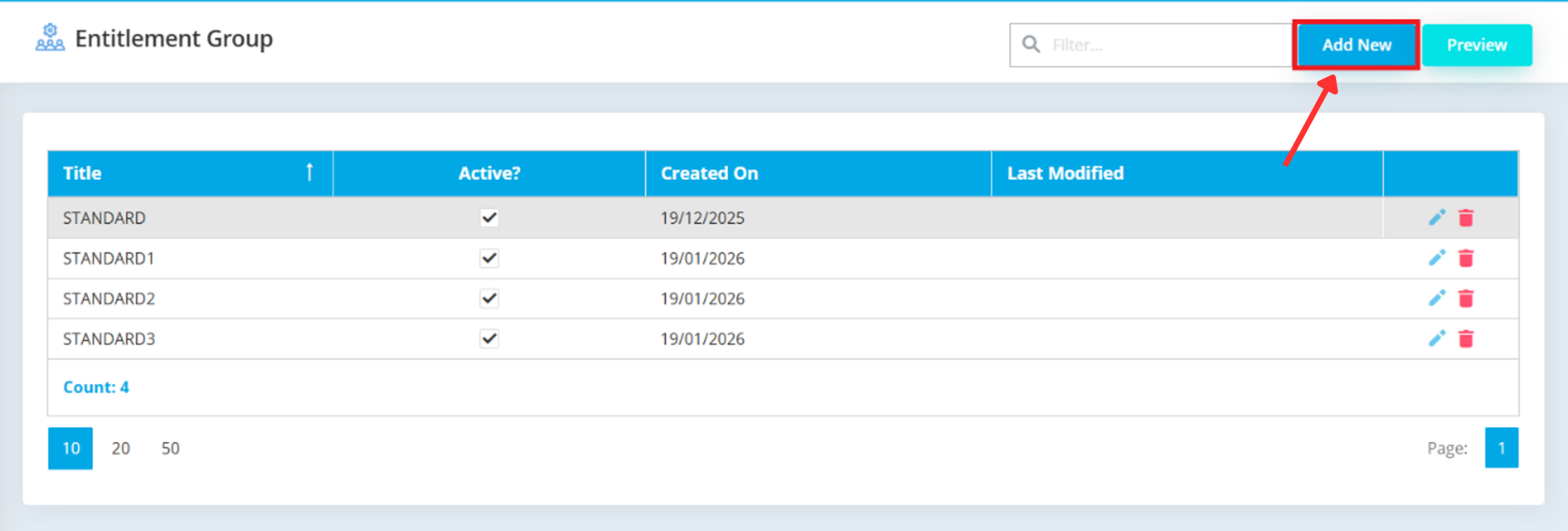
In the top right corner of the screen, click the Add New button to begin creating a new entitlement group.
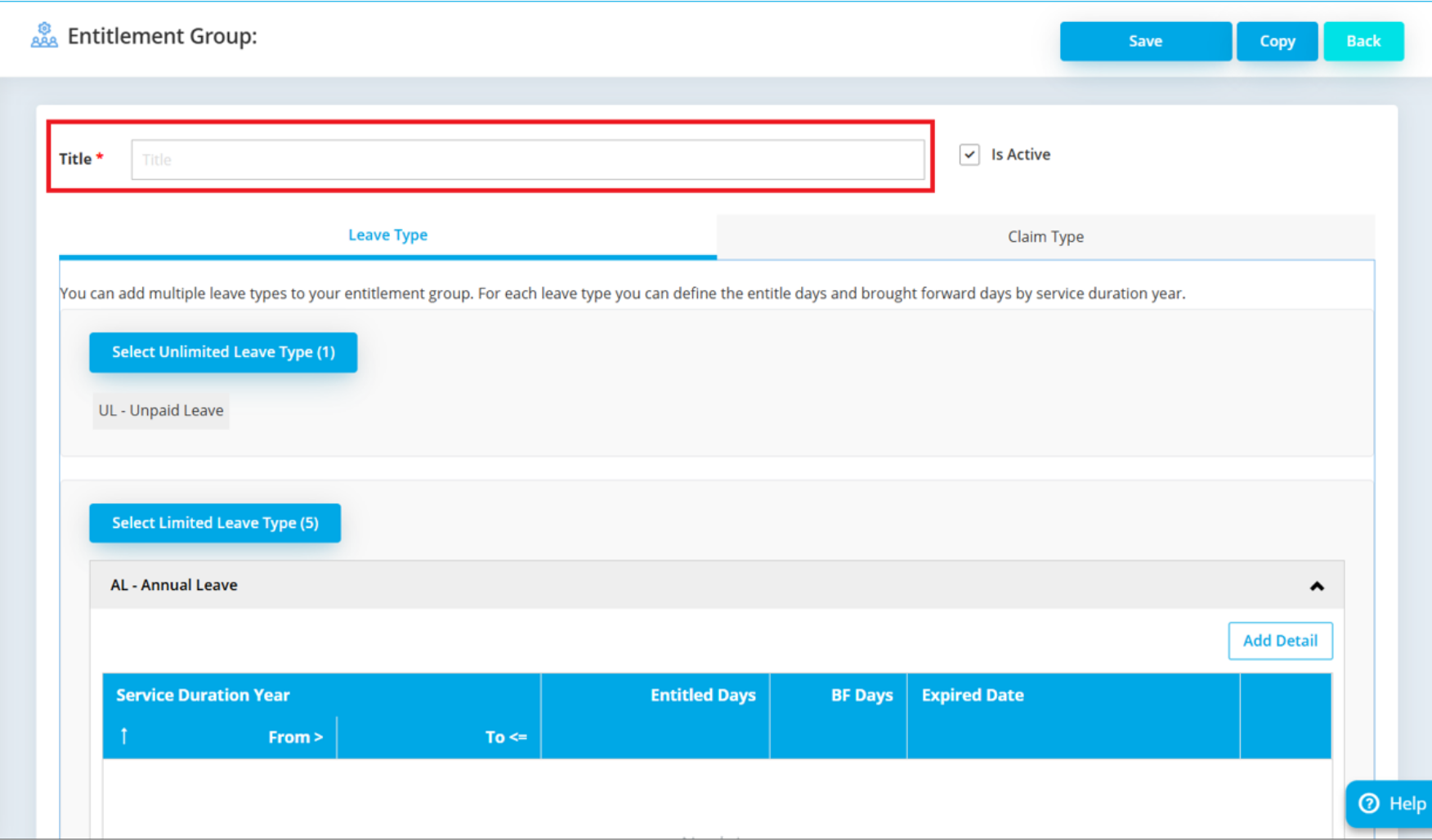
In the Name field, enter a descriptive name for the group, such as “Full-time Employees,” “Part-Time Staff,” or “Executive Management.”
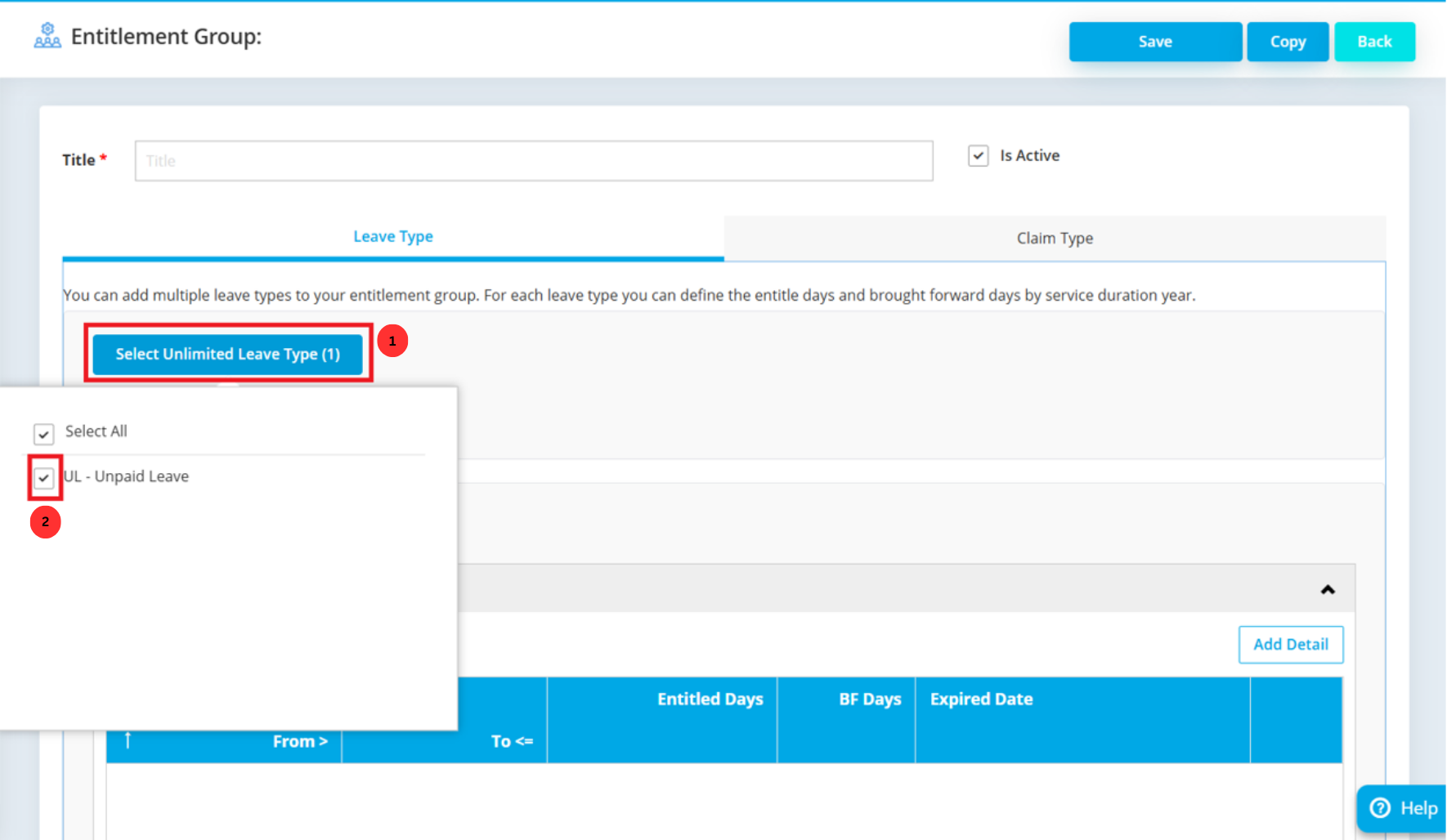
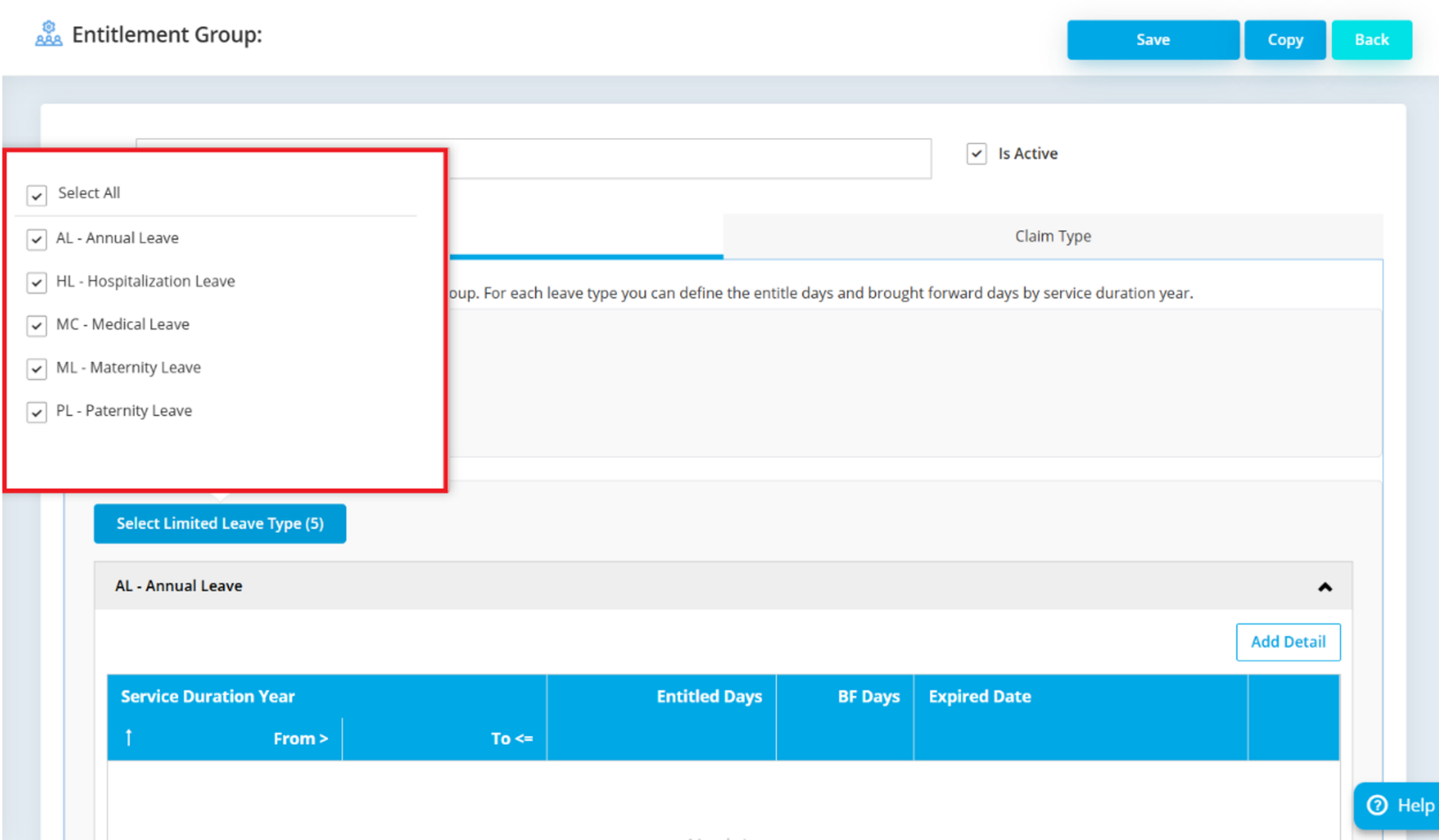
Under the Select Unlimited Leave Type section, choose leave categories that should not have a capped balance. For example, you might select “Emergency Leave” or “Maternity Leave” here.
Under the Select Limited Leave Type section, choose leave categories that have a maximum balance, such as “Annual Leave” or “Sick Leave.”
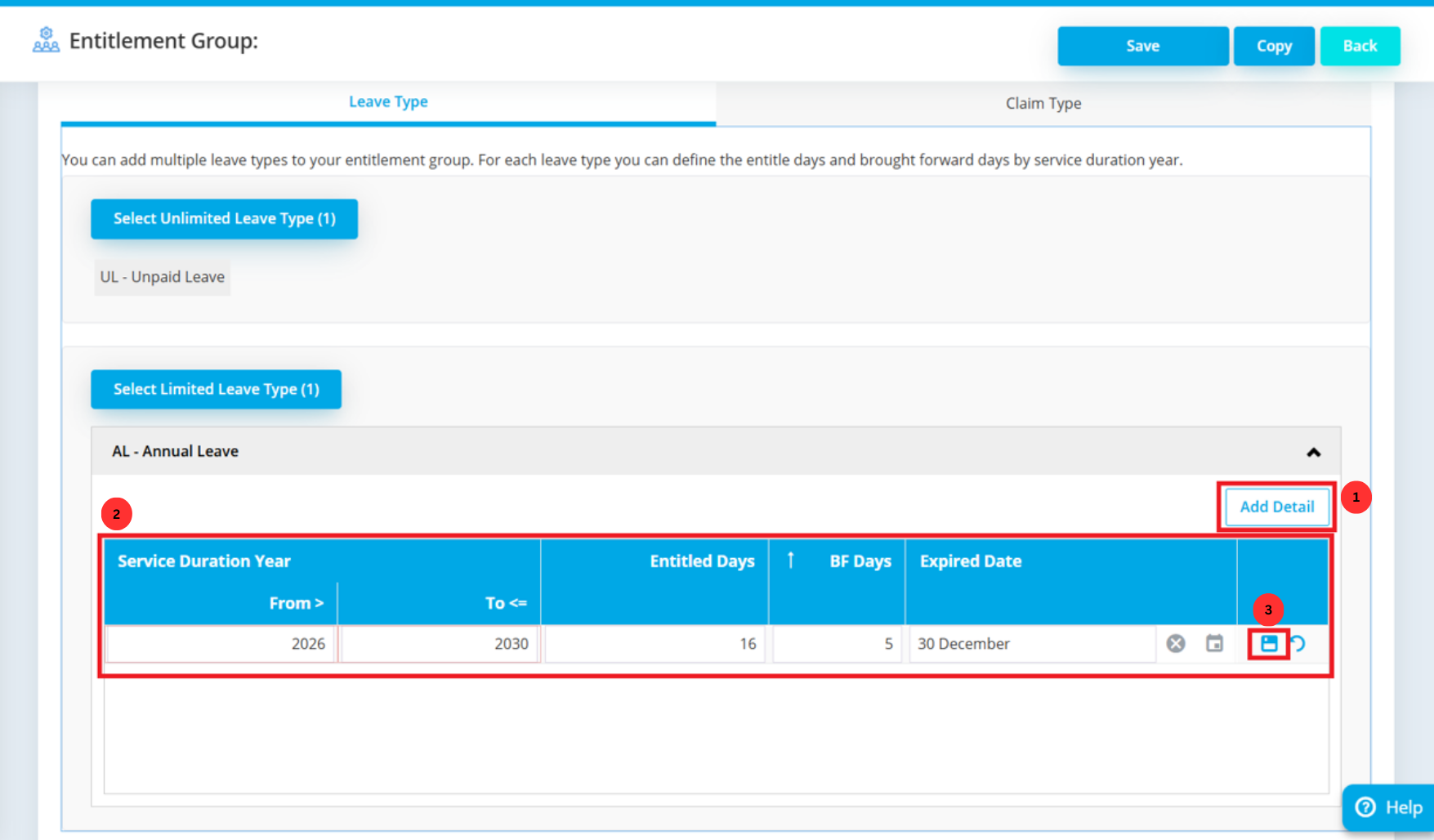
This is the core of the setup. Click Add Detail to define the specific entitlement rules.For each range of years worked, set the entitled days and other related allowances. For example:
Repeat this process to cover all applicable tenure ranges and leave combinations for your organization. After entering all details, click the Save icon at the bottom of the section.
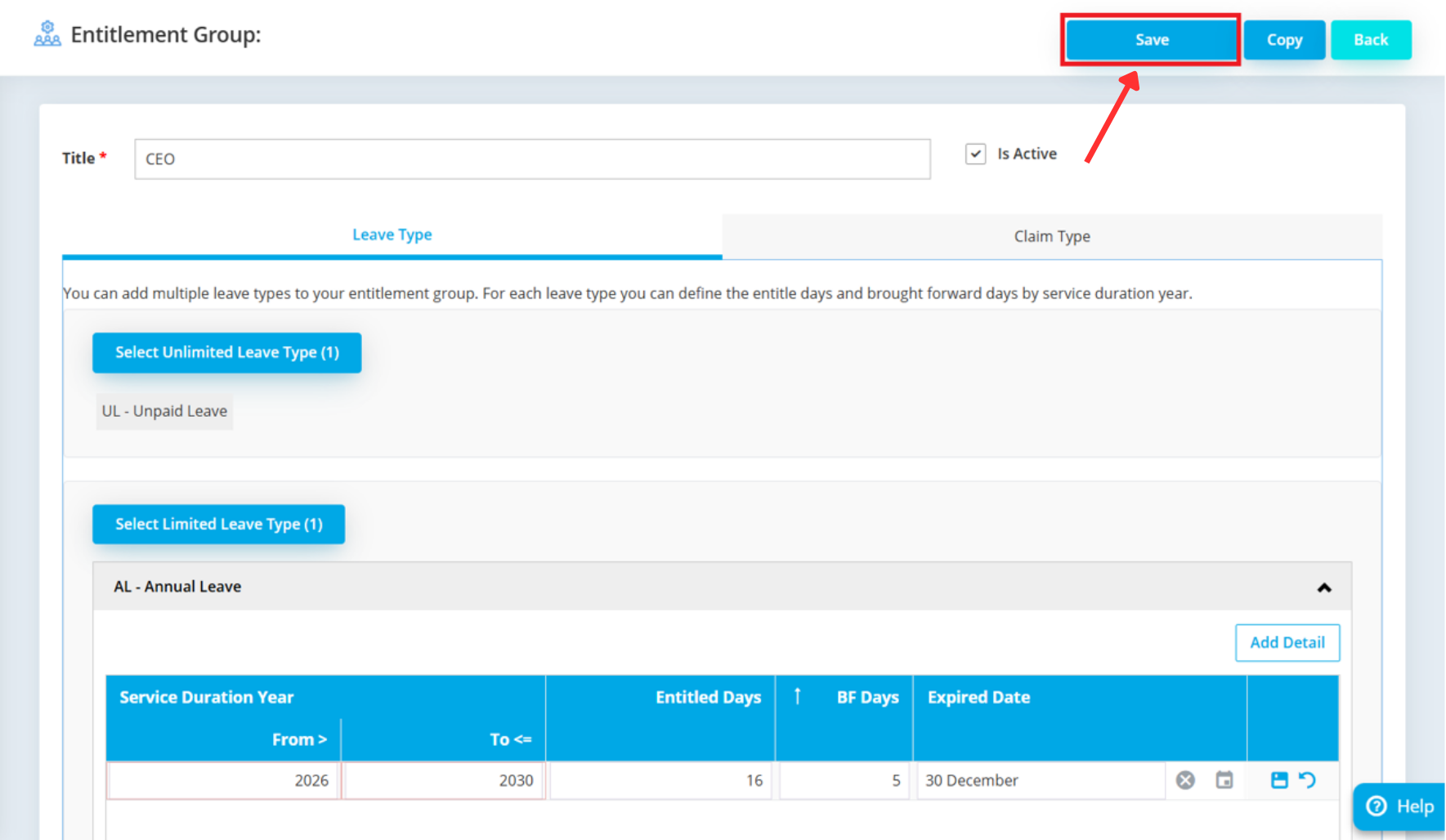
Finally, click the main Save button in the top right corner to finalize and activate your new entitlement group.
Leave Entitlement in AutoCount e‑Leave isn’t just a policy setting — it delivers real value that makes leave management smarter and more reliable for your organisation:
Leave entitlement rules calculate employee leave balances automatically based on tenure or other criteria, removing the need for manual tracking and reducing errors that happen with spreadsheets.
You can define multiple leave entitlements for different employee groups (e.g., full‑time, part‑time, contract), giving your company the freedom to reflect actual HR policies in the system.
Leave balances and accruals are tracked in real time, so HR and employees always know how many days are available or used — boosting transparency and confidence.
Once entitlement rules are set, the system handles calculations and leave crediting, saving HR teams time and effort for more strategic tasks.
Accurate entitlement data helps managers forecast staffing levels and plan team schedules around leave patterns without guesswork.
Effectively managing leave entitlement with AutoCount e-Leave delivers tangible value across your entire organization. It automates the calculation of leave balances, supports complex and flexible company policies, and provides real-time tracking for total transparency. By reducing the administrative burden on your HR team, you empower them to focus on more strategic work, all while ensuring your leave processes are accurate, fair, and compliant.
A properly configured leave entitlement system is an investment in operational efficiency and employee satisfaction. It removes guesswork, eliminates manual errors, and provides a single source of truth for all leave-related data.
Within AutoCount HRMS, leave requests show status like Pending, Approved, or Rejected, so employees and managers can track progress directly in the system.
AutoCount HRMS supports multiple methods — such as yearly based on join/confirmation date, calendar year, earn leave, and advance earn leave — allowing flexible leave crediting.
Leave balances are recalculated automatically based on entitlement rules and calculation method (joined/confirmation date or calendar year). Check the entitlement settings and calculation method for accuracy.
Employees can cancel a pending leave application if the leave date hasn’t passed. Payroll users in HRMS can cancel approved leave when needed.
Unlock all AutoCount Cloud Payroll features for free and then think carefully which plan is best with your business needs.