
The System Shows Stock, but the Warehouse Cannot Find It: 6 Causes and Solutions

When the System Says 50 Units but the Shelf Is Empty
A customer places an order after the Sales team confirms that the item is available.
The system shows 50 units in stock. However, when the warehouse team starts preparing the order, nobody can find the goods.
Warehouse employees check the shelves, storage areas and recent delivery records. Sales continues referring to the available quantity shown on the screen, while the customer keeps asking when the order will be delivered.
This is a common inventory problem for wholesale and trading companies.
In many cases, the goods have not simply disappeared. The real problem is that the system records, warehouse activity and order process are not properly synchronised.
When information does not move together with the physical goods, the company begins operating with inaccurate or false inventory.
Why Does the System Show Stock That the Warehouse Cannot Find?
An inventory system calculates stock according to the transactions and documents entered into it.
When goods are received, transferred, delivered, returned or adjusted, the relevant transaction should be recorded promptly. The system then updates the inventory balance based on those records.
However, when a transaction is entered late, skipped or recorded incorrectly, the system balance may no longer represent the quantity physically available in the warehouse.
- 50 units shown as available in the system
- Zero units on the warehouse shelf
- One confirmed customer order waiting for delivery
Each department is looking at a different source of information.
The system is using transaction records. The warehouse is checking physical stock. Sales is relying on the quantity displayed on the screen.
When these three areas are not aligned, inventory discrepancies begin to appear.
Six Common Reasons Inventory Records Become Inaccurate
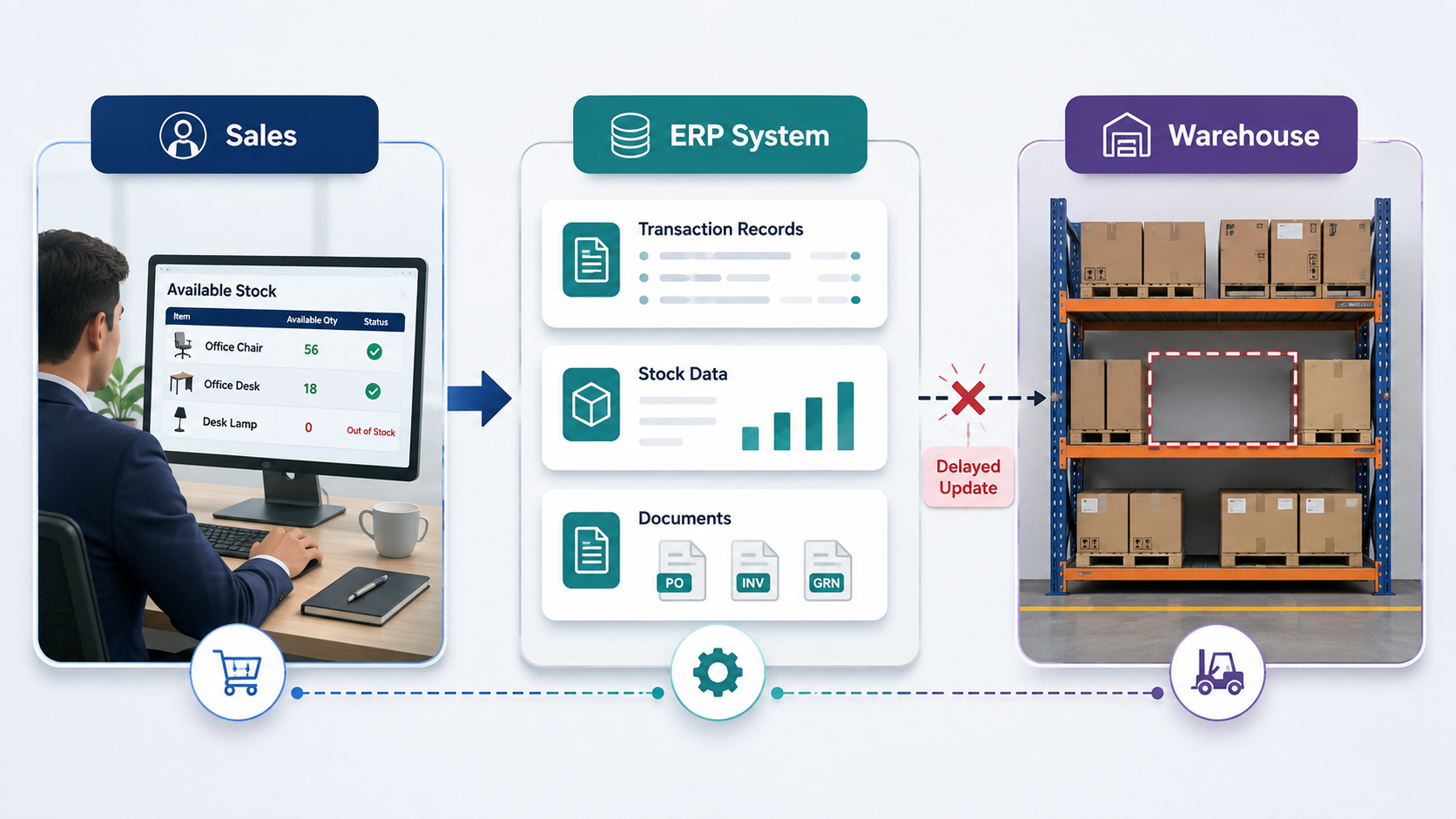
Reason 1: Inventory Transactions Are Posted Late
- 50 units shown as available in the system
- Zero units on the warehouse shelf
- One confirmed customer order waiting for delivery
Reason 2: The Company Depends Too Much on Manual Entry
- Paper forms
- Excel spreadsheets
- Handwritten notes
- WhatsApp messages
- Verbal instructions
- Repeated manual data entry
As a result, every additional handover creates another opportunity for information to be missed or entered incorrectly.
An employee may forget to record a transaction. A handwritten quantity may be difficult to read. The wrong item code, warehouse location or unit of measurement may be selected.
One missed transaction may appear minor. However, when similar mistakes happen repeatedly across hundreds of stock movements, the inventory balance becomes increasingly unreliable.
The more times employees manually copy the same information, the greater the risk of inconsistency.
Reason 3: Barcode Scanning Is Used Inconsistently
- Pick goods without scanning
- Receive stock without scanning
- Move stock using paper forms
- Complete urgent deliveries before updating the system
- Scan only selected items
- Use scanning as an optional step
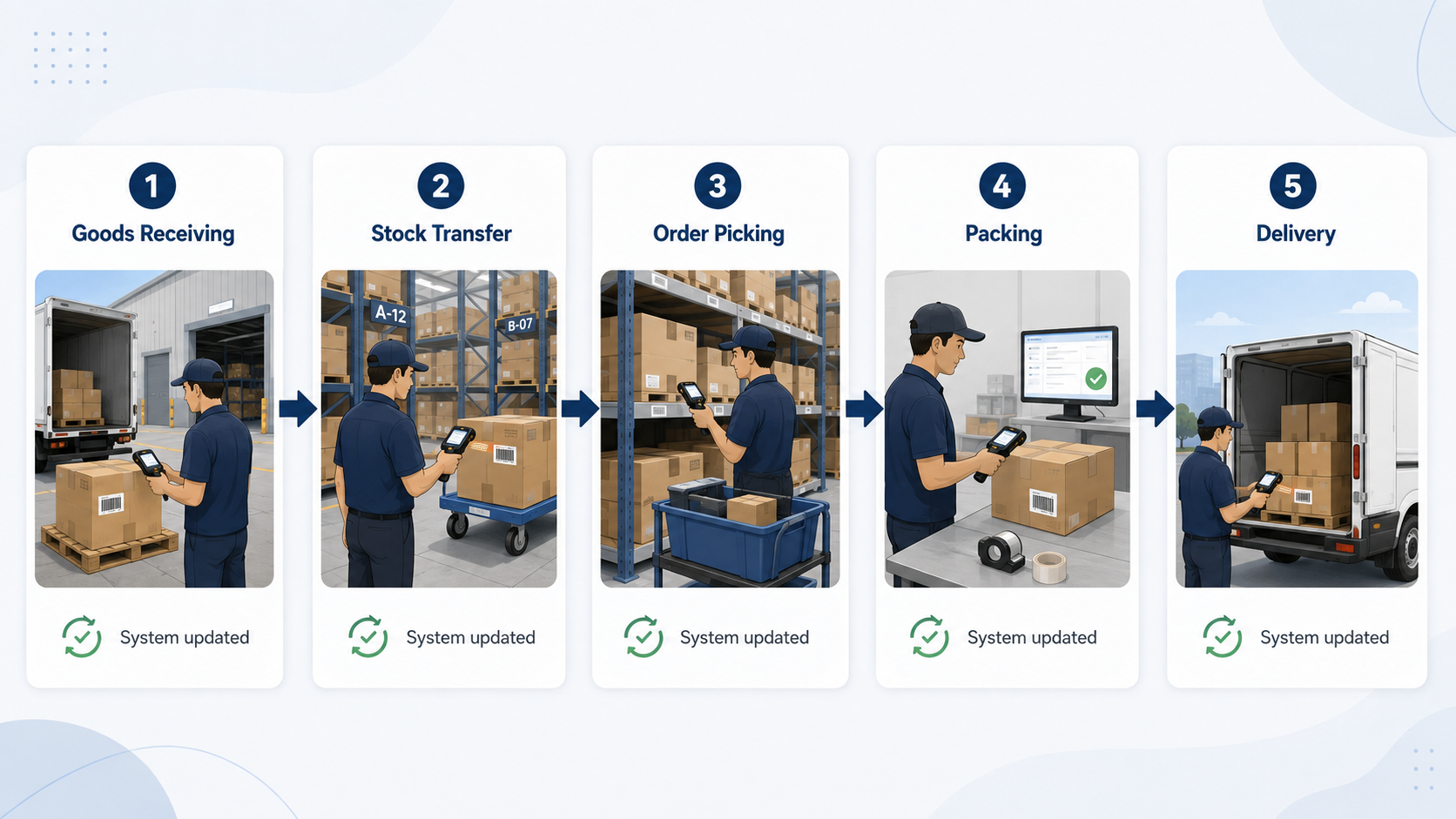
- Goods receiving
- Stock transfers
- Order picking
- Packing
- Delivery
- Customer returns
- Supplier returns
- Stocktaking
Reason 4: Warehouse Transfers Are Not Synchronised
In addition, businesses with multiple warehouses or branches face an additional inventory challenge.
For example, stock may be physically moved from Warehouse A to Warehouse B, but the transfer transaction is not completed immediately.
- Warehouse A appears to have stock that is no longer there.
- Warehouse B appears to have less stock than it physically holds.
- Sales may promise stock from the wrong warehouse.
- Employees may spend time searching the wrong location.
The problem becomes more serious when different branches, salespeople or customers are served by different warehouses.
Stock transfers should be recorded as part of the movement itself, rather than several days later.
- Important
Reason 5: Negative Inventory Is Allowed to Continue
Negative inventory occurs when the system records more goods being sold or issued than the available stock balance.
For example, the system may show 10 units available, but a delivery of 15 units is processed. The system balance then becomes negative five units.
Some companies allow this because they need to complete an urgent sale. They plan to enter the missing purchase, Goods Received Note or stock transfer later.
- Stock availability
- Inventory valuation
- Cost calculations
- Purchasing decisions
- Reorder planning
- Profitability reports
- Management confidence in the system
- Warning
Reason 6: The Document Workflow Is Unclear
Inventory accuracy depends on more than counting stock. It also depends on how documents move through the company.
- Sales Orders
- Delivery Orders
- Sales Invoices
- Purchase Orders
- Goods Received Notes
- Stock Transfers
- Stock Adjustments
- Customer Returns
- Supplier Returns
Therefore, employees must understand which document records the order and which document actually updates the inventory balance.
For example, the warehouse may release goods based on a Sales Order, while the stock is only deducted after the Delivery Order is posted. When that Delivery Order is delayed, the system may continue showing the goods as available.
- Which document triggers the inventory movement
- Who creates the document
- Who verifies or approves it
- When it must be posted
- How urgent or exceptional transactions are handled
- Who reviews incomplete documents
In AutoCount, businesses should configure and follow a consistent flow between Sales Orders, Delivery Orders, purchase documents, stock transfers and returns. The software can support the process, but employees must still follow the agreed workflow.
How Inventory Discrepancies Affect the Business
| Business Area | What Can Happen |
|---|---|
| Customer Orders | Sales may accept an order for stock that is not physically available in the warehouse. |
| Delivery | Warehouse employees may spend additional time searching for missing goods or arranging emergency stock transfers. |
| Customer Service | Customers may experience late updates, delayed deliveries or order cancellations. |
| Customer Trust | Repeated stock problems may cause customers to view the company as unreliable or poorly organised. |
| Operating Costs | The business may incur emergency purchasing, urgent transport, overtime, repacking and document correction costs. |
| Purchasing | Buyers may reorder products that are already available or fail to purchase items that are physically out of stock. |
| Management Reporting | Inventory valuation, costing and stock-availability reports may no longer reflect the actual business situation. |
| Cash Flow | Delayed deliveries may postpone invoicing and customer payment collection. |
Five Ways to Improve Inventory Accuracy
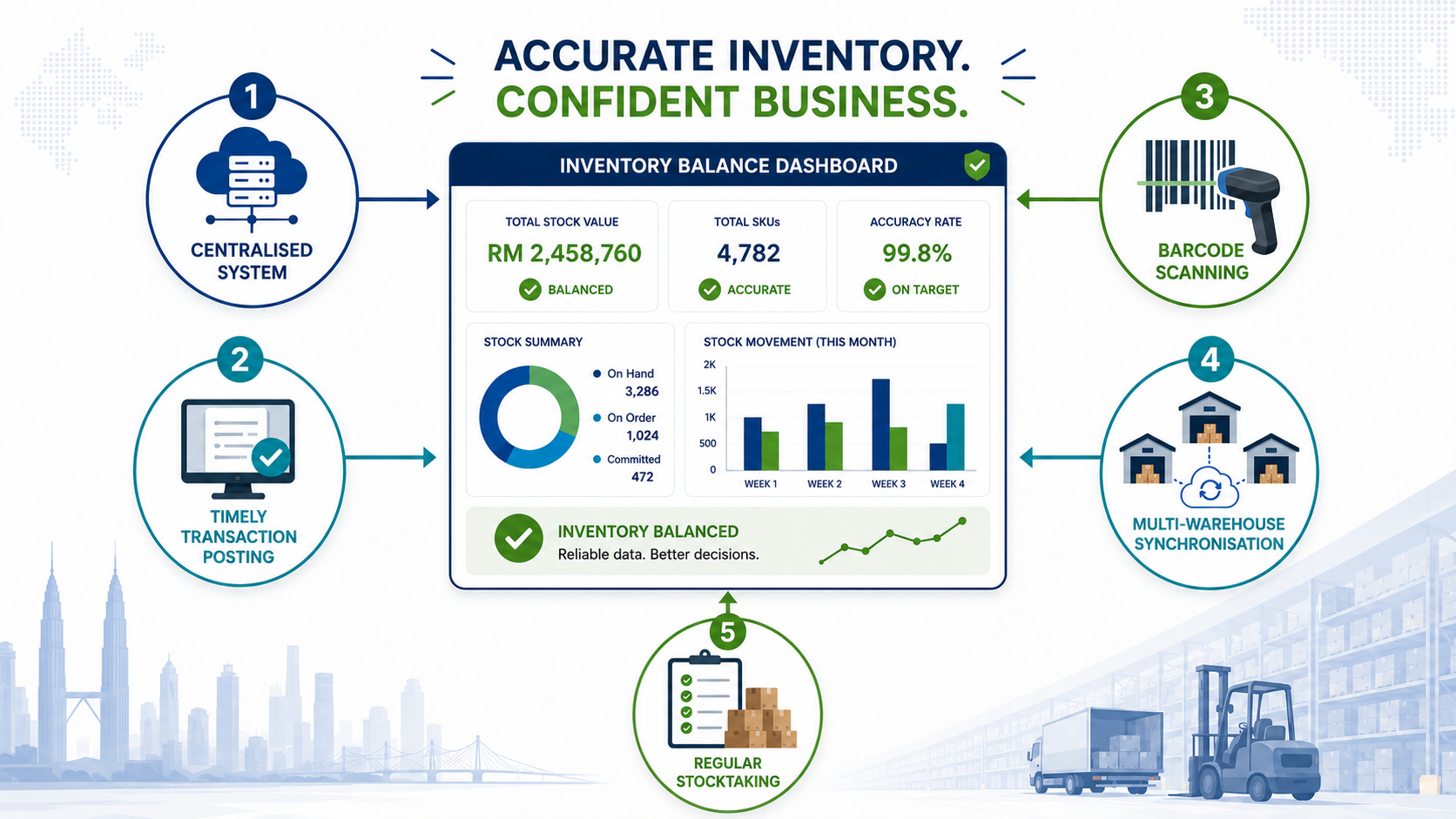
1. Manage Inventory in One Central System
- Stock balances
- Customer orders
- Purchases
- Deliveries
- Warehouse transfers
- Returns
- Inventory adjustments
- Stock reports
- Stock reports
2. Post Stock Transactions Promptly
- All deliveries must be posted before the end of the day.
- Warehouse transfers must be recorded before the goods leave.
- Goods received must be checked and entered promptly.
- Returns must be recorded before items are returned to available stock.
- Urgent manual transactions must be reviewed daily.
- Unposted documents must appear in a management report.
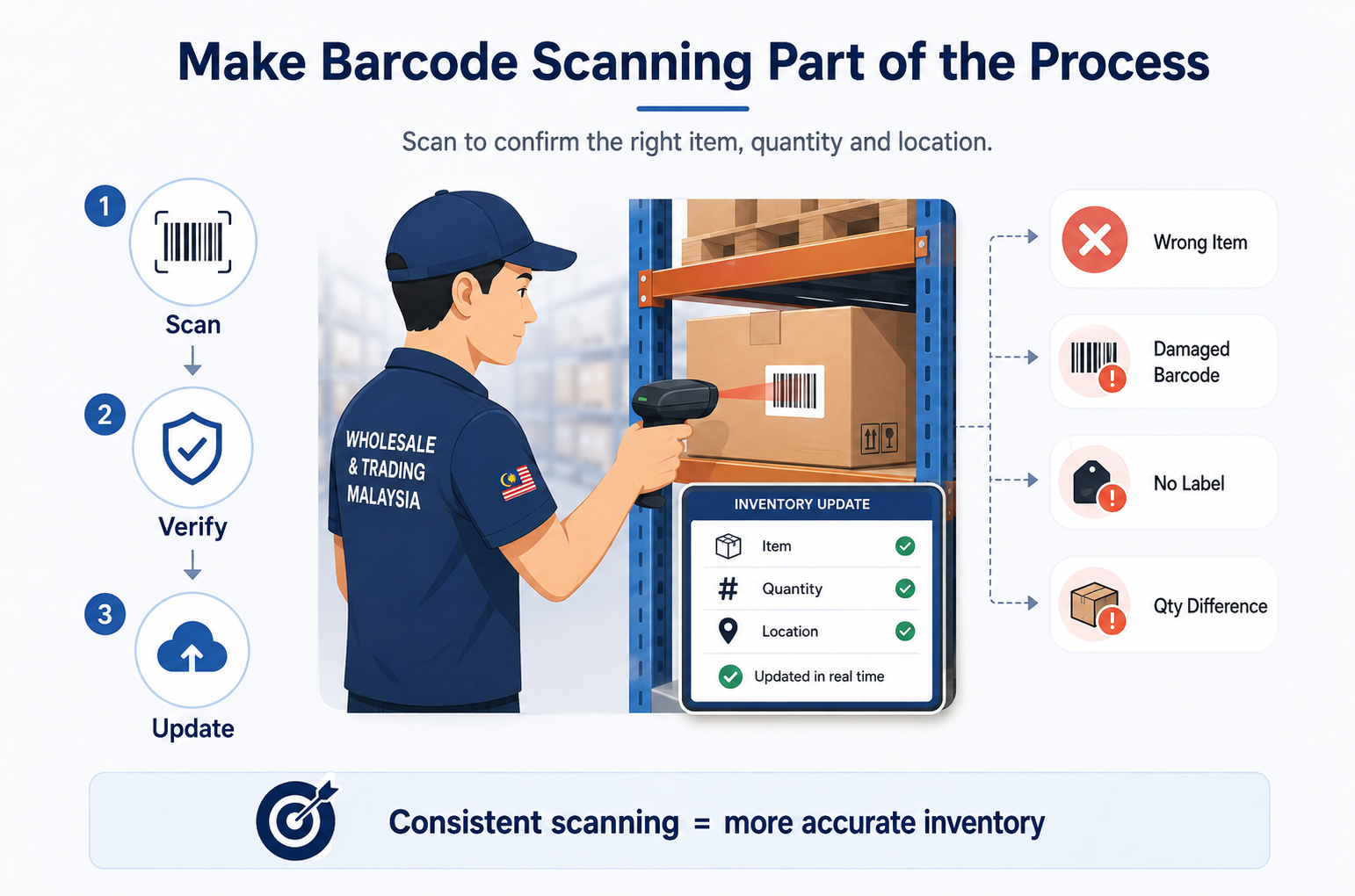
3. Make Barcode Scanning Part of the Process
Barcode scanning can reduce manual item-entry errors and improve stock traceability.
Employees should understand that scanning is not an optional additional task. It is the method used to confirm that the correct item and quantity have moved.
- Incorrect item scans
- Duplicate scans
- Wrong warehouse locations
- Damaged barcodes
- Items without labels
- Quantity differences
- Alternative units of measurement
- Returned or quarantined stock
4. Synchronise Stock Across Warehouses
- Waiting to be transferred
- In transit
- Received by the destination warehouse
- Available for sale
- Reserved for an order
- Damaged or quarantined
5. Perform Regular Stocktaking
- Annually
- Monthly
- Weekly
- By warehouse location
- By product category
- Through cycle counting
- For high-value items
- For fast-moving products
- Unposted documents
- Incorrect warehouse selection
- Wrong item codes
- Unrecorded transfers
- Picking mistakes
- Receiving errors
- Damaged goods
- Unprocessed returns
- Incorrect stock adjustments
- Important
Inventory Discrepancy Troubleshooting Checklist
Check Documents and Stock Locations
| Area to Check | What to Review | Recommended Action |
|---|---|---|
| Unposted Documents | Recent Delivery Orders, Goods Received Notes, returns, stock transfers and adjustments. | Complete or correct any outstanding transactions before making a stock adjustment. |
| Warehouse Location | Branch, warehouse, bin, rack or temporary storage area where the item may have been placed. | Confirm that employees are checking the correct physical location and system warehouse. |
| Reserved Stock | Quantities already committed or reserved for existing Sales Orders. | Separate physically available stock from quantities that are already committed to other customers. |
| Recent Stock Transfers | Goods recently moved between warehouses, branches or storage locations. | Verify that both the sending and receiving sides of the transfer were completed correctly. |
| Negative Inventory | Transactions where stock was issued before the related purchase, receiving or transfer document was entered. | Identify the missing source transaction and correct the document sequence. |
| Item Codes | Similar item codes, alternative item codes, barcodes or batch references. | Confirm that the physical product matches the correct item record in the system. |
Check Transaction Accuracy and Warehouse Processes
| Area to Check | What to Review | Recommended Action |
|---|---|---|
| Unit of Measurement | Piece, box, carton, kilogram or other unit conversions used during the transaction. | Check whether the correct unit and conversion rate were used. |
| Returns | Customer returns, supplier returns or rejected goods that may not have been processed completely. | Confirm whether returned items were inspected and posted into the correct stock status. |
| Damaged Stock | Damaged, expired, quarantined or non-saleable inventory. | Separate unavailable goods from normal saleable inventory and update the system accordingly. |
| Barcode Compliance | Barcode scanning during receiving, transfers, picking, packing and delivery. | Confirm that employees followed the required scanning process at each stock movement. |
| Transaction Timing | Transactions entered before or after the inventory report was generated. | Compare the report date and time with the actual physical movement of the goods. |
| Stock Adjustments | Recent manual quantity corrections or stock adjustment entries. | Check who made the adjustment, when it was entered and why it was required. |
Inventory Accuracy Depends on Process Discipline
The Better Question Is: Where Did the Data Stop Flowing?
When the system shows inventory but the warehouse cannot find it, the first reaction is usually:
“Where did the goods go?”
A better question may be:
“Where did the information stop flowing?”
The goods may have been delivered, transferred, returned, reserved or placed in another location without the corresponding transaction being completed.
The solution is not always to purchase more stock or perform another adjustment.
The more sustainable solution is to identify the point where the physical movement and system record became disconnected, then improve that part of the workflow.
- Important
Improve Inventory Visibility With AutoCount
AutoCount can help wholesale and trading businesses manage inventory, Sales Orders, purchases, deliveries, returns and warehouse transactions in one centralised system.
With a properly configured workflow, businesses can improve stock visibility, reduce repeated manual entry, manage inventory by location and identify discrepancies more quickly.
The objective is not only to know how much stock the company should have. It is to keep the system quantity, physical warehouse quantity and customer-order commitments aligned.
Frequently Asked Questions
Why does the system show stock when the warehouse is empty?
The most common reason is that a delivery, transfer, return or adjustment was not posted correctly or on time. The system calculates inventory according to recorded transactions, so its quantity may remain unchanged when a physical movement is not entered.
Should I make a stock adjustment immediately when inventory does not match?
Not immediately. First check unposted documents, warehouse locations, reserved stock, transfers, returns, units of measurement and recent adjustments. After identifying the cause, make the necessary correction while keeping a record of why the adjustment was required.
Can barcode scanning completely prevent inventory discrepancies?
Barcode scanning can reduce item-entry and quantity errors, but it cannot prevent discrepancies when employees skip the scanning process or complete transactions incorrectly. Scanning must be required at the correct receiving, picking, transfer, delivery and stocktaking stages.
How often should a company perform stocktaking?
The frequency depends on the number of items, transaction volume and value of the inventory. Companies may perform annual stocktakes, monthly checks, weekly cycle counts or more frequent counts for fast-moving and high-value items.
How can AutoCount help improve inventory accuracy?
AutoCount can connect Sales Orders, deliveries, purchases, stock transfers, returns and inventory records in one system. It can also support inventory by location, barcode-related processes and stocktaking. Accurate results still depend on employees following the agreed document and warehouse workflow.