AutoCount B2B Ordering System | Portal, Mobile & WhatsApp

TD B2B Ordering System

Let customers order through online, mobile or WhatsApp B2B Ordering System gives customers and salespeople a more organised way to place orders using product information from AutoCount. Customers can view their assigned catalogue, pricing and available stock before submitting orders. The completed orders can then be processed in AutoCount as Sales Orders or Sales Invoices.

What is TD B2B Ordering?

B2B Ordering is an AutoCount-connected ordering system for businesses that sell regularly to trade customers. It provides a central product catalogue while allowing each customer to order through a customer portal, mobile ordering interface or WhatsApp. Instead of receiving order messages, photos and handwritten lists before entering everything again, your team can manage incoming orders through one connected workflow. Customer accounts, item codes, pricing and inventory information come from AutoCount, and completed orders are sent back for confirmation and posting.

Set It Up Once. Let Every Order Flow Through AutoCount.

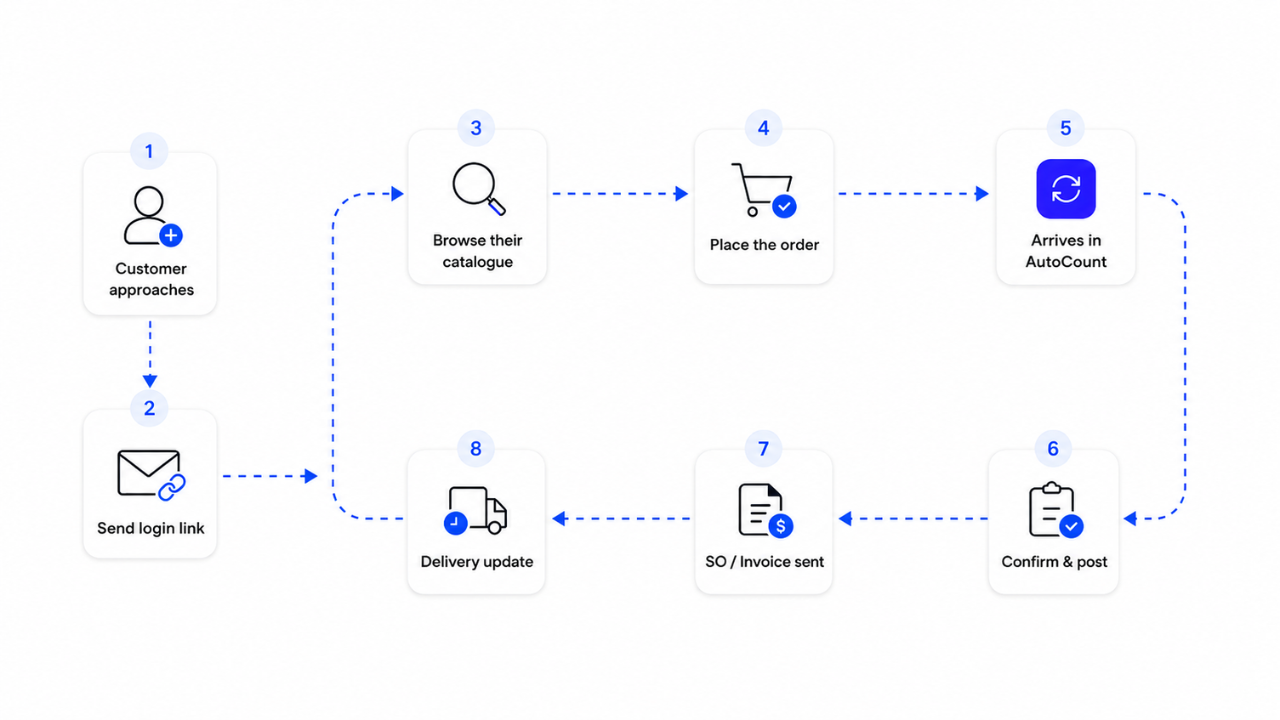
Create the customer account and catalogue access once. After that, customers can browse their assigned products and pricing, place orders, and receive delivery updates through one connected ordering process.
B2B ordering workflow showing customer account setup, login link, catalogue browsing, order placement, order submission to AutoCount, confirmation, invoice creation and delivery updates.

Key Features

Multiple Ordering Options

Customers can place orders through the Customer Portal, Mobile Ordering page or WhatsApp, depending on their preferred method.

Customer-Specific Catalogue and Pricing

Each customer can view the products, prices and stock information assigned to their account.

WhatsApp AI Ordering

Customers can order using typed messages, product photos or handwritten order lists through WhatsApp.

Quick Repeat Ordering

Previous orders and saved Order Templates allow customers to reorder frequently purchased products more quickly.

Multiple Companies and Delivery Addresses

Users can select the correct company, branch or delivery address during checkout without creating separate accounts.

Direct AutoCount Processing

Confirmed orders are sent to AutoCount for review and processing as a Sales Order or Sales Invoice.

Different Ways to Order Through B2B Ordering

Ordering Feature Customer Portal Mobile Ordering WhatsApp AI
Best suited for Office purchasers Customers on the move Customers who prefer chat
Ordering experience Full ordering portal Browse, cart and checkout Order through messages
Catalogue and Pricing
Browse products with images
Customer-specific pricing
View stock status
Ordering Methods
Reorder previous purchases
Use saved order templates On request
Order using text, photo or handwriting Available through WhatsApp AI
Orders and Documents
View previous orders Recent Orders Through chat
Access invoices and statements Based on access On request
AutoCount Connection
Send confirmed orders to AutoCount

Frequently Asked Questions

Does B2B Ordering connect to AutoCount?
Yes. Customer information, item codes, pricing and inventory data are synchronised from AutoCount. Submitted orders can be returned to AutoCount and posted as Sales Orders or Sales Invoices.
Customers can order through the customer portal, mobile ordering interface or WhatsApp. Businesses may provide the channel that best suits each customer’s normal purchasing workflow.
WhatsApp Ordering can process typed text, product photos and photos of handwritten lists. Voice messages are also supported, but their accuracy may be affected by slang, pronunciation or audio quality.
The order is sent to AutoCount for review and confirmation. Your team can then post it as a Sales Order or Sales Invoice and continue with the normal invoicing and delivery process.

Give Your Customers an Easier Way to Order

See how portal, mobile and WhatsApp ordering can work with your AutoCount catalogue, customer pricing and daily sales process.