Retail POS System Malaysia: How to Choose the Right One
Looking for a retail POS system in Malaysia? Learn which features matter most for inventory, multi-outlet management, accounting integration and e-Invoice workflows, plus how to choose between cloud and on-premise POS solutions.
What Is a Retail POS System?
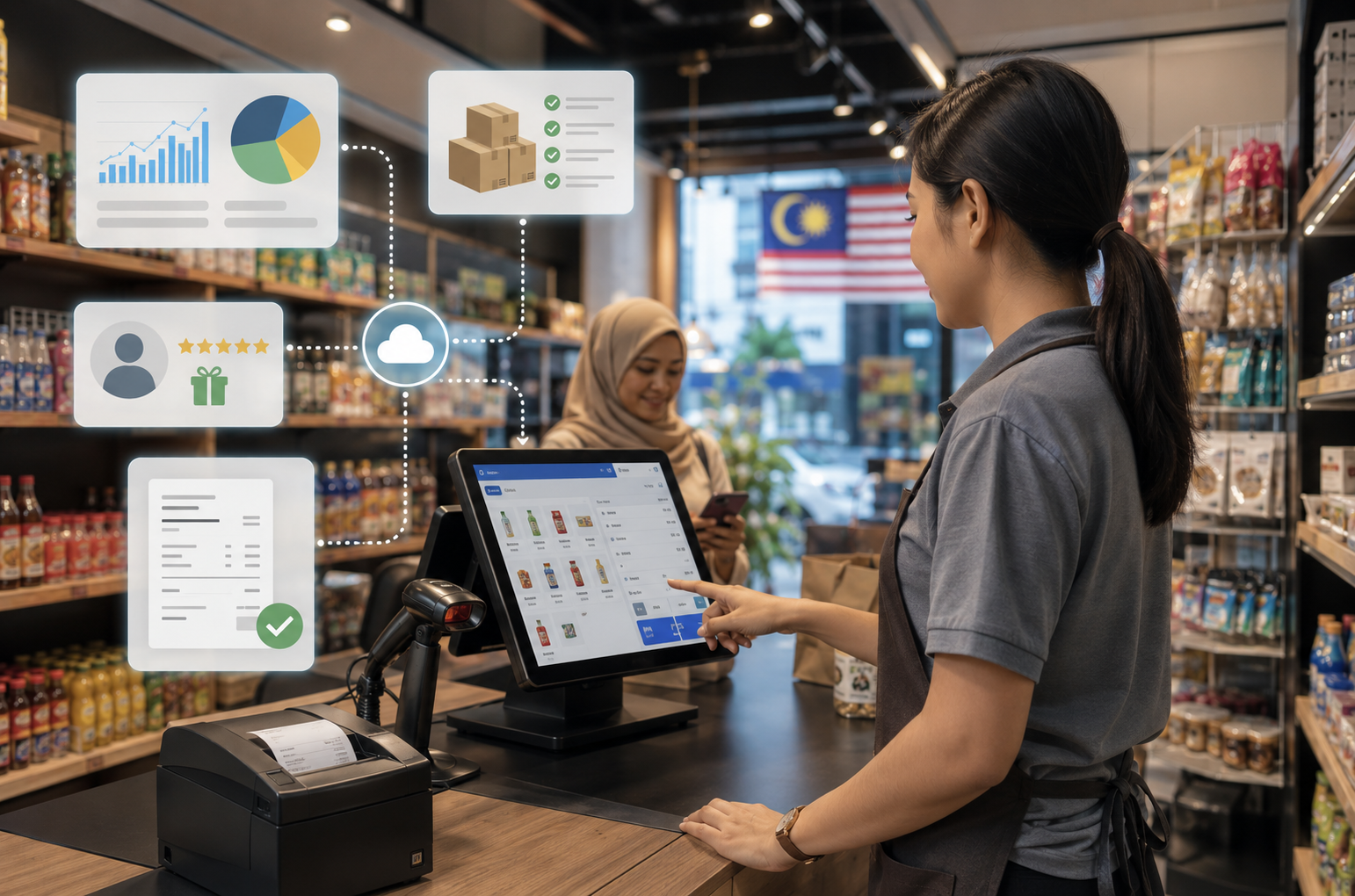
A retail Point of Sale (POS) system is the combination of software and hardware used to process transactions when customers make a purchase. Modern retail POS systems, however, do considerably more than operate the checkout counter.
A good POS system can connect sales with inventory, purchasing, customer records, accounting and business reporting. When an item is sold, stock records can be updated automatically while the transaction is recorded for reporting and accounting purposes.
For Malaysian retailers, another important consideration is e-Invoice readiness. Businesses that fall within Malaysia’s mandatory e-Invoice scope should ensure that their POS and accounting workflow can support the required transaction records, buyer information and MyInvois submission process.
This makes the POS system an important operational platform rather than simply a replacement for a cash register.
Key Features Every Retail POS System in Malaysia Should Have
Choosing POS software based only on the checkout screen can lead to problems later. The better approach is to look at how the system handles the operations behind each sale.
For most Malaysian retailers, the following areas should be evaluated before choosing a system.
Real-Time Inventory Management
Inventory is one of the biggest reasons retailers move from basic cashier software to a proper POS system.
Managing stock through spreadsheets, physical counts or memory can lead to overstocking slow-moving products, running out of popular items and discovering stock discrepancies too late.
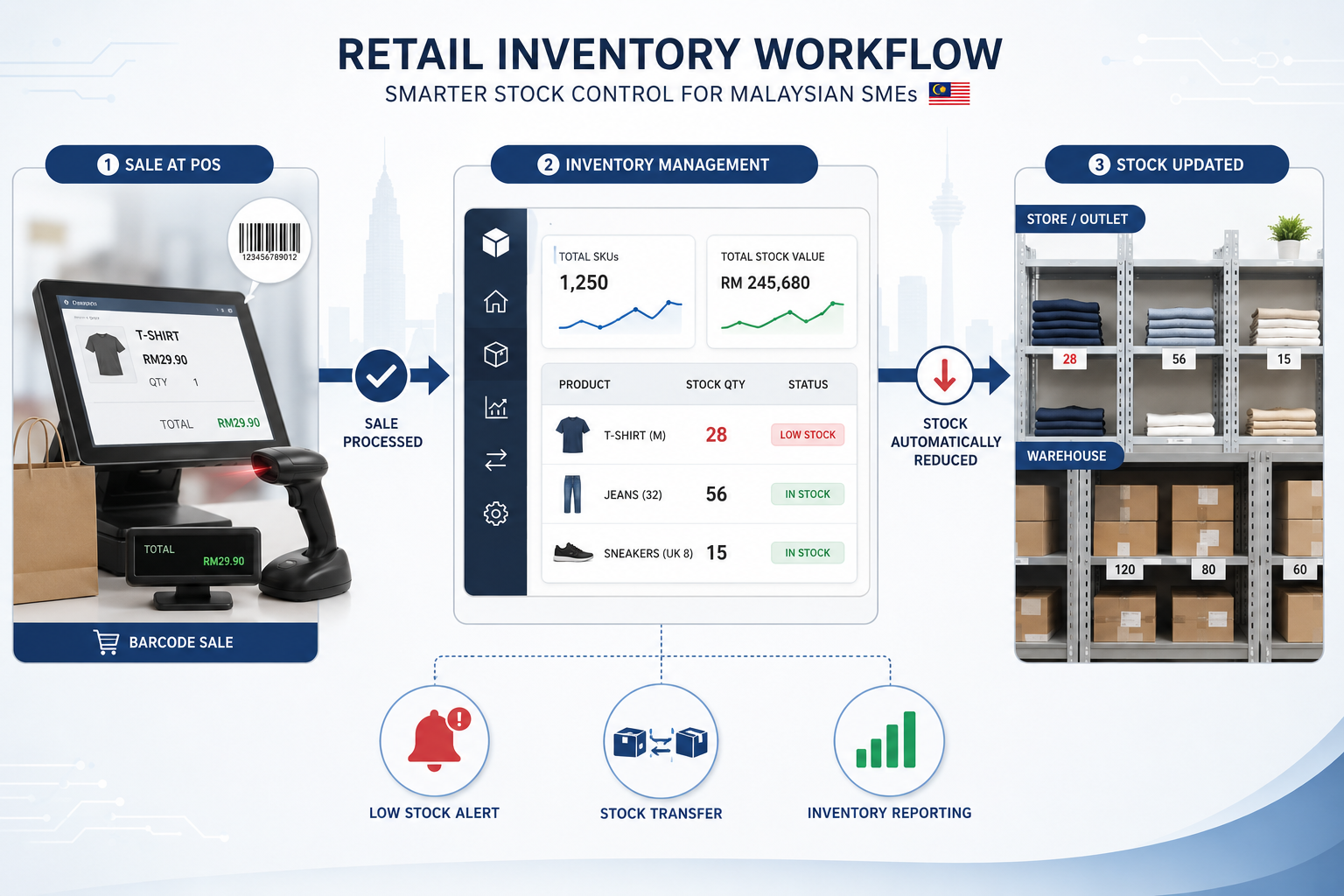
A suitable retail POS system should help you:
- Update stock when sales are recorded
- Monitor stock across different locations
- Set or review reorder levels
- Handle stock transfers between outlets
- Identify fast- and slow-moving items
- Maintain more reliable stock movement records
For businesses using AutoCount POS Retail together with AutoCount Accounting, POS and inventory information can be connected within the AutoCount ecosystem, reducing the need to repeatedly transfer sales information between separate systems.
Sales Reporting and Analytics
Collecting sales data is only useful when the information can help you make decisions.
For businesses with multiple branches, consolidated reporting is especially important. Management should be able to compare locations without manually combining separate spreadsheets or reports from every outlet.
Customer Management and Loyalty
A POS system can also help retailers maintain customer information and run loyalty programmes without relying on a completely separate system.
Depending on the POS solution, retailers may be able to manage membership information, loyalty points, redemption, purchase history and customer-specific pricing.
Purchase history can also provide useful insight into customer behaviour. Instead of relying only on assumptions, retailers can use actual transaction data when planning promotions and evaluating what customers are buying.
Multi-Outlet and Chain Store Suppport
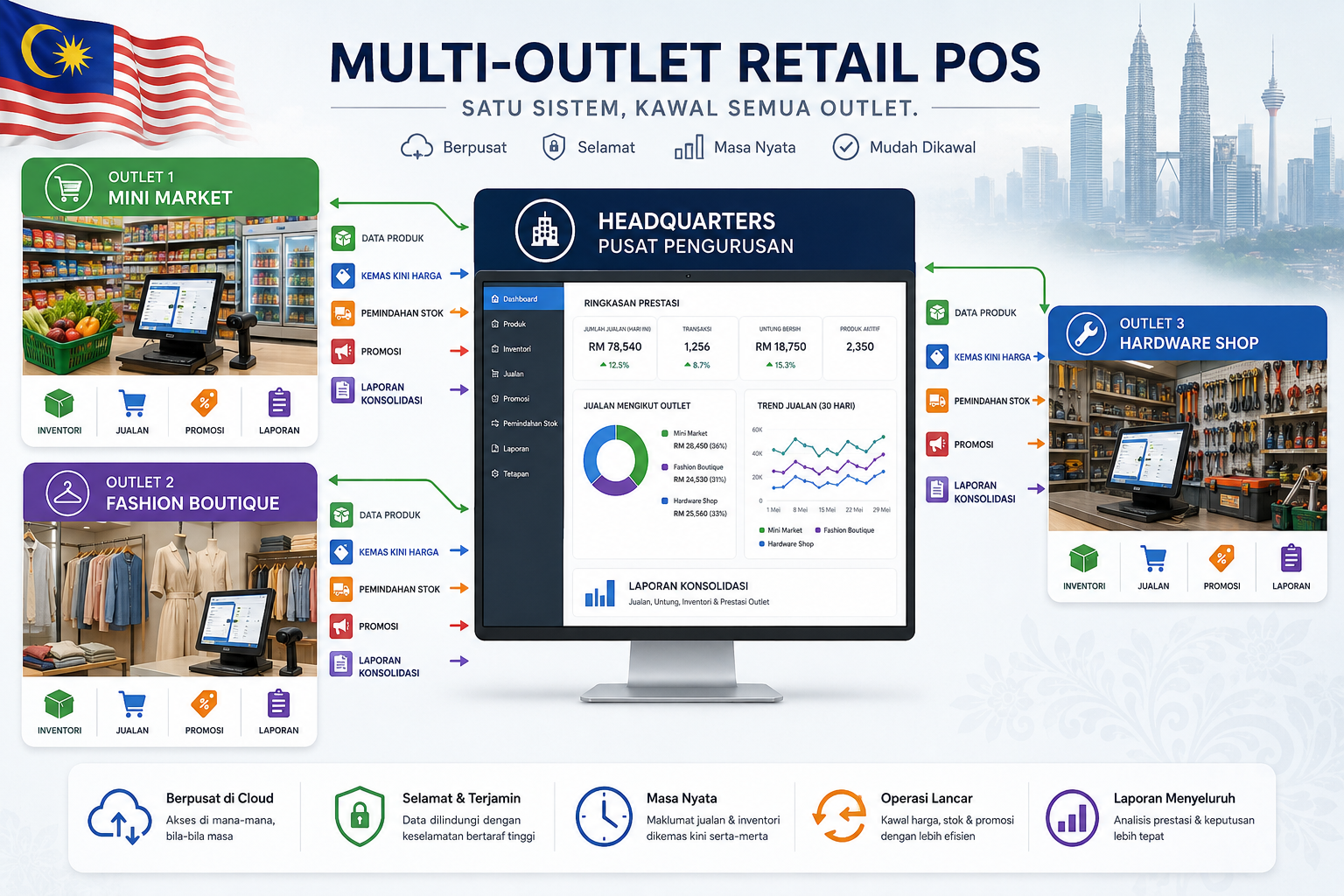
If you operate more than one outlet — or expect to expand in the future — check whether the POS system is designed for centralised management.
Important capabilities may include:
- Shared product information
- Centralised price management
- Promotion management
- Stock transfers between outlets
- Outlet-level permissions
- Branch sales reporting
- Consolidated management reporting
Choosing a system that works for one store but becomes difficult to manage when you open additional outlets can create unnecessary migration work later.
AutoCount POS Retail can also be considered for chain-store and multi-outlet retail environments where businesses need centralised control across multiple locations.
Malaysia e-Invoice Support
e-Invoice support should now be part of the POS evaluation process for Malaysian retailers that fall within the mandatory implementation scope.
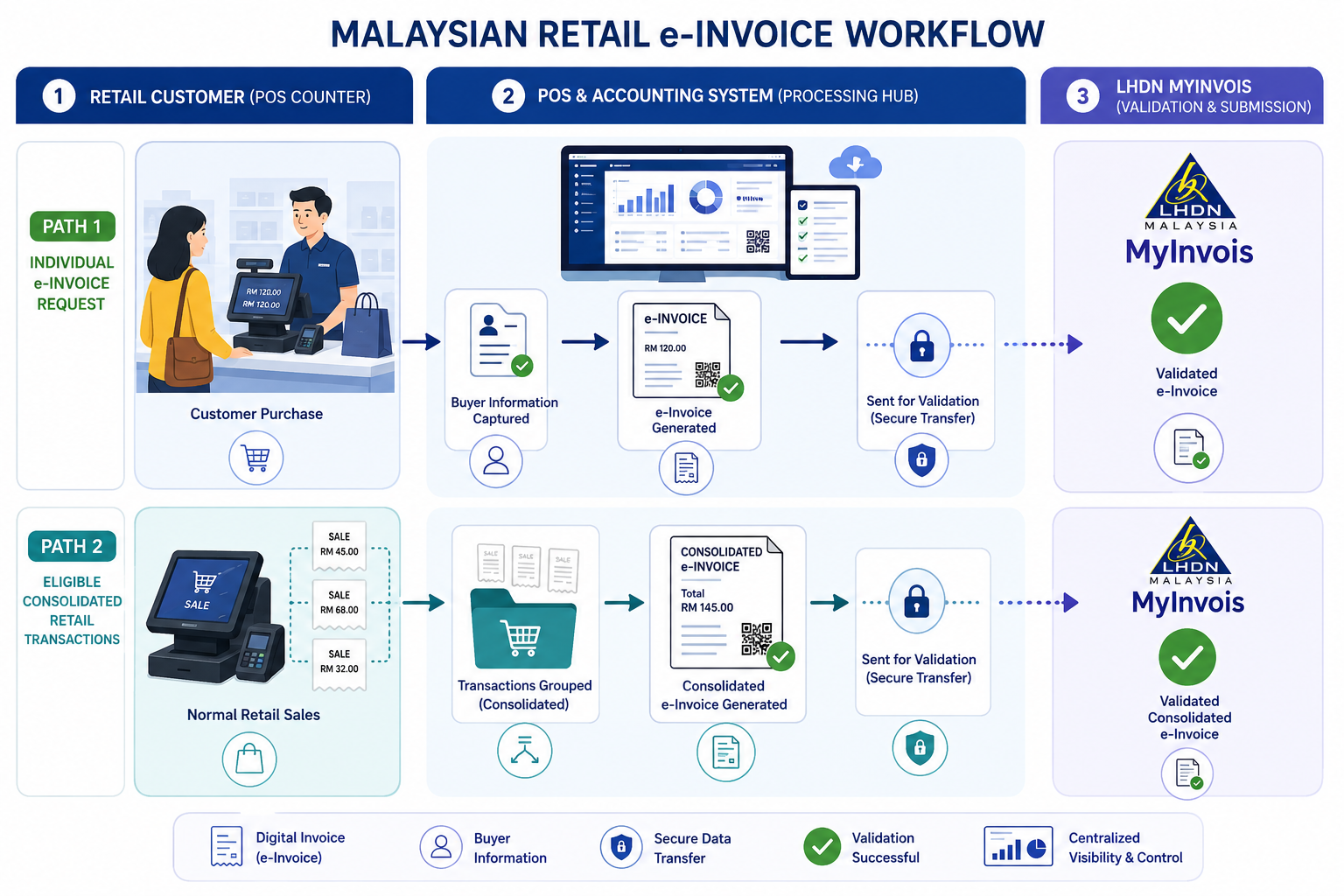
A suitable POS and accounting workflow should make it easier to maintain transaction records, collect the required buyer information when an individual e-Invoice is requested and support the relevant e-Invoice submission process.
For retail transactions, this does not necessarily mean issuing an individual e-Invoice to every walk-in customer. HASiL allows eligible transactions involving buyers who do not require an individual e-Invoice to be consolidated, subject to the prevailing rules and restrictions.
- Important
OneSales should be evaluated as an ecosystem, not simply as a cashier system. The more sales channels your business operates, the more valuable centralised inventory and transaction data can become.
AutoCount’s e-Invoice functionality can form part of this workflow for businesses using AutoCount POS and Accounting.
Current HASiL guidance confirms both the below-RM1-million exemption and the availability of consolidated e-Invoice treatment for eligible transactions.
Integration with Accounting Software
A POS system should not create another isolated set of business data.
If sales information has to be manually entered into accounting software again, your team spends additional time on duplicate work and increases the risk of errors.
A properly integrated setup can connect areas such as:
- Retail sales
- Payment records
- Inventory movements
- Customer transactions
- Accounting records
- Management reporting
Because AutoCount POS Retail forms part of the broader AutoCount ecosystem, retailers using AutoCount Accounting can connect front-end retail operations with their accounting and inventory workflow.
Retail POS System Checklist
Before choosing a system, use this checklist to compare your options.
| Feature | Why It Matters |
|---|---|
| Inventory management | Helps maintain accurate stock information as products are sold and transferred. |
| Barcode support | Speeds up checkout and reduces manual item entry. |
| Sales reporting | Helps management understand sales performance and product movement. |
| Multi-outlet support | Allows growing retailers to manage branches more efficiently. |
| Customer and loyalty management | Helps manage members, purchase history and loyalty programmes. |
| Accounting integration | Reduces duplicated data entry between POS and accounting. |
| e-Invoice support | Helps businesses within the mandatory scope manage their e-Invoice workflow. |
| User access control | Helps control what cashiers, supervisors and managers can access. |
| Backup and data security | Protects important business and transaction information. |
| Local implementation and support | Makes setup, training and troubleshooting easier. |
A feature list alone should not decide your purchase. The important question is whether those features match the way your business actually operates.
Retail Businesses That Benefit Most From a POS System
Different retail businesses have different operational requirements. The POS system you choose should therefore match your products, transaction volume and inventory workflow.
Mini Markets and Grocey Stores
Mini markets manage high transaction volumes and large numbers of SKUs, often with tight margins. Fast checkout, barcode scanning, stock control and reorder visibility are therefore particularly important.
AutoCount also provides solutions for mini market and grocery operations.
Pharmacies
Pharmacies may need more detailed stock management because products can have different batches, expiry dates and other operational requirements.
Before selecting a pharmacy POS system, check whether it can handle the specific stock and reporting controls required by your business rather than relying only on standard cashier functions.
Fashion Boutiques
Fashion retailers commonly manage products across different sizes, colours, seasons and promotions.
A suitable POS system should make product variants, pricing and stock availability easy for staff to manage.
Hardware Shops
Hardware businesses often carry large numbers of products and may sell the same item using different units of measurement.
Their POS and inventory system should therefore be able to handle the way products are purchased, stored and sold rather than treating every item as a simple single-unit product.
Mobile Phone and Computer Shops
Technology retailers often sell higher-value products where serial-number or warranty information may be important.
For these businesses, the POS system should connect the retail transaction with the appropriate stock and product tracking process.
Cloud POS vs On-Premise POS: Which is Right for Your Retail Business?
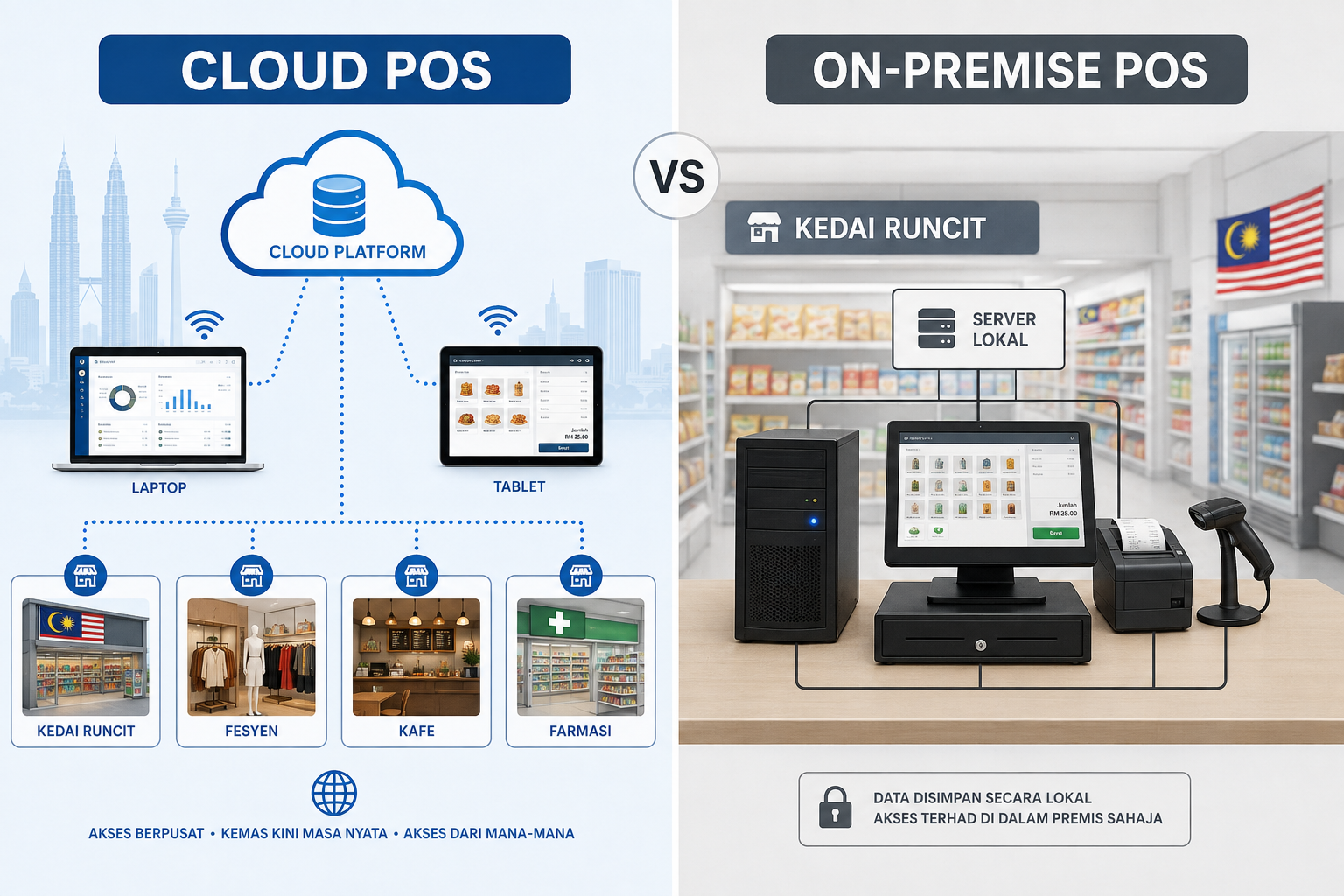
One of the most common decisions when choosing a retail POS system is whether to use a cloud-based or on-premise setup.
Neither approach is automatically better for every retailer.
For retailers operating in locations with unreliable connectivity, offline operation may be an important requirement. For businesses where management needs to access information from different locations, cloud-based systems may be more attractive.
AutoCount provides different deployment options within its product ecosystem, so the right approach should be chosen according to the retailer’s operational requirements rather than simply choosing cloud because it is newer.
| Consideration | Cloud POS | On-Premise POS |
|---|---|---|
| System location | Hosted remotely and accessed through the internet | Installed on local business hardware |
| Remote access | Generally easier | Depends on the system and configuration |
| Internet dependency | Usually more dependent on connectivity, although some systems support offline functions | Core local operation can be less dependent on internet connectivity |
| Infrastructure | Usually requires less local server infrastructure | May require local hardware and IT management |
| Updates | Often centrally managed | Depends on the software and implementation |
| Customisation | Depends on the provider | Can be suitable where more local configuration is required |
| Multi-outlet visibility | Often convenient for distributed operations | Can also support multiple outlets when properly configured |
How to Choose the Right Retail POS System
Instead of comparing POS systems only by price or the number of features advertised, evaluate how each option fits your actual operation.
-
Map Your Current Retail Workflow
List how your business currently handles checkout, inventory, purchasing, returns, customer accounts, accounting and reporting.
This makes it easier to identify what the new POS system actually needs to improve.
-
Identify Your Must-Have Features
Separate essential requirements from features that would simply be nice to have.
For example, a single fashion boutique and a ten-outlet mini-market chain will have very different requirements.
-
Think About Future Expansion
Consider whether the system can support additional users, outlets, products and transaction volume.
Changing systems again because your business outgrows the software can be far more expensive than planning for growth from the beginning.
-
Check Accounting and e-Invoice Integration
Ask exactly how sales information reaches your accounting system and how the software handles your applicable e-Invoice workflow.
Avoid assuming that two products “integrate” simply because both can export Excel files.
-
Ask for a Workflow Demonstration
A generic product presentation is not enough.
Ask the provider to demonstrate the processes that matter to your business, such as:
- ● Completing a normal sale
- ● Processing a return
- ● Checking stock at another outlet
- ● Transferring inventory
- ● Changing a product price
- ● Reviewing a sales report
- ● Handling an e-Invoice request
- ● Posting POS information into accounting
-
Evaluate Implementation and Support
The software itself is only one part of a successful POS project.
Ask who will configure the system, migrate existing information, train your employees and provide support after implementation.
What Makes AutoCount POS Retail a Strong Choice for Malaysian Retailers?
For retailers already considering the AutoCount ecosystem, there are several practical reasons AutoCount POS Retail may be worth evaluating.
Integrated Retail and Account Workflow
AutoCount POS can be used together with AutoCount Accounting, helping businesses connect front-end retail transactions with inventory and accounting processes instead of operating two completely separate systems.
Suitable for Different Retail Environments
AutoCount POS is used for retail operations ranging from standalone shops to businesses with multiple outlets.
The appropriate configuration will depend on areas such as transaction volume, inventory complexity, branch structure and reporting requirements.
Malaysia-Focused e-Invoice Functionality
For businesses that fall within Malaysia’s e-Invoice implementation scope, AutoCount provides e-Invoice functionality designed to work with the broader accounting workflow.
Local Implementation and Support
The quality of implementation matters as much as the software itself.
Businesses evaluating AutoCount should therefore consider not only the product features, but also the setup, training, data migration and ongoing support available from their implementation provider.
Choosing the Right Retail POST System in Malaysia
The right retail POS system should do more than make checkout faster.
It should help you maintain better stock records, understand sales performance, manage customers, connect multiple outlets where required and reduce duplicated work between your retail and accounting systems.
For Malaysian businesses within the mandatory e-Invoice scope, the POS and accounting workflow should also make compliance easier rather than creating additional manual work.
Before committing to any system, identify your requirements and ask the provider to demonstrate how those actual workflows will operate.
AutoCount System also provides implementation, e-Invoice setup and data migration services for businesses moving from an existing system.
Frequently Asked Questions
What is a retail POS system?
A retail POS system is software and hardware used to record customer sales and manage related retail operations. Modern POS systems can also connect checkout transactions with inventory, customer management, reporting, accounting and other business processes.
What should I look for in a retail POS system in Malaysia?
Look for inventory management, sales reporting, barcode support, customer management, accounting integration, appropriate e-Invoice functionality, user access controls and multi-outlet capability if your business has more than one location. Local implementation and support should also be considered.
Does every Malaysian retailer need an e-Invoice POS system?
Businesses that fall within Malaysia’s mandatory e-Invoice scope should ensure their system can support their required e-Invoice workflow. Under the current HASiL implementation timeline, taxpayers with annual turnover or revenue below RM1 million are exempt from implementation.
Is cloud POS better than on-premise POS?
Neither is automatically better. Cloud POS can make remote access and centralised management convenient, while on-premise systems may be suitable for businesses that require local operation or specific configurations. The best option depends on your internet connectivity, outlet structure, IT requirements and business workflow.
Can AutoCount POS integrate with accounting and inventory?
AutoCount’s retail POS ecosystem is designed to work with AutoCount Accounting and inventory processes, helping businesses connect sales, stock and accounting information rather than maintaining completely separate records.
AutoCountSystem’s existing product content also describes its integrated POS, inventory and accounting ecosystem.
Need Help Choosing the Right Retail POS System?
Not sure which POS setup suits your retail business? Contact SL Software Solutions and we’ll help you review your inventory, outlets, accounting and e-Invoice requirements to recommend the right AutoCount POS setup for your business.