How to Use AutoCount V2 Rev 45 for Malaysia e-Invoice SVDP
AutoCount Accounting V2 Rev 45 introduces dedicated functions for preparing, submitting and tracking supported transactional, consolidated and self-billed e-Invoices under Malaysia’s Special Voluntary Disclosure Programme.
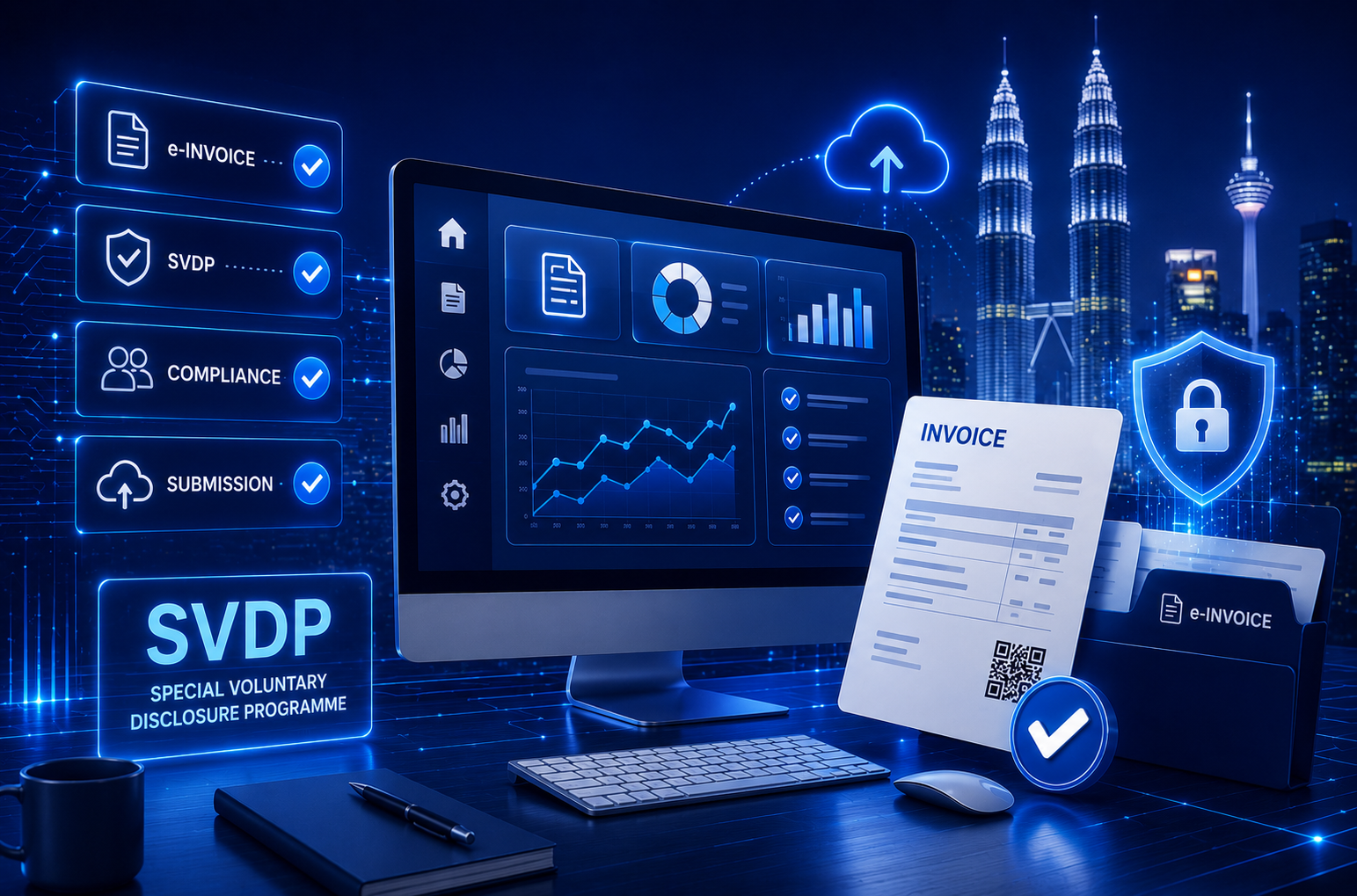
What Is the e-Invoice Special Voluntary Disclosure Programme?
Malaysia’s e-Invoice Special Voluntary Disclosure Programme, or SVDP, allows eligible taxpayers to address certain missing, incorrect or non-compliant e-Invoices relating to periods after their mandatory e-Invoice implementation date.
The programme runs from 7 July 2026 until 31 December 2027. Submitting a document under SVDP does not automatically guarantee protection from penalties. Every disclosure must still be accurate, complete and submitted according to the applicable LHDN requirements.
For detailed information about SVDP eligibility, document versions, RM10,000 transactions, monthly consolidation and self-billed e-Invoices, read our Malaysia e-Invoice SVDP Guide.
AutoCount e-Invoice SVDP Submission Workflow
AutoCount Accounting Version 2.2.32.45, also known as AutoCount V2 Rev 45, introduces dedicated functions for managing supported SVDP e-Invoice submissions.
The main functions include:
- A dedicated SVDP setting
- An e-Invoice SVDP submission checkbox
- Support for multiple transaction document types
- Consolidated e-Invoice SVDP generation
- Possible late-submission detection
- Warnings when transactions from multiple months are selected
- SVDP tracking columns
- Improved self-billed document filtering
These functions help users review historical e-Invoice records more systematically and reduce the risk of selecting an unsuitable submission period or process.
AutoCount provides the relevant software functions, but businesses remain responsible for confirming whether each transaction qualifies for submission under SVDP.
AutoCount V2 Rev 45 Supports e-Invoice SVDP
The general AutoCount SVDP process is:
- Upgrade AutoCount Accounting to Version 2.2.32.45.
- Back up the company database before starting the upgrade.
- Enable the SVDP function in AutoCount e-Invoice Settings.
- Review the affected transactions and reporting periods.
- Determine whether the document should be transactional, consolidated or self-billed.
- Select the e-Invoice SVDP option in the relevant submission screen.
- Submit the document for validation.
- Review the status and SVDP indicator in AutoCount.
- Cross-check the validated document through the MyInvois Portal.
This workflow provides a general overview. Users should still confirm the correct transaction period, document type and submission method before proceeding.
Important AutoCount Upgrade Notice
- Warning
Installing AutoCount Accounting Version 2.2.32.45 upgrades the company database to Database Version 2.2.97.
Create a complete database backup before starting the upgrade. Businesses using plugins, customised reports, integrations or customised functions should also confirm compatibility before updating.
Upgrade Preparation Checklist
- Back up the AutoCount database.
- Check the current AutoCount Accounting version.
- Review installed plugins and customised functions.
- Confirm that integrations and customised reports are compatible.
- Upgrade AutoCount Accounting to Rev 45.
- Confirm that the database upgrade has completed successfully.
- Review the e-Invoice Settings before processing live documents.
How to Enable SVDP in AutoCount Accounting
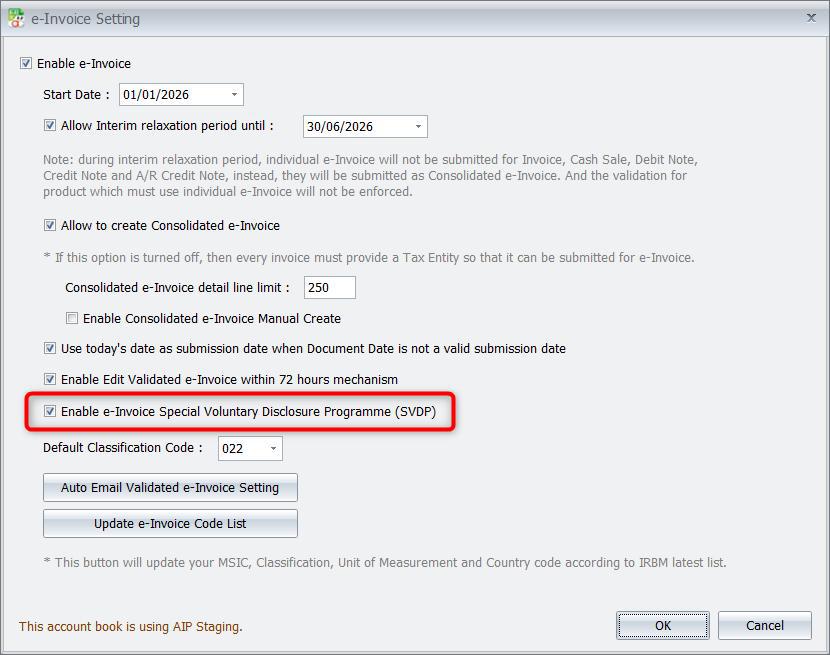
Before processing an SVDP submission, users must first enable the function in AutoCount Accounting.
Go to:
e-Invoice Menu → e-Invoice Setting → Setting
Select:
Enable e-Invoice Special Voluntary Disclosure Programme (SVDP)
After the setting has been enabled, the relevant SVDP options will appear in the supported transaction and consolidated e-Invoice screens.
The SVDP setting is scheduled to be hidden after 31 December 2027, when the programme ends.
Submit Transactional e-Invoices Under SVDP
After enabling SVDP, users can prepare their accounting documents through the normal transaction entry process.
A new e-Invoice SVDP checkbox is available under the Edit tab in the Submit e-Invoice section. Select this checkbox before submitting an eligible document under SVDP.
The checkbox is available for the following document types:
- Invoice
- Cash Sale
- Debit Note
- Credit Note
- AR Credit Note
- Self-Billed e-Invoice
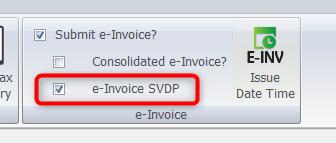
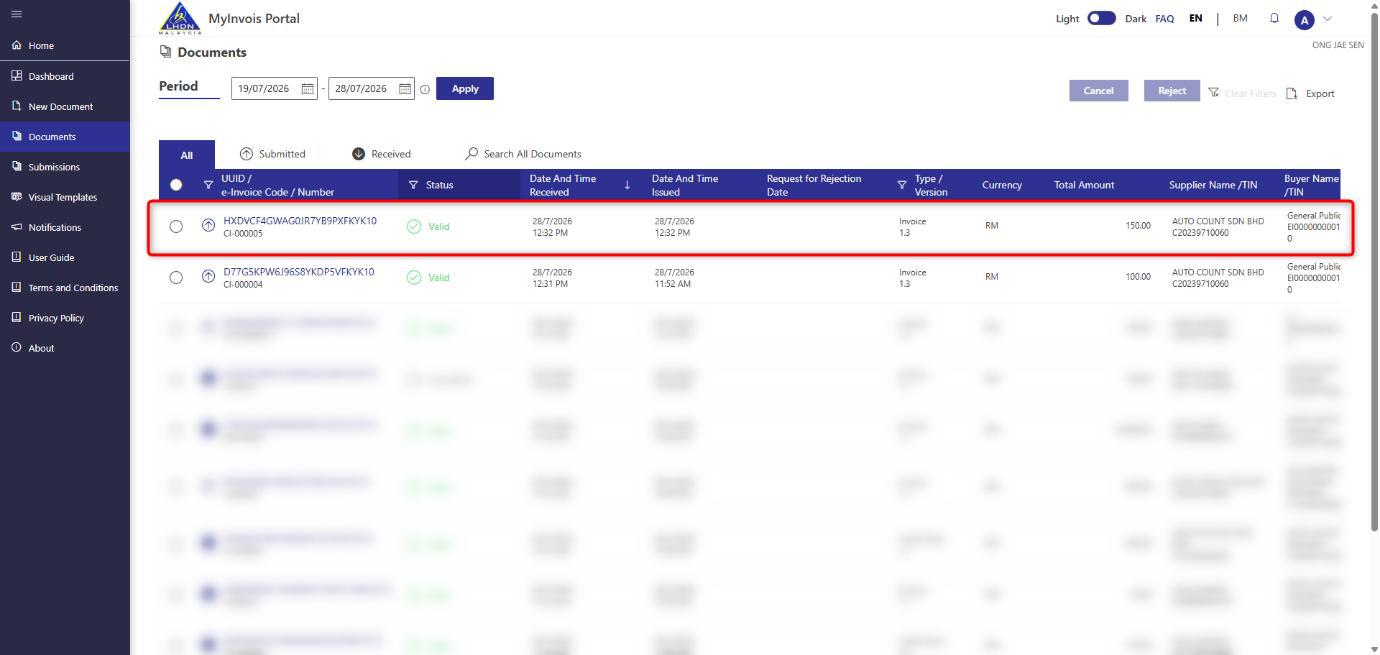
After the document has been validated, cross-check it through the MyInvois Portal. The AutoCount guide shows a validated SVDP transaction displaying Invoice Version 1.3.
AutoCount also provides an e-Invoice SVDP column in the transaction command form, allowing users to identify documents submitted through the programme.
The transaction-level SVDP checkbox is scheduled to be disabled or greyed out after 31 December 2027.
Consolidated e-Invoice SVDP Support
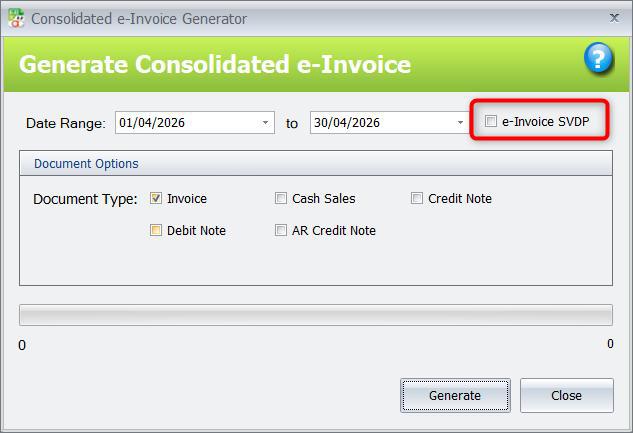
AutoCount V2 Rev 45 also supports SVDP submissions for consolidated e-Invoices.
Go to:
e-Invoice → Consolidated e-Invoice → New
The Generate Consolidated e-Invoice window includes an e-Invoice SVDP checkbox. Select this option when generating an eligible consolidated e-Invoice for voluntary disclosure.
Previously unsubmitted consolidated e-Invoices should be organised according to their relevant transaction month. Transactions covering several months should not be combined into one consolidated submission.
How AutoCount Detects Possible Late Consolidated Submissions
AutoCount V2 Rev 45 can identify a possible late consolidated e-Invoice submission by comparing the generation date with the selected transaction period.
The system applies the following detection logic:
| Generation Timing | Selected Transaction Period | Possible Late Submission |
|---|---|---|
| On or before the seventh day of the current month | Previous month | No |
| On or before the seventh day of the current month | Two months earlier or more | Yes |
| After the seventh day of the current month | Previous month | Yes |
| After the seventh day of the current month | Earlier periods | Yes |
For example, if the current month is July 2026:
| Generation Date | Consolidated Period | System Detection |
|---|---|---|
| 7 July 2026 | June 2026 | Not detected as late |
| 7 July 2026 | March 2026 | Detected as possibly late |
| 20 July 2026 | June 2026 | Detected as possibly late |
| 20 July 2026 | March 2026 | Detected as possibly late |
When a possible late submission is detected, AutoCount prompts the user to consider submitting the consolidated e-Invoice under SVDP.
If the SVDP setting has not been enabled, the system will first prompt the user to enable it.
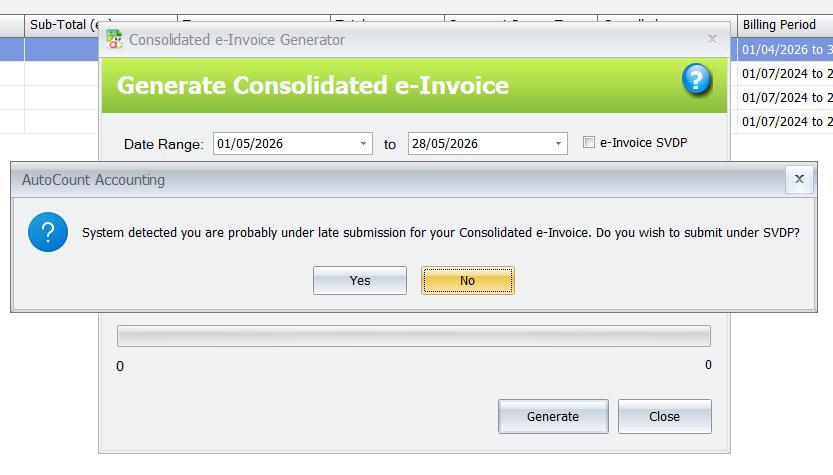
AutoCount’s detection is a review prompt. It helps identify a potentially late period, but it does not independently determine whether the transaction is legally eligible for SVDP.
Responding to the Late-Submission Warning
When AutoCount displays the possible late-submission warning:
- Select Yes to continue the consolidated e-Invoice process using SVDP.
- Select No to continue the consolidated e-Invoice process without SVDP.
- Warning
Continuing without SVDP does not automatically mean that the submission method is compliant. Review the selected period and confirm the appropriate treatment before proceeding.
Warning for Consolidating Transactions from Multiple Months
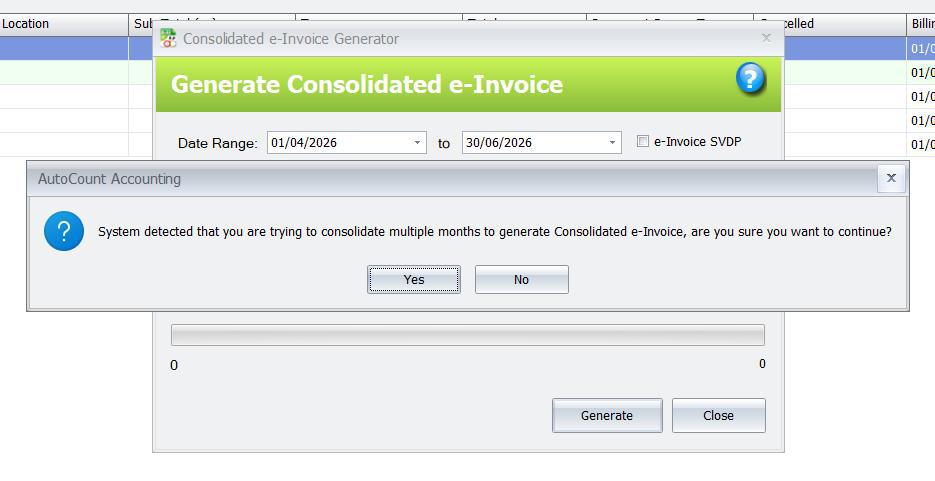
Previously unsubmitted consolidated e-Invoices should be prepared according to the relevant transaction month.
Businesses should not combine transactions from several months into one consolidated e-Invoice.
For example, if consolidated e-Invoices were missed for January, February and March, prepare three separate consolidated e-Invoices:
- One for January
- One for February
- One for March
AutoCount displays a warning when transactions from more than one month are selected for a single consolidated e-Invoice.
When the warning appears:
- Selecting Yes allows AutoCount to continue generating the consolidated e-Invoice.
- Selecting No cancels the process so the selected period can be corrected.
- Important
The warning does not completely block the user from continuing. Treat it as an alert to review the date range before submission.
Track and Check SVDP Submissions
AutoCount V2 Rev 45 provides an e-Invoice SVDP column in the relevant transaction and consolidated e-Invoice command forms.
The column helps users:
- Identify documents submitted under SVDP
- Separate normal submissions from SVDP submissions
- Review historical records
- Check the submission status
- Compare AutoCount records with MyInvois
- Improve internal review and audit tracking
Check the Submission in AutoCount
- Open the relevant transaction or consolidated e-Invoice listing.
- Open the Column Chooser.
- Display the e-Invoice SVDP column.
- Confirm that the correct document is marked.
- Review the e-Invoice status and UUID where applicable.
Check the Submission in MyInvois
- Log in to the MyInvois Portal.
- Search for the submitted document.
- Confirm that the document has been validated.
- Review the displayed document version.
- Compare the document details with the corresponding AutoCount record.
Checking both systems helps confirm that the document was transmitted, validated and recorded correctly.
Improved Self-Billed e-Invoice Filtering
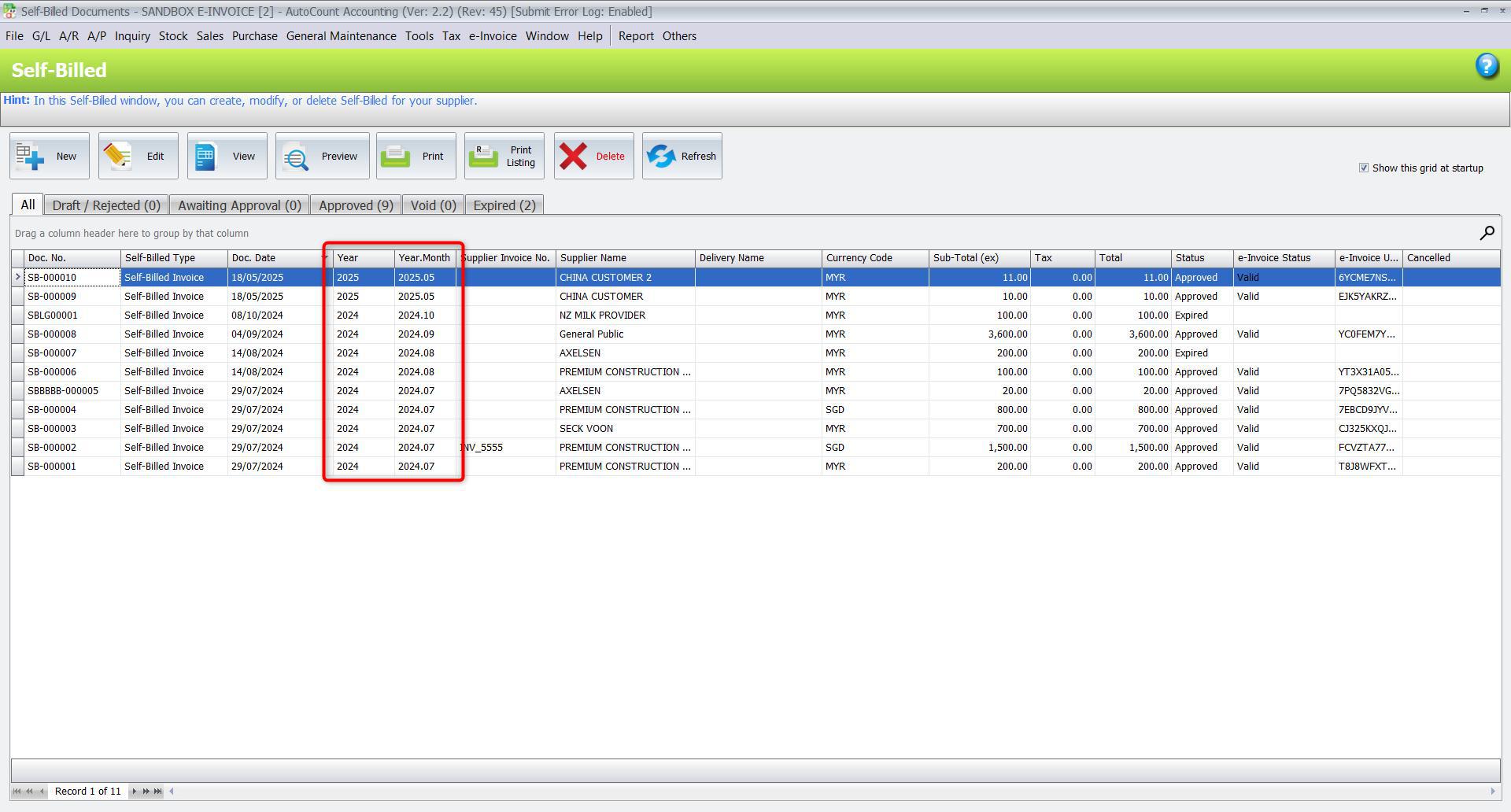
In addition to the new SVDP functions, AutoCount V2 Rev 45 adds two filtering columns to the Self-Billed Command Form and Self-Billed Print Listing:
- Year
- Year.Month
These columns make it easier to locate and review self-billed documents according to their year and reporting month.
If the columns are not displayed, add them through the Column Chooser in the relevant Self-Billed Command Form or Print Listing.
This improvement can help users review historical self-billed records more efficiently when checking earlier reporting periods.
SVDP Pre-Submission Checklist
Before submitting a historical e-Invoice under SVDP, confirm the following:
- The company’s mandatory e-Invoice implementation date
- The documents or reporting periods that were missed
- Whether an earlier submission contained incorrect information
- The correct transaction month
- Whether the document should be transactional or consolidated
- Whether a self-billed e-Invoice is required
- Whether the buyer, supplier, TIN and tax information are correct
- Whether SVDP has been enabled in AutoCount
- Whether the selected consolidated period covers only the intended transaction month
- Whether the document has already been submitted
- Whether the submission status is reflected correctly in MyInvois
- Whether the selected treatment follows the latest applicable requirements
AutoCount provides the software functions needed to prepare and submit supported documents, but the taxpayer remains responsible for the accuracy, completeness and eligibility of the disclosure.
Why Upgrade to AutoCount V2 Rev 45?
AutoCount V2 Rev 45 provides a more structured way to manage supported e-Invoice voluntary disclosures.
The update can help businesses:
- Submit supported documents using the SVDP option
- Identify possible late consolidated submissions
- Review warnings when multiple transaction months are selected
- Track documents submitted under SVDP
- Review self-billed documents by year and reporting month
- Maintain clearer internal e-Invoice records
- Reduce manual checking when reviewing historical transactions
These functions are especially useful for businesses with a large number of past transactions or multiple affected reporting periods.
Need Help Upgrading AutoCount for e-Invoice SVDP?
The e-Invoice SVDP gives eligible businesses an opportunity to address certain previous e-Invoice compliance issues before the programme ends on 31 December 2027.
However, each submission must still be reviewed carefully to ensure that the document type, transaction period and information are correct.
SL Software Solutions Sdn Bhd can assist with:
- AutoCount V2 Rev 45 upgrades
- Database backup and upgrade preparation
- Plugin and customisation compatibility checks
- SVDP function setup
- AutoCount e-Invoice Settings review
- Consolidated e-Invoice processing
- Self-billed e-Invoice review
- User training and implementation support
Businesses that need to use the SVDP functions should update their AutoCount Accounting system before processing the affected submissions.
- Disclaimer:
This article is provided for general information and software guidance only. It should not be treated as tax, legal or professional compliance advice.
Businesses should refer to the latest LHDN e-Invoice guidelines and consult a qualified tax professional where necessary.
SVDP eligibility and treatment depend on the accuracy, completeness and circumstances of each disclosure.
Frequently Asked Questions
Does AutoCount support Malaysia’s e-Invoice SVDP?
Yes. AutoCount Accounting Version 2.2.32.45, also known as Rev 45, includes dedicated functions for supported e-Invoice SVDP submissions.
How do I enable SVDP in AutoCount?
Go to:
e-Invoice Menu → e-Invoice Setting → Setting
Then enable:
Enable e-Invoice Special Voluntary Disclosure Programme (SVDP)
Which documents support the AutoCount SVDP checkbox?
The SVDP checkbox is available for Invoice, Cash Sale, Debit Note, Credit Note, AR Credit Note and Self-Billed e-Invoice documents.
Can AutoCount submit consolidated e-Invoices under SVDP?
Yes. Open the Generate Consolidated e-Invoice window and select the e-Invoice SVDP checkbox before generating an eligible consolidated document.
What happens to the AutoCount SVDP function after 31 December 2027?
The SVDP setting is scheduled to be hidden after 31 December 2027. The transaction-level SVDP checkbox will also be disabled or greyed out after that date.
Need Help Preparing Your AutoCount e-Invoice SVDP Submission?
Contact SL Software Solutions to check your AutoCount version, review your e-Invoice settings, and confirm the correct SVDP document type before submission.