
-
AutoCount Accounting Features
-
- Approval Workflow
- Audit Trail
- Auto Save in Draft Folder
- AutoCount Contra Account
- AutoCount License Setting Guide
- Deposit Tracking & Management
- Documents Numbering Format
- Full Transfer and Partial Transfer
- Import Data to AutoCount Accounting Using Excel
- Informative Charts and Analytical Data
- Layout Customization
- Multi Pricing
- Sales and Services Tax
- Schedule Backup
- Search Lookup Edit
- View Documents Flow
- AutoCount Feature Stock Take
- Column Chooser
- Show Remaining (3) Collapse
-
AutoCount Cloud Accounting
-
AutoCount E-Invoice
-
AutoCount HRMS User Guide
-
AutoCount Modules
-
- Activity Stream
- Advanced Financial Report
- Advanced Item
- Advanced Multi-UOM
- Advanced Quotation Module
- Basic Multi-UOM
- Budget Module
- Consignment
- Filter By Salesman
- FOC Quantity
- Formula
- Item Batch
- Item Package
- Landing Cost
- Multi-Currency
- Multi-Dimensional Analysis
- Multi-Location
- Project Account
- Recurrence
- Remote Credit Control Module
- Stock Assembly
- User Defined Fields (UDF)
- AutoCount SST Hidden Functions
- AutoCount SST Submission - Service Tax
- AutoCount Scripting Module User Guide
- AutoCount Bonus Point Module User Guide
- Show Remaining (11) Collapse
-
AutoCount Plugins
-
- Fixed Assets Management
- Goldsmith
- TD Ordering Mobile Apps
- TD Stock Mobile Apps
- Universal Import Plugin
- DMS Import Plugin
- AutoCount Item Scope Plugin
- AutoCount Easy Knock Off Plugin
- AutoCount Pick List Plugin User Guide
- AutoCount Agent Validation Plugin User Guide
- AutoCount Barcode Generator Plugin User Guide
- AutoCount Bill Remark Plugin User Guide
- AutoCount Easy Batch Number Entry Plugin User Guide
- AutoCount Recurring Invoice Plugin User Guide
- AutoCount Easy Photo 2.0 User Guide
- AutoCount Pain Tracker User Guide
- AutoCount Credit Memo Plugin User Guide
- Show Remaining (2) Collapse
-
- AutoCount Easy Recurrence Plugin
- AutoCount Recurring Billing Plugin
- Event Management System
- AutoCount To-Do List Plugin
- AutoCount AutoBank Reconciliation Plugin
- Intercompany Billing Plugin User Guide
- AutoCount Basket Plugin User Guide
- Lead Management 2.0 Plugin
- AutoCount Service Contract Plugin User Guide
- Autocount Repacking Plugin
- AutoCount Scale Barcode Plugin User Guide
- AutoCount Progressive Billing
- AutoCount Optical Plugin
- AutoCount Meter Reading Plugin User Guide
- AutoCount Car Tint Film Plugin
- AutoCount Leasing Plugin User Guide
- AutoCount Integrator Plugin
- AutoCount Procurement Planning Plugin
- Show Remaining (3) Collapse
-
-
Form Template
-
Report Template
-
- Advance Quotation
- Cash Sale
- Consignment
- Consignment Movement
- Credit Note
- Debit Note
- Delivery Order
- FOC Quantity Analysis By Document Report
- Invoice
- Item Package Sales Report
- Monthly Sales Analysis
- Outstanding Sales Order Listing
- Profit And Loss Of Documents
- Quotation
- Sales Agent Contribution Report
- Sales Order
- Top/Bottom Sales Ranking
- Show Remaining (2) Collapse
-
- Available Stock Status Report
- Expired Item Batch Listing
- Inventory Physical Worksheet
- Stock Adjustment
- Stock Aging Report
- Stock Assembly
- Stock Assembly Order
- Stock Balance By Location
- Stock Balance Report
- Stock Card Report
- Stock Disassembly
- Stock Issue
- Stock Item Profit Margin
- Stock Movement Report
- Stock Receive
- Stock Take
- Stock Transfer
- Stock Write Off
- Show Remaining (3) Collapse
AutoCount E-Invoice Step Up:
How to Update Data Classification Codes?
Introduction to Data Classification Code
Learn how to update Data Classification Codes in AutoCount E-invoice is crucial for categorizing goods and services for tax purposes, such as the Sales and Service Tax (SST). Moreover, these codes ensure accurate submission of E-Invoices and eliminate errors during billing. As a result, businesses can maintain compliance with tax regulations and improve operational efficiency. This guide explains the methods to update Data Classification Codes efficiently, streamlining your invoicing process
AutoCount E-Invoice: Update Data Classification Code Video Guide
Discover how to update the data classification code in the AutoCount E-Invoice system, ensuring proper categorization for seamless processing.
What Is a Data Classification Code?
A Data Classification Code categorizes goods and services into specific groups as defined by LHDN (Lembaga Hasil Dalam Negeri). Each code corresponds to a type of product or service and is crucial for ensuring compliance when submitting tax-related documents.
For the latest Data Classification Codes, refer to the LHDN Malaysia Classification Codes Website.
Methods to Update Data Classification Codes in AutoCount
AutoCount provides three methods to update Data Classification Codes, catering to different business needs.
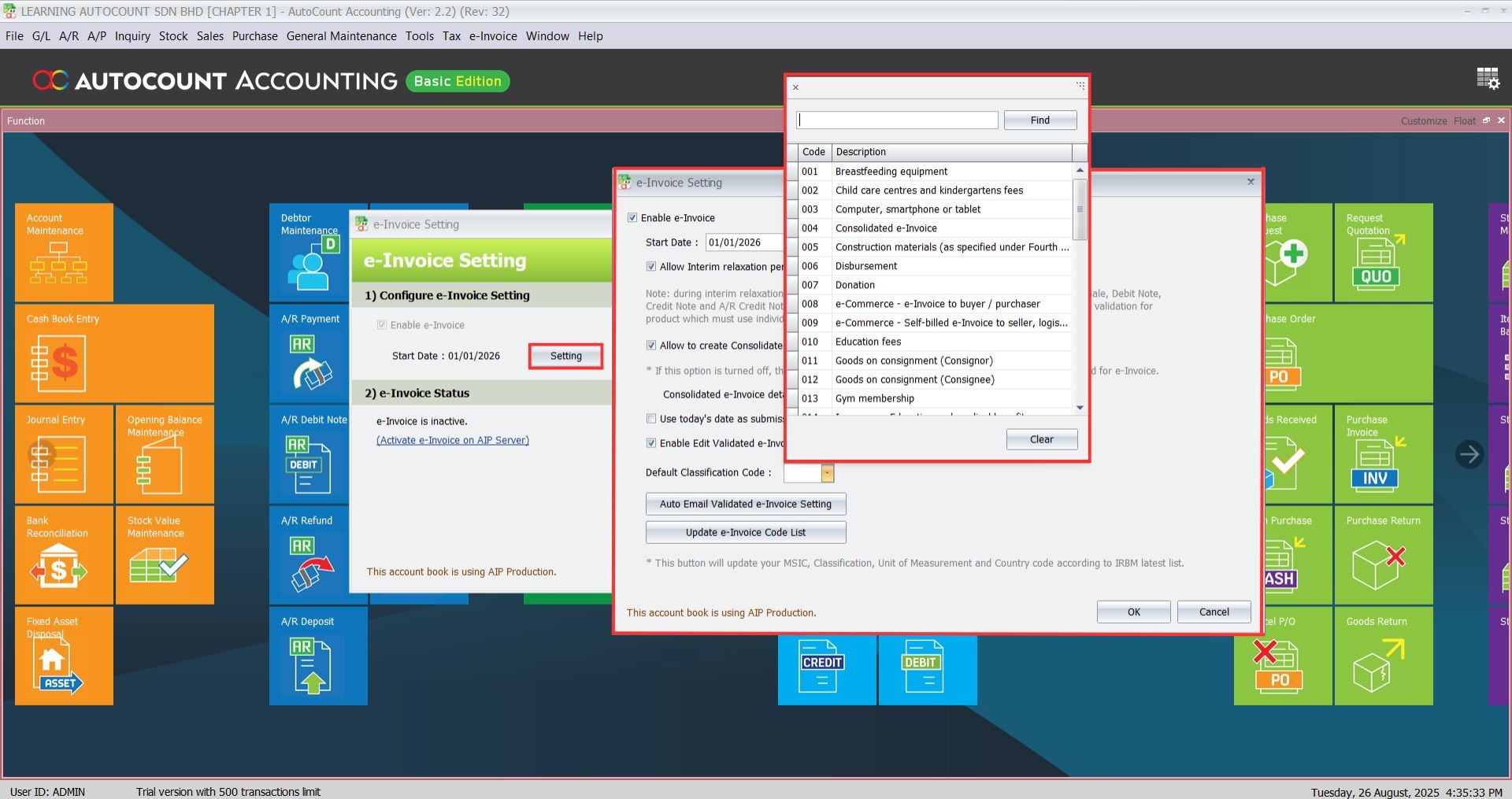
1. Default Classication Code
You may also set default classification code in e-invoice setting tab.
- Navigate to Find Stock Item and use the search filter to locate the items requiring updates.
Import Data Classification Codes via Excel is recommended for buiness managing hundreds or thousands of items.
2. Manual Update (Item Maintenance)
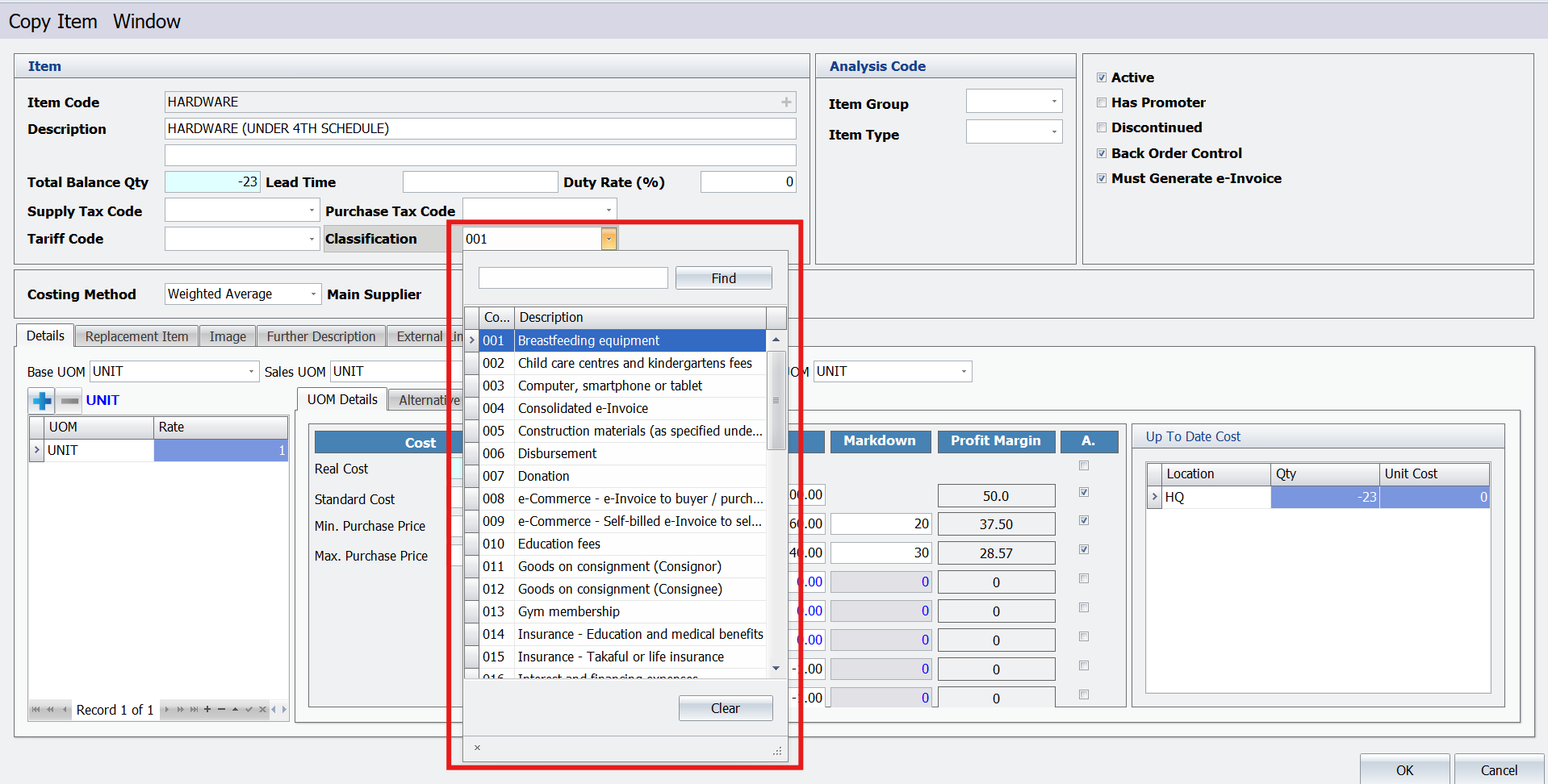
This method is ideal for updating a small number of items or when codes are assigned individually. For instance, if a business only needs to update specific products, manual updates provide a simple and effective solution.
3. Batch Update (Easy Edit)
The Easy Edit feature allows batch updates of Data Classification Codes for multiple items simultaneously. Therefore, it is particularly useful for businesses with medium-sized inventories. Additionally, it saves time by enabling users to edit several items in one operation.
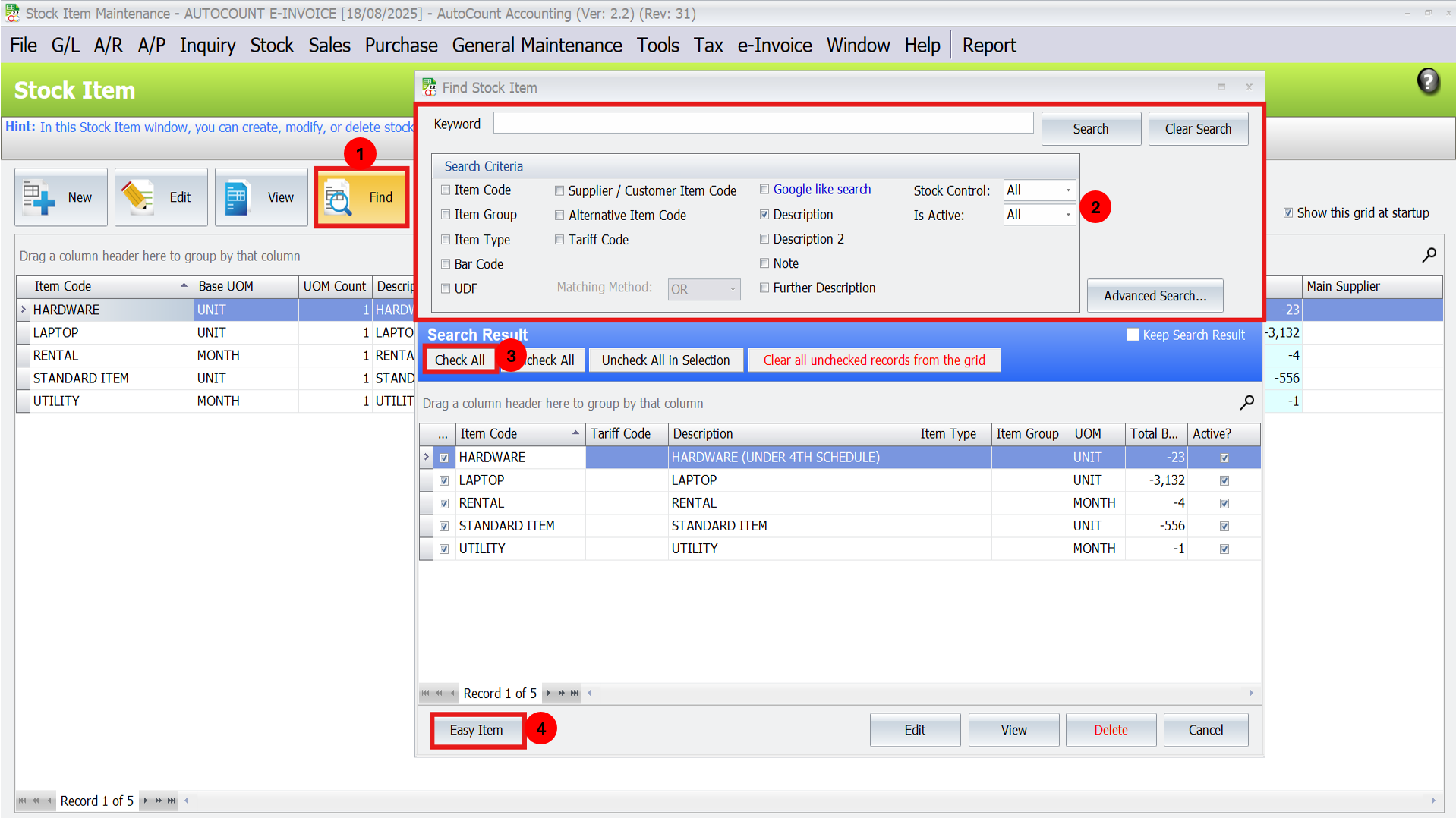
Find Stock Items:
- Navigate to Find Stock Item and use the search filter to locate the items requiring updates.
- You can search by keywords or criteria to quickly identify the relevant items.
- Click the Easy Edit button to enable batch editing.
Apply Range Set:
- Use the “Select All” button to highlight all items.
- Click the Range Set button beside “Select All” to assign a Data Classification Code to the selected items.
- Tick the checkbox for each item to apply changes, then save and refresh the list.

The batch update method works best for updating a large number of items within the same category.
4. Import Data Classification Codes via Excel
For bulk updates across extensive inventory lists, using Excel is the most efficient method.

Importing Data Classification Codes via Excel is recommended for businesses managing hundreds or thousands of items.
Important Notes When Updating Data Classification Codes
Mandatory Field
Data Classification Codes are compulsory for all items. Consequently, if left blank, the system will display a “Missing Classification” error and disallow saving the E-Invoice. To prevent this, ensure that all required fields are filled before proceeding.
Error Detection
AutoCount automatically detects blank Data Classification Codes during the invoice creation process, ensuring no submission errors occur.
Conclusion
Updating Data Classification Codes in AutoCount ensures compliance, simplifies invoicing, and reduces errors. Whether you’re managing a small inventory or thousands of items, AutoCount provides flexible solutions to suit your needs.
By keeping your Data Classification Codes up-to-date, you’ll enhance the efficiency of your invoicing processes and maintain smooth compliance with tax regulations.
Frequently Asked Questions
What happens if an item doesn’t have a Data Classification Code?
The system will flag an error and disallow saving the invoice until the missing code is updated. Hence, it is essential to verify that all items have valid codes before generating invoices.
Can I use a default Data Classification Code?
Yes, you can use default codes from AutoCount or the LHDN website.
How often should I update Data Classification Codes?
Update codes whenever new items are added to your inventory or when LHDN introduces new codes.
Can I edit multiple items at once?
Yes, use the Batch Update (Easy Edit) or Excel Import methods for bulk updates.
Do I need technical support for Excel imports?
Yes, it’s recommended to contact your AutoCount dealer for assistance with importing Excel files.
Are Data Classification Codes specific to Malaysia?
Yes, the codes align with Malaysian tax regulations under LHDN.
Interested in Getting AutoCount for your Business?
Contact our sales team today to explore pricing options and get started with the perfect solution for you.