
-
AutoCount Accounting Features
-
- Approval Workflow
- Audit Trail
- Auto Save in Draft Folder
- AutoCount Contra Account
- AutoCount License Setting Guide
- Deposit Tracking & Management
- Documents Numbering Format
- Full Transfer and Partial Transfer
- Import Data to AutoCount Accounting Using Excel
- Informative Charts and Analytical Data
- Layout Customization
- Multi Pricing
- Sales and Services Tax
- Schedule Backup
- Search Lookup Edit
- View Documents Flow
- AutoCount Feature Stock Take
- Column Chooser
- Show Remaining (3) Collapse
-
AutoCount Cloud Accounting
-
AutoCount E-Invoice
-
AutoCount HRMS User Guide
-
AutoCount Modules
-
- Activity Stream
- Advanced Financial Report
- Advanced Item
- Advanced Multi-UOM
- Advanced Quotation Module
- Basic Multi-UOM
- Budget Module
- Consignment
- Filter By Salesman
- FOC Quantity
- Formula
- Item Batch
- Item Package
- Landing Cost
- Multi-Currency
- Multi-Dimensional Analysis
- Multi-Location
- Project Account
- Recurrence
- Remote Credit Control Module
- Stock Assembly
- User Defined Fields (UDF)
- AutoCount SST Hidden Functions
- AutoCount SST Submission - Service Tax
- AutoCount Scripting Module User Guide
- AutoCount Bonus Point Module User Guide
- AutoCount Service Management Plugin User Guide
- Show Remaining (12) Collapse
-
AutoCount Plugins
-
- Fixed Assets Management
- Goldsmith
- TD Ordering Mobile Apps
- TD Stock Mobile Apps
- Universal Import Plugin
- DMS Import Plugin
- AutoCount Pick List Plugin User Guide
- AutoCount Credit Memo Plugin User Guide
- AutoCount Lock Price Plugin
- AutoCount Progressive Billing
- AutoCount Easy Recurrence Plugin
- Batch Update Unit Price Plugin
- AutoCount Production order
- AutoCount Car Tint Film Plugin
-
- Event Management System
- AutoCount To-Do List Plugin
- AutoCount AutoBank Reconciliation Plugin
- Intercompany Billing Plugin User Guide
- Lead Management 2.0 Plugin
- AutoCount Service Contract Plugin User Guide
- AutoCount Optical Plugin
- AutoCount Integrator Plugin
- AutoCount Procurement Planning Plugin
- Cage Management Plugin
- AutoCount Vehicle Plugin
- AutoCount Agent Validation Plugin User Guide
- AutoCount Barcode Generator Plugin User Guide
- AutoCount Easy Batch Number Entry Plugin User Guide
- Warranty 2.0 Plugin
- AutoCount Easy Photo 2.0 User Guide
- AutoCount Recurring Invoice Plugin User Guide
- AutoCount Scale Barcode Plugin User Guide
- AutoCount Recurrence Late Interest Plugin
- AutoCount Item Visibility Control
- AutoCount Bill Remark Plugin User Guide
- AutoCount Pain Tracker User Guide
- AutoCount Easy Payment
- AutoCount Easy Deposit Plugin
- AutoCount Easy Knock Off Plugin
- AutoCount Daily Collection Summary Plugin
- Timber Log Plugins
- Batch Transfer SODO Plugin
- AutoCount Vege Basket Plugin Guide
- AutoCount Fruit Basket Plugin Guide
- Referral Management Plugin
- AutoCount Migrator Plugin
- AutoCount Email & WhatsApp Plugin
- AutoCount Multi Company Knock Off Plugin
- AutoCount Advance Aging Format Plugin
- AutoCount Payment Request Plugin
- AutoCount Vehicle Master Plugin
- AutoCount Advance Deposit Plugin
- AutoCount IC Checker Plugin
- AutoCount RMA Plugin
- AutoCount Historical Outstanding DO Listing Plugin
- AutoCount Project Department Visibility Control Plugin
- AutoCount MRP Order Plugin
- AutoCount GridToExcel Plugin
- AutoCount Stock Availability Report Plugin
- AutoCount Batch Transfer SO DO Plugin
- AutoCount Centralized Kitchen Management Plugin
- SL AutoCount API
- AutoCount InterCompany Billing Plugin
- AutoCount Sales Commission Plugin
- AutoCount Advanced Credit Term Plugin
- AutoCount Advanced Stock Assembly Plugin
- AutoCount Shipment Plugin
- AutoCount Tour Plugin
- AutoCount Smart Analysis
- AutoCount Rental Management
- Show Remaining (41) Collapse
-
-
Form Template
-
Report Template
-
- Advance Quotation
- Cash Sale
- Consignment
- Consignment Movement
- Credit Note
- Debit Note
- Delivery Order
- FOC Quantity Analysis By Document Report
- Invoice
- Item Package Sales Report
- Monthly Sales Analysis
- Outstanding Sales Order Listing
- Profit And Loss Of Documents
- Quotation
- Sales Agent Contribution Report
- Sales Order
- Top/Bottom Sales Ranking
- Show Remaining (2) Collapse
-
- Available Stock Status Report
- Expired Item Batch Listing
- Inventory Physical Worksheet
- Stock Adjustment
- Stock Aging Report
- Stock Assembly
- Stock Assembly Order
- Stock Balance By Location
- Stock Balance Report
- Stock Card Report
- Stock Disassembly
- Stock Issue
- Stock Item Profit Margin
- Stock Movement Report
- Stock Receive
- Stock Take
- Stock Transfer
- Stock Write Off
- Show Remaining (3) Collapse
-
B2B ORDERING
-
AutoCount AI Agent
AutoCount E-Invoice feature:
Auto-email for validated e-invoice
Introduction
In today’s fast-paced business environment, efficiency is essential. AutoCount has introduced a game-changing feature—the Auto Email Validated Setting—designed to automate the process of sending validated e-invoices to your customers. This feature is a great asset for businesses looking to streamline their invoicing operations while ensuring compliance with Malaysia's e-invoicing regulations.
What is the Auto Email Validated Setting?
The Auto Email Validated Setting is a feature in AutoCount Accounting that automates the sending of validated e-invoices to your customers. Once an invoice is validated by the LHDN MyInvois system, the software sends the e-invoice directly to the customer’s email without requiring any manual action. This automation reduces the administrative burden and ensures a faster and more reliable invoicing process.
Auto-email for Validate E-Invoice Video Guide
Watch this comprehensive video guide on how to enable Auto-email for validate e-invoice setting in AutoCount Accounting.
Step-by-Step Guide to Set Up Auto-Email for validated e-invoice
Locate the Feature
- Locate the e-invoice > e-invoice setting option from the top menu bar section.
- Tick the “Enable e-invoice” tickbox to enable e-invoice.
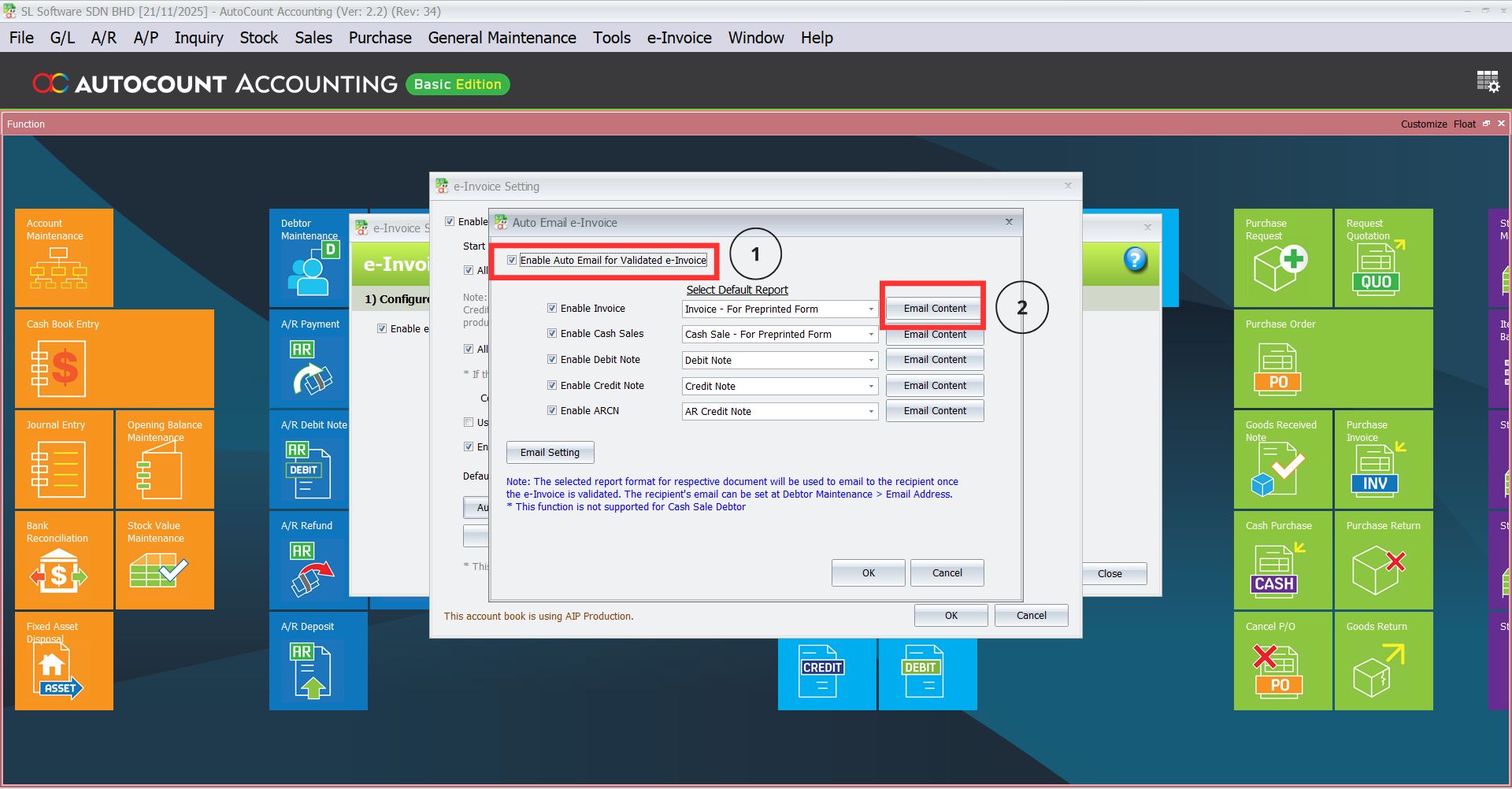
- Locate and click the button “Auto Email Validated e-Invoice Setting“.

Activate e-Invoice Feature
- Here you may tick Enable Auto Email for Validated e-Invoice
- Choose which report you would like to be sent as auto-email
- You may select the default report format
- Email content can also be modified (refer next step)
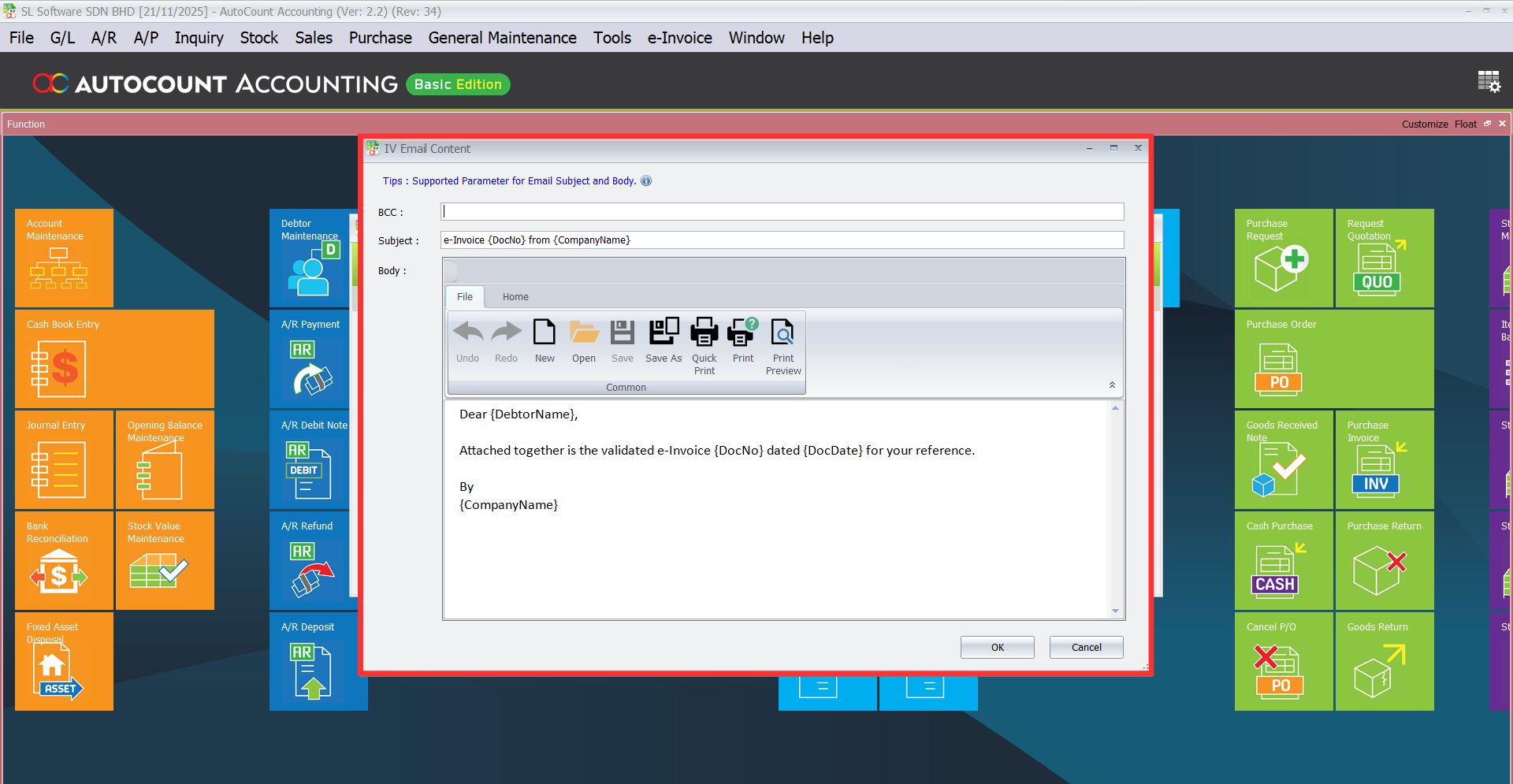
Email Content
You can personalize the email content—adjust the subject line, body message and configure additional settings to suit your business needs. Once ready, click OK to save.
SMTP Server Setup
Set up your SMTP server > send test email > click OK

Conclusion
The Auto Email Validated Setting in AutoCount’s e-invoicing feature is a powerful tool that automates the process of sending validated invoices directly to customers. By streamlining email dispatch, this feature not only saves businesses valuable time but also ensures that invoices are sent accurately and promptly, in compliance with regulatory requirements. With easy setup and seamless functionality, businesses can enjoy enhanced operational efficiency, increased accuracy, and improved customer satisfaction.
By embracing this feature, companies can eliminate manual errors, focus on core activities, and foster better communication with clients—ultimately driving smoother workflows and a more professional invoicing process.
Frequently Asked Questions
What happens if an e-invoice is not validated?
The auto-email feature only works for invoices that have been validated by the LHDN MyInvois system. If the invoice is not validated, it will not be sent automatically.
Do I need to manually enter customer email addresses?
Customer email addresses must be keyed in the debtor maintenance/tax entity maintenance for the auto-email feature to work. Ensure that customer profiles are up-to-date with valid email addresses to avoid delivery issues.
Is there any way to disable the Auto Email Validated Setting?
Yes, you can simply uncheck the “Auto Email Validated e-Invoice Setting” box in your E-Invoice Settings to disable the feature.
Interested in Getting AutoCount for your Business?
Contact our sales team today to explore pricing options and get started with the perfect solution for you.