
-
AutoCount Accounting Features
-
- Approval Workflow
- Audit Trail
- Auto Save in Draft Folder
- AutoCount Contra Account
- AutoCount License Setting Guide
- Deposit Tracking & Management
- Documents Numbering Format
- Full Transfer and Partial Transfer
- Import Data to AutoCount Accounting Using Excel
- Informative Charts and Analytical Data
- Layout Customization
- Multi Pricing
- Sales and Services Tax
- Schedule Backup
- Search Lookup Edit
- View Documents Flow
- AutoCount Feature Stock Take
- Column Chooser
- Show Remaining (3) Collapse
-
AutoCount Cloud Accounting
-
AutoCount E-Invoice
-
AutoCount HRMS User Guide
-
AutoCount Modules
-
- Activity Stream
- Advanced Financial Report
- Advanced Item
- Advanced Multi-UOM
- Advanced Quotation Module
- Basic Multi-UOM
- Budget Module
- Consignment
- Filter By Salesman
- FOC Quantity
- Formula
- Item Batch
- Item Package
- Landing Cost
- Multi-Currency
- Multi-Dimensional Analysis
- Multi-Location
- Project Account
- Recurrence
- Remote Credit Control Module
- Stock Assembly
- User Defined Fields (UDF)
- AutoCount SST Hidden Functions
- AutoCount SST Submission - Service Tax
- AutoCount Scripting Module User Guide
- AutoCount Bonus Point Module User Guide
- Show Remaining (11) Collapse
-
AutoCount Plugins
-
- Fixed Assets Management
- Goldsmith
- TD Ordering Mobile Apps
- TD Stock Mobile Apps
- Universal Import Plugin
- DMS Import Plugin
- AutoCount Item Scope Plugin
- AutoCount Easy Knock Off Plugin
- AutoCount Pick List Plugin User Guide
- AutoCount Agent Validation Plugin User Guide
- AutoCount Barcode Generator Plugin User Guide
- AutoCount Bill Remark Plugin User Guide
- AutoCount Easy Batch Number Entry Plugin User Guide
- AutoCount Recurring Invoice Plugin User Guide
- AutoCount Easy Photo 2.0 User Guide
- AutoCount Pain Tracker User Guide
- AutoCount Credit Memo Plugin User Guide
- Show Remaining (2) Collapse
-
- AutoCount Easy Recurrence Plugin
- AutoCount Recurring Billing Plugin
- Event Management System
- AutoCount To-Do List Plugin
- AutoCount AutoBank Reconciliation Plugin
- Intercompany Billing Plugin User Guide
- AutoCount Basket Plugin User Guide
- Lead Management 2.0 Plugin
- AutoCount Service Contract Plugin User Guide
- Autocount Repacking Plugin
- AutoCount Scale Barcode Plugin User Guide
- AutoCount Progressive Billing
- AutoCount Optical Plugin
- AutoCount Meter Reading Plugin User Guide
- AutoCount Car Tint Film Plugin
- AutoCount Leasing Plugin User Guide
- AutoCount Integrator Plugin
- AutoCount Procurement Planning Plugin
- Show Remaining (3) Collapse
-
-
Form Template
-
Report Template
-
- Advance Quotation
- Cash Sale
- Consignment
- Consignment Movement
- Credit Note
- Debit Note
- Delivery Order
- FOC Quantity Analysis By Document Report
- Invoice
- Item Package Sales Report
- Monthly Sales Analysis
- Outstanding Sales Order Listing
- Profit And Loss Of Documents
- Quotation
- Sales Agent Contribution Report
- Sales Order
- Top/Bottom Sales Ranking
- Show Remaining (2) Collapse
-
- Available Stock Status Report
- Expired Item Batch Listing
- Inventory Physical Worksheet
- Stock Adjustment
- Stock Aging Report
- Stock Assembly
- Stock Assembly Order
- Stock Balance By Location
- Stock Balance Report
- Stock Card Report
- Stock Disassembly
- Stock Issue
- Stock Item Profit Margin
- Stock Movement Report
- Stock Receive
- Stock Take
- Stock Transfer
- Stock Write Off
- Show Remaining (3) Collapse
Reducing Manual Entry Errors by Bridging Third-Party Logistics via AutoCount Integrator Plugin
What is AutoCount Integrator Plugin?
The AutoCount Integrator Plugin is a powerful tool designed to streamline business operations by automating the integration between AutoCount and other systems or modules. It enables seamless data synchronization across various AutoCount functions, such as sales, inventory, and accounting, reducing manual data entry and minimizing errors. By automating repetitive tasks, the plugin enhances efficiency, accuracy, and workflow, allowing businesses to manage their operations more effectively while ensuring data consistency across multiple platforms.
AutoCount Integrator Plugin Video Guide
- AutoCount Integrator Plugin (EN)
Integrator Plugin Setup
Integration & Synchronization Setup
- AutoCount Integrator Plugin (CN)
集成插件设置
集成与同步设置
Why You Should Use Integrator Plugin?
The AutoCount Integrator Plugin is essential for streamlining business processes by automating data synchronization across multiple AutoCount modules and external systems. It reduces manual data entry, minimizes errors, and enhances operational efficiency. The plugin integrates seamlessly with the existing AutoCount setup, enabling smoother workflows, faster transaction processing, and more accurate reporting. By automating repetitive tasks and ensuring data consistency, it saves time, boosts productivity, and improves overall business performance.
Who This Plugin is For?
Businesses Seeking Automation
Ideal for companies looking to automate data synchronization and streamline workflows across multiple systems, reducing manual entry and errors.
SMEs Using AutoCount
Perfect for small and medium-sized enterprises that rely on AutoCount for accounting, inventory, and sales, and want to integrate these modules seamlessly for improved efficiency.
Organizations with Multiple Platforms
Suitable for businesses needing to integrate AutoCount with other software or external systems to ensure consistent and accurate data flow across platforms.
Features of the Integrator Plugin
Seamless Data Synchronization
Automatically synchronizes data across multiple AutoCount modules and external systems, ensuring consistency and accuracy without manual input.
Customizable Integration
Allows businesses to integrate AutoCount with various third-party systems, including ERP, accounting software, and inventory management platforms.
Automation of Repetitive Tasks
Reduces time spent on manual processes by automating routine tasks such as data entry, transaction processing, and reporting generation.
Real-Time Reporting and Analytics
Generates accurate, real-time reports and analytics, helping businesses make informed decisions based on up-to-date information.
Setting Up the Integrator Plugin
1. Setting Up Scheduler
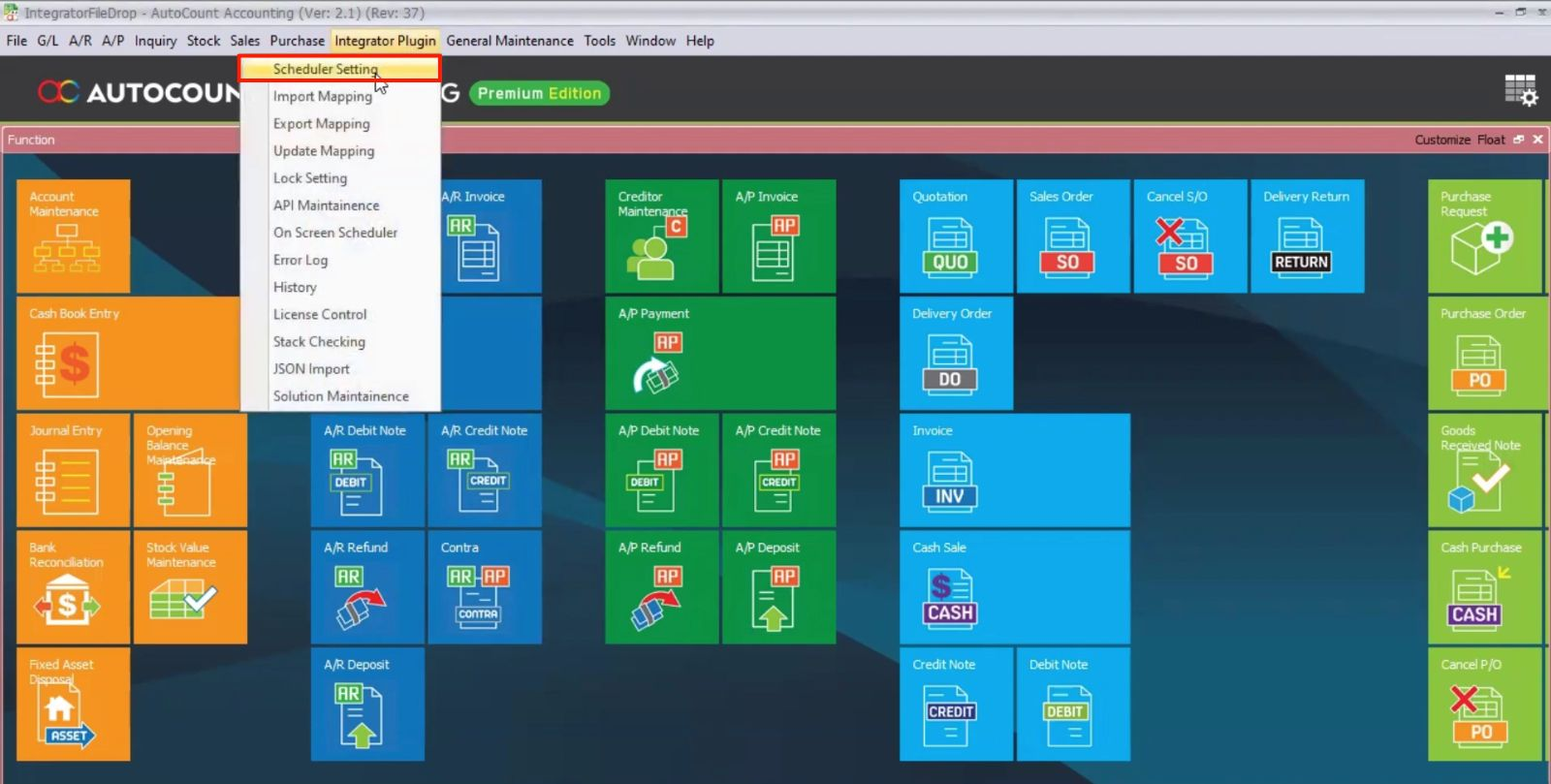
- Go to Integrator Plugin > Scheduler Setting.
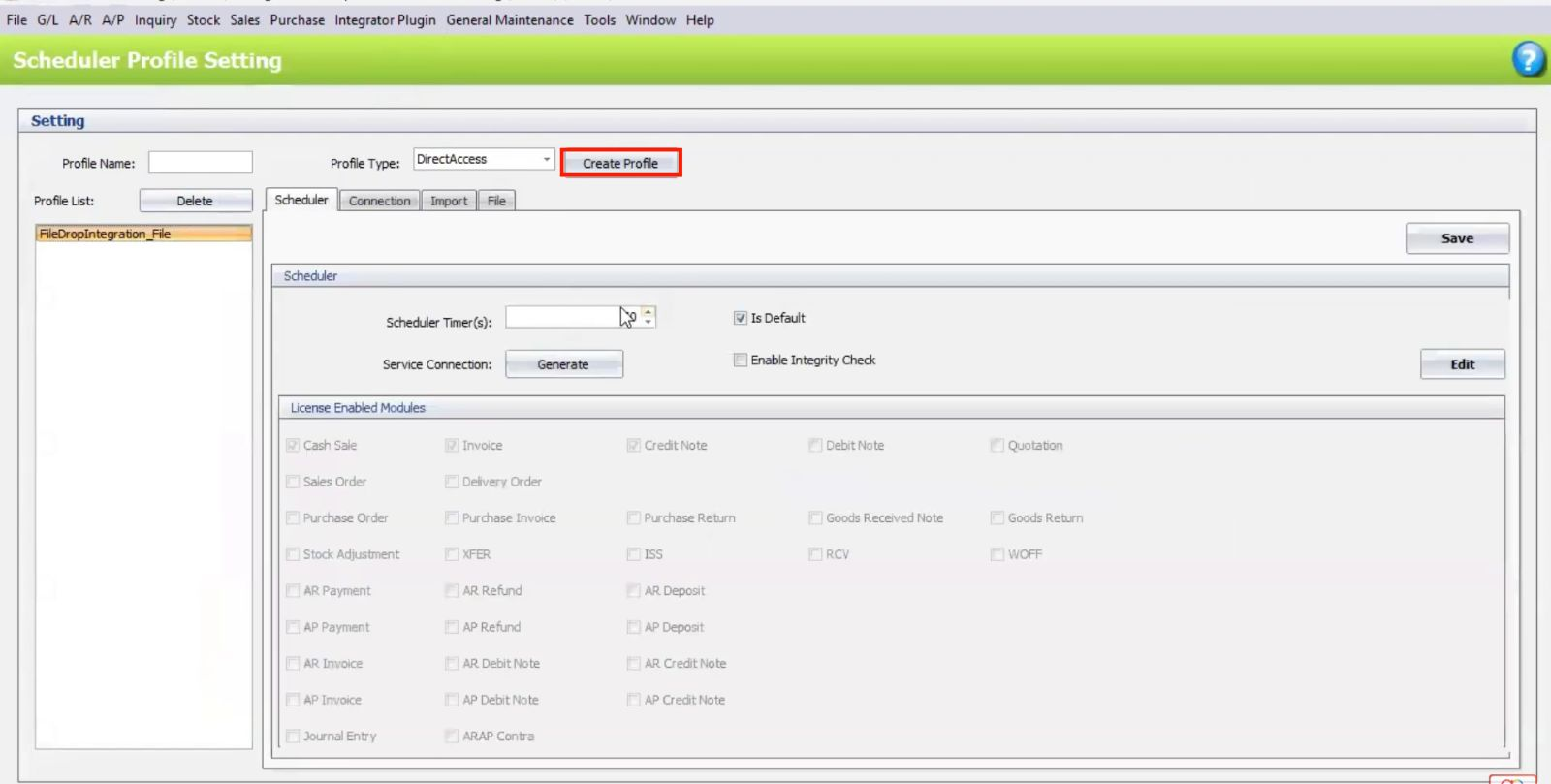
- Create Profile and set the Profile Type (e.g., Direct Access or File Drop).
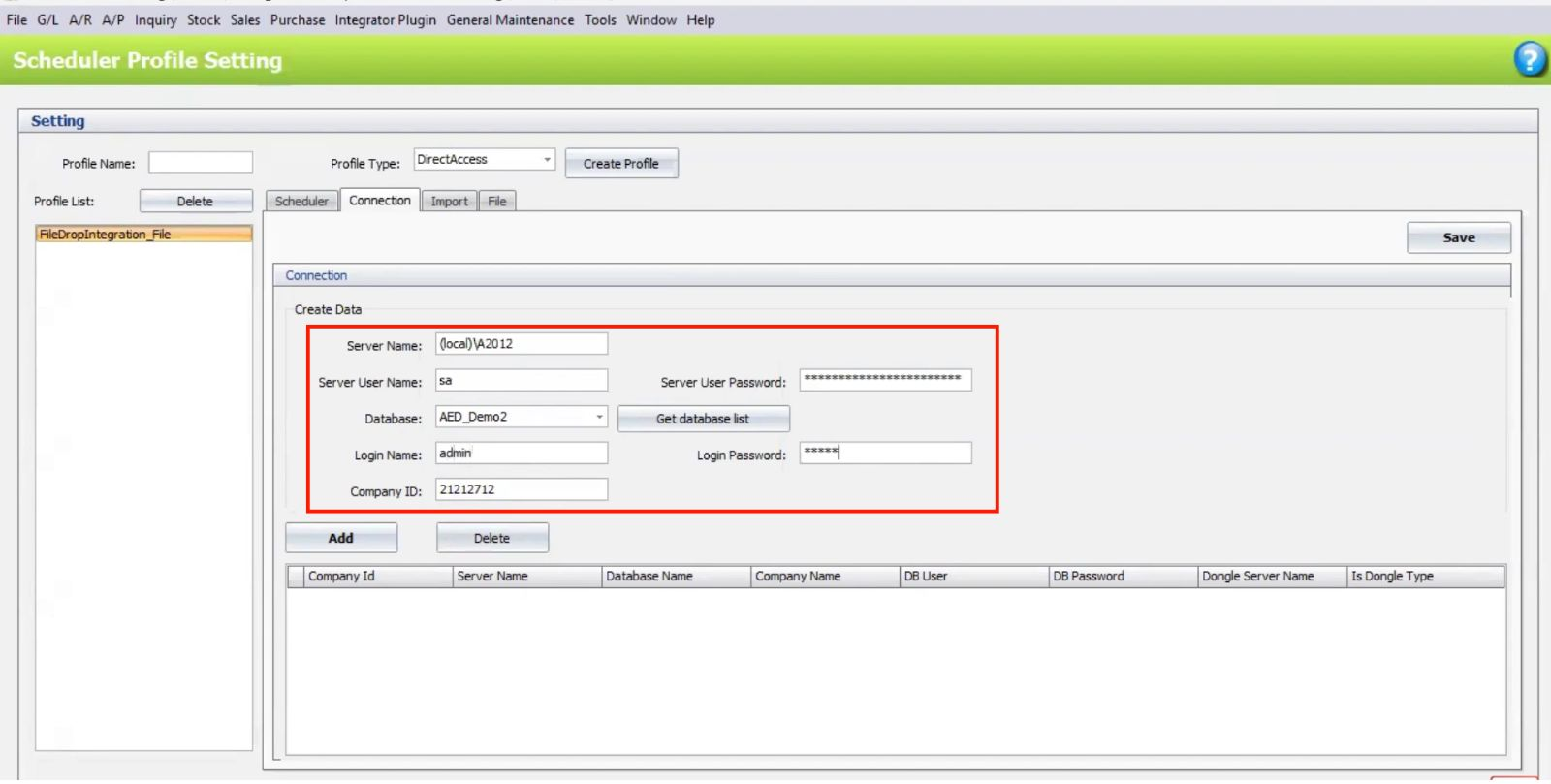
- Configure Server Name, User Info, and Database Details.
Pro Tip:
Double-check server details and use consistent naming for profiles to avoid connection issues and stay organized.
2. Selecting the Integration Method
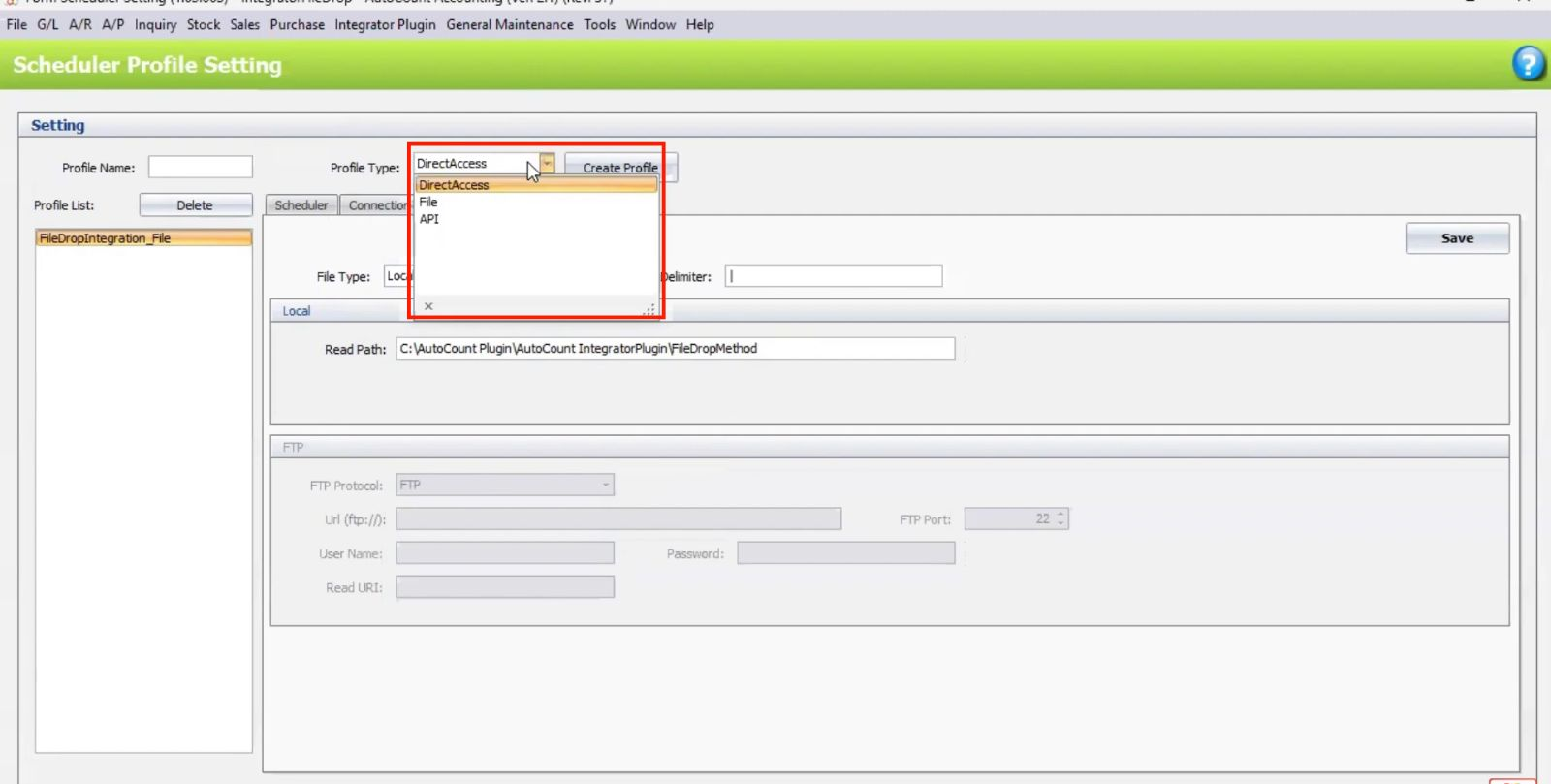
Choose between File Drop, API, or Direct Access depending on your integration setup.
- File Drop: Select a directory or FTP server for file imports.
- API: Enter the external system’s API credentials.
- Direct Access: Set up temporary tables for data import.
Pro Tip:
Choose the integration method based on your system’s needs—File Drop for file imports, API for direct system integration, or Direct Access for temporary data tables.
How AutoCount Integrator Plugin Works
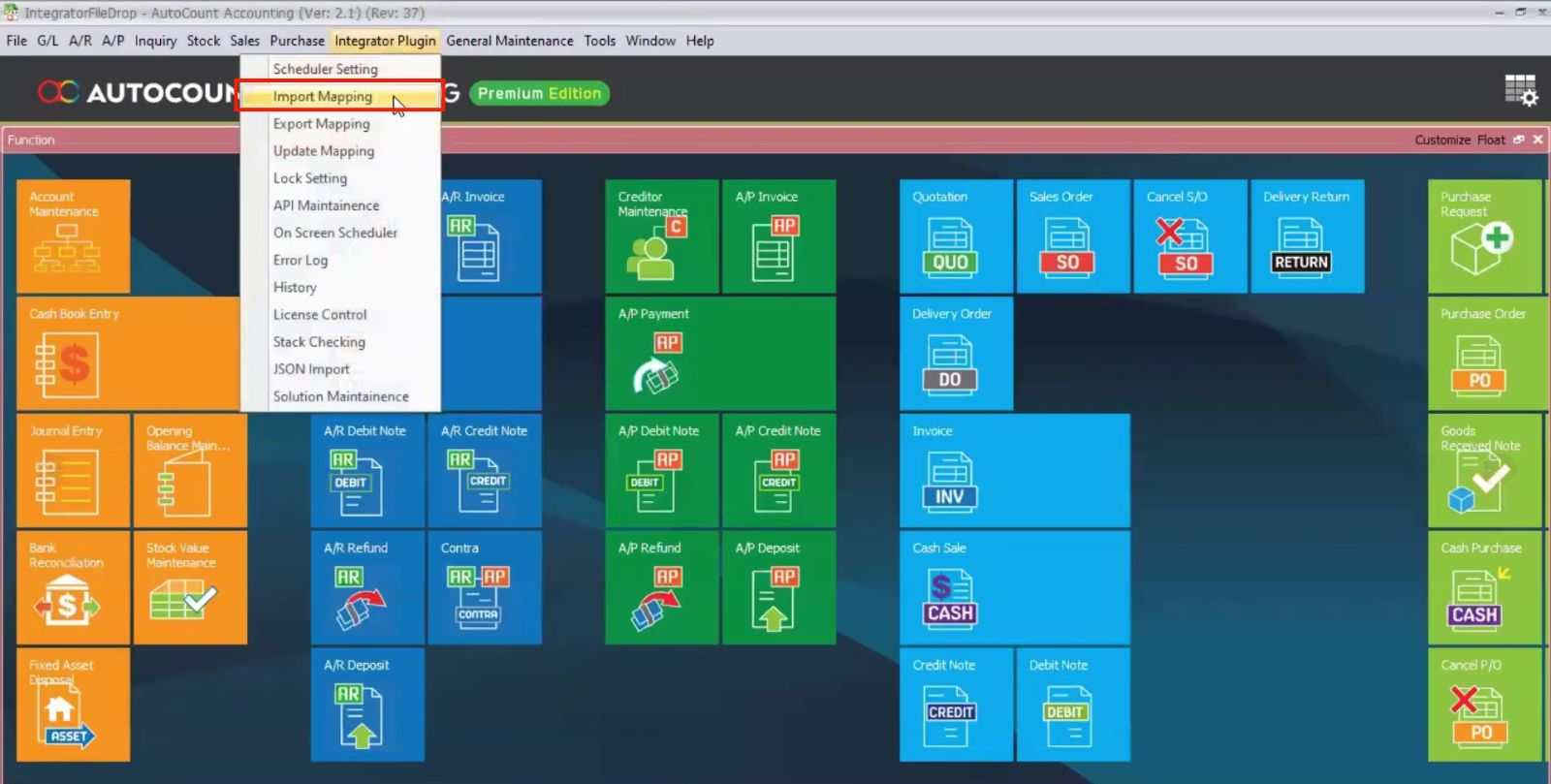
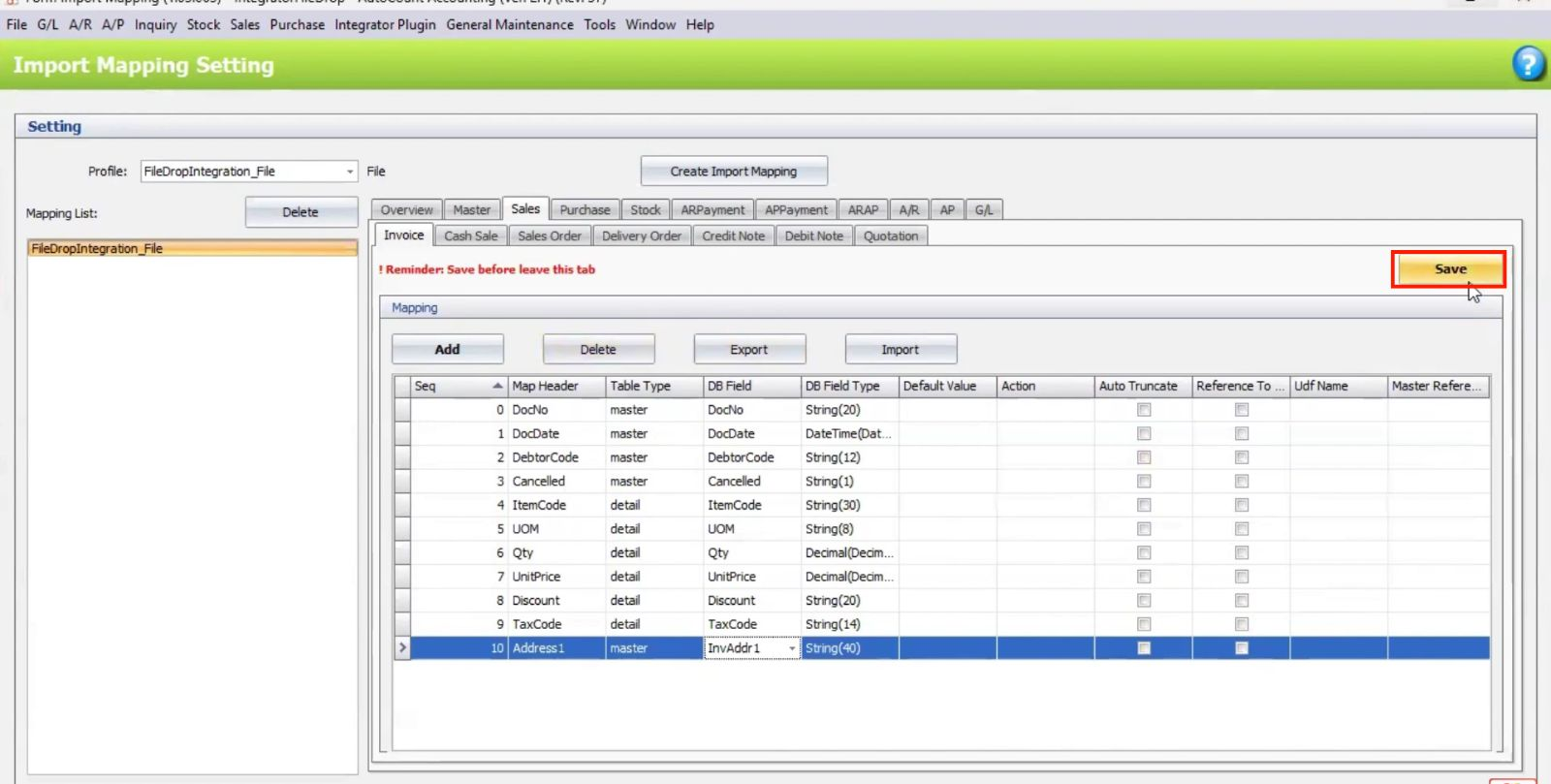
1. Map Data for Import
Go to Import Mapping.
Map the source file fields (e.g., Customer Code, Item Code) to corresponding fields in AutoCount.
Save the mapping template for future use.
Pro Tip:
Save your import mapping templates to quickly reuse them in future imports, ensuring consistent data mapping and saving time.
2. File Drop and FTP Configuration
- Set the directory path or FTP folder for incoming files.
- Configure file delimiter (e.g., CSV delimiter).
- Optionally set up FTP credentialsfor file imports from external servers.
Pro Tip:
Ensure the directory path and FTP credentials are correct to avoid import errors, and match the file delimiter with the format of your incoming files for seamless processing.
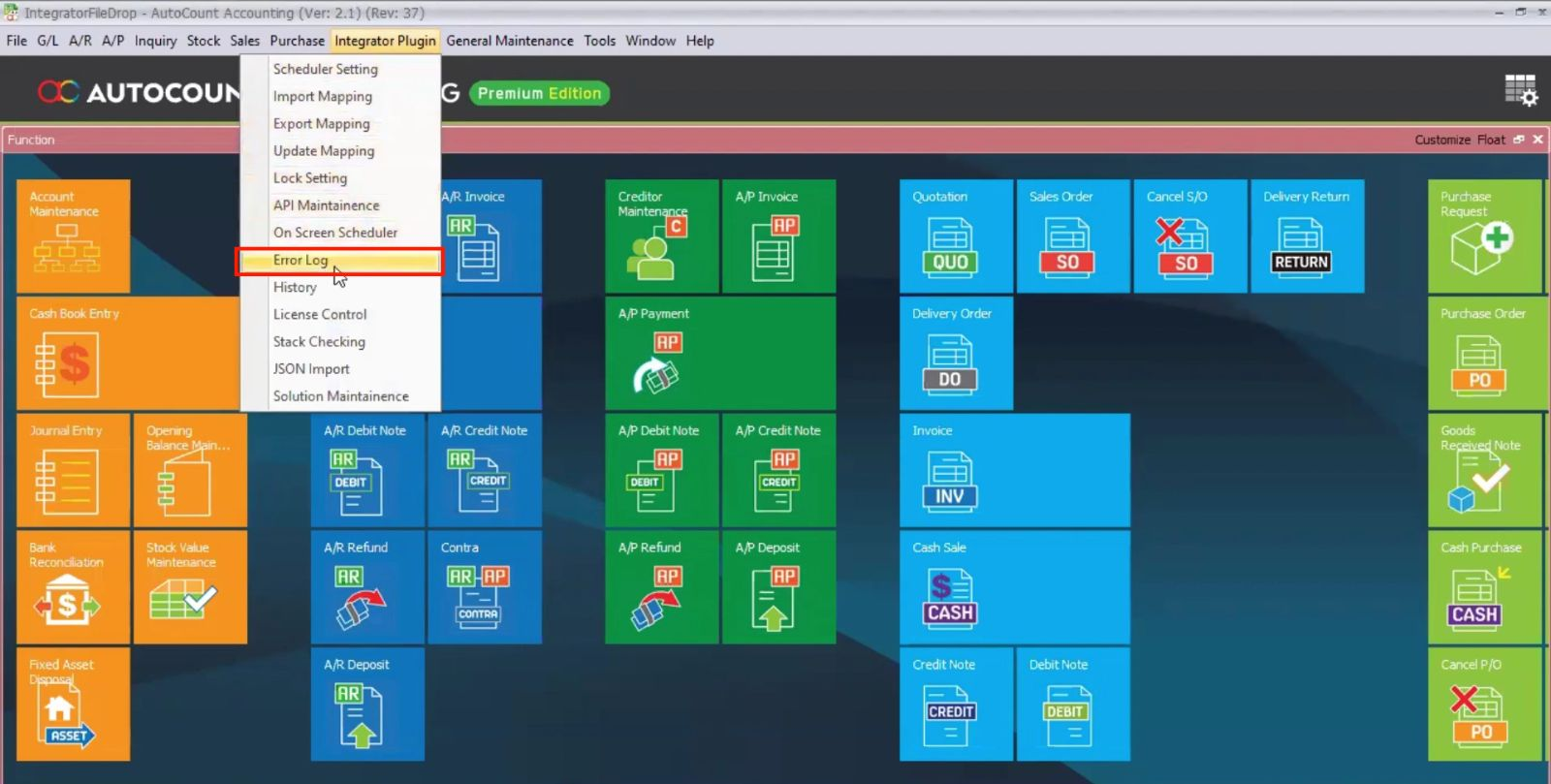
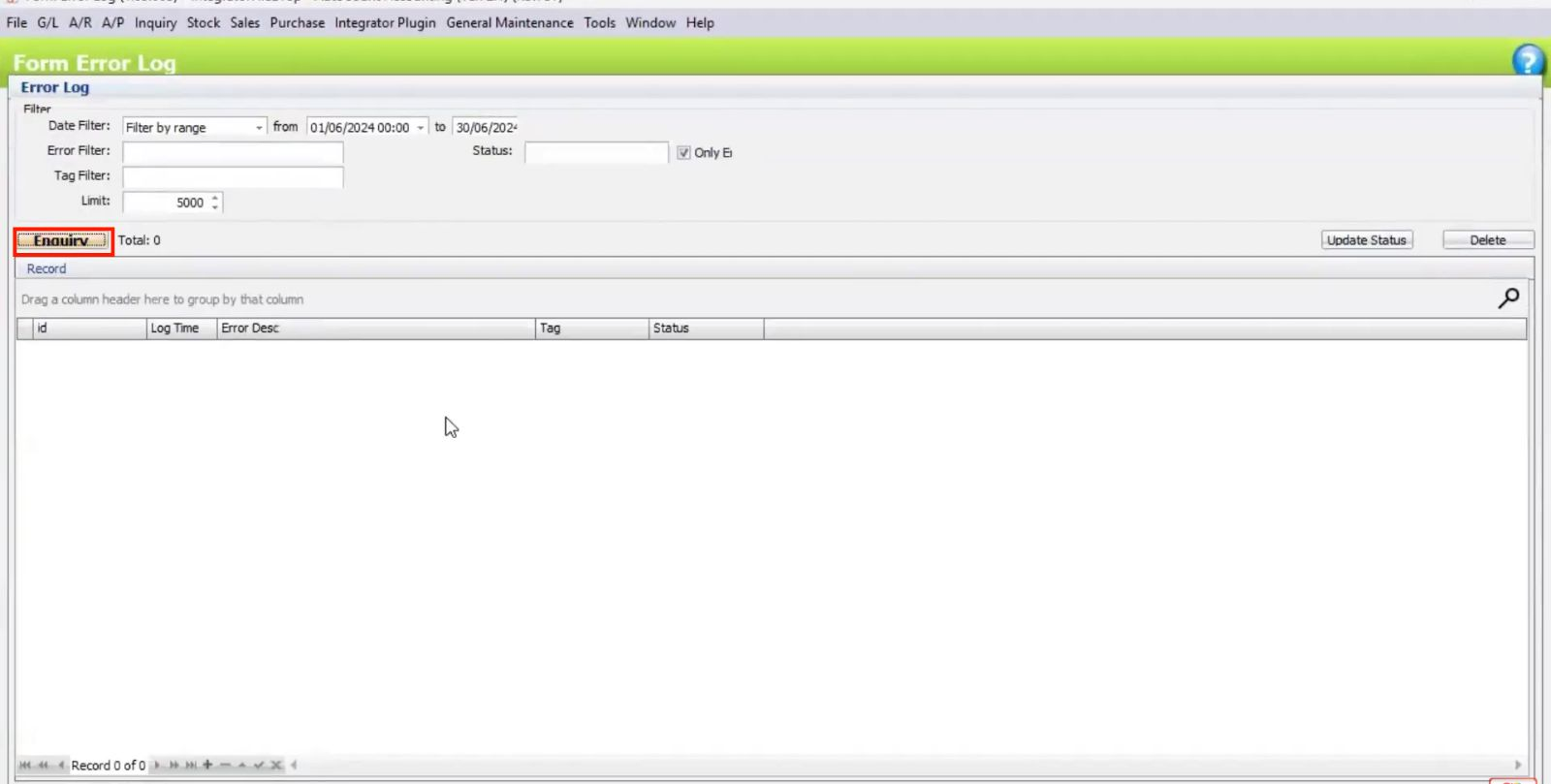
3. Handling Errors
- Go to Error Log to check import issues.
- Manually resolve file issues (e.g., fixing incorrect formatting or data) and place corrected files in the import folder.
- Retry the import — the plugin will automatically process fixed files.
Pro Tip:
Regularly check the error log for import issues and promptly fix any data or formatting errors. Once corrected, simply place the files back in the import folder, and the plugin will handle the rest.
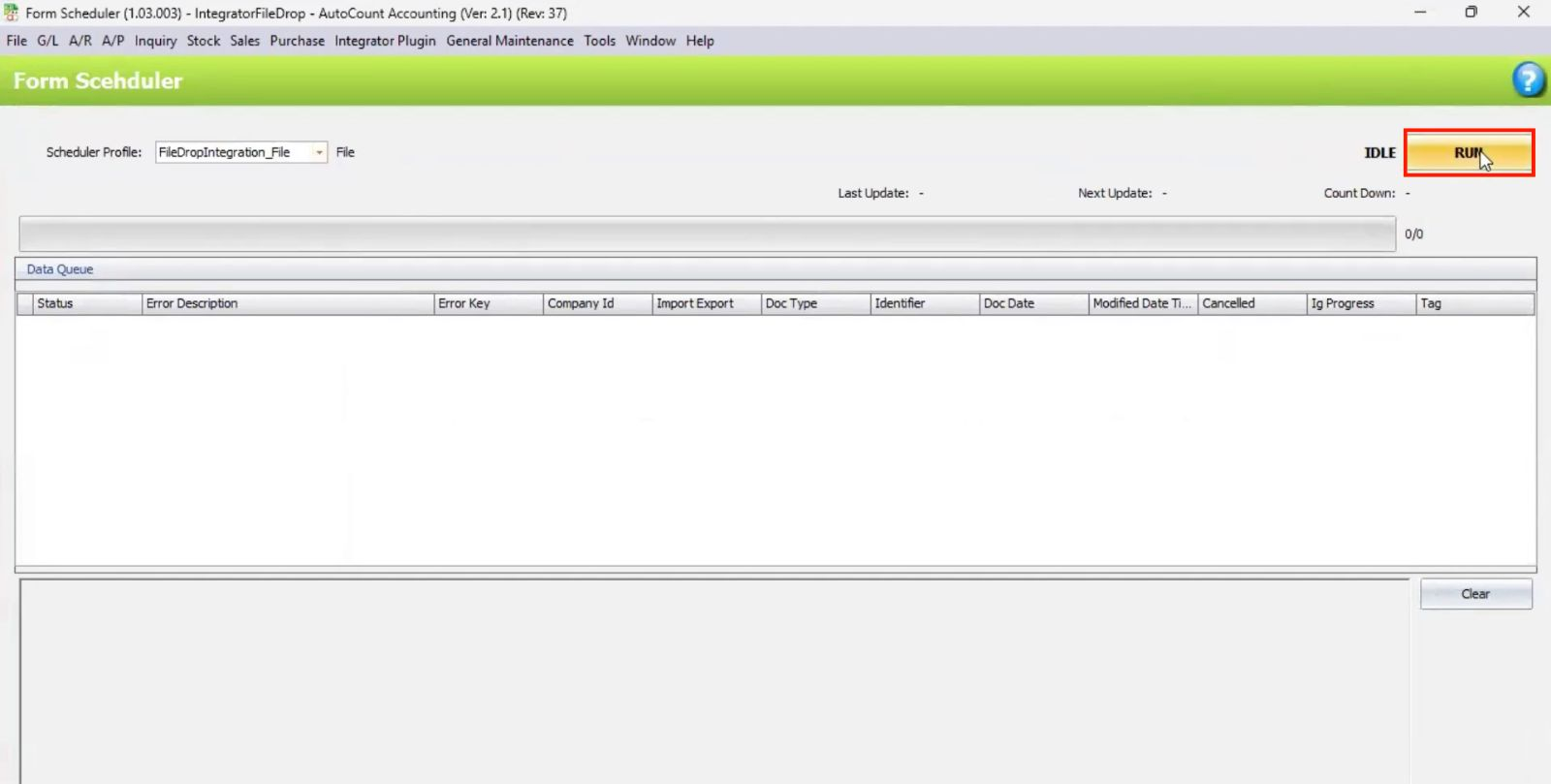
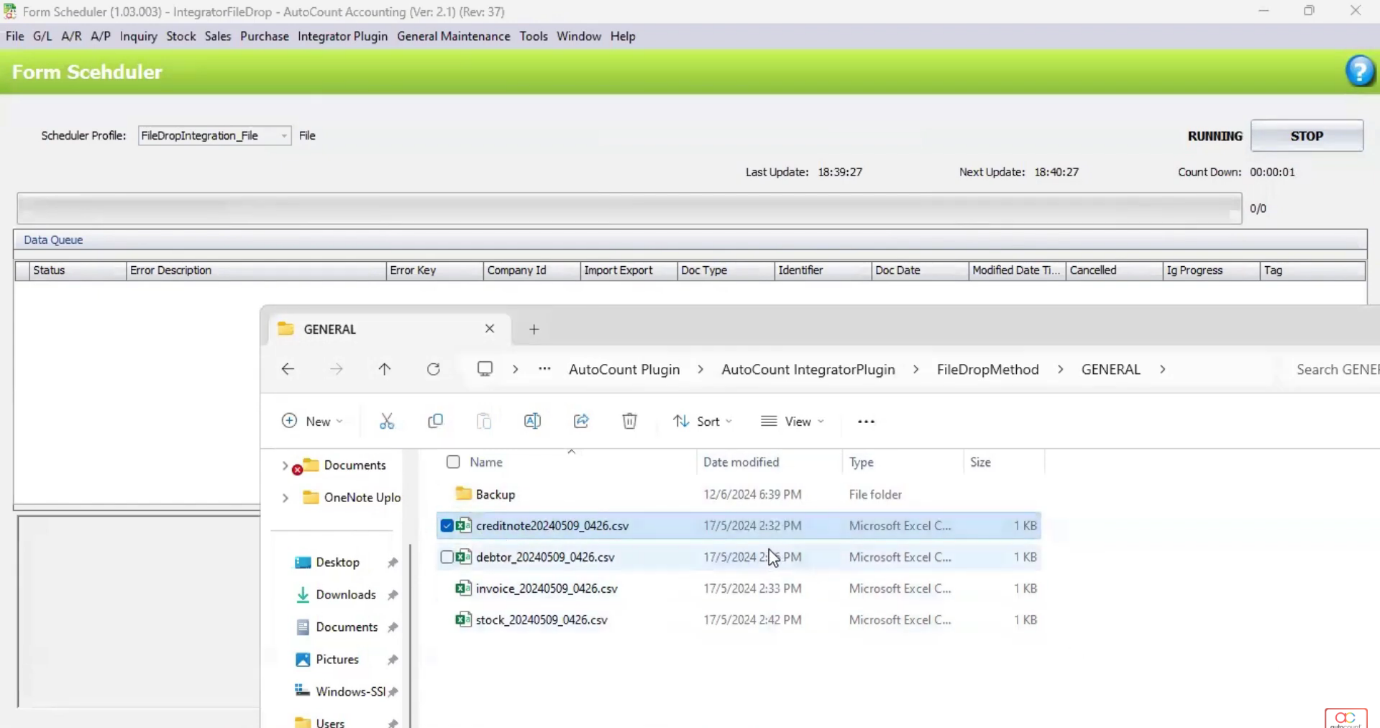
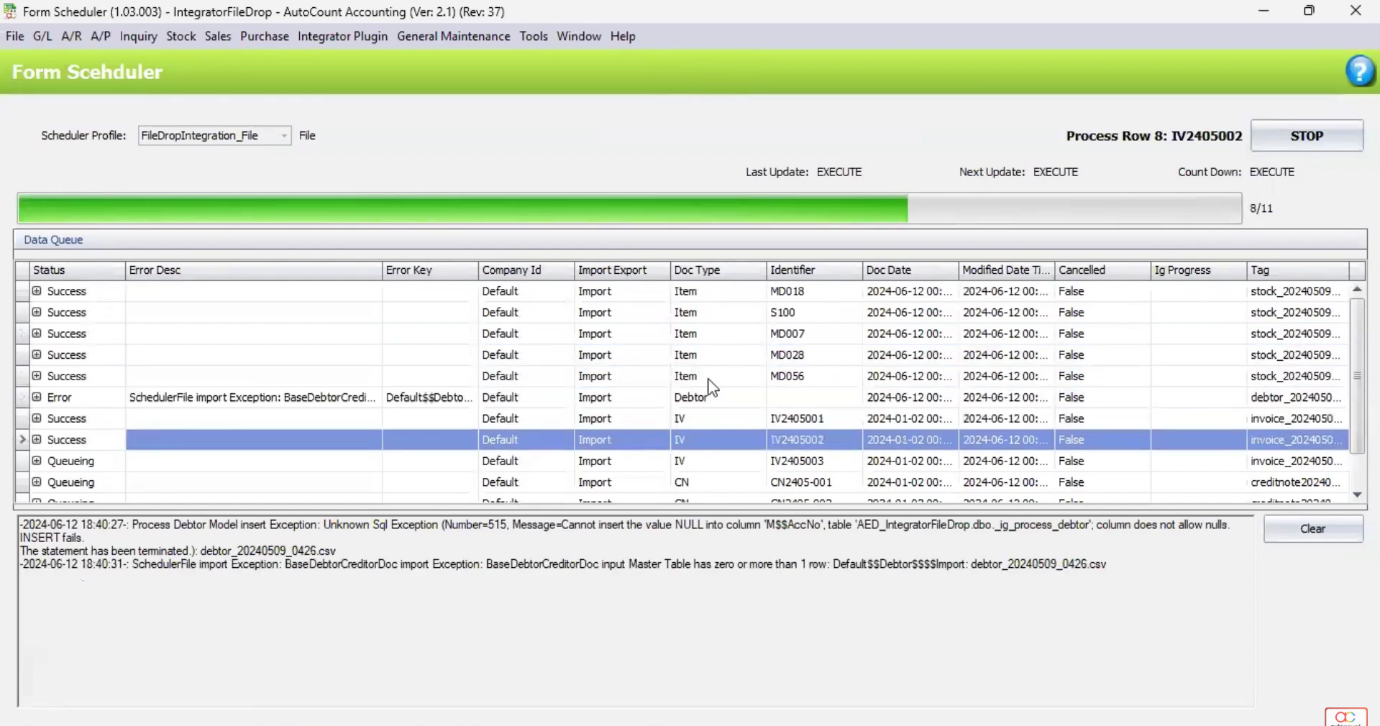
4. Running and Testing the Integration
Enable the Scheduler to run the import process at set intervals.
- Test by dropping sample CSV/Excel files into the configured folder/FTP.
- Monitor the logs to ensure smooth operation and correct data transfer.
Pro Tip:
Start with small test files to ensure the integration runs smoothly, and regularly monitor the logs for any issues during the initial tests to quickly address any errors.
5. Using the AutoCount Integrator Plugin with Third-Party Software
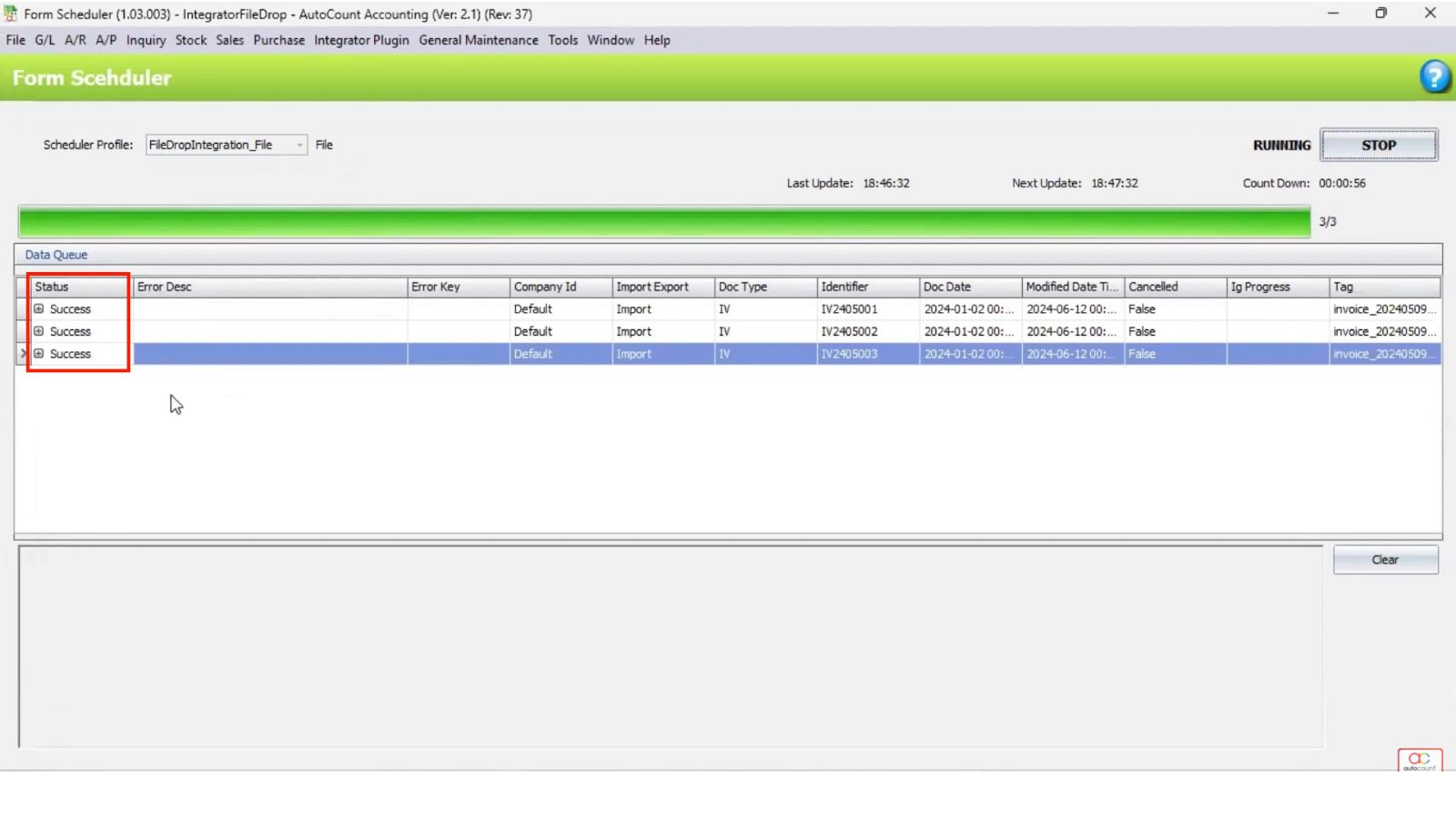
- Connect AutoCount with third-party systems using APIor File Drop methods to sync data automatically.
- Ensure that data (e.g., invoices, payments) is accurately reflected in AutoCount.
Pro Tip:
Double-check API credentials or file paths when connecting with third-party systems to ensure smooth data syncing and accurate reflection of invoices, payments, and other critical data in AutoCount.
Benefits of the Plugin
Increased Efficiency
Automates data synchronization and repetitive tasks, significantly reducing the time spent on manual entry and improving overall workflow efficiency.
Improved Accuracy
Minimizes human errors by automating processes, ensuring data consistency across all systems and reducing the risk of discrepancies.
Enhanced Integration
Seamlessly connects AutoCount with other platforms, providing a unified system for smoother operations and better data management.
Cost and Time Savings
By streamlining processes and eliminating manual work, businesses can save time and reduce operational costs, leading to better resource allocation.
Conclusion
The AutoCount Integrator Plugin is a powerful tool that enhances business operations by automating data synchronization and streamlining workflows across various AutoCount modules and external systems. By improving accuracy, boosting efficiency, and enabling seamless integration, it reduces manual tasks and operational errors, ultimately saving time and costs. Perfect for businesses looking to optimize their processes, this plugin offers a flexible and scalable solution to improve overall performance, making it an invaluable asset for organizations of all sizes.
Frequently Asked Questions
How do I set up the AutoCount Integrator Plugin?
Create a profile, configure server details, and select your integration method (File Drop, API, or Direct Access).
Can I automate data synchronization with third-party software?
Yes, use File Drop or API to sync data automatically with third-party systems.
How do I troubleshoot import errors?
Check the Error Log, fix issues in the file, and re-import it. The plugin will process the corrected file.
Is it possible to schedule automatic imports?
Yes, enable the Scheduler to run imports at set intervals automatically.
Interested in Getting AutoCount for your Business?
Contact our sales team today to explore pricing options and get started with the perfect solution for you.