
-
AutoCount Accounting Features
-
- Approval Workflow
- Audit Trail
- Auto Save in Draft Folder
- AutoCount Contra Account
- AutoCount License Setting Guide
- Deposit Tracking & Management
- Documents Numbering Format
- Full Transfer and Partial Transfer
- Import Data to AutoCount Accounting Using Excel
- Informative Charts and Analytical Data
- Layout Customization
- Multi Pricing
- Sales and Services Tax
- Schedule Backup
- Search Lookup Edit
- View Documents Flow
- AutoCount Feature Stock Take
- Column Chooser
- Show Remaining (3) Collapse
-
AutoCount Cloud Accounting
-
AutoCount E-Invoice
-
AutoCount HRMS User Guide
-
AutoCount Modules
-
- Activity Stream
- Advanced Financial Report
- Advanced Item
- Advanced Multi-UOM
- Advanced Quotation Module
- Basic Multi-UOM
- Budget Module
- Consignment
- Filter By Salesman
- FOC Quantity
- Formula
- Item Batch
- Item Package
- Landing Cost
- Multi-Currency
- Multi-Dimensional Analysis
- Multi-Location
- Project Account
- Recurrence
- Remote Credit Control Module
- Stock Assembly
- User Defined Fields (UDF)
- AutoCount SST Hidden Functions
- AutoCount SST Submission - Service Tax
- AutoCount Scripting Module User Guide
- AutoCount Bonus Point Module User Guide
- AutoCount Service Management Plugin User Guide
- Show Remaining (12) Collapse
-
AutoCount Plugins
-
- Fixed Assets Management
- Goldsmith
- TD Ordering Mobile Apps
- TD Stock Mobile Apps
- Universal Import Plugin
- DMS Import Plugin
- AutoCount Pick List Plugin User Guide
- AutoCount Credit Memo Plugin User Guide
- AutoCount Lock Price Plugin
- AutoCount Progressive Billing
- AutoCount Easy Recurrence Plugin
- Batch Update Unit Price Plugin
- AutoCount Production order
- AutoCount Car Tint Film Plugin
-
- Event Management System
- AutoCount To-Do List Plugin
- AutoCount AutoBank Reconciliation Plugin
- Intercompany Billing Plugin User Guide
- Lead Management 2.0 Plugin
- AutoCount Service Contract Plugin User Guide
- AutoCount Optical Plugin
- AutoCount Integrator Plugin
- AutoCount Procurement Planning Plugin
- Cage Management Plugin
- AutoCount Vehicle Plugin
- AutoCount Agent Validation Plugin User Guide
- AutoCount Barcode Generator Plugin User Guide
- AutoCount Easy Batch Number Entry Plugin User Guide
- Warranty 2.0 Plugin
- AutoCount Easy Photo 2.0 User Guide
- AutoCount Recurring Invoice Plugin User Guide
- AutoCount Scale Barcode Plugin User Guide
- AutoCount Recurrence Late Interest Plugin
- AutoCount Item Visibility Control
- AutoCount Bill Remark Plugin User Guide
- AutoCount Pain Tracker User Guide
- AutoCount Easy Payment
- AutoCount Easy Deposit Plugin
- AutoCount Easy Knock Off Plugin
- AutoCount Daily Collection Summary Plugin
- Timber Log Plugins
- Batch Transfer SODO Plugin
- AutoCount Vege Basket Plugin Guide
- AutoCount Fruit Basket Plugin Guide
- Referral Management Plugin
- AutoCount Migrator Plugin
- AutoCount Email&WhatsApp Plugin
- AutoCount Multi Company Knock Off Plugin
- AutoCount Advance Aging Format Plugin
- AutoCount Payment Request Plugin
- AutoCount Vehicle Master Plugin
- AutoCount Advance Deposit Plugin
- AutoCount IC Checker Plugin
- AutoCount RMA Plugin
- AutoCount Historical Outstanding DO Listing Plugin
- AutoCount Project Department Visibility Control Plugin
- AutoCount MRP Order Plugin
- AutoCount GridToExcel Plugin
- AutoCount Stock Availability Report Plugin
- AutoCount Batch Transfer SO DO Plugin
- AutoCount Centralized Kitchen Management Plugin
- SL AutoCount API
- AutoCount InterCompany Billing Plugin
- AutoCount Sales Commission Plugin
- AutoCount Advanced Credit Term Plugin
- AutoCount Advanced Stock Assembly Plugin
- AutoCount Shipment Plugin
- AutoCount Tour Plugin
- AutoCount Smart Analysis
- AutoCount Rental Management
- Show Remaining (41) Collapse
-
-
Form Template
-
Report Template
-
- Advance Quotation
- Cash Sale
- Consignment
- Consignment Movement
- Credit Note
- Debit Note
- Delivery Order
- FOC Quantity Analysis By Document Report
- Invoice
- Item Package Sales Report
- Monthly Sales Analysis
- Outstanding Sales Order Listing
- Profit And Loss Of Documents
- Quotation
- Sales Agent Contribution Report
- Sales Order
- Top/Bottom Sales Ranking
- Show Remaining (2) Collapse
-
- Available Stock Status Report
- Expired Item Batch Listing
- Inventory Physical Worksheet
- Stock Adjustment
- Stock Aging Report
- Stock Assembly
- Stock Assembly Order
- Stock Balance By Location
- Stock Balance Report
- Stock Card Report
- Stock Disassembly
- Stock Issue
- Stock Item Profit Margin
- Stock Movement Report
- Stock Receive
- Stock Take
- Stock Transfer
- Stock Write Off
- Show Remaining (3) Collapse
-
B2B ORDERING
-
AutoCount AI Agent
AutoCount Plugin: DMS Import Plugin
Why Use the AutoCount DMS Import Plugin?
The AutoCount DMS Import Plugin is a specialized tool designed to integrate data from Distribution Management Systems (DMS) into AutoCount's accounting software. It facilitates the seamless transfer of sales orders, customer information, and inventory details, reducing manual data entry and enhancing operational efficiency.
AutoCount DMS Import Plugin Video Guide
These videos provides a comprehensive overview of the AutoCount DMS Import Plugin, explaining its features and showing how to seamlessly integrate data from your Distribution Management System, including handling sales orders, customer details,
- AutoCount DMS Import Plugin (EN)
DMS Import Plugin Setup
Integration & DMS Import Setup
- AutoCount DMS Import Plugin (CN)
DMS导入插件设置
集成和DMS导入设置
Key Features of the AutoCount DMS Import Plugin
Flexible Data Mapping
Middleware Functionality
Step-by-Step Guide in Configuring Import Plugin
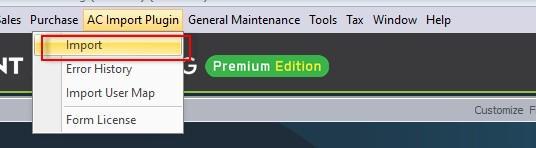
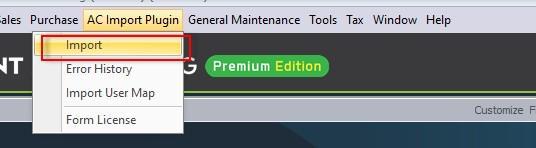
- Go to AC Import Plugins > Import.
- Go To Setting Page, Put in Password: 1300800828 and Click Login
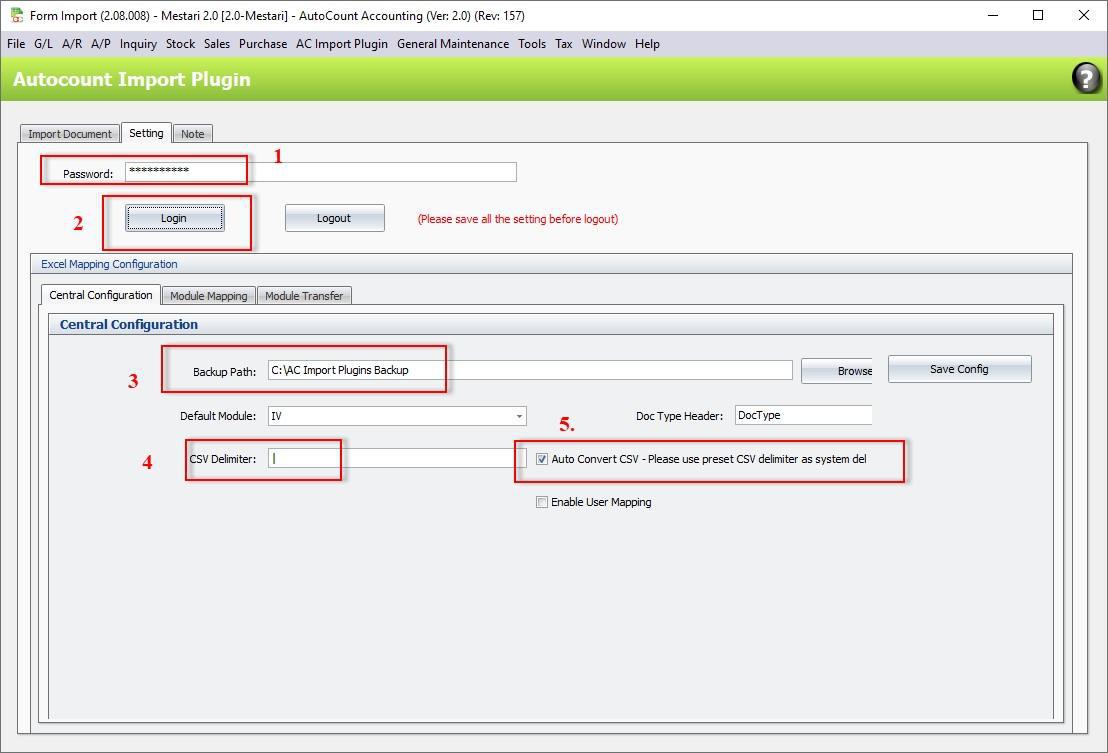
- Password: 1300800828
- Login Button
- Make sure the “Backup Path” is valid folder directory
- CSV Delimiter
- Auto Convert CSV Setting
- Please remember Click “Save Configure” button once you have finalized your setting
You can ignore this setting if your option 5 is not tick, this is for auto convert your excel to CSV
format.
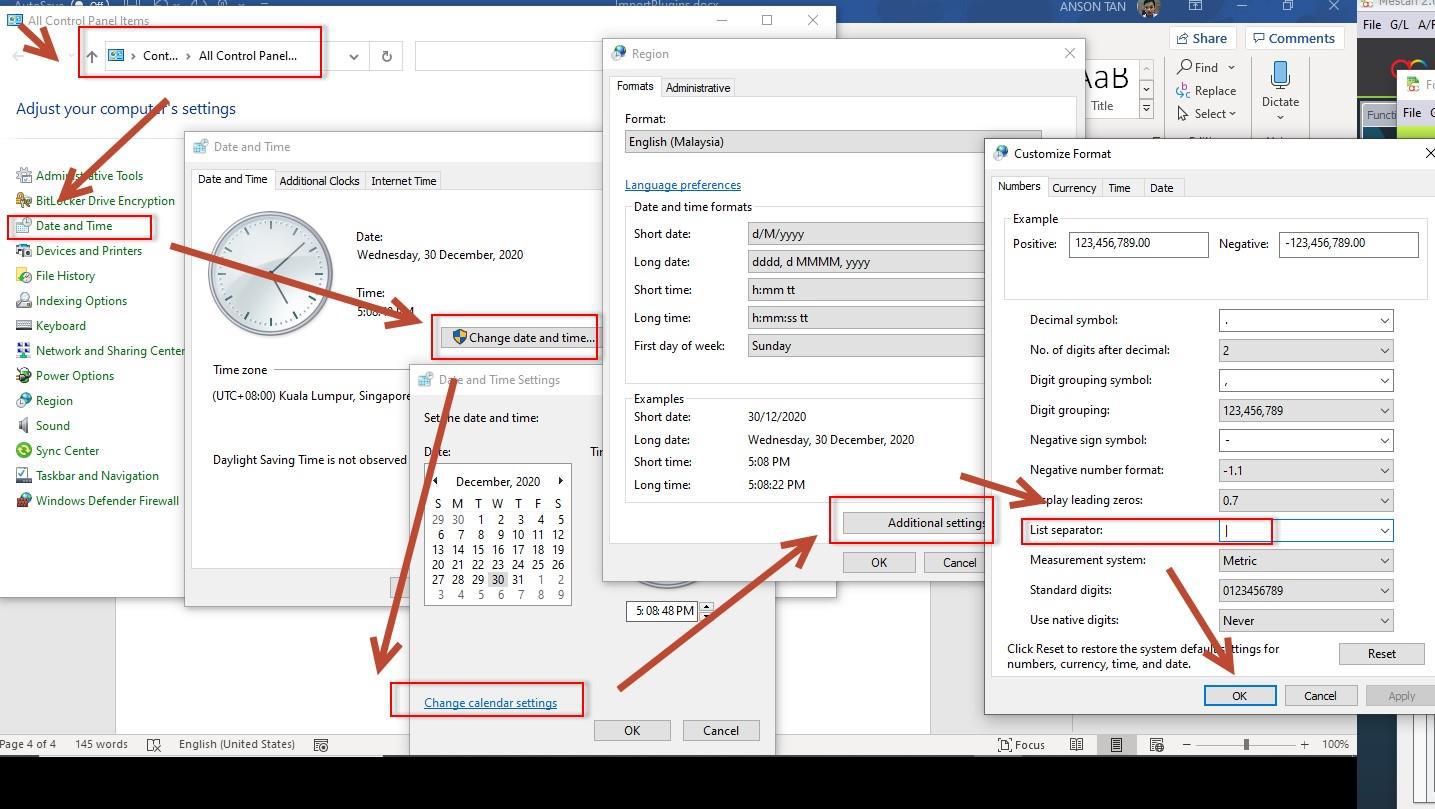
Advise to use “|” as delimiter if your excel consist of comma in address. If u want to use “|” as delimiter, make sure your computer setting is also the same. In addition, you also need to check your control panel, locate the date time setting, and follow the steps below.
Configuring Module Mapping
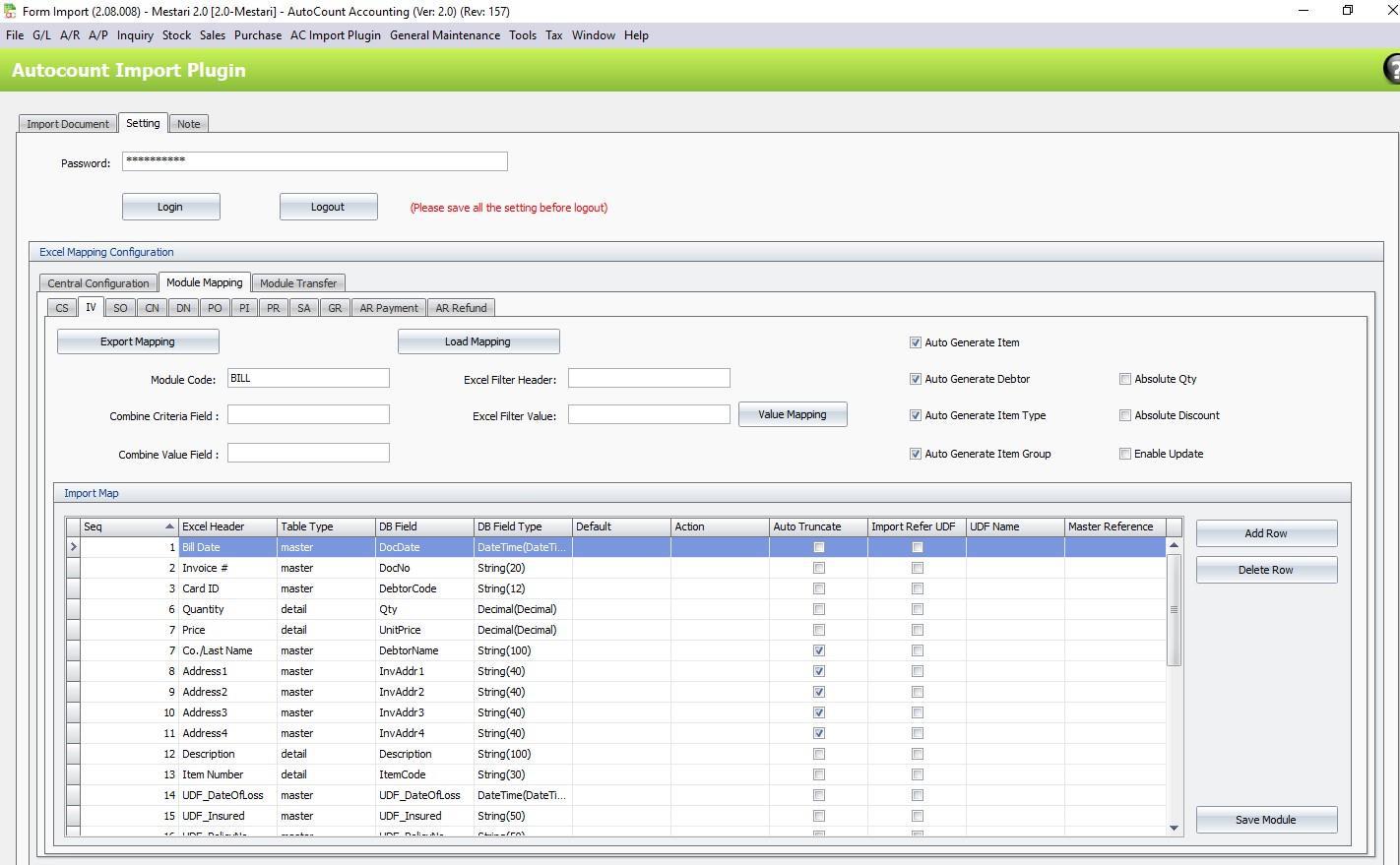
CS: Cash Sales
IV: Invoice
SO: Sales Order
CN: Credit Note
DN: Debit Note
PO: Purchase Order
PI: Purchase Invoice
PR: Purchase Return
SA: Stock Adjustment
GR: Goods Received
AR: Payment Refund
You can add additional mapping based on your excel info.
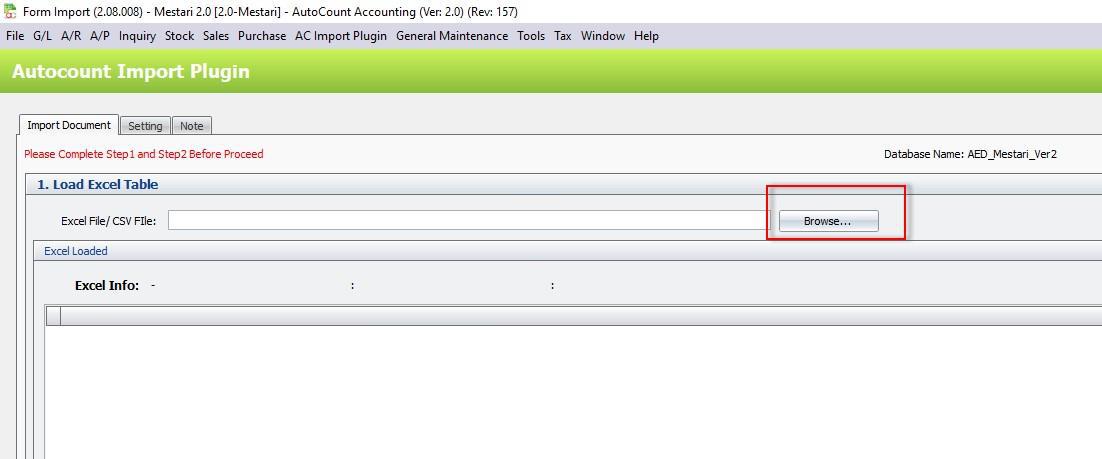
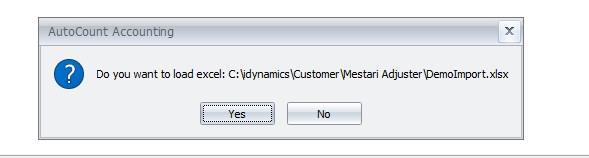
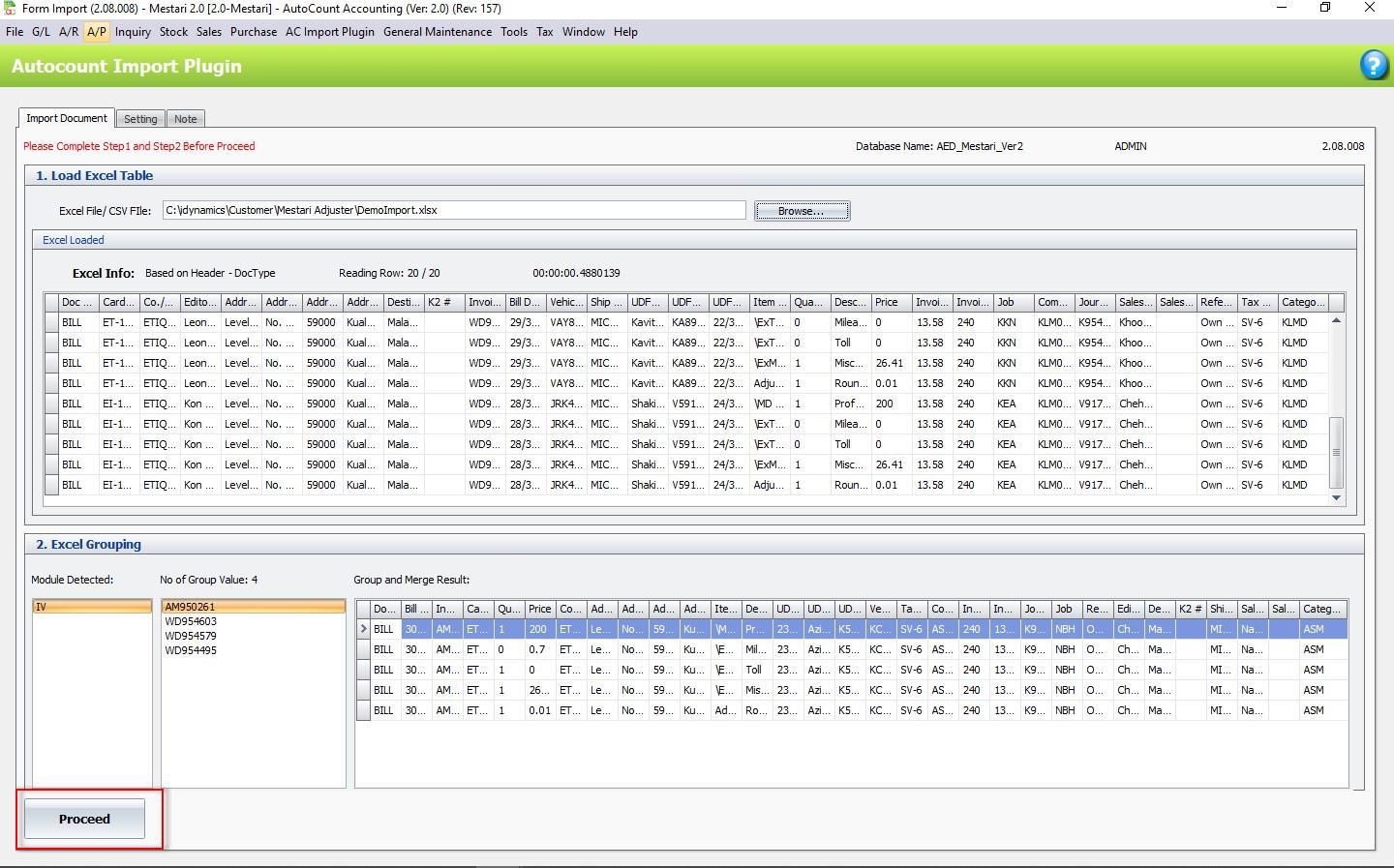
- First, import your Excel file.
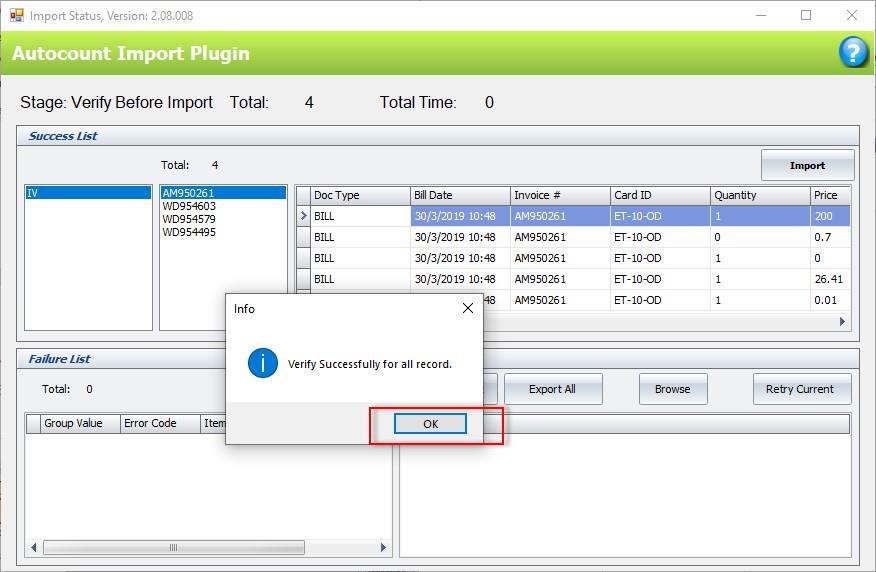
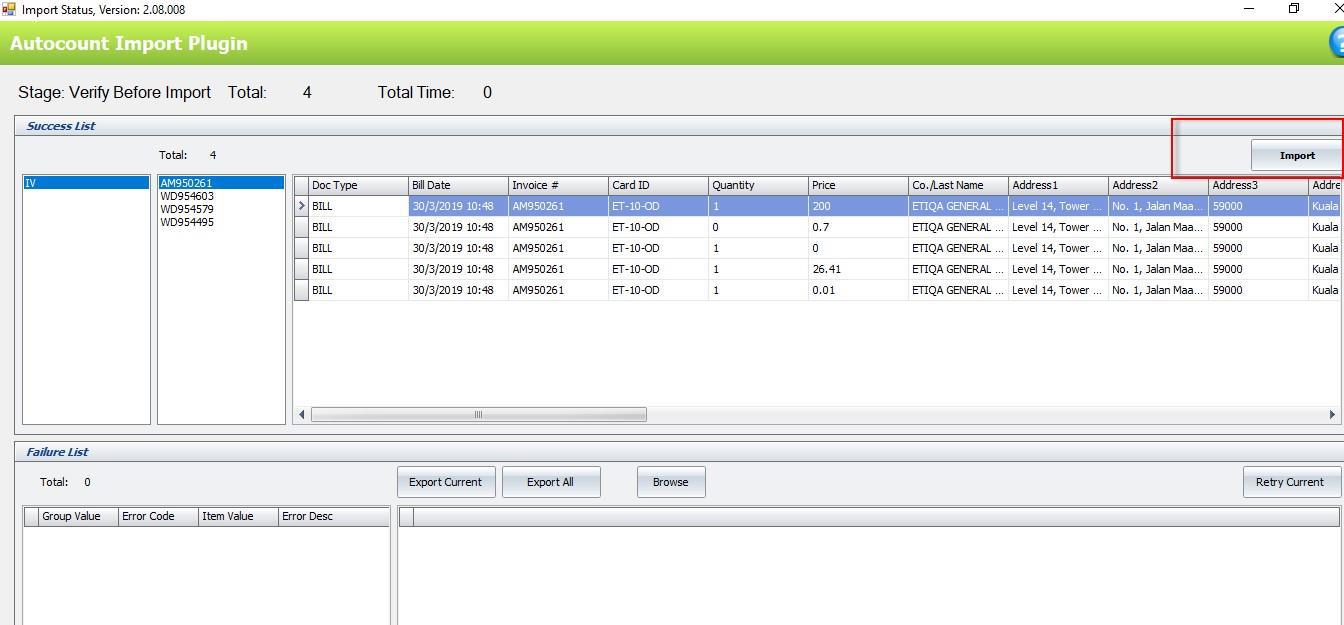
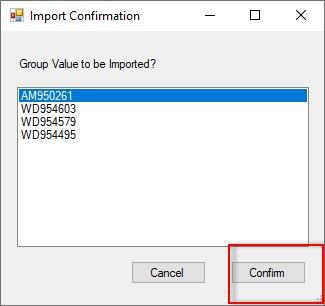
Conclusion
The AutoCount DMS Import Plugin is more than just a tool—it’s a transformative solution for your business. By integrating your DMS with AutoCount’s robust accounting platform, you enable higher efficiency, accuracy, and productivity. Embrace the future of accounting with AutoCount and turn your data management into a strategic asset for growth.
Frequently Asked Questions
Which formats are supported by the DMS Import Plugin?
The plugin supports CSV and Excel file formats, making it compatible with most Distribution Management Systems that export data in these formats.
How does the mapping process work in the DMS Import Plugin?
The plugin allows users to customize mappings between DMS data fields and AutoCount fields. You can set up mappings using User Defined Fields (UDF) to link debtor codes, item codes, and other relevant data to ensure a smooth import process.
What happens if data discrepancies are found during the import?
If any discrepancies are found during the import process, the plugin checks for errors and generates a detailed error report. This allows users to fix any issues before completing the import, ensuring data accuracy.
Can the DMS Import Plugin create new debtor or item codes automatically?
Yes, if a debtor or item code does not exist in AutoCount, the plugin can automatically generate new codes during the import process, ensuring that all imported data is accurately recorded.
Is the AutoCount DMS Import Plugin suitable for large businesses?
Yes, the plugin is ideal for businesses with large transaction volumes, especially distributors and wholesalers, as it ensures efficient data integration, accuracy, and timely financial reporting.
Interested in Getting AutoCount for your Business?
Contact our sales team today to explore pricing options and get started with the perfect solution for you.