
-
AutoCount Accounting Features
-
- Approval Workflow
- Audit Trail
- Auto Save in Draft Folder
- AutoCount Contra Account
- AutoCount Feature Stock Take
- AutoCount License Setting Guide
- Column Chooser
- Deposit Tracking & Management
- Documents Numbering Format
- Full Transfer and Partial Transfer
- Import Data to AutoCount Accounting Using Excel
- Informative Charts and Analytical Data
- Layout Customization
- Multi Pricing
- Sales and Services Tax
- Schedule Backup
- Search Lookup Edit
- View Documents Flow
- Show Remaining (3) Collapse
-
AutoCount Cloud Accounting
-
AutoCount E-Invoice
- AutoCount E-Invoicing Tutorial
- E-Invoice Guide and Preparation for AutoCount Users
- Employee Handbook Template for E-Invoicing
- How E-Invoice Works in AutoCount Accounting?
- How to Enable and Submit SVDP e-Invoices in AutoCount 2.0
- How to Use AutoCount Accounting for LHDN e-Invoice
- What is E-Invoicing?
-
AutoCount Payroll & HRMS
-
- Coming soon
-
- Coming soon
-
AutoCount Modules
-
- Activity Stream
- Advanced Financial Report
- Advanced Item
- Advanced Multi-UOM
- Advanced Quotation Module
- AutoCount Bonus Point Module User Guide
- AutoCount Scripting Module User Guide
- AutoCount Service Management Plugin User Guide
- AutoCount SST Hidden Functions
- AutoCount SST Submission - Service Tax
- Basic Multi-UOM
- Budget Module
- Consignment
- Filter By Salesman
- FOC Quantity
- Formula
- Item Batch
- Item Package
- Landing Cost
- Multi-Currency
- Multi-Dimensional Analysis
- Multi-Location
- Project Account
- Recurrence
- Remote Credit Control Module
- Stock Assembly
- User Defined Fields (UDF)
- Show Remaining (12) Collapse
-
AutoCount Plugins
-
- AutoCount Car Tint Film Plugin
- AutoCount Credit Memo Plugin User Guide
- AutoCount Easy Recurrence Plugin
- AutoCount Lock Price Plugin
- AutoCount Pick List Plugin User Guide
- AutoCount Production order
- AutoCount Progressive Billing
- Batch Update Unit Price Plugin
- DMS Import Plugin
- Fixed Assets Management
- Goldsmith
- TD Ordering Mobile Apps
- TD Stock Mobile Apps
- Universal Import Plugin
-
- AutoCount Advance Aging Format Plugin
- AutoCount Advance Deposit Plugin
- AutoCount Advanced Credit Term Plugin User Guide
- AutoCount Advanced Stock Assembly Plugin User Guide
- AutoCount Agent Validation Plugin User Guide
- AutoCount AutoBank Reconciliation Plugin User Guide
- AutoCount Barcode Generator Plugin User Guide
- AutoCount Batch Transfer SO DO Plugin
- AutoCount Bill Remark Plugin User Guide
- AutoCount Cage Management Plugin User Guide
- AutoCount Centralized Kitchen Management Plugin
- AutoCount Daily Collection Summary Plugin User Guide
- AutoCount Easy Batch Number Entry Plugin User Guide
- AutoCount Easy Deposit Plugin User Guide
- AutoCount Easy Knock Off Plugin
- AutoCount Easy Payment Plugin User Guide
- AutoCount Easy Photo 2.0 User Guide
- AutoCount Email & WhatsApp Plugin User Guide
- AutoCount Event Management System Plugin User Guide
- AutoCount Fruit Basket Plugin Guide
- AutoCount GridToExcel Plugin
- AutoCount Historical Outstanding DO Listing Plugin
- AutoCount IC Checker Plugin
- AutoCount Integrator Plugin
- AutoCount InterCompany Billing Plugin
- AutoCount Item Visibility Control Plugin User Guide
- AutoCount Migrator Plugin
- AutoCount MRP Order Plugin
- AutoCount Multi Company Knock Off Plugin
- AutoCount Optical Plugin
- AutoCount Pain Tracker Plugin User Guide
- AutoCount Payment Request Plugin
- AutoCount Procurement Planning Plugin User Guide
- AutoCount Project Department Visibility Control Plugin
- AutoCount Recurrence Late Interest Plugin
- AutoCount Recurring Invoice Plugin User Guide
- AutoCount Referral Management Plugin User Guide
- AutoCount Rental Management
- AutoCount RMA Plugin
- AutoCount Sales Commission Plugin
- AutoCount Scale Barcode Plugin User Guide
- AutoCount Service Contract Plugin User Guide
- AutoCount Shipment Plugin User Guide
- AutoCount Smart Analysis Plugin User Guide
- AutoCount Stock Availability Report Plugin
- AutoCount Timber Log Plugin User Guide
- AutoCount To-Do List Plugin User Guide
- AutoCount Tour Plugin User Guide
- AutoCount Vege Basket Plugin User Guide
- AutoCount Vehicle Master Plugin User Guide
- AutoCount Vehicle Plugin
- AutoCount Warranty 2.0 Plugin User Guide
- Batch Transfer SODO Plugin
- Intercompany Billing Plugin User Guide
- Lead Management 2.0 Plugin
- SL AutoCount API
- AutoCount Smart Dashboard Plugin User Guide
- Show Remaining (42) Collapse
-
-
Form Template
-
Report Template
-
- Advance Quotation
- Cash Sale
- Consignment
- Consignment Movement
- Credit Note
- Debit Note
- Delivery Order
- FOC Quantity Analysis By Document Report
- Invoice
- Item Package Sales Report
- Monthly Sales Analysis
- Outstanding Sales Order Listing
- Profit And Loss Of Documents
- Quotation
- Sales Agent Contribution Report
- Sales Order
- Top/Bottom Sales Ranking
- Show Remaining (2) Collapse
-
- Available Stock Status Report
- Expired Item Batch Listing
- Inventory Physical Worksheet
- Stock Adjustment
- Stock Aging Report
- Stock Assembly
- Stock Assembly Order
- Stock Balance By Location
- Stock Balance Report
- Stock Card Report
- Stock Disassembly
- Stock Issue
- Stock Item Profit Margin
- Stock Movement Report
- Stock Receive
- Stock Take
- Stock Transfer
- Stock Write Off
- Show Remaining (3) Collapse
-
B2B ORDERING
-
AutoCount AI Agent
-
AutoCount FAQ & Troubleshooting
- How to Add New User ID in AutoCount Accounting (Step-by-Step Guide)
- How to Add or Edit Company Header in AutoCount
- How to Add the Account Number Column in AutoCount
- How to Adjust Decimal Places in AutoCount
- How to Change Default Document Numbering Format for OR and PV in AutoCount
- How to Disable e-Invoice in AutoCount
- How to Switch to Default Workspace in AutoCount
- How to Turn Off Smart App Control in Windows 11 for AutoCount
-
AutoCount F&B
-
- How to Accept or Reject QR Orders in AutoCount F&B POS
- How to Connect AutoCount POS Backend to QR Ordering Using an API Key
- How to Create a Restaurant in AutoCount QR Ordering Backend
- How to Customize AutoCount QR Ordering Customer View and Operating Hours
- How to Print and Test AutoCount F&B Table QR Codes
- How to Publish Menu Items to AutoCount F&B QR Ordering
- How to Set Up AutoCount F&B QR Ordering: Complete Guide
- How to Set Up Table QR Codes in AutoCount F&B
-
-
AutoCount Unicart Integration
- How Customer, Supplier and Order Field Mapping Works
- How Does a SiteGiant iSKU Map to an AutoCount Item Code?
- How Does the System Check Duplicate iSKU Mapping?
- How Is the Stock Sync Quantity Calculated?
- How Shipping, Discounts, Vouchers and Marketplace Charges Post to AutoCount?
- How Should a New AutoCount Item and SiteGiant iSKU Be Created?
- How SiteGiant Members and Bonus Points Sync with AutoCount POS
- How SiteGiant Orders Sync to AutoCount: Manual or Automatic
- How SiteGiant Purchase Flow Posts to AutoCount GRN
- How to Auto Sync AutoCount Price & Cost to SiteGiant Inventory
- How to Choose the Stock Master in SiteGiant and AutoCount
- How to Connect SiteGiant ERP to AutoCount and Confirm the Connection
- How to Handle Cancelled, Returned or Refunded Online Orders?
- How to Handle Fulfilled by Shopee Stock in AutoCount
- How to Handle SiteGiant Bundle / KIT Items
- How to Map Different UOMs for the Same Item?
- How to Reconcile Marketplace Settlements Using Bulk Knock Off
- How to Set the Posting Rules for Each Sales Channel
- How to Sync Stock from AutoCount to SiteGiant: Manual or Automatic
- Show Remaining (4) Collapse
AutoCount Outstanding A/P Invoice Report Template
Browse the AutoCount Outstanding AP Invoice (A/P Invoice) System Report template. Preview the original print layout and download the ART (ZIP) or PDF sample.
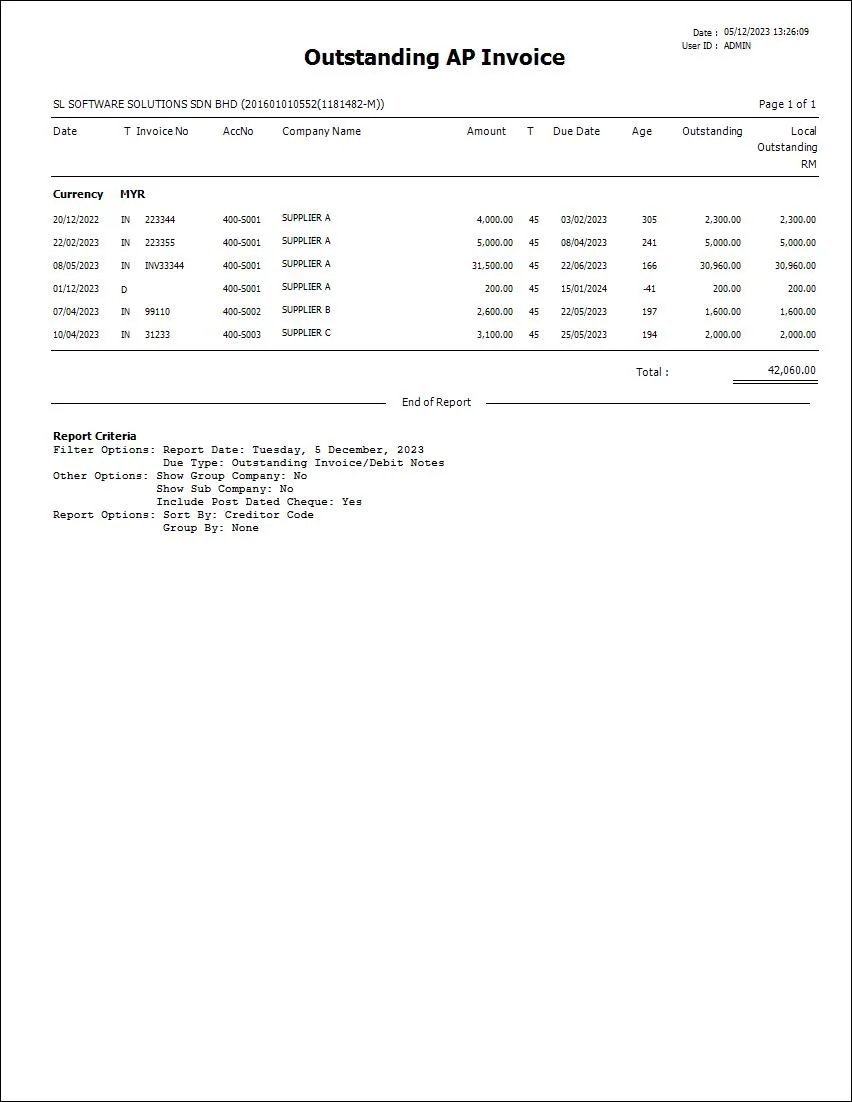
The AutoCount Outstanding A/P Invoice report lists supplier invoices that remain unpaid as of a selected reporting date. This page offers a free System Report layout, an ART template download and a PDF sample. It is a report-format resource, not a tool for entering or posting accounting transactions.
Before choosing the layout, preview the report image and PDF to check whether the supplier name, invoice number, document date, due date and outstanding amounts are easy to read. An organised report makes it easier to identify open invoices, prepare payment reviews and discuss payable balances with your accounts team. Your actual available columns may depend on the version and report settings used.
Download the ART ZIP only after confirming that the report format suits your business. Keep a backup of your existing approved template, check compatibility with your installed AutoCount Accounting version and test printing with representative supplier invoices. For more about monitoring supplier balances and payables, explore AutoCount Advance Aging Format plugin.
AutoCount Outstanding A/P Invoice Report Template
1 templatePreview and download the genuine Outstanding A/P Invoice – System Report layout for unpaid supplier invoices.
Outstanding A/P Invoice – System Report
Original printout format to review outstanding supplier invoice details and layout.
The ZIP contains the ART report template; the PDF is for reviewing the printed design. Check your installed AutoCount version and report compatibility before importing.
Need a Custom Outstanding A/P Invoice Layout?
Want a company logo, supplier details, due-date columns or different print dimensions? SL Software can review your requirements based on your sample and AutoCount version.
Discuss Report Customization ↗Explore Other AutoCount Report Templates
Creditor Aging Reports
Review unpaid balances by aging period with the Creditor Aging Report.
Browse Creditor Aging →Creditor Statement Reports
Explore creditor statements for supplier account balances and transactions.
View Creditor Statements →AutoCount Accounting
Explore the software for accounts payable, purchasing and related accounting workflows.
Explore Accounting →Frequently Asked Questions About Outstanding AP Invoice Templates
What does the Outstanding A/P Invoice report show?
It lists unpaid supplier invoices as of a selected date, helping you review open accounts payable balances.
How many templates are available?
One original System Report template is available here, with an ART ZIP file, sample PDF and report image.
What is the difference between the ART ZIP and PDF?
The ZIP contains the ART report template. The PDF lets you review the printed report layout before importing it. Open the PDF to check invoice columns, spacing, print alignment and the information included in the report. You can then compare the sample with your organisation's existing outstanding accounts payable printout.
When testing the AutoCount Outstanding A/P Invoice template, use records with different due dates and outstanding amounts. Make sure the supplier name, invoice reference and report totals are legible. Keep a copy of your current template so that you can restore your previous format if the new design does not match your reporting needs. The free template is intended for compatible AutoCount report printing, not for changing payable balances.
Can I customize the report layout?
Yes. Contact SL Software to discuss columns, branding, and other layout changes, subject to your AutoCount version.
Will downloading the template change my supplier balances?
No. These downloads are report layout files, not transactions, and do not post or change supplier invoices.
Need Help With Your Outstanding A/P Invoice Reports?
Discuss report-layout changes with SL Software.