
-
AutoCount Accounting Features
-
- Approval Workflow
- Audit Trail
- Auto Save in Draft Folder
- AutoCount Contra Account
- AutoCount License Setting Guide
- Deposit Tracking & Management
- Documents Numbering Format
- Full Transfer and Partial Transfer
- Import Data to AutoCount Accounting Using Excel
- Informative Charts and Analytical Data
- Layout Customization
- Multi Pricing
- Sales and Services Tax
- Schedule Backup
- Search Lookup Edit
- View Documents Flow
- AutoCount Feature Stock Take
- Column Chooser
- Show Remaining (3) Collapse
-
AutoCount Cloud Accounting
-
AutoCount E-Invoice
-
AutoCount HRMS User Guide
-
AutoCount Modules
-
- Activity Stream
- Advanced Financial Report
- Advanced Item
- Advanced Multi-UOM
- Advanced Quotation Module
- Basic Multi-UOM
- Budget Module
- Consignment
- Filter By Salesman
- FOC Quantity
- Formula
- Item Batch
- Item Package
- Landing Cost
- Multi-Currency
- Multi-Dimensional Analysis
- Multi-Location
- Project Account
- Recurrence
- Remote Credit Control Module
- Stock Assembly
- User Defined Fields (UDF)
- AutoCount SST Hidden Functions
- AutoCount SST Submission - Service Tax
- AutoCount Scripting Module User Guide
- AutoCount Bonus Point Module User Guide
- AutoCount Service Management Plugin User Guide
- Show Remaining (12) Collapse
-
AutoCount Plugins
-
- Fixed Assets Management
- Goldsmith
- TD Ordering Mobile Apps
- TD Stock Mobile Apps
- Universal Import Plugin
- DMS Import Plugin
- AutoCount Pick List Plugin User Guide
- AutoCount Credit Memo Plugin User Guide
- AutoCount Lock Price Plugin
- AutoCount Progressive Billing
- AutoCount Easy Recurrence Plugin
- Batch Update Unit Price Plugin
- AutoCount Production order
- AutoCount Car Tint Film Plugin
-
- Event Management System
- AutoCount To-Do List Plugin
- AutoCount AutoBank Reconciliation Plugin
- Intercompany Billing Plugin User Guide
- Lead Management 2.0 Plugin
- AutoCount Service Contract Plugin User Guide
- AutoCount Optical Plugin
- AutoCount Integrator Plugin
- AutoCount Procurement Planning Plugin
- Cage Management Plugin
- AutoCount Vehicle Plugin
- AutoCount Agent Validation Plugin User Guide
- AutoCount Barcode Generator Plugin User Guide
- AutoCount Easy Batch Number Entry Plugin User Guide
- Warranty 2.0 Plugin
- AutoCount Easy Photo 2.0 User Guide
- AutoCount Recurring Invoice Plugin User Guide
- AutoCount Scale Barcode Plugin User Guide
- AutoCount Recurrence Late Interest Plugin
- AutoCount Item Visibility Control
- AutoCount Bill Remark Plugin User Guide
- AutoCount Pain Tracker User Guide
- AutoCount Easy Payment
- AutoCount Easy Deposit Plugin
- AutoCount Easy Knock Off Plugin
- AutoCount Daily Collection Summary Plugin
- Timber Log Plugins
- Batch Transfer SODO Plugin
- AutoCount Vege Basket Plugin Guide
- AutoCount Fruit Basket Plugin Guide
- Referral Management Plugin
- AutoCount Migrator Plugin
- AutoCount Email & WhatsApp Plugin
- AutoCount Multi Company Knock Off Plugin
- AutoCount Advance Aging Format Plugin
- AutoCount Payment Request Plugin
- AutoCount Vehicle Master Plugin
- AutoCount Advance Deposit Plugin
- AutoCount IC Checker Plugin
- AutoCount RMA Plugin
- AutoCount Historical Outstanding DO Listing Plugin
- AutoCount Project Department Visibility Control Plugin
- AutoCount MRP Order Plugin
- AutoCount GridToExcel Plugin
- AutoCount Stock Availability Report Plugin
- AutoCount Batch Transfer SO DO Plugin
- AutoCount Centralized Kitchen Management Plugin
- SL AutoCount API
- AutoCount InterCompany Billing Plugin
- AutoCount Sales Commission Plugin
- AutoCount Advanced Credit Term Plugin
- AutoCount Advanced Stock Assembly Plugin
- AutoCount Shipment Plugin
- AutoCount Tour Plugin
- AutoCount Smart Analysis
- AutoCount Rental Management
- Show Remaining (41) Collapse
-
-
Form Template
-
Report Template
-
- Advance Quotation
- Cash Sale
- Consignment
- Consignment Movement
- Credit Note
- Debit Note
- Delivery Order
- FOC Quantity Analysis By Document Report
- Invoice
- Item Package Sales Report
- Monthly Sales Analysis
- Outstanding Sales Order Listing
- Profit And Loss Of Documents
- Quotation
- Sales Agent Contribution Report
- Sales Order
- Top/Bottom Sales Ranking
- Show Remaining (2) Collapse
-
- Available Stock Status Report
- Expired Item Batch Listing
- Inventory Physical Worksheet
- Stock Adjustment
- Stock Aging Report
- Stock Assembly
- Stock Assembly Order
- Stock Balance By Location
- Stock Balance Report
- Stock Card Report
- Stock Disassembly
- Stock Issue
- Stock Item Profit Margin
- Stock Movement Report
- Stock Receive
- Stock Take
- Stock Transfer
- Stock Write Off
- Show Remaining (3) Collapse
-
B2B ORDERING
-
AutoCount AI Agent
AutoCount Accounting: Audit Trail
Introduction to AutoCount's Audit Trail
Firstly, the Audit Trail feature in AutoCount Accounting is essential for tracking financial transactions and ensuring compliance with auditing standards. Therefore, this user guide will walk you through the steps to utilize this feature effectively. Thus, helping you maintain transparency and accuracy in your accounting processes.
AutoCount Audit Trail Video Guide
- AutoCount Audit Trail (EN)
Audit Trail Setup
Integration & Audit Trail Setup
- AutoCount Audit Trail (CN)
审计跟踪设置
集成和审计跟踪设置
Key Features of Autocount's Audit Trail
Benefits of Audit Trail
Enhanced Security
Firstly, it helps businesses to track all changes. Thus, ensuring only authorized modifications.
Compliance
Secondly, it helps businesses to meet regulatory requirements by providing transparent records.
Error Detection
Thirdly, it identifies and rectifies discrepancies quickly. Thus, allowing errors to be detected early before it escalated.
Accessing the Audit trail Feature
To make the most of the Audit Trail feature, it’s important to know how to access it within AutoCount Accounting.
Navigation Steps
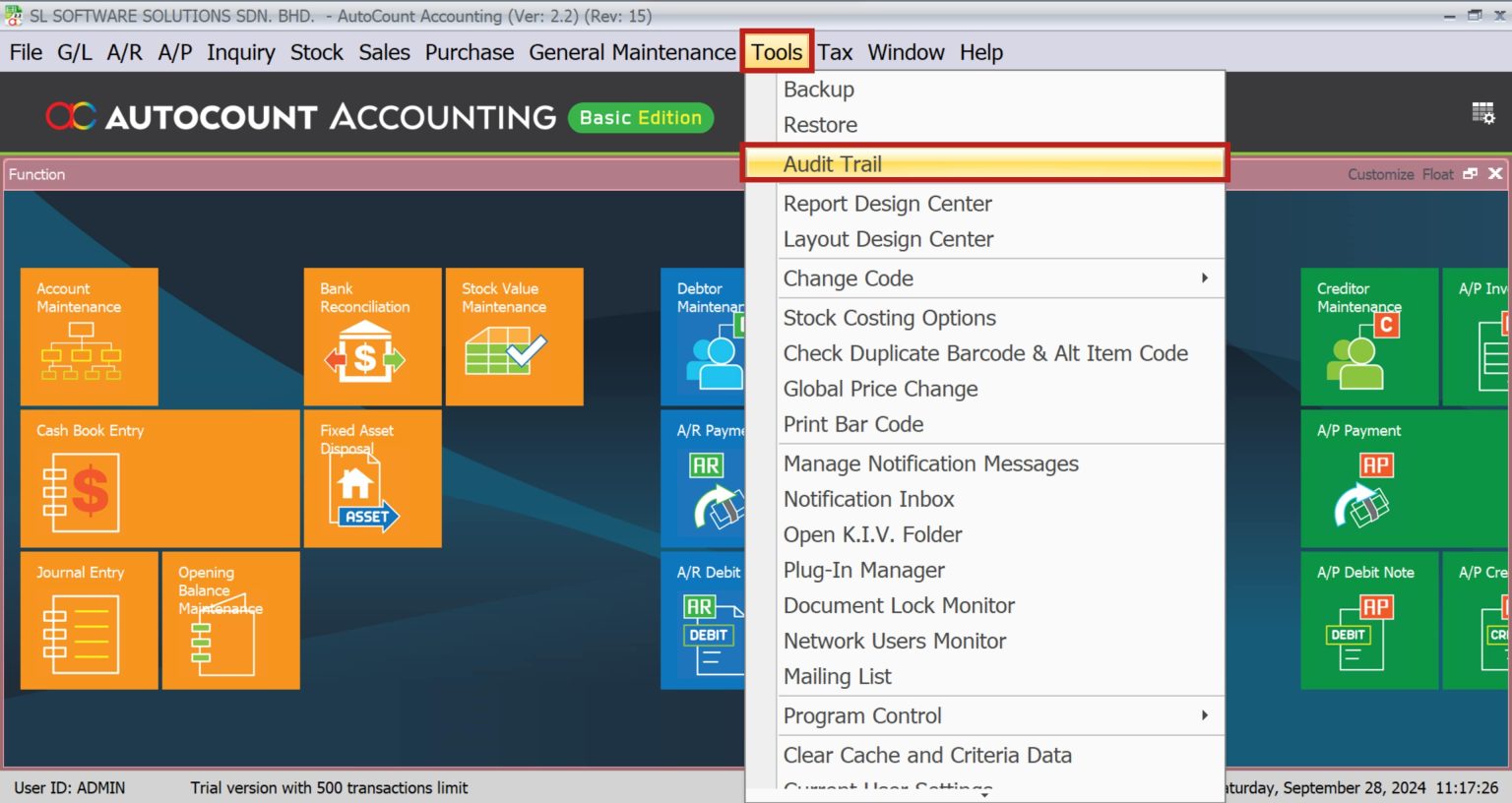
- Firstly, open AutoCount Accounting.
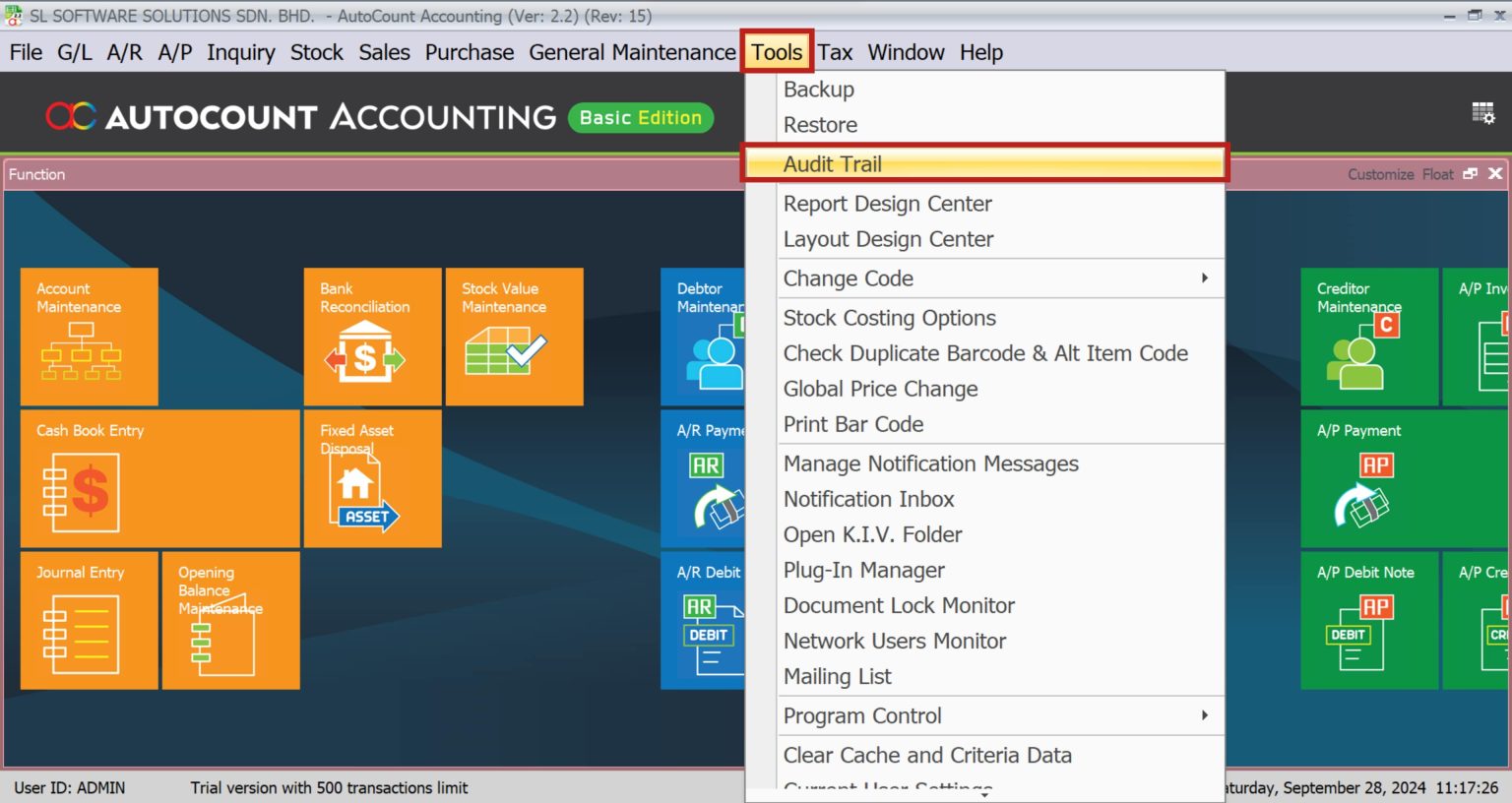
- Secondly, navigate to the Tools menu.
- Thirdly, select Audit Trail from the dropdown list.
Interface Overview
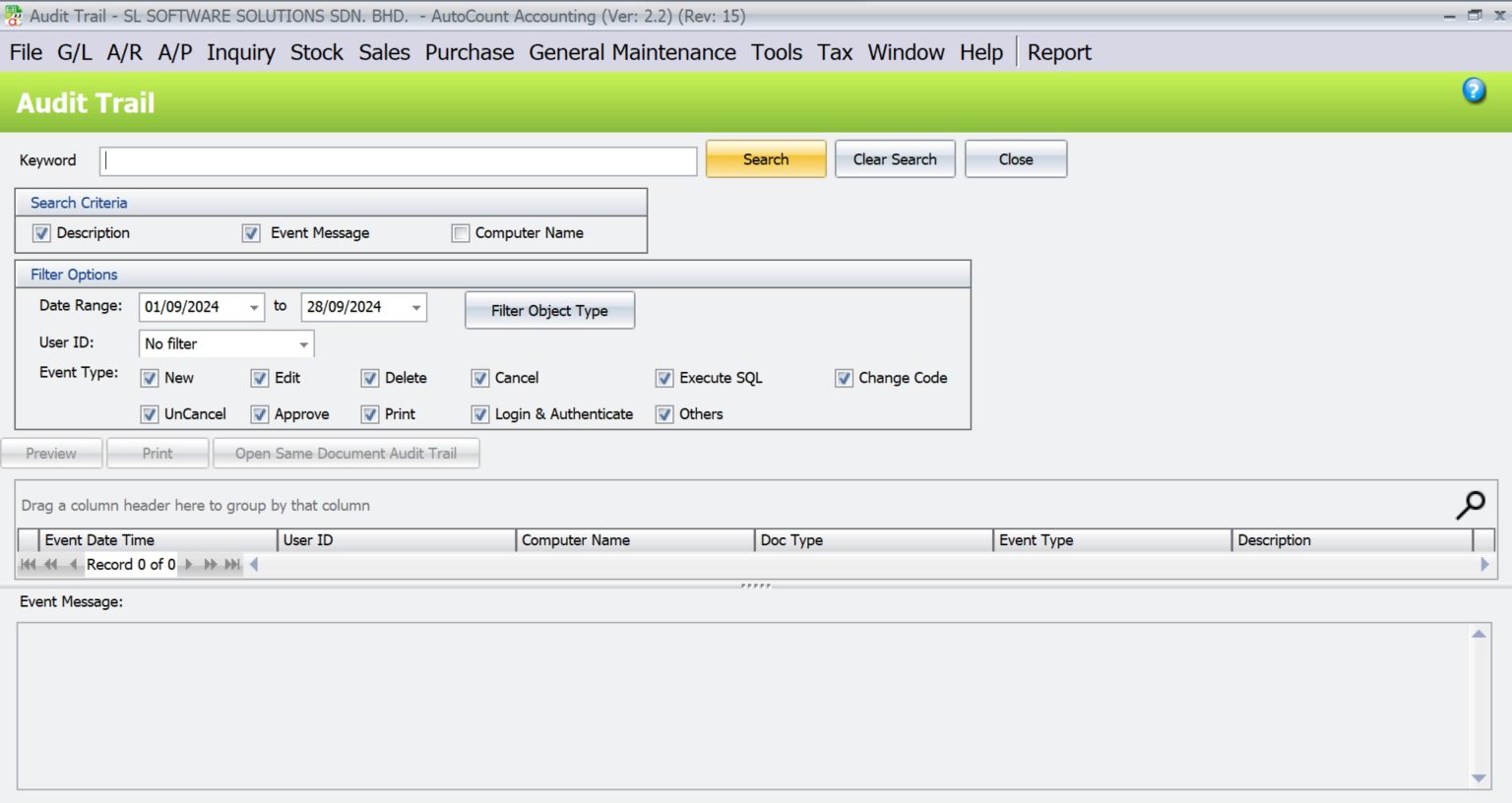
The Audit Trail interface is user-friendly, with options to filter and search specific transactions. Thus, making it easy to find the information you need.
Configuring Access Rights for Audit Trail
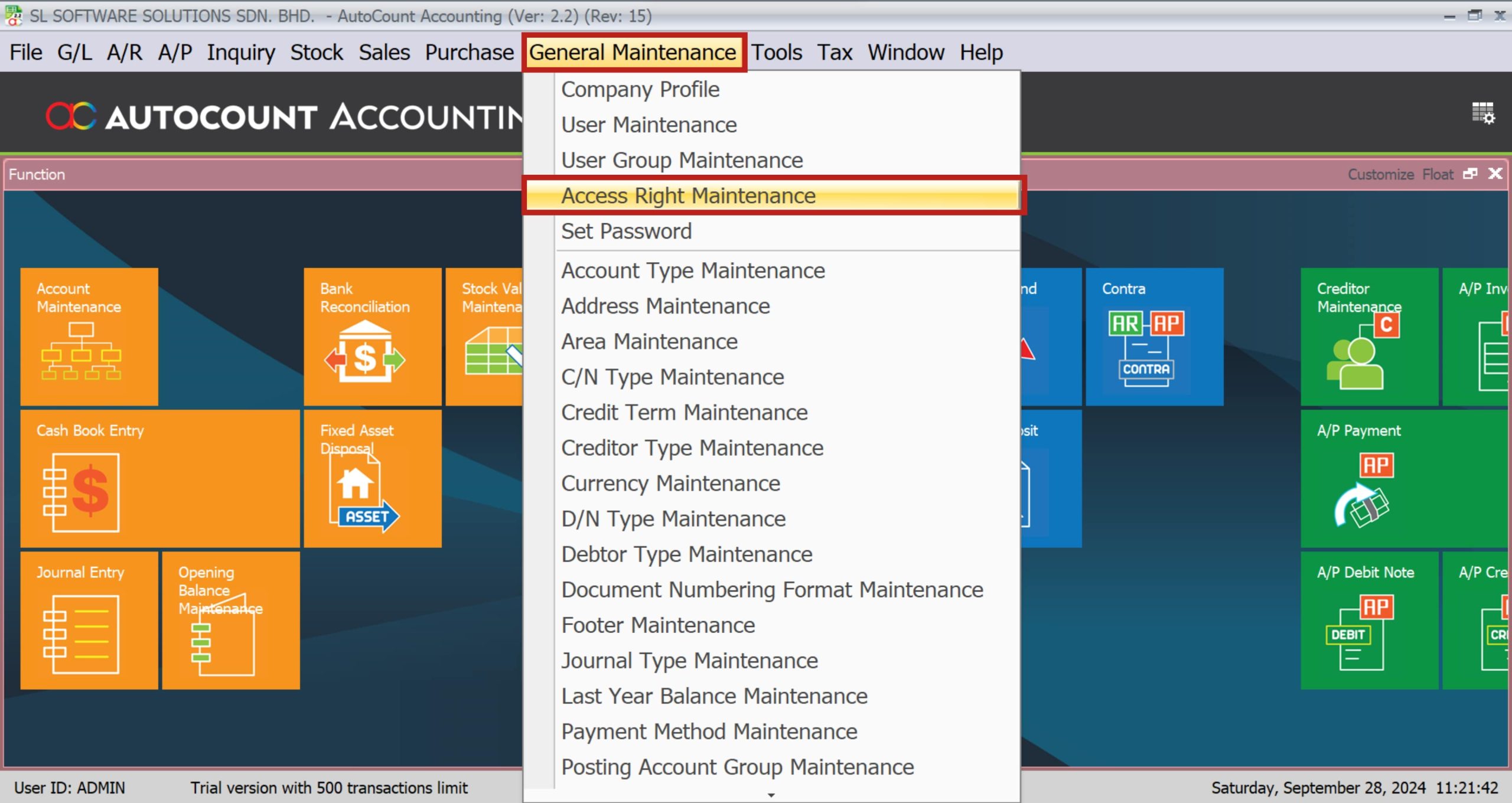
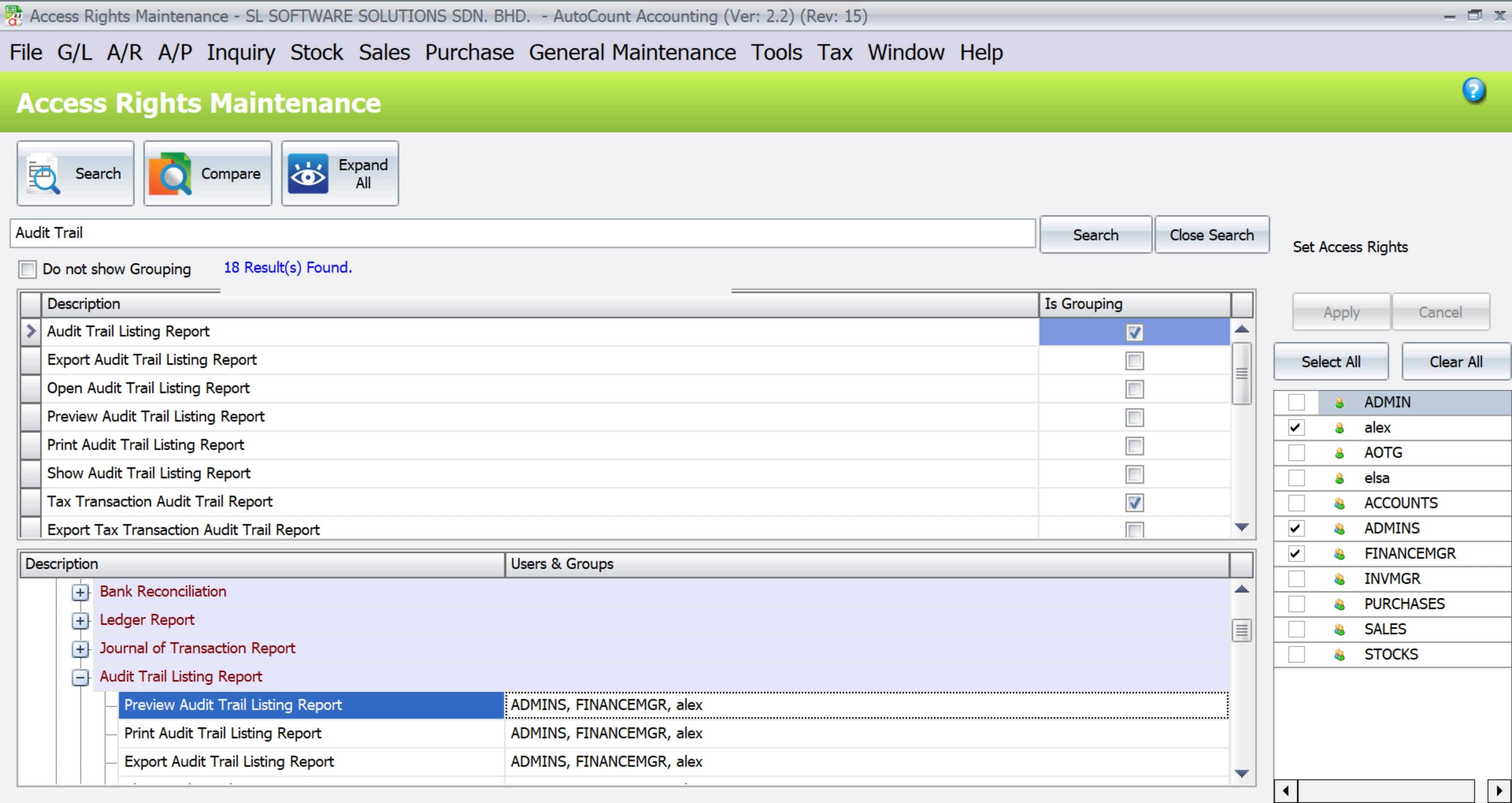
Access to the Audit Trail feature should be controlled to ensure that only authorized personnel can view or modify the data.
Settings Permission
- Firstly, go to the Access Rights Maintenance section.
- Secondly, search for Audit Trail in the description.
- Thirdly, assign or restrict access based on user roles and groups.
User Groups in Audit Trail
Admin Group
Typically has full access to all features including viewing, printing, and exporting the audit trail.
User Group
May have restricted access based on the organization’s policies.
Viewing The Audit trail
Regularly viewing the Audit Trail helps maintain financial integrity.
Step 1: Open Audit Trail
Firstly, open the Audit Trail report from the Tools menu.
Step 2: Use Filters
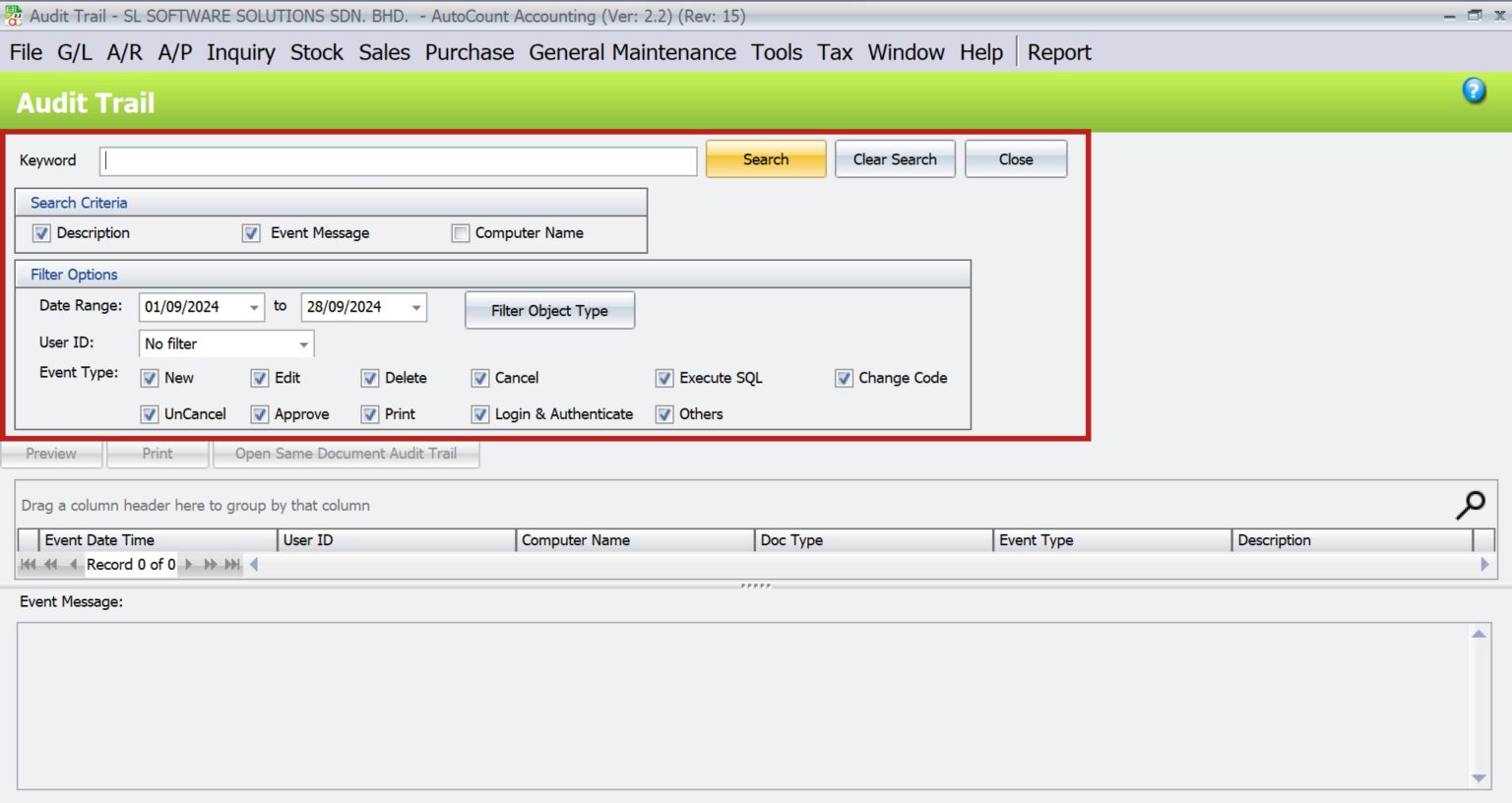
Secondly, use filters to narrow down the data (e.g., date range, transaction type).
Step 3: Review Entries
Thirdly, review the entries for any irregularities.

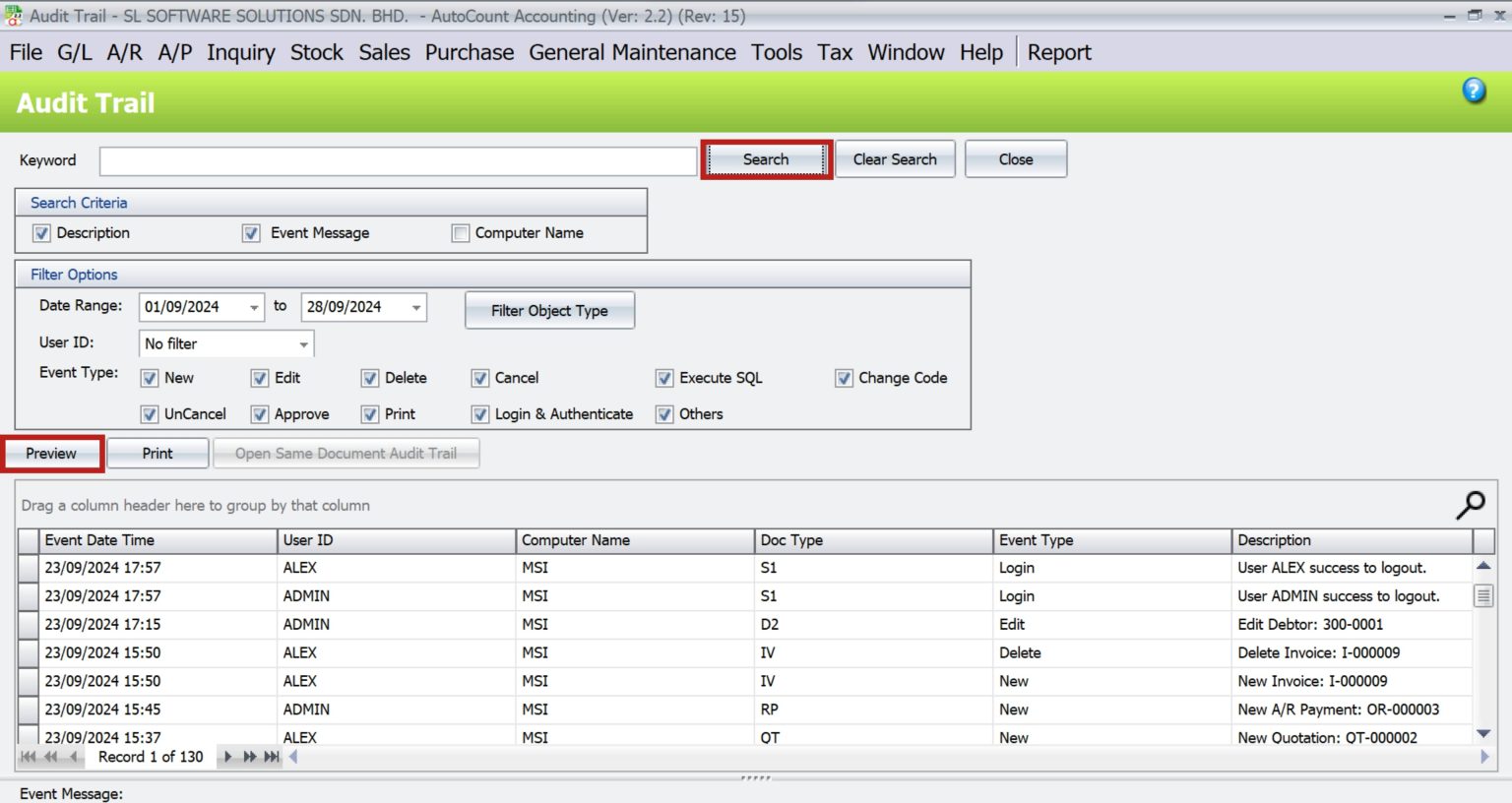
NOTE: The Filter Object Type feature allows you to specify the types of objects or transactions you want to include in your search, such as sales orders, invoices, or user login events.
Analyzing the Audit Trail Data
Analyzing the data in the Audit Trail can provide valuable insights into your financial operations.
Data Interpretation
- Firstly, look for patterns or unusual activities.
- Secondly, compare with previous periods to identify trends.
Generating Reports
- Firstly, select the desired data range.
- Secondly, generate a report in your preferred format (PDF, Excel).
- Thirdly, review the report for any anomalies.
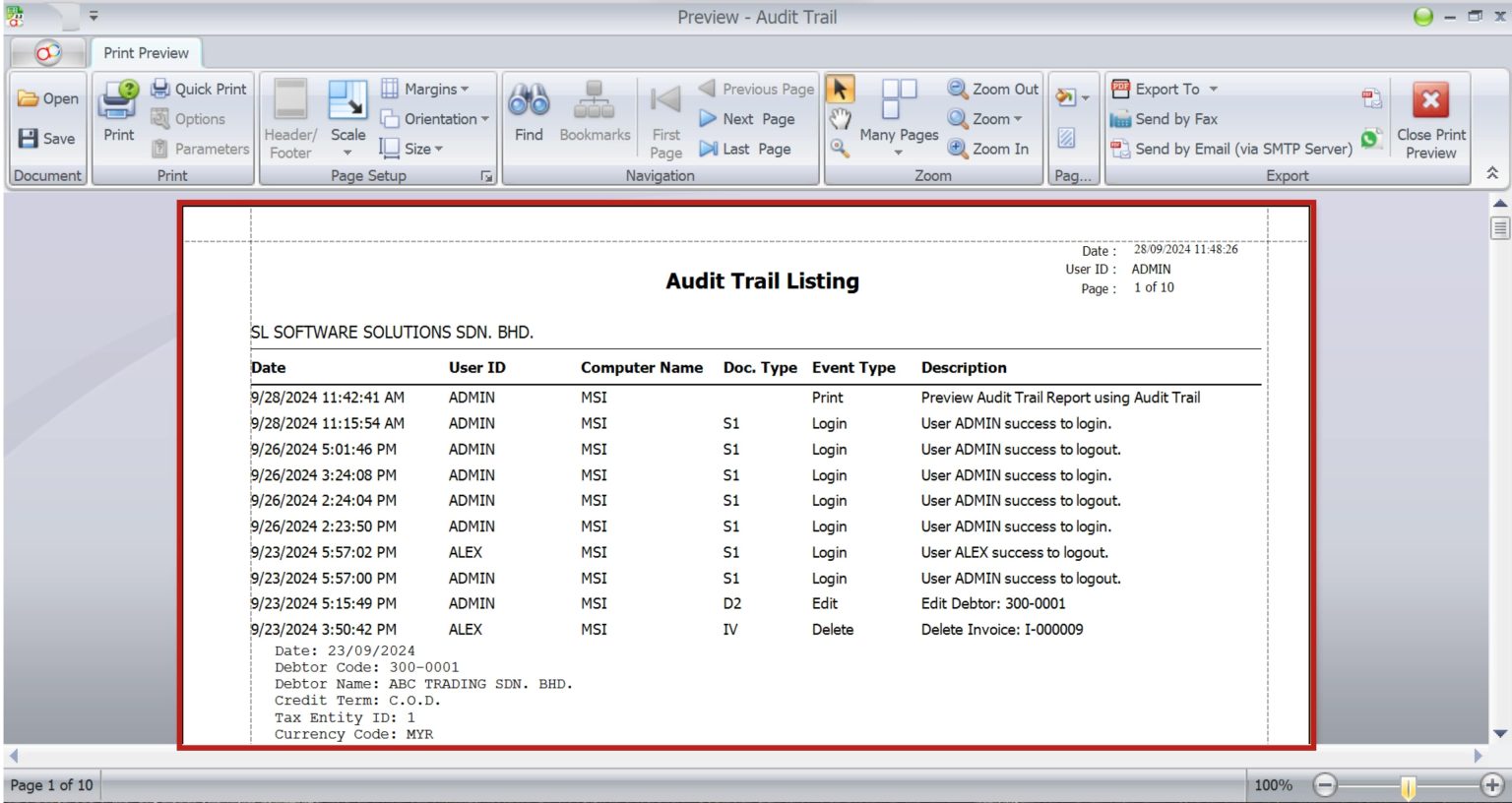
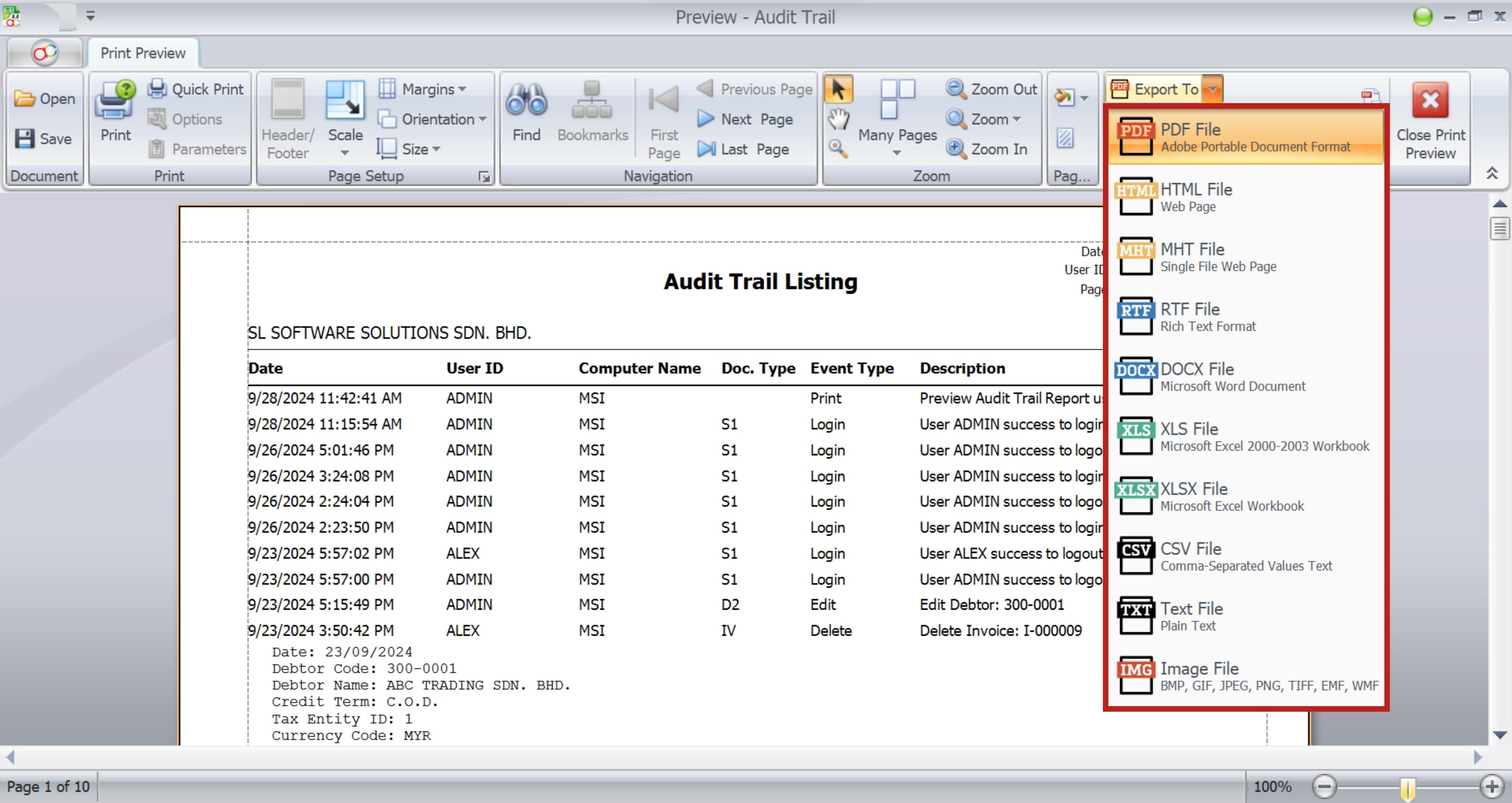
NOTE: Click export to and user can choose the type of file they want to save.
Exporting Audit trail Reports
Exporting reports allows for easier sharing and external analysis.
Export Formats
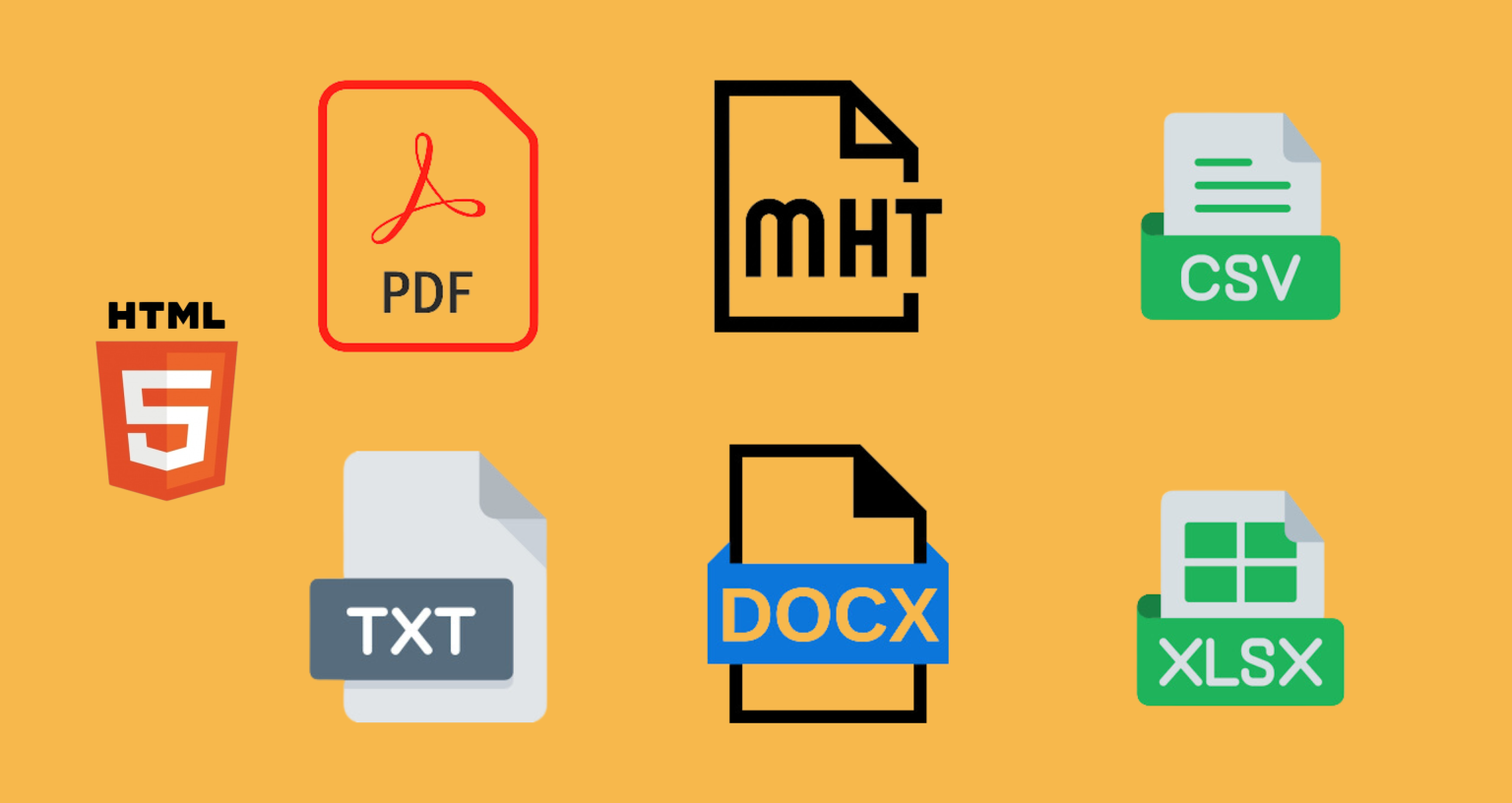
- Image Files (BMP, GIF, JPEG, PNG, TIFF, EMF, WMF)
Step-by-Step Guide on Exporting Audit trail Reports
Step 1: Open Audit Trail Report
Firstly, open the Audit Trail report.
Step 2: Preview
Secondly, click Preview.
Step 3: Export To Desired Format
Thirdly, click Export to => Choose the desired format.
Step 4: Save the Report
Finally, save the report to your device.
Using Audit Trail for Compliance
The Audit Trail is a powerful tool for ensuring compliance with financial regulations.
Case Study
NOTE: For Instance, if Company C used the Audit Trail report to provide evidence of a staff member’s unauthorized access to sensitive company data, leading to disciplinary actions and improved security protocols.
Detailed Tracking Capabilities
The Audit Trail in AutoCount Accounting provides detailed information including:
Deleted Details
View which transactions were deleted, when they were deleted, and by which user.
Edit Details
Track all changes made to transactions, including what was edited, when, and by whom.
Access Details
Identify the computer from which the system was accessed and the user ID used.
Login Tracking
Monitor user login times and activities within AutoCount.

Troubleshooting Common Issues
How do I enable the Audit Trail?
Navigate to Tools > Audit Trail and its ready to use
What if I notice discrepancies?
Investigate immediately and correct any errors.
How often should I review the Audit Trail?
At least monthly, or more frequently if required.
Conclusion
To conclude, the Audit Trail in AutoCount Accounting is a vital feature for maintaining financial accuracy and transparency. Therefore, by following this user guide, you can effectively utilize this feature to enhance your accounting processes. Thus, ensuring compliance and improving overall financial management.
Frequently Asked Questions
What is Audit Trail?
The Audit Trail is a detailed record of all transactions and changes made in the accounting system.
Why is the Audit Trail Important?
It helps maintain transparency, detect fraud, and ensure compliance with auditing standards.
How do i access the Audit Trail in AutoCount Accounting?
Navigate to Tools and select Audit Trail from the dropdown menu.
Can I customize the Audit Trail Settings?
While no initial setup is required, you can use filters to manage the data displayed.
How Often Should i Review the Audit Trail?
It’s recommended to review the Audit Trail at least monthly.
What formats can i Export Audit Trail Reports In?
You can export reports in PDF, HTML, MHT, RTF, DOCX, XLS, XLSX, CSV, TXT, and various image formats.
Interested in Getting AutoCount for your Business?
Contact our sales team today to explore pricing options and get started with the perfect solution for you.