
-
AutoCount Accounting Features
-
- Approval Workflow
- Audit Trail
- Auto Save in Draft Folder
- AutoCount Contra Account
- AutoCount License Setting Guide
- Deposit Tracking & Management
- Documents Numbering Format
- Full Transfer and Partial Transfer
- Import Data to AutoCount Accounting Using Excel
- Informative Charts and Analytical Data
- Layout Customization
- Multi Pricing
- Sales and Services Tax
- Schedule Backup
- Search Lookup Edit
- View Documents Flow
- AutoCount Feature Stock Take
- Column Chooser
- Show Remaining (3) Collapse
-
AutoCount Cloud Accounting
-
AutoCount E-Invoice
-
AutoCount HRMS User Guide
-
AutoCount Modules
-
- Activity Stream
- Advanced Financial Report
- Advanced Item
- Advanced Multi-UOM
- Advanced Quotation Module
- Basic Multi-UOM
- Budget Module
- Consignment
- Filter By Salesman
- FOC Quantity
- Formula
- Item Batch
- Item Package
- Landing Cost
- Multi-Currency
- Multi-Dimensional Analysis
- Multi-Location
- Project Account
- Recurrence
- Remote Credit Control Module
- Stock Assembly
- User Defined Fields (UDF)
- AutoCount SST Hidden Functions
- AutoCount SST Submission - Service Tax
- AutoCount Scripting Module User Guide
- AutoCount Bonus Point Module User Guide
- Show Remaining (11) Collapse
-
AutoCount Plugins
-
- Fixed Assets Management
- Goldsmith
- TD Ordering Mobile Apps
- TD Stock Mobile Apps
- Universal Import Plugin
- DMS Import Plugin
- AutoCount Item Scope Plugin
- AutoCount Easy Knock Off Plugin
- AutoCount Pick List Plugin User Guide
- AutoCount Agent Validation Plugin User Guide
- AutoCount Barcode Generator Plugin User Guide
- AutoCount Bill Remark Plugin User Guide
- AutoCount Easy Batch Number Entry Plugin User Guide
- AutoCount Recurring Invoice Plugin User Guide
- AutoCount Easy Photo 2.0 User Guide
- AutoCount Pain Tracker User Guide
- AutoCount Credit Memo Plugin User Guide
- Show Remaining (2) Collapse
-
- AutoCount Easy Recurrence Plugin
- AutoCount Recurring Billing Plugin
- Event Management System
- AutoCount To-Do List Plugin
- AutoCount AutoBank Reconciliation Plugin
- Intercompany Billing Plugin User Guide
- AutoCount Basket Plugin User Guide
- Lead Management 2.0 Plugin
- AutoCount Service Contract Plugin User Guide
- Autocount Repacking Plugin
- AutoCount Scale Barcode Plugin User Guide
- AutoCount Progressive Billing
- AutoCount Optical Plugin
- AutoCount Meter Reading Plugin User Guide
- AutoCount Car Tint Film Plugin
- AutoCount Leasing Plugin User Guide
- AutoCount Integrator Plugin
- AutoCount Procurement Planning Plugin
- Show Remaining (3) Collapse
-
-
Form Template
-
Report Template
-
- Advance Quotation
- Cash Sale
- Consignment
- Consignment Movement
- Credit Note
- Debit Note
- Delivery Order
- FOC Quantity Analysis By Document Report
- Invoice
- Item Package Sales Report
- Monthly Sales Analysis
- Outstanding Sales Order Listing
- Profit And Loss Of Documents
- Quotation
- Sales Agent Contribution Report
- Sales Order
- Top/Bottom Sales Ranking
- Show Remaining (2) Collapse
-
- Available Stock Status Report
- Expired Item Batch Listing
- Inventory Physical Worksheet
- Stock Adjustment
- Stock Aging Report
- Stock Assembly
- Stock Assembly Order
- Stock Balance By Location
- Stock Balance Report
- Stock Card Report
- Stock Disassembly
- Stock Issue
- Stock Item Profit Margin
- Stock Movement Report
- Stock Receive
- Stock Take
- Stock Transfer
- Stock Write Off
- Show Remaining (3) Collapse
Advanced AutoCount Plugin Setup For Managing Complex Multi-Year Service Contract Agreements
What is AutoCount Service Contract Plugin?
The AutoCount Service Contract Plugin streamlines service management for businesses by automating the tracking of service agreements, generating service invoices, and providing reminders for contract renewals or service maintenance. It integrates seamlessly with AutoCount to simplify the management of service contracts.
(EN) AutoCount Service Contract plugin Video Guide
Why You Should Use Service Contract Plugin?
This plugin helps businesses reduce manual work, improve contract accuracy, and save time by automating service contract processes. With automatic reminders, reporting, and invoicing, it enhances service-related workflows and boosts efficiency.
Key Features of the AutoCount Service Contract Plugin
Service Contract Creation
Efficiently create and manage service contracts for each customer.
Automatic Billing
Set billing frequencies and automate invoice creation for recurring payments.
Contract Renewal
Manage contract renewal dates and notifications.
Comprehensive Reporting
Generate detailed reports to monitor service contract performance.
Who Can Benefit from This Plugin?
Maintenance Companies
If your business regularly services equipment, machinery, or installations under a contract (like yearly check‑ups or scheduled maintenance), this plugin keeps all your contracts organized and on schedule.
Subscription Based Services
Got customers who pay monthly or yearly for a service (e.g., software support, cleaning plans, security monitoring)? The plugin helps you manage renewals, invoices, and reminders so nothing slips through the cracks.
After‑Sales Support Providers
For businesses that offer warranty support, service plans, or extended care after a sale — this plugin tracks what needs to happen, when it needs to happen, and alerts your team when actions are due.
How AutoCount Service Contract Plugin works
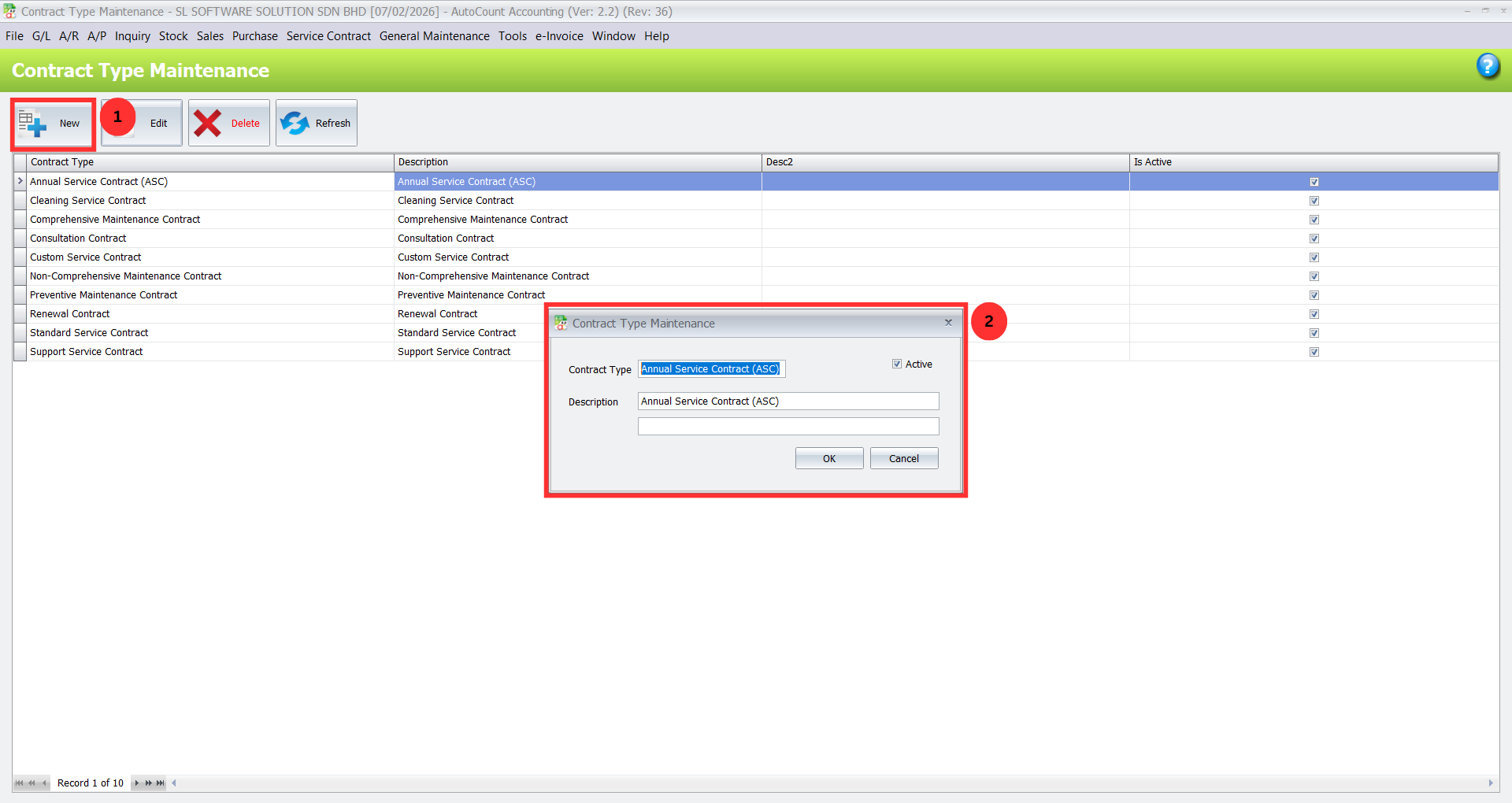
1. Organizing Contract Types
Create Contract Categories: Go to Service Contract > Contract Type Maintenance to define categories such as “Annual Maintenance,” “Support,” or “Warranty Extensions.”
Standardize Creation: This helps maintain consistency across your contracts, ensuring that each type follows a set structure.
Pro Tip:
Regularly review and update contract types as your business offers new services or product categories.
2. Setting Up Billing Templates
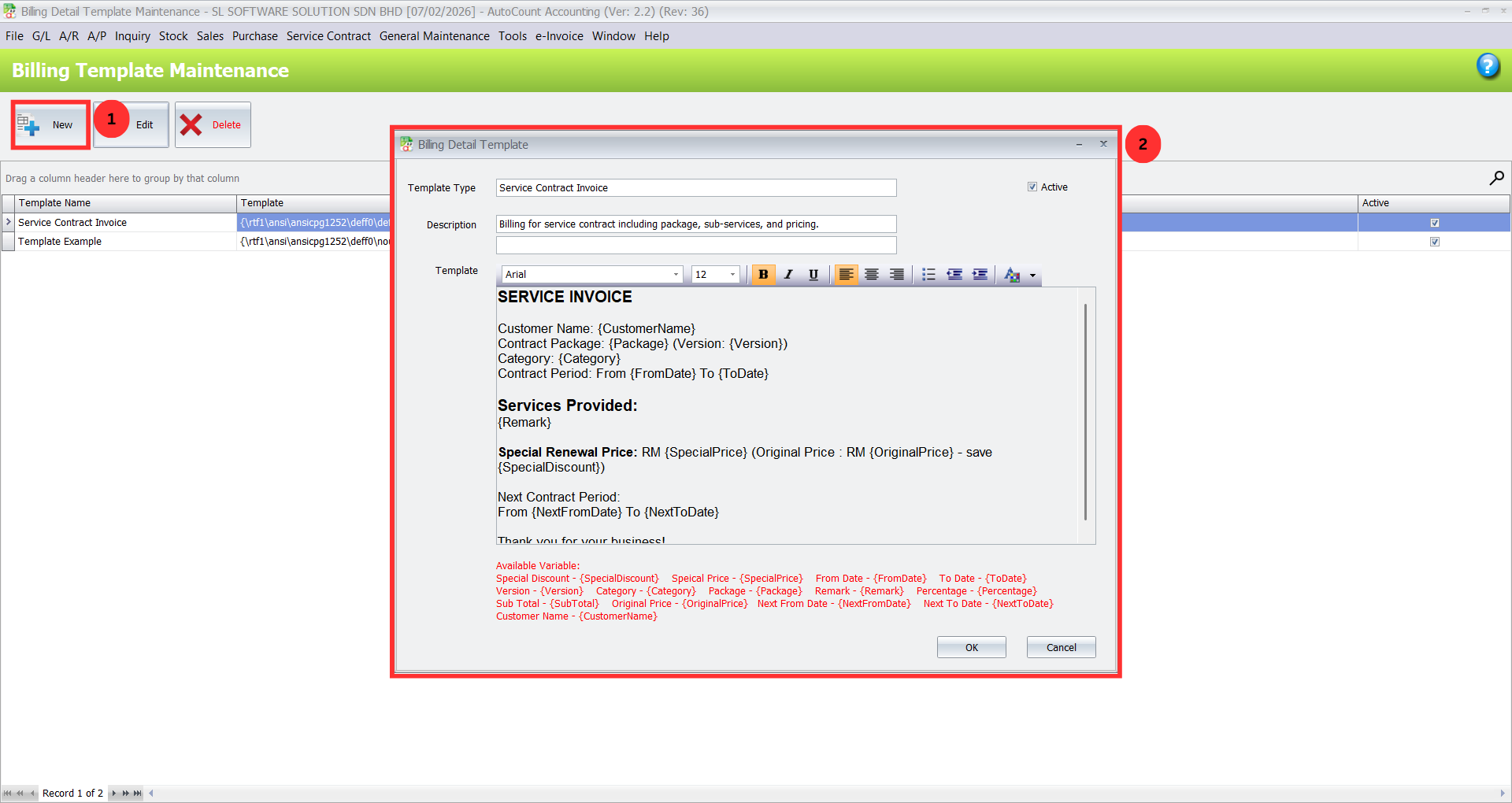
Create Reusable Billing Templates: Navigate to Service Contract > Billing Template Maintenance to set up templates for recurring charges like yearly or monthly billing.
Simplify Repetitive Tasks: Templates save time on data entry and help maintain consistency in invoicing.
Pro Tip:
Modify templates based on customer needs, such as adjusting service charges for different contract types.
3. Entering a New Service Contract
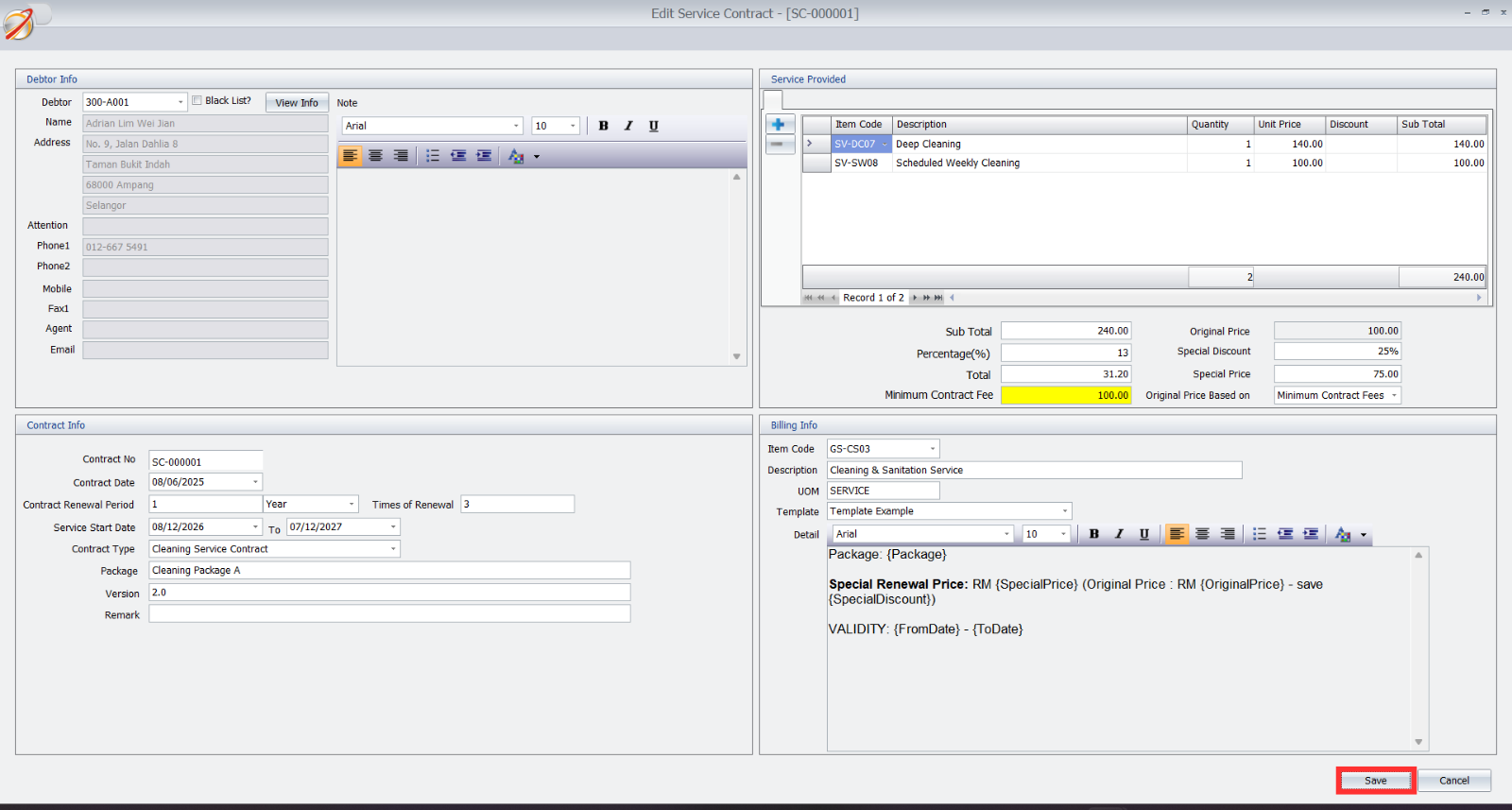
Create Contracts: Go to Service Contract > Service Contract Maintenance and click “New” to input customer details, contract duration, service types, and pricing.
Track Workflow: Use the module to view contract statuses, check billing details, and generate necessary documents.
Pro Tip:
Use the contract workflow tab to keep track of contract stages from creation to renewal.
4. Settings Configuration
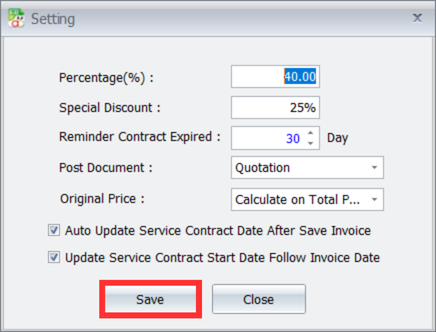
Adjust Settings: Access Service Contract > Settings to fine-tune contract features like pricing methods, reminder notifications, and discount settings.
Customize for Workflow: Adapt the system to your specific needs, such as selecting advance documents for contract creation.
Pro Tip:
Review and update settings regularly to align with your business changes and customer requirements.
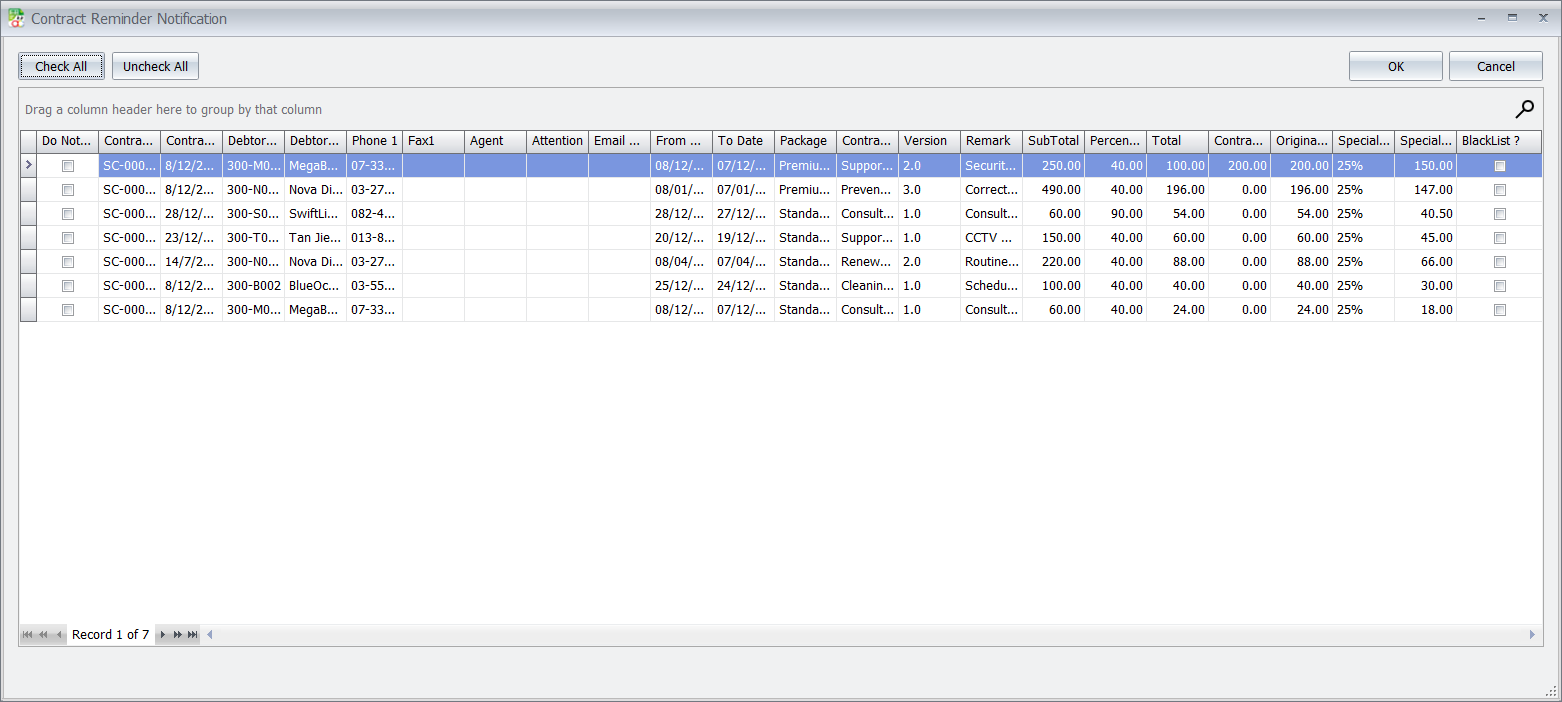
5. Contract Reminder System
Manage Reminders: Visit Service Contract > Reminder to manually view upcoming contract renewals and expiry dates.
Automate Notifications: Contract reminders will appear automatically when logging into AutoCount to help you stay on top of renewals.
Pro Tip:
Set up automatic notifications for both internal teams and clients to streamline the renewal process.
6. Checking Contract Status
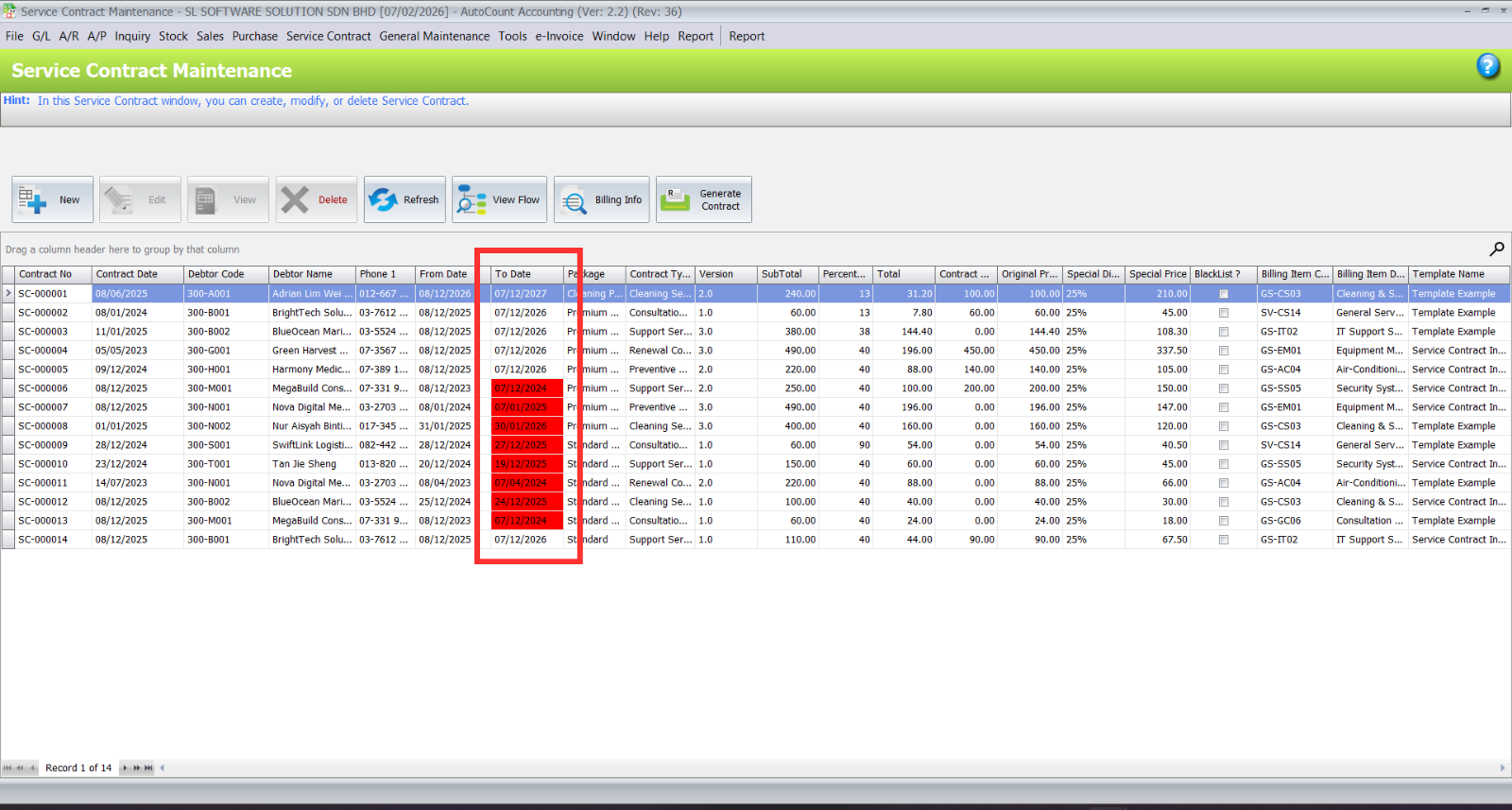
View Status: Use AutoCount’s color-coded list to track contracts’ status—active, nearing expiry, expired, or blocked.
Quick Insights: This visual layout provides a clear overview of where contracts stand and which need follow-ups.
Pro Tip:
Customize your dashboard to highlight contracts that require immediate action, such as those near expiration.
Core Benefits of the AutoCount Service Contract Plugin
Centralized Contract Management
Manage all service contracts within one system, ensuring streamlined operations and easy access to customer data.
Automated Billing and Renewals
Automate billing cycles and contract renewals to save time and reduce manual effort.
Enhanced Reporting and Insights
Generate detailed reports to track contract performance, revenue, and renewal rates, helping you make data-driven decisions.
Best Practices for Managing Service Contracts
Regularly Update Contract Terms
Review contract terms periodically to reflect changes in pricing, service offerings, or business needs.
Train Employees
Educate team members on the features of the Service Contract Plugin to ensure efficient use.
Monitor Contract Performance
Use reports to track contract effectiveness and renewal rates.
Conclusion
The AutoCount Service Contract Plugin offers an efficient way to manage contracts, invoicing, and service maintenance. By automating tasks and integrating with your existing systems, it improves accuracy, saves time, and ensures smooth daily operations.
Frequently Asked Questions
What types of businesses is this plugin best for?
It is ideal for any SME that manages recurring service agreements, including IT support companies, maintenance service providers, software service firms, and copier/printer service businesses.
Can I create different billing schedules for different contracts?
Yes. Within the Billing Detail Template and individual contract entries, you can define specific billing cycles (monthly, quarterly, annually) and pricing structures to match your service offerings.
How does the color-coded listing work?
The system automatically applies color codes based on the contract’s dates and status. For example, active contracts may be in green, those expiring soon in yellow, and expired contracts in red, providing an at-a-glance overview.
Can I generate invoices directly from a contract?
Absolutely. The plugin is fully integrated with AutoCount’s accounting functions. You can generate a Sales Invoice directly from an active service contract, populating it with all the agreed-upon items and prices.
How do I handle a contract renewal?
When a contract is nearing its end date, you can use the plugin to quickly generate a renewal quotation. Once the customer approves, you can create a new contract period with updated terms if needed.
Elevate Your Service Business with Organized Contracts
Stop letting manual contract management slow you down and introduce risk. The AutoCount Service Contract Plugin provides the structure, automation, and visibility you need to manage your service agreements professionally and profitably.