
-
AutoCount Accounting Features
-
- Approval Workflow
- Audit Trail
- Auto Save in Draft Folder
- AutoCount Contra Account
- AutoCount License Setting Guide
- Deposit Tracking & Management
- Documents Numbering Format
- Full Transfer and Partial Transfer
- Import Data to AutoCount Accounting Using Excel
- Informative Charts and Analytical Data
- Layout Customization
- Multi Pricing
- Sales and Services Tax
- Schedule Backup
- Search Lookup Edit
- View Documents Flow
- AutoCount Feature Stock Take
- Column Chooser
- Show Remaining (3) Collapse
-
AutoCount Cloud Accounting
-
AutoCount E-Invoice
-
AutoCount HRMS User Guide
-
AutoCount Modules
-
- Activity Stream
- Advanced Financial Report
- Advanced Item
- Advanced Multi-UOM
- Advanced Quotation Module
- Basic Multi-UOM
- Budget Module
- Consignment
- Filter By Salesman
- FOC Quantity
- Formula
- Item Batch
- Item Package
- Landing Cost
- Multi-Currency
- Multi-Dimensional Analysis
- Multi-Location
- Project Account
- Recurrence
- Remote Credit Control Module
- Stock Assembly
- User Defined Fields (UDF)
- AutoCount SST Hidden Functions
- AutoCount SST Submission - Service Tax
- AutoCount Scripting Module User Guide
- AutoCount Bonus Point Module User Guide
- Show Remaining (11) Collapse
-
AutoCount Plugins
-
- Fixed Assets Management
- Goldsmith
- TD Ordering Mobile Apps
- TD Stock Mobile Apps
- Universal Import Plugin
- DMS Import Plugin
- AutoCount Item Scope Plugin
- AutoCount Easy Knock Off Plugin
- AutoCount Pick List Plugin User Guide
- AutoCount Agent Validation Plugin User Guide
- AutoCount Barcode Generator Plugin User Guide
- AutoCount Bill Remark Plugin User Guide
- AutoCount Easy Batch Number Entry Plugin User Guide
- AutoCount Recurring Invoice Plugin User Guide
- AutoCount Easy Photo 2.0 User Guide
- AutoCount Pain Tracker User Guide
- AutoCount Credit Memo Plugin User Guide
- Show Remaining (2) Collapse
-
- AutoCount Easy Recurrence Plugin
- AutoCount Recurring Billing Plugin
- Event Management System
- AutoCount To-Do List Plugin
- AutoCount AutoBank Reconciliation Plugin
- Intercompany Billing Plugin User Guide
- AutoCount Basket Plugin User Guide
- Lead Management 2.0 Plugin
- AutoCount Service Contract Plugin User Guide
- Autocount Repacking Plugin
- AutoCount Scale Barcode Plugin User Guide
- AutoCount Progressive Billing
- AutoCount Optical Plugin
- AutoCount Meter Reading Plugin User Guide
- AutoCount Car Tint Film Plugin
- AutoCount Leasing Plugin User Guide
- AutoCount Integrator Plugin
- AutoCount Procurement Planning Plugin
- Show Remaining (3) Collapse
-
-
Form Template
-
Report Template
-
- Advance Quotation
- Cash Sale
- Consignment
- Consignment Movement
- Credit Note
- Debit Note
- Delivery Order
- FOC Quantity Analysis By Document Report
- Invoice
- Item Package Sales Report
- Monthly Sales Analysis
- Outstanding Sales Order Listing
- Profit And Loss Of Documents
- Quotation
- Sales Agent Contribution Report
- Sales Order
- Top/Bottom Sales Ranking
- Show Remaining (2) Collapse
-
- Available Stock Status Report
- Expired Item Batch Listing
- Inventory Physical Worksheet
- Stock Adjustment
- Stock Aging Report
- Stock Assembly
- Stock Assembly Order
- Stock Balance By Location
- Stock Balance Report
- Stock Card Report
- Stock Disassembly
- Stock Issue
- Stock Item Profit Margin
- Stock Movement Report
- Stock Receive
- Stock Take
- Stock Transfer
- Stock Write Off
- Show Remaining (3) Collapse
AutoCount Plugin: Timber Log Plugin
Introduction to AutoCount Timber Log Plugin
The AutoCount Timber Log Plugin is designed for timber wholesalers, timber suppliers, and wood-related businesses that need to record timber log size, condition, weight, and lot number accurately. Instead of relying on manual calculations, this plugin helps users record each timber log’s diameter, length, hollow/defect deductions, and photos directly inside AutoCount. It reduces human error and speeds up daily billing operations.
What is AutoCount Timber Log Plugin?
The AutoCount Timber Log Plugin is a specialized add-on for AutoCount Accounting. It helps timber businesses manage log details more efficiently by automatically calculating gross tonnage, net weight, and log number information based on the entered measurements. This plugin is useful for businesses that need to manage many logs with different sizes, conditions, and weights.
AutoCount Timber Log Plugin Video Guide
- AutoCount Timber Log Plugin (EN)
Timber Log Plugin Setup
Integrated Lot Number, Size & Weight Calculation
- AutoCount Timber Log Plugin (CN)
Timber Log 插件设置
集成木材尺寸与重量计算
Why Timber Businesses Need This Plugin
Many timber businesses still rely on manual calculations for log size and weight. This can lead to inaccurate measurements, missing log numbers, slow billing processes, and inconsistent documentation.
Core Features of AutoCount Timber Log Plugin
Auto Log Number / Lot Number
Automatically generate and manage lot numbers for every timber log, making it easier to track each log without manual typing or missing records.
Timber Size Recording
Record key timber measurements such as diameter, length, quantity, condition, and weight information for clearer and more accurate log records.
Automatic Gross Tonnage Calculation
Calculate gross tonnage automatically after entering log size details, reducing manual calculation errors during sales or purchase document preparation.
Hollow, Defect and Deduction Handling
Enter hollow, defect, final adjustment, or other deduction details so the system can calculate a more accurate final net weight.
Photo Attachment for Timber Logs
Attach timber log photos for quality control, internal checking, customer reference, dispute prevention, and proof of log condition.
Detail Auto Fill
Speed up document entry by auto-filling repeated timber log details, helping users issue documents faster and more efficiently.
Timber Log Plugin Features Overview
Control User Permission for Plugin Settings
The Timber Log access rights allow administrators to control which users can access important plugin settings inside AutoCount.
- Manage Timber Log plugin access from AutoCount Access Rights Maintenance.
- Allow selected users to access Formula Settings.
- Allow selected users to view License Information.
- Protect important calculation settings from unauthorized changes.
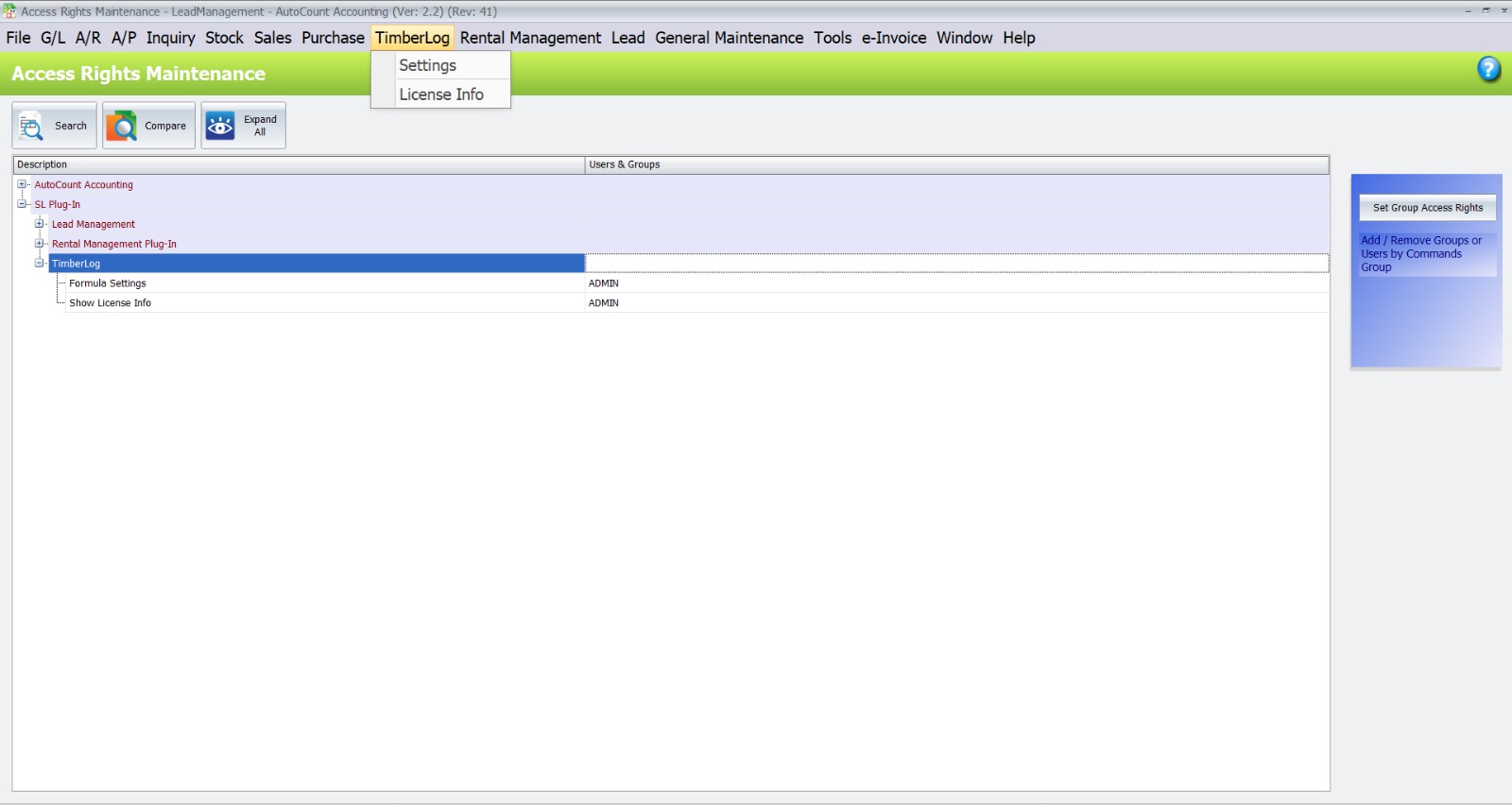
The Timber Log Plugin includes dedicated access control inside AutoCount. This helps businesses manage user permissions properly and prevent unauthorized staff from changing formula settings or license details.
Timber Log Formula Settings
The Timber Log Plugin allows users to define the formula used for timber calculation across supported AutoCount documents.
- Select the timber formula to be applied to all documents.
- Use Length and Diameter as the main calculation variables.
- Calculate Gross Ton automatically based on timber measurements.
- Support length deduction, diameter deduction, and hole deduction.
- Apply Less % and Deduct % for more accurate final quantity calculation.
- Keep results using 3-decimal handling for consistent calculation.
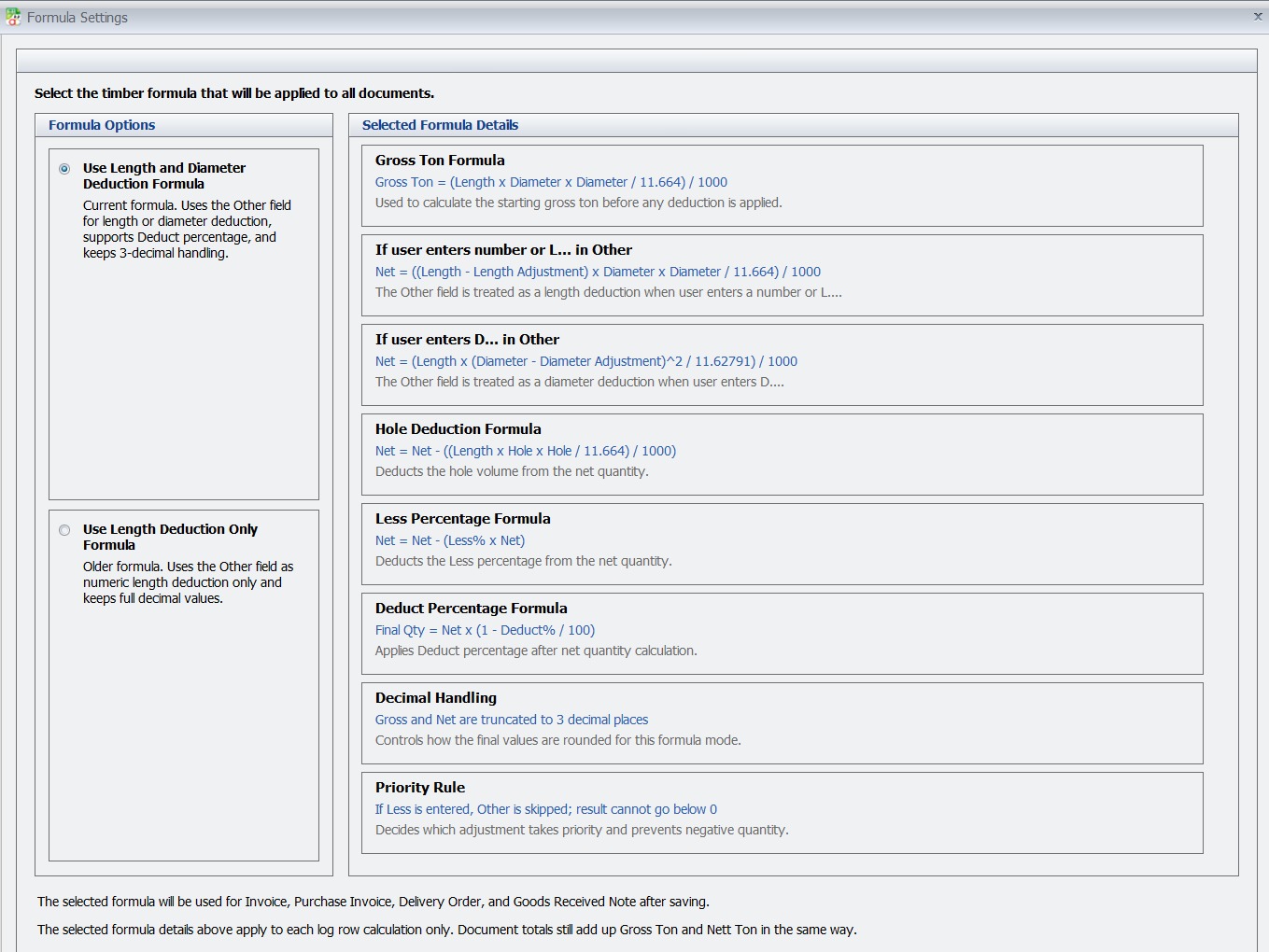
This formula setting is suitable for businesses that require a more complete timber calculation method. It helps improve accuracy by using multiple timber variables and deduction rules in the calculation process.
Alternative Timber Formula Option
The Timber Log Plugin also provides a simplified formula option for businesses that only require basic length deduction.
- Select Use Length Deduction Only Formula.
- Treat the Other field as a numeric length deduction.
- Calculate quantity based on Length and Diameter.
- Do not use Diameter Adjustment in this formula mode.
- Do not apply Deduct Percentage in this formula mode.
- Keep calculation results in full decimal values.
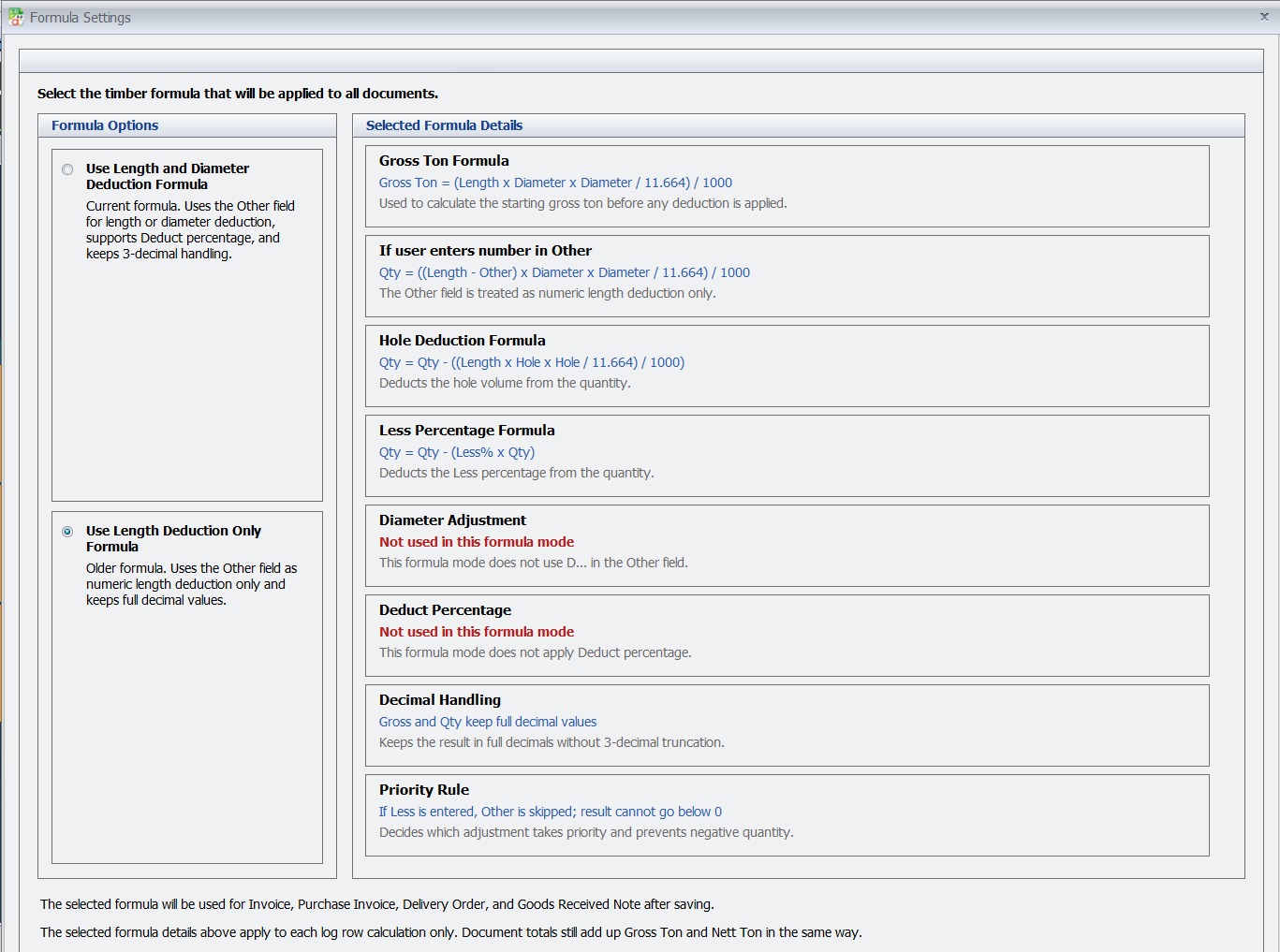
This option is suitable for businesses that prefer a simpler timber calculation method. It is useful when only length deduction is required and more advanced deduction logic is not needed.
Document Listing with Timber Totals
The Timber Log Plugin adds timber quantity totals into AutoCount document listings for easier review and faster checking.
- Display Total Nett Ton directly in the document listing.
- Display Total Gross Ton without opening each transaction.
- Help users review timber transaction totals more efficiently.
- Improve visibility of timber quantity at the listing level.
- Support faster checking for purchase and sales records.
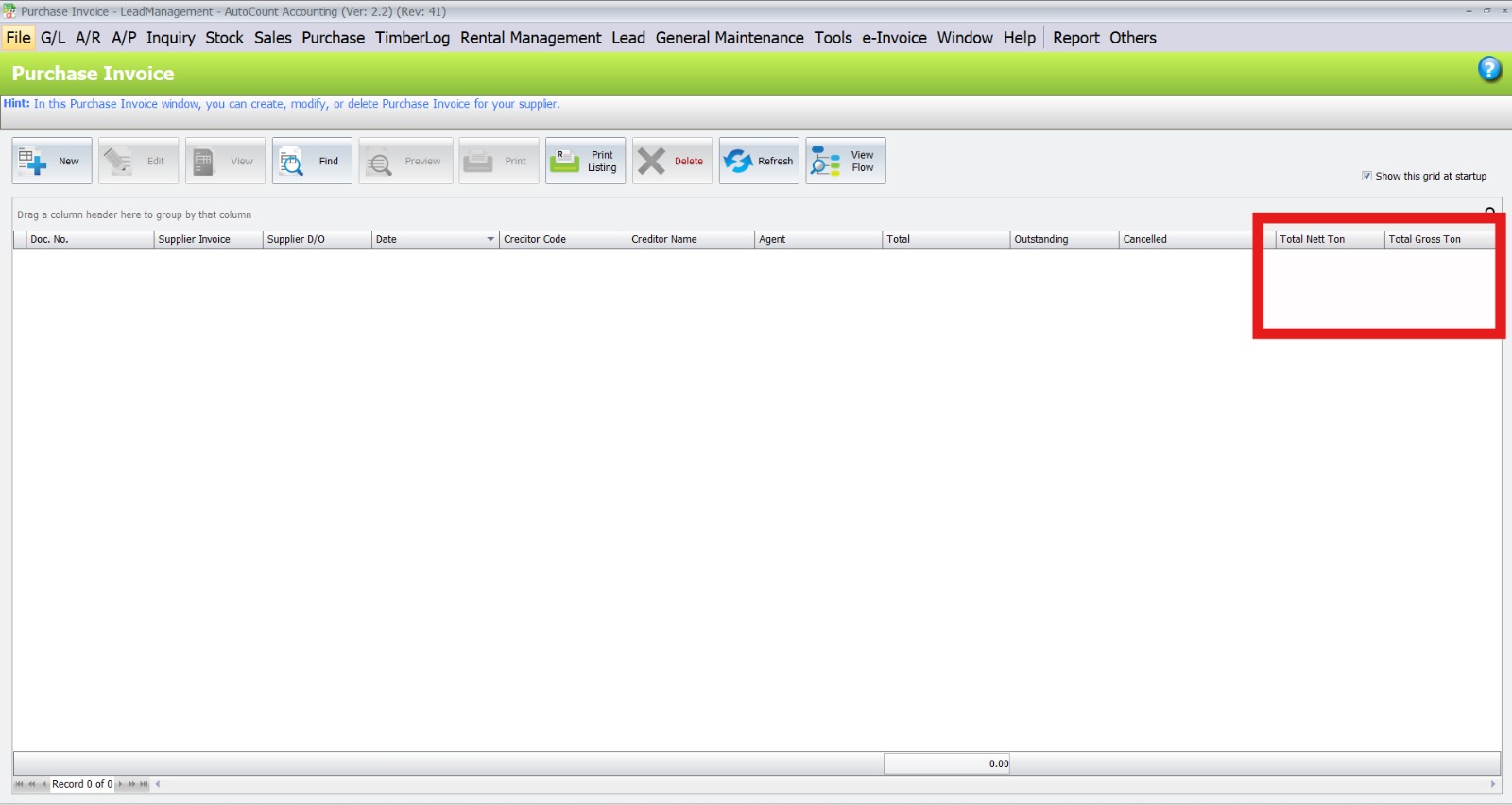
With the timber total columns shown in the listing, users can quickly review the overall quantity of each
Timber Log Variables in Transaction Screen
The Timber Log Plugin adds dedicated timber calculation variables directly into the document detail line for easier entry and automatic calculation.
- LogNo records the unique timber log number.
- Length (Ft) captures the timber log length in feet.
- Diameter (Inch) records the timber log diameter in inches.
- Gross Ton is calculated automatically from the entered measurements.
- Less (%) allows percentage-based deduction.
- Hole (Inch) deducts hollow or hole measurement from the quantity.
- Deduct applies further deduction after calculation.
- Other supports additional adjustment based on the selected formula.
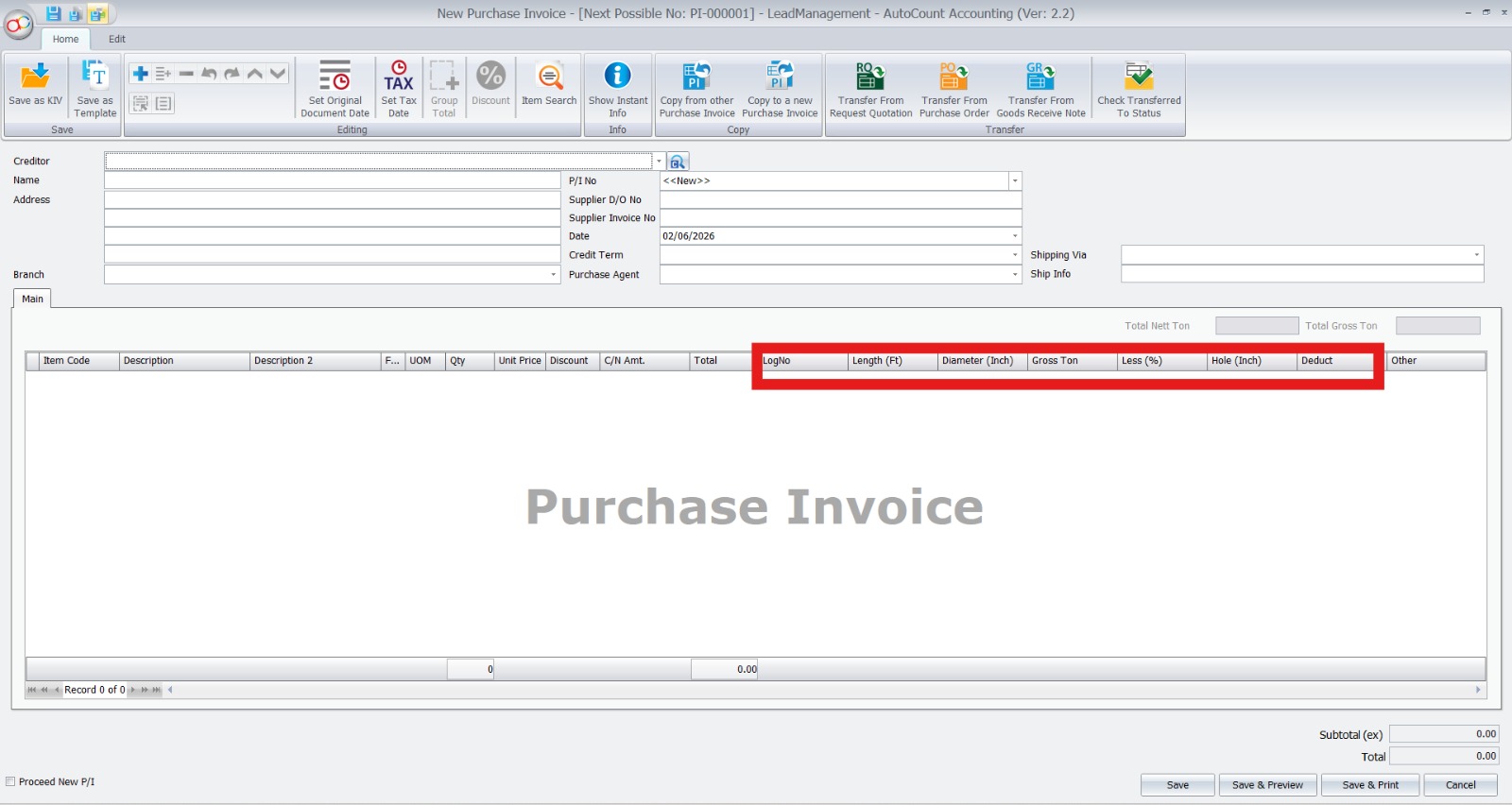
These timber variables allow users to enter timber details directly in the transaction screen. The system then calculates the timber quantity automatically, helping reduce manual work and improve document accuracy.
Conclusion
The AutoCount Timber Log Plugin helps timber businesses manage log number, size, weight, deduction, and photo documentation more efficiently. It improves calculation accuracy, reduces manual work, and makes the billing process faster.
For timber wholesalers and suppliers, this plugin is a practical solution to simplify daily operations and improve stock and document accuracy.
Frequently Asked Questions
What is AutoCount Timber Log Plugin?
It is an AutoCount add-on designed for timber businesses to manage timber log size, weight, deduction, photo, and log number records.
Can the system calculate timber log weight automatically?
Yes. The plugin can calculate gross tonnage and final weight based on the timber log details entered.
Can I record hollow or defect deduction?
Yes. Users can enter hollow, defect, and other deductions to calculate a more accurate net weight.
Can I attach timber log photos?
Yes. The plugin supports photo attachment for better documentation and quality control.
Who should use this plugin?
It is suitable for timber wholesalers, timber suppliers, wood trading businesses, and companies that manage timber logs.
Interested in Getting AutoCount for Your Timber Business?
Contact our team today to explore how the AutoCount Timber Log Plugin can help your business improve accuracy, save time, and simplify timber log management.