
-
AutoCount Accounting Features
-
- Approval Workflow
- Audit Trail
- Auto Save in Draft Folder
- AutoCount Contra Account
- AutoCount License Setting Guide
- Deposit Tracking & Management
- Documents Numbering Format
- Full Transfer and Partial Transfer
- Import Data to AutoCount Accounting Using Excel
- Informative Charts and Analytical Data
- Layout Customization
- Multi Pricing
- Sales and Services Tax
- Schedule Backup
- Search Lookup Edit
- View Documents Flow
- AutoCount Feature Stock Take
- Column Chooser
- Show Remaining (3) Collapse
-
AutoCount Cloud Accounting
-
AutoCount E-Invoice
-
AutoCount HRMS User Guide
-
AutoCount Modules
-
- Activity Stream
- Advanced Financial Report
- Advanced Item
- Advanced Multi-UOM
- Advanced Quotation Module
- Basic Multi-UOM
- Budget Module
- Consignment
- Filter By Salesman
- FOC Quantity
- Formula
- Item Batch
- Item Package
- Landing Cost
- Multi-Currency
- Multi-Dimensional Analysis
- Multi-Location
- Project Account
- Recurrence
- Remote Credit Control Module
- Stock Assembly
- User Defined Fields (UDF)
- AutoCount SST Hidden Functions
- AutoCount SST Submission - Service Tax
- AutoCount Scripting Module User Guide
- AutoCount Bonus Point Module User Guide
- Show Remaining (11) Collapse
-
AutoCount Plugins
-
- Fixed Assets Management
- Goldsmith
- TD Ordering Mobile Apps
- TD Stock Mobile Apps
- Universal Import Plugin
- DMS Import Plugin
- AutoCount Item Scope Plugin
- AutoCount Easy Knock Off Plugin
- AutoCount Pick List Plugin User Guide
- AutoCount Agent Validation Plugin User Guide
- AutoCount Barcode Generator Plugin User Guide
- AutoCount Bill Remark Plugin User Guide
- AutoCount Easy Batch Number Entry Plugin User Guide
- AutoCount Recurring Invoice Plugin User Guide
- AutoCount Easy Photo 2.0 User Guide
- AutoCount Pain Tracker User Guide
- AutoCount Credit Memo Plugin User Guide
- Show Remaining (2) Collapse
-
- AutoCount Easy Recurrence Plugin
- AutoCount Recurring Billing Plugin
- Event Management System
- AutoCount To-Do List Plugin
- AutoCount AutoBank Reconciliation Plugin
- Intercompany Billing Plugin User Guide
- AutoCount Basket Plugin User Guide
- Lead Management 2.0 Plugin
- AutoCount Service Contract Plugin User Guide
- Autocount Repacking Plugin
- AutoCount Scale Barcode Plugin User Guide
- AutoCount Progressive Billing
- AutoCount Optical Plugin
- AutoCount Meter Reading Plugin User Guide
- AutoCount Car Tint Film Plugin
- AutoCount Leasing Plugin User Guide
- AutoCount Integrator Plugin
- AutoCount Procurement Planning Plugin
- Show Remaining (3) Collapse
-
-
Form Template
-
Report Template
-
- Advance Quotation
- Cash Sale
- Consignment
- Consignment Movement
- Credit Note
- Debit Note
- Delivery Order
- FOC Quantity Analysis By Document Report
- Invoice
- Item Package Sales Report
- Monthly Sales Analysis
- Outstanding Sales Order Listing
- Profit And Loss Of Documents
- Quotation
- Sales Agent Contribution Report
- Sales Order
- Top/Bottom Sales Ranking
- Show Remaining (2) Collapse
-
- Available Stock Status Report
- Expired Item Batch Listing
- Inventory Physical Worksheet
- Stock Adjustment
- Stock Aging Report
- Stock Assembly
- Stock Assembly Order
- Stock Balance By Location
- Stock Balance Report
- Stock Card Report
- Stock Disassembly
- Stock Issue
- Stock Item Profit Margin
- Stock Movement Report
- Stock Receive
- Stock Take
- Stock Transfer
- Stock Write Off
- Show Remaining (3) Collapse
AutoCount Plugin: Batch Update Unit Price Plugin
Understand The Batch Update Unit Price.
The AutoCount Batch Update Unit Price Plugin is designed for businesses that issue Delivery Orders or Goods Received Notes with zero unit price because the final market price is not confirmed yet. Users can later search the zero price documents from one inquiry screen, enter the confirmed unit price, and update the original DO or GRN directly.
What Is The Batch Update Unit Price Plugin?
The Batch Update Unit Price Plugin allows users to update item unit prices for saved Delivery Order and Goods Received Note documents where the unit price is still 0.00. Users can select the document type, click Inquiry, review the document details, edit the unit price, and save the update. Once the process is completed, AutoCount will update the unit price and total price in the related DO or GRN.
Why You Should Use Batch Update Unit Price Plugin?
This plugin helps by:
- Perfect for Delivery Orders and Goods Received Notes created with 0.00 unit price when the actual price is not known yet.
- Useful for businesses with prices that are confirmed later, such as fresh produce, market-based goods, supplier price adjustments, or temporary pricing arrangements.
- Useful for businesses with prices that are confirmed later, such as fresh produce, market-based goods, supplier price adjustments, or temporary pricing arrangements.
Key Features & Capabilities
Direct Zero Price Update
Easily update documents with 0.00 unit price from one inquiry screen.
Delivery Order & GRN Support
Supports zero price updates for Delivery Order and Goods Received Note documents.
Inquiry-Based Filtering
Find zero price documents using document type, date, document number, and account filters.
Auto Price Recalculation
After saving, the original DO or GRN reflects the updated unit price and recalculated total price.
Who This Plugin is For
Vegetable Farmers
Perfect for farmers who deliver vegetables first and receive the confirmed market price later.
Fresh Produce Suppliers
Useful for suppliers dealing with daily price changes where pricing is not confirmed during delivery.
Hawker Supply Operations
Suitable for businesses where hawkers confirm the final price only after selling the goods.
Admin & Accounting Teams
Helps users update zero price DO or GRN documents accurately without opening each document manually
How AutoCount Batch Update Unit Price Plugin Works
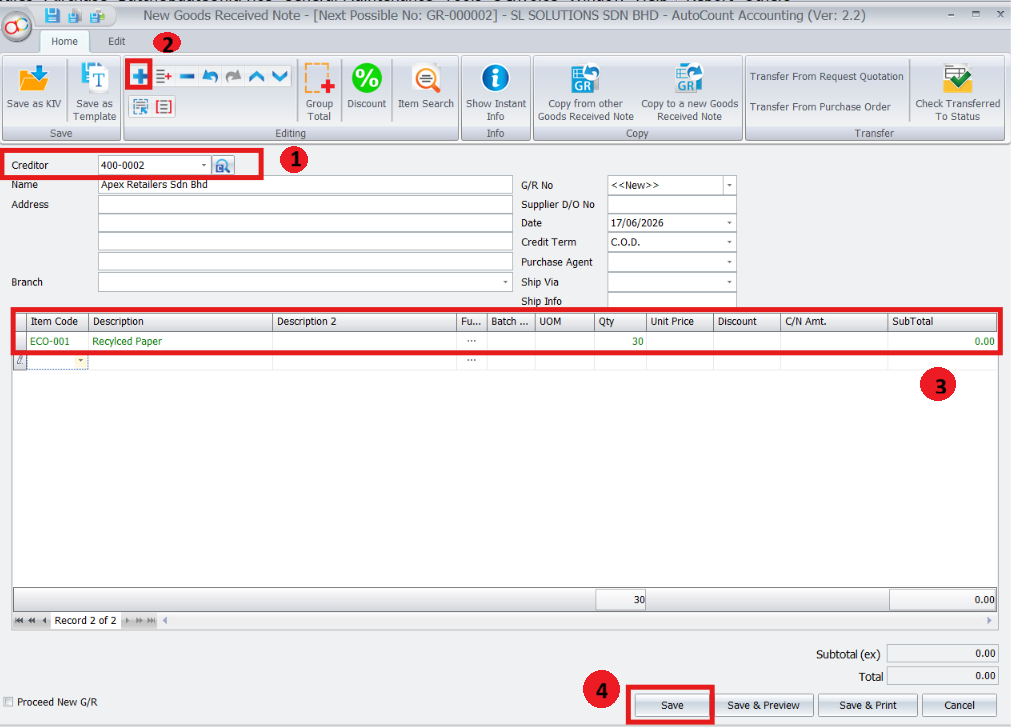
1. Creating Source Documents
Create the Delivery Order or Goods Received Note with zero unit price.
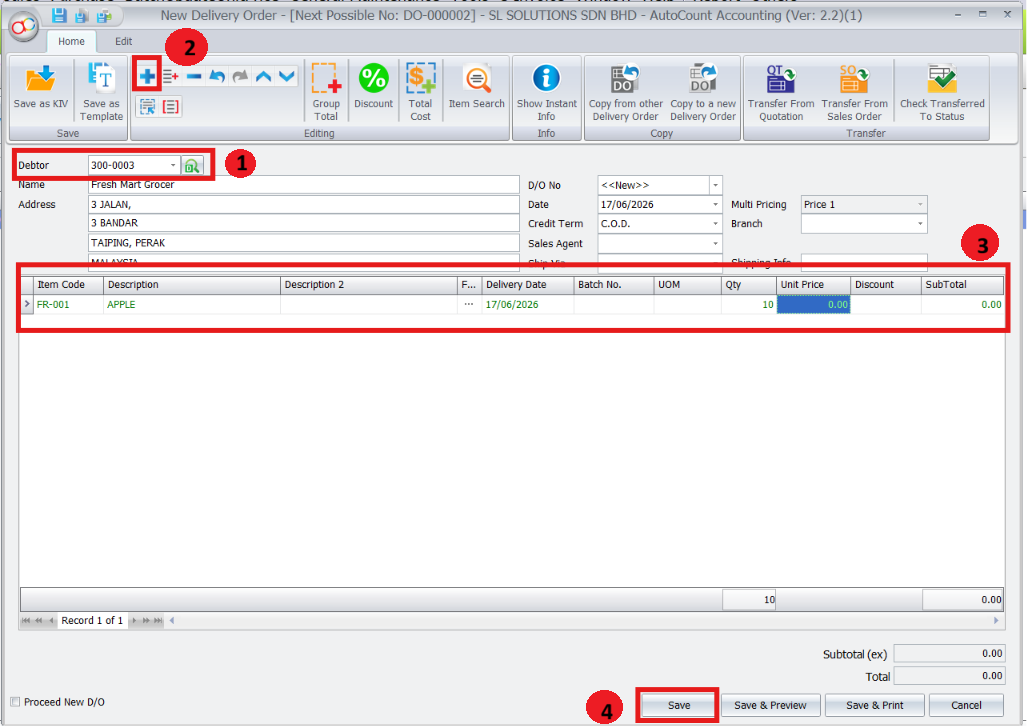
Go to Purchase > Goods Received Note to create a GRN
- Select the creditor
- Add the item and enter the quantity
- Keep the Unit Price as 0.00.
- Save the Goods Received Note
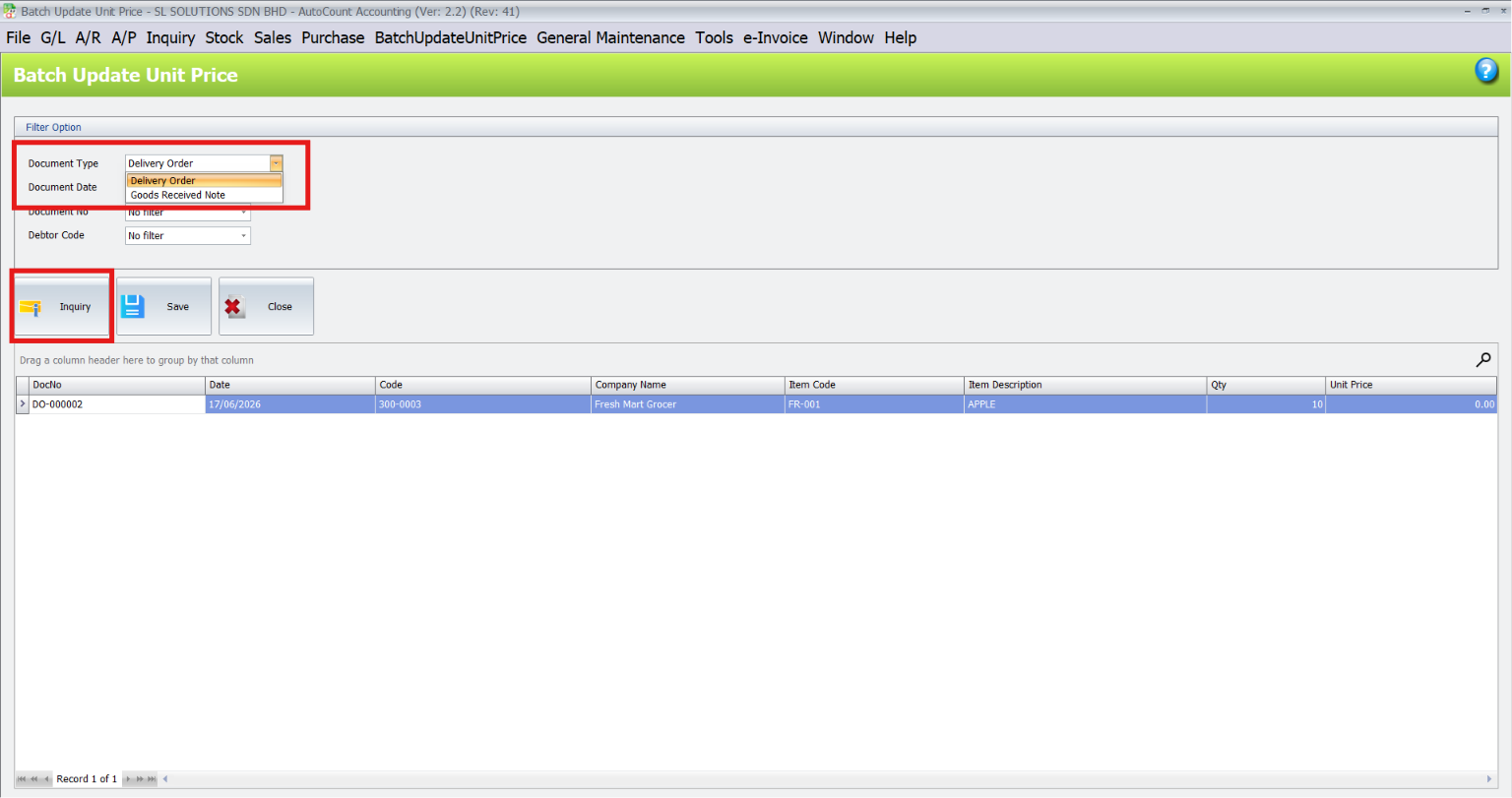
2. Batch Update Unit Inquiry
Use the inquiry screen to find zero price document.
Go to BatchUpdateUnitPrice > Batch Update Unit Price
- Select the document type, such as Delivery Order or Goods Received Note.
- Apply optional filters such as document date, document number, or debtor/creditor code.
- Click Inquiry to display the matching zero price document details
Pro Tip:
Use filters when there are many zero price documents. This helps you find the correct DO or GRN faster and reduces the chance of editing the wrong record.
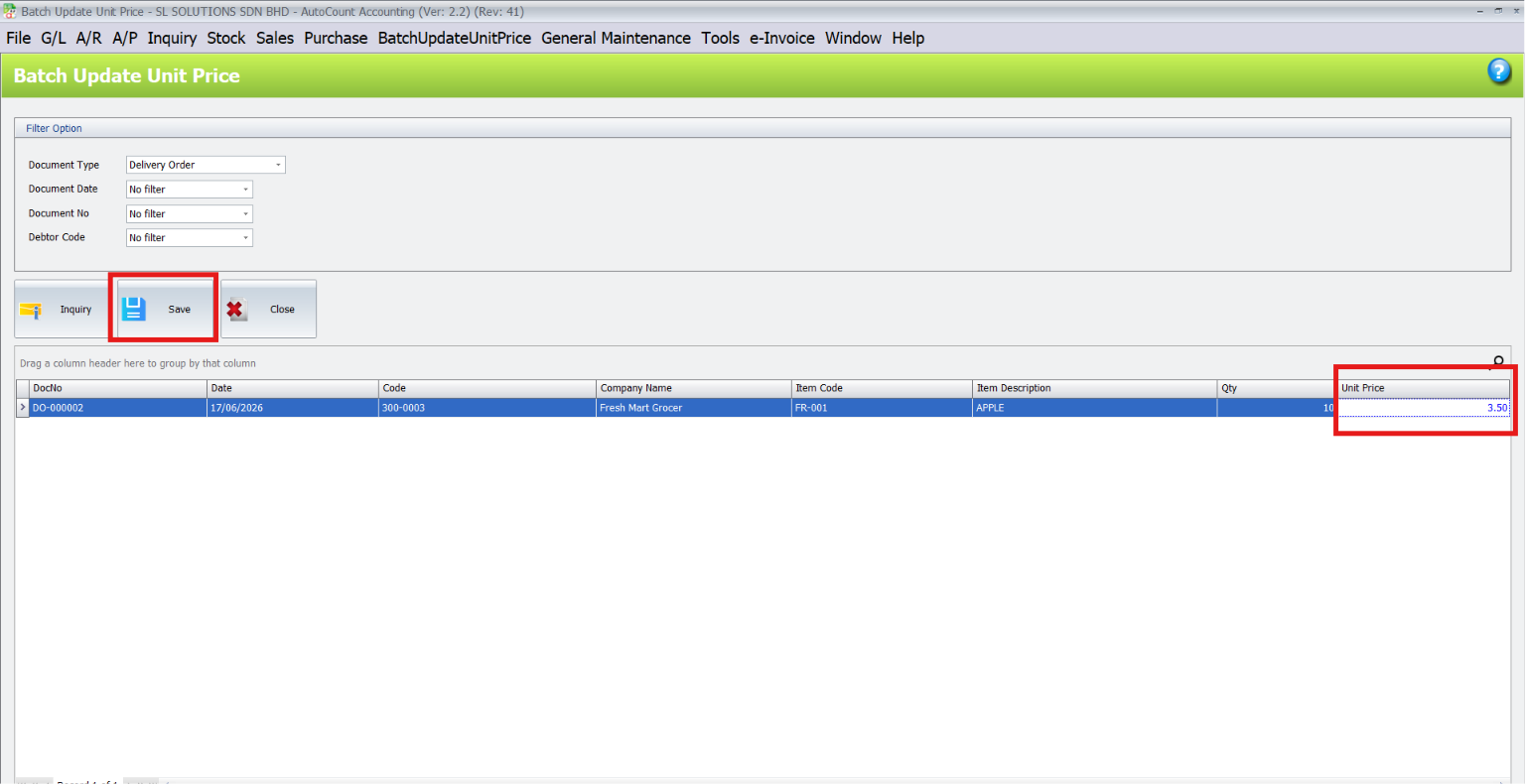
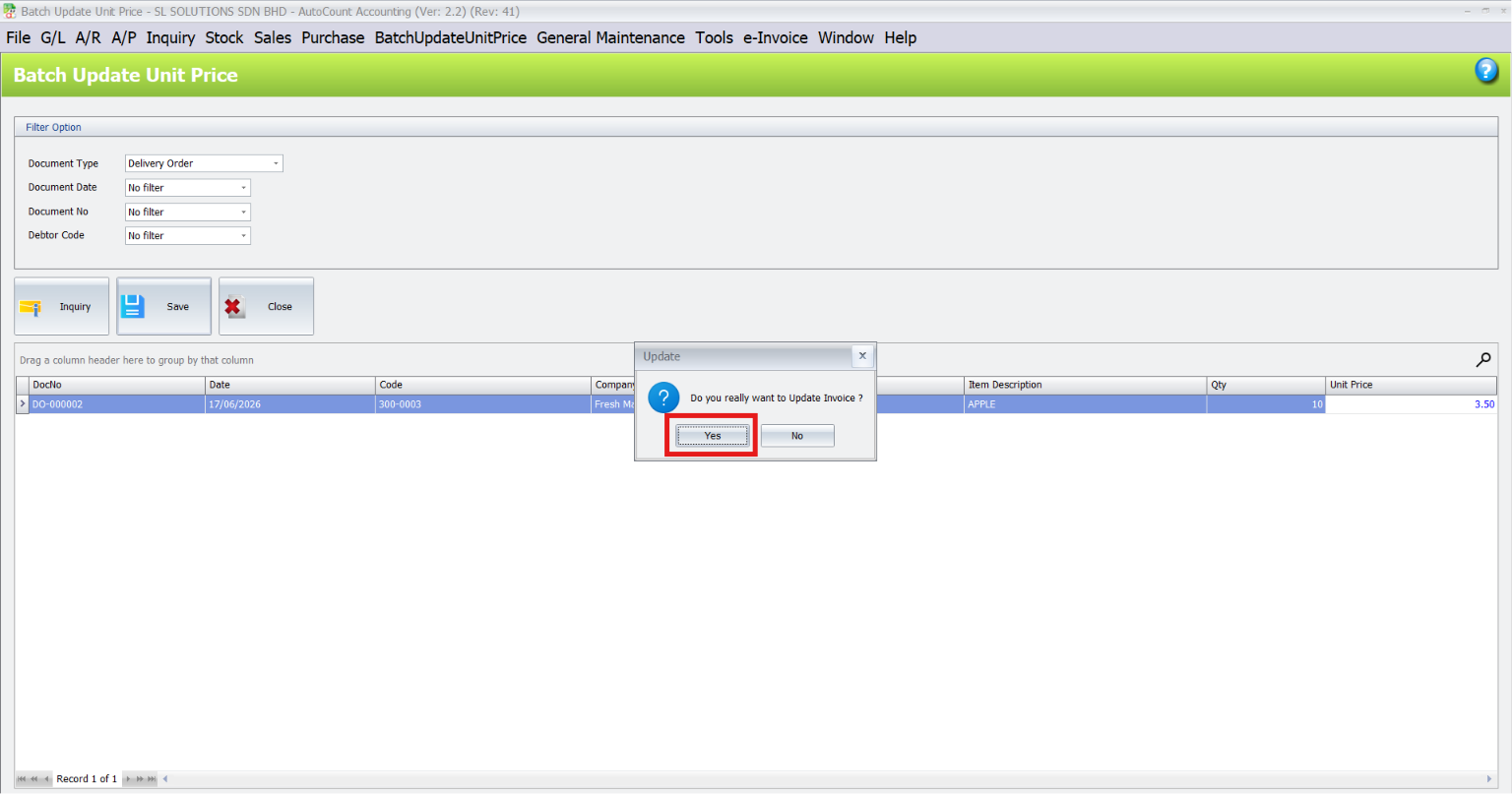
3. Updating and Saving Unit Price
Select the document from the inquiry grid
- Edit the Unit Price value
- Click Save
- Confirm the update when prompted
AutoCount will update the related DO or GRN unit price and total price
4. Checking Updated Document
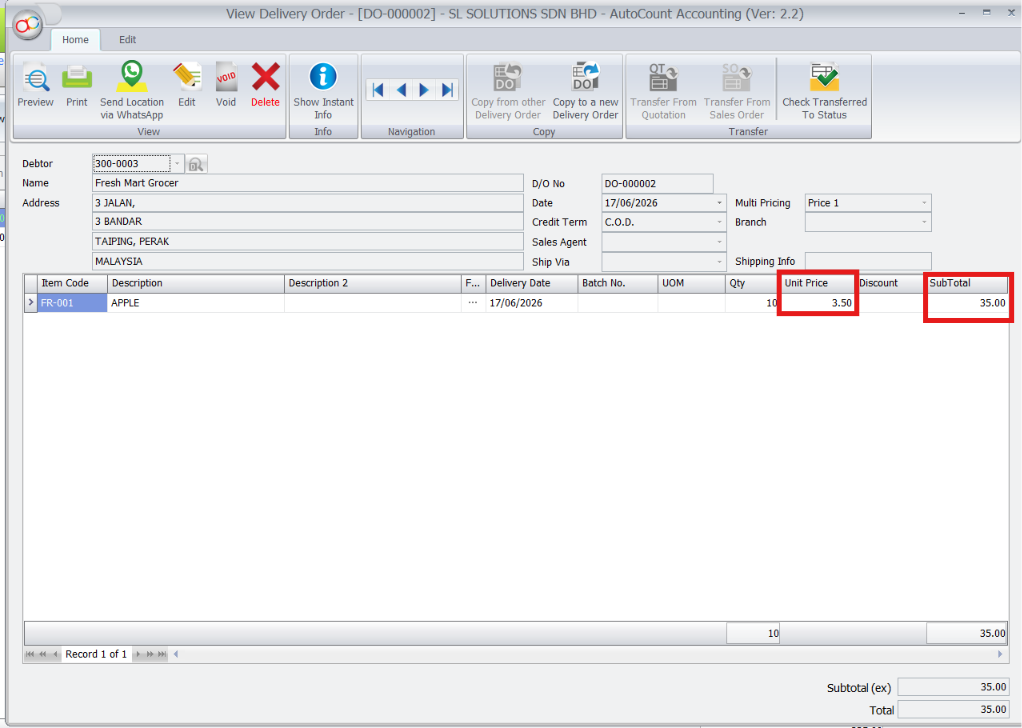
After saving, open the original document to confirm the result
- Open the related Delivery Order or Goods Received Note
- Check the item line
- Confirm that the Unit Price has been updated from 0.00
Confirm that the SubTotal or total price has been recalculated correctly
Pro Tip:
If the updated price does not appear immediately, close and reopen the document inquiry screen to refresh the displayed data.
Conclusion
The AutoCount Batch Update Unit Price Plugin is a practical tool for businesses that create DO or GRN documents before the final unit price is confirmed. By allowing users to search zero price documents, enter the confirmed unit price, and update the original document directly, it helps reduce manual work, improve pricing accuracy, and keep document totals correct without opening each DO or GRN one by one.
Frequently Asked Questions
Why should I use the Batch Update Unit Price Plugin?
The Batch Update Unit Price Plugin is designed to help AutoCount users update item unit prices in bulk instead of changing prices one by one. It is useful when a company has many items and needs to revise selling prices, cost prices, or document unit prices more efficiently.
Why should I use the Batch Update Unit Price Plugin?
This plugin helps save time, reduce manual data entry, and lower the risk of pricing mistakes. Instead of opening each item or document individually, users can perform price updates in a faster and more organized way.
Who is this plugin suitable for?
This plugin is suitable for businesses that manage many stock items, frequently adjust prices, or need to update prices based on supplier cost changes, promotion periods, price revisions, or management instructions.
Do I need AutoCount Accounting to use this plugin?
Yes. This plugin is developed for AutoCount users and works together with the AutoCount system. Your company must be using a compatible AutoCount version to use the plugin.
Interested in Getting AutoCount for your Business?
Contact our sales team today to explore pricing options and get started with the perfect solution for you.