
-
AutoCount Accounting Features
-
- Approval Workflow
- Audit Trail
- Auto Save in Draft Folder
- AutoCount Contra Account
- AutoCount License Setting Guide
- Deposit Tracking & Management
- Documents Numbering Format
- Full Transfer and Partial Transfer
- Import Data to AutoCount Accounting Using Excel
- Informative Charts and Analytical Data
- Layout Customization
- Multi Pricing
- Sales and Services Tax
- Schedule Backup
- Search Lookup Edit
- View Documents Flow
- AutoCount Feature Stock Take
- Column Chooser
- Show Remaining (3) Collapse
-
AutoCount Cloud Accounting
-
AutoCount E-Invoice
-
AutoCount HRMS User Guide
-
AutoCount Modules
-
- Activity Stream
- Advanced Financial Report
- Advanced Item
- Advanced Multi-UOM
- Advanced Quotation Module
- Basic Multi-UOM
- Budget Module
- Consignment
- Filter By Salesman
- FOC Quantity
- Formula
- Item Batch
- Item Package
- Landing Cost
- Multi-Currency
- Multi-Dimensional Analysis
- Multi-Location
- Project Account
- Recurrence
- Remote Credit Control Module
- Stock Assembly
- User Defined Fields (UDF)
- AutoCount SST Hidden Functions
- AutoCount SST Submission - Service Tax
- AutoCount Scripting Module User Guide
- AutoCount Bonus Point Module User Guide
- AutoCount Service Management Plugin User Guide
- Show Remaining (12) Collapse
-
AutoCount Plugins
-
- Fixed Assets Management
- Goldsmith
- TD Ordering Mobile Apps
- TD Stock Mobile Apps
- Universal Import Plugin
- DMS Import Plugin
- AutoCount Pick List Plugin User Guide
- AutoCount Credit Memo Plugin User Guide
- AutoCount Lock Price Plugin
- AutoCount Progressive Billing
- AutoCount Easy Recurrence Plugin
- Batch Update Unit Price Plugin
- AutoCount Production order
- AutoCount Car Tint Film Plugin
-
- Event Management System
- AutoCount To-Do List Plugin
- AutoCount AutoBank Reconciliation Plugin
- Intercompany Billing Plugin User Guide
- Lead Management 2.0 Plugin
- AutoCount Service Contract Plugin User Guide
- AutoCount Optical Plugin
- AutoCount Integrator Plugin
- AutoCount Procurement Planning Plugin
- Cage Management Plugin
- AutoCount Vehicle Plugin
- AutoCount Agent Validation Plugin User Guide
- AutoCount Barcode Generator Plugin User Guide
- AutoCount Easy Batch Number Entry Plugin User Guide
- Warranty 2.0 Plugin
- AutoCount Easy Photo 2.0 User Guide
- AutoCount Recurring Invoice Plugin User Guide
- AutoCount Scale Barcode Plugin User Guide
- AutoCount Recurrence Late Interest Plugin
- AutoCount Item Visibility Control
- AutoCount Bill Remark Plugin User Guide
- AutoCount Pain Tracker User Guide
- AutoCount Easy Payment
- AutoCount Easy Deposit Plugin
- AutoCount Easy Knock Off Plugin
- AutoCount Daily Collection Summary Plugin
- Timber Log Plugins
- Batch Transfer SODO Plugin
- AutoCount Vege Basket Plugin Guide
- AutoCount Fruit Basket Plugin Guide
- Referral Management Plugin
- AutoCount Migrator Plugin
- AutoCount Email&WhatsApp Plugin
- AutoCount Multi Company Knock Off Plugin
- AutoCount Advance Aging Format Plugin
- Show Remaining (20) Collapse
-
-
Form Template
-
Report Template
-
- Advance Quotation
- Cash Sale
- Consignment
- Consignment Movement
- Credit Note
- Debit Note
- Delivery Order
- FOC Quantity Analysis By Document Report
- Invoice
- Item Package Sales Report
- Monthly Sales Analysis
- Outstanding Sales Order Listing
- Profit And Loss Of Documents
- Quotation
- Sales Agent Contribution Report
- Sales Order
- Top/Bottom Sales Ranking
- Show Remaining (2) Collapse
-
- Available Stock Status Report
- Expired Item Batch Listing
- Inventory Physical Worksheet
- Stock Adjustment
- Stock Aging Report
- Stock Assembly
- Stock Assembly Order
- Stock Balance By Location
- Stock Balance Report
- Stock Card Report
- Stock Disassembly
- Stock Issue
- Stock Item Profit Margin
- Stock Movement Report
- Stock Receive
- Stock Take
- Stock Transfer
- Stock Write Off
- Show Remaining (3) Collapse
-
B2B ORDERING
-
AutoCount AI Agent
AutoCount E-Invoice Set Up:
How to Update Currency Codes?
Introduction to Currency Code
Understanding how to update Currency Codes is a critical part of compliance for businesses using the AutoCount E-Invoice system. To clarify, currency codes represent the currency used in transactions and must align with LHDN standards to avoid errors during billing. Therefore, this guide will walk you through the process of updating currency codes, referencing the official LHDN Currency Code List.
AutoCount E-Invoice: Update Currency Code Video Guide
Learn how to update the currency codes in the AutoCount E-Invoice system, making it easy to handle multi-currency transactions.
What Are Currency Codes?
Currency codes are three-letter abbreviations defined by ISO standards and recognized globally. For Malaysian E-Invoicing, currency codes must match the approved list by LHDN to ensure compliance.
Examples of LHDN-Approved Currency Codes:
MYR
Malaysian Ringgit
USD
United States Dollar
CHN
Yuan Renminbi (International)
For the complete list, visit the official LHDN Currency Code List.
Steps to Update Currency Codes in AutoCount
AutoCount provides a straightforward process to verify and update currency codes. Follow these steps to maintain compliance and accuracy.
Step 1: Verify Existing Currency Codes
- Firstly, navigate to General Maintenance > Currency Maintenance.
- After that, compare the listed currency codes in AutoCount with the official LHDN-approved Currency Code List.

Identify Discrepancies
Look for incorrect codes, such as "YUAN" or "RMB", instead of the correct "CNY" for Chinese Yuan.
Step 2: Update Incorrect Currency Codes
If discrepancies exist, follow these steps to update the codes:
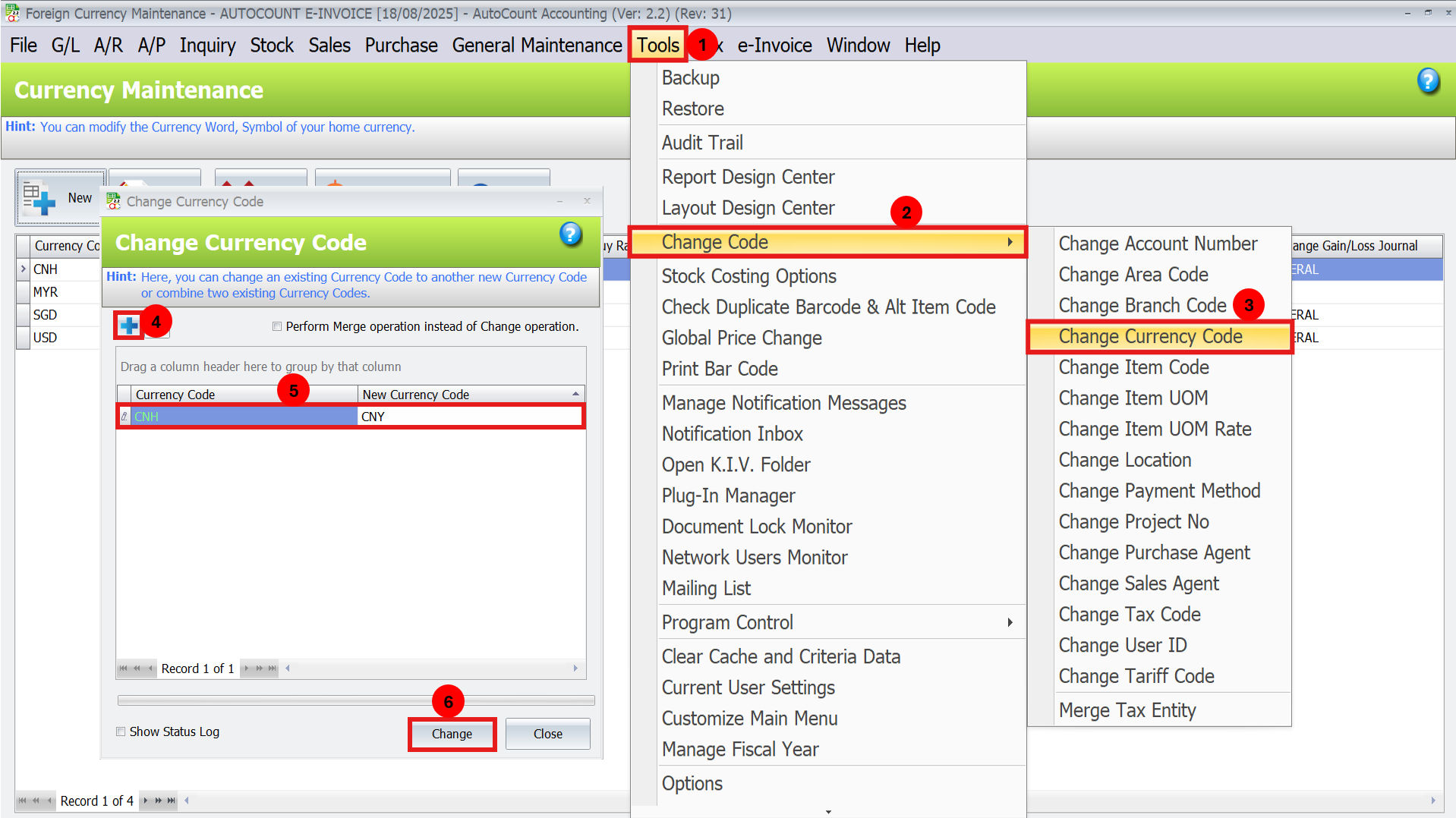
- Firstly, navigate to Tools > Change Code > Change Currency Code.
- Secondly, input the incorrect code (e.g., “YUAN”) and replace it with the correct code (e.g., “CNY”).
- Next, click Change to apply the changes.
Best Practices for Managing Currency Codes
Regular Updates
Check the LHDN Currency Code List periodically for updates to ensure continued compliance.
Team Training
Educate your staff on the importance of using correct codes to avoid manual errors.
Test Before Submission
Perform test transactions after updating codes to ensure the system processes them correctly
Standardize Codes
Implement a standard code format across your organization to avoid discrepancies.
Conclusion
To conclude, updating currency codes in AutoCount is a vital step to ensure compliance with Malaysian tax regulations and streamline your invoicing process. By referencing the LHDN Currency Code List and following this guide, you can eliminate billing errors and maintain smooth operations.
In addition, take proactive measures to verify and update your currency codes regularly, empowering your business with accurate and efficient invoicing.
Frequently Asked Questions
What happens if I use an incorrect currency code?
The system may reject your E-Invoice submission, leading to delays and potential non-compliance issues.
Where can I find the correct currency codes?
Refer to the official LHDN Currency Code List.
Can I add custom currency codes in AutoCount?
No, you must use the LHDN-approved codes to maintain compliance.
How often should I update currency codes?
Check and update your codes whenever LHDN releases updates or when discrepancies are detected.
What should I do if I find multiple incorrect codes?
Use the Change Currency Code tool to correct each code individually. For extensive updates, consider consulting AutoCount support.
Interested in Getting AutoCount for your Business?
Contact our sales team today to explore pricing options and get started with the perfect solution for you.