
-
AutoCount Accounting Features
-
- Approval Workflow
- Audit Trail
- Auto Save in Draft Folder
- AutoCount Contra Account
- AutoCount License Setting Guide
- Deposit Tracking & Management
- Documents Numbering Format
- Full Transfer and Partial Transfer
- Import Data to AutoCount Accounting Using Excel
- Informative Charts and Analytical Data
- Layout Customization
- Multi Pricing
- Sales and Services Tax
- Schedule Backup
- Search Lookup Edit
- View Documents Flow
- AutoCount Feature Stock Take
- Column Chooser
- Show Remaining (3) Collapse
-
AutoCount Cloud Accounting
-
AutoCount E-Invoice
-
AutoCount HRMS User Guide
-
AutoCount Modules
-
- Activity Stream
- Advanced Financial Report
- Advanced Item
- Advanced Multi-UOM
- Advanced Quotation Module
- Basic Multi-UOM
- Budget Module
- Consignment
- Filter By Salesman
- FOC Quantity
- Formula
- Item Batch
- Item Package
- Landing Cost
- Multi-Currency
- Multi-Dimensional Analysis
- Multi-Location
- Project Account
- Recurrence
- Remote Credit Control Module
- Stock Assembly
- User Defined Fields (UDF)
- AutoCount SST Hidden Functions
- AutoCount SST Submission - Service Tax
- AutoCount Scripting Module User Guide
- AutoCount Bonus Point Module User Guide
- AutoCount Service Management Plugin User Guide
- Show Remaining (12) Collapse
-
AutoCount Plugins
-
- Fixed Assets Management
- Goldsmith
- TD Ordering Mobile Apps
- TD Stock Mobile Apps
- Universal Import Plugin
- DMS Import Plugin
- AutoCount Pick List Plugin User Guide
- AutoCount Credit Memo Plugin User Guide
- AutoCount Lock Price Plugin
- AutoCount Progressive Billing
- AutoCount Easy Recurrence Plugin
- Batch Update Unit Price Plugin
- AutoCount Production order
- AutoCount Car Tint Film Plugin
-
- Event Management System
- AutoCount To-Do List Plugin
- AutoCount AutoBank Reconciliation Plugin
- Intercompany Billing Plugin User Guide
- Lead Management 2.0 Plugin
- AutoCount Service Contract Plugin User Guide
- AutoCount Optical Plugin
- AutoCount Integrator Plugin
- AutoCount Procurement Planning Plugin
- Cage Management Plugin
- AutoCount Vehicle Plugin
- AutoCount Agent Validation Plugin User Guide
- AutoCount Barcode Generator Plugin User Guide
- AutoCount Easy Batch Number Entry Plugin User Guide
- Warranty 2.0 Plugin
- AutoCount Easy Photo 2.0 User Guide
- AutoCount Recurring Invoice Plugin User Guide
- AutoCount Scale Barcode Plugin User Guide
- AutoCount Recurrence Late Interest Plugin
- AutoCount Item Visibility Control
- AutoCount Bill Remark Plugin User Guide
- AutoCount Pain Tracker User Guide
- AutoCount Easy Payment
- AutoCount Easy Deposit Plugin
- AutoCount Easy Knock Off Plugin
- AutoCount Daily Collection Summary Plugin
- Timber Log Plugins
- Batch Transfer SODO Plugin
- AutoCount Vege Basket Plugin Guide
- AutoCount Fruit Basket Plugin Guide
- Referral Management Plugin
- AutoCount Migrator Plugin
- AutoCount Email & WhatsApp Plugin
- AutoCount Multi Company Knock Off Plugin
- AutoCount Advance Aging Format Plugin
- AutoCount Payment Request Plugin
- AutoCount Vehicle Master Plugin
- AutoCount Advance Deposit Plugin
- AutoCount IC Checker Plugin
- AutoCount RMA Plugin
- AutoCount Historical Outstanding DO Listing Plugin
- AutoCount Project Department Visibility Control Plugin
- AutoCount MRP Order Plugin
- AutoCount GridToExcel Plugin
- AutoCount Stock Availability Report Plugin
- AutoCount Batch Transfer SO DO Plugin
- AutoCount Centralized Kitchen Management Plugin
- SL AutoCount API
- AutoCount InterCompany Billing Plugin
- AutoCount Sales Commission Plugin
- Advanced Credit Term Management Software for AutoCount
- AutoCount Advanced Stock Assembly Plugin
- AutoCount Shipment Plugin
- AutoCount Tour Plugin
- AutoCount Smart Analysis
- AutoCount Rental Management
- Show Remaining (41) Collapse
-
-
Form Template
-
Report Template
-
- Advance Quotation
- Cash Sale
- Consignment
- Consignment Movement
- Credit Note
- Debit Note
- Delivery Order
- FOC Quantity Analysis By Document Report
- Invoice
- Item Package Sales Report
- Monthly Sales Analysis
- Outstanding Sales Order Listing
- Profit And Loss Of Documents
- Quotation
- Sales Agent Contribution Report
- Sales Order
- Top/Bottom Sales Ranking
- Show Remaining (2) Collapse
-
- Available Stock Status Report
- Expired Item Batch Listing
- Inventory Physical Worksheet
- Stock Adjustment
- Stock Aging Report
- Stock Assembly
- Stock Assembly Order
- Stock Balance By Location
- Stock Balance Report
- Stock Card Report
- Stock Disassembly
- Stock Issue
- Stock Item Profit Margin
- Stock Movement Report
- Stock Receive
- Stock Take
- Stock Transfer
- Stock Write Off
- Show Remaining (3) Collapse
-
B2B ORDERING
-
AutoCount AI Agent
AutoCount Referral Management Plugin User Guide
What is AutoCount Referral Management Plugin?
The AutoCount Referral Management Plugin helps businesses manage referrers, commission plans, referral commission records and referrer contribution reports inside AutoCount Accounting. It is useful for companies that pay commission to agents, partners or customers who refer sales to them.
Why Use AutoCount Referral Management Plugin?
This plugin helps businesses reduce manual commission calculation, keep referrer records organised, and see how much each referrer contributes. Commission is generated from fully paid invoices and cash sales using the rates you have set, so payouts are consistent and easier to check.
Maintain organized treatment records
Monitor customer progress
Improve service consistency
Provide better customer care
This is particularly important for businesses that rely on repeat treatment sessions and progress tracking.
Key Features of the AutoCount Referral Management Plugin
Referrer Maintenance
Create and maintain referrer records with code, description, phone, email, bank account and active status.
Commission Plan Maintenance
Set commission by rate or amount for each item code, item group or item type.
Referral Commission Entry
Generate referral commission documents from fully paid invoices and cash sales for a selected referrer.
Referrer Contribution Report
Review sales, cost, gross profit, commission and contribution for each referrer over a selected date range.
Who Should Use AutoCount Referral Management Plugin?
Businesses with Referral Agents or Partners
Helps businesses that work with agents, introducers or partners keep each referrer's details, rates and payouts in one place.
Businesses Running Customer Referral Programmes
Allows businesses that reward customers for recommending them to record who referred each sale and what they are owed.
Service and Project-Based Businesses
Useful for renovation, training and professional service businesses that depend on word-of-mouth leads and want to know which referrers bring in profitable sales.
Sales and Finance Teams
Helps the teams that calculate and approve commission work from the same referrer records, rates and paid sales.
How AutoCount Referral Management Plugin Plugin Works
A. Access Rights
1. Administrators assign only the Referral functions required for each user role.
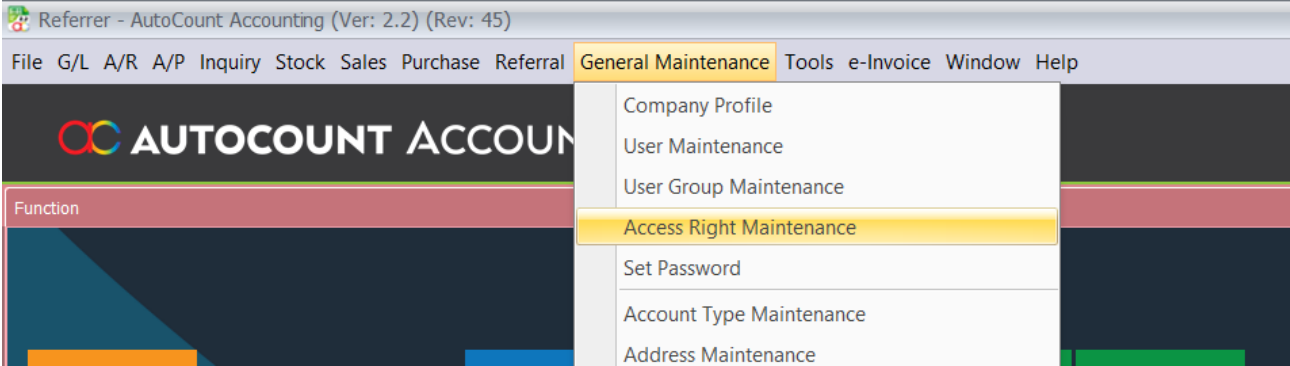
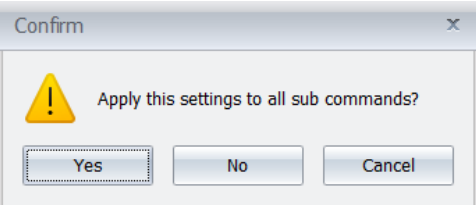
2. Assign the required rights for Referrer, Referral Commission, commission reports, Referrer
Contribution, and Commission Rate Maintenance.

3. Save the access-right changes. Users without the matching rights cannot use the protected action.
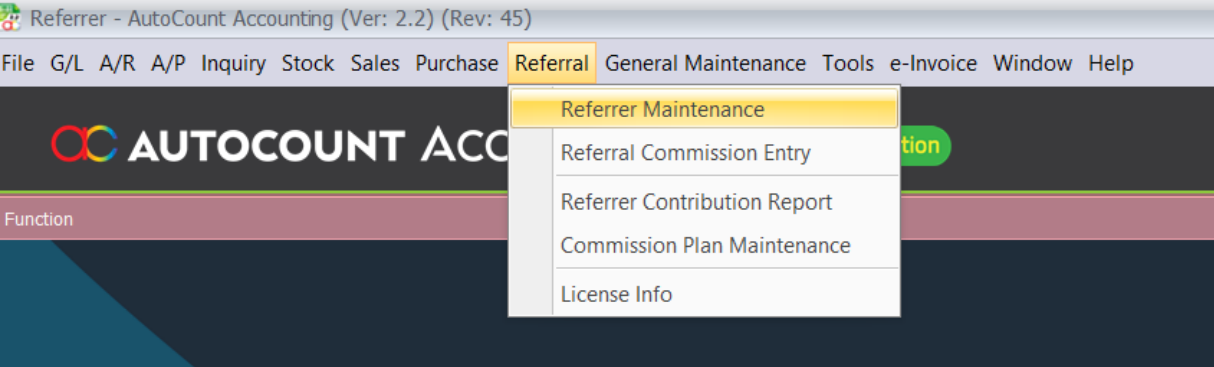
B. Referrer Maintenance
Referrer Maintenance stores the referrer information used by referral documents and commission processing.
1. Open Referral > Referrer Maintenance.
2. Click New to add a referrer, or select an existing referrer and click Edit.
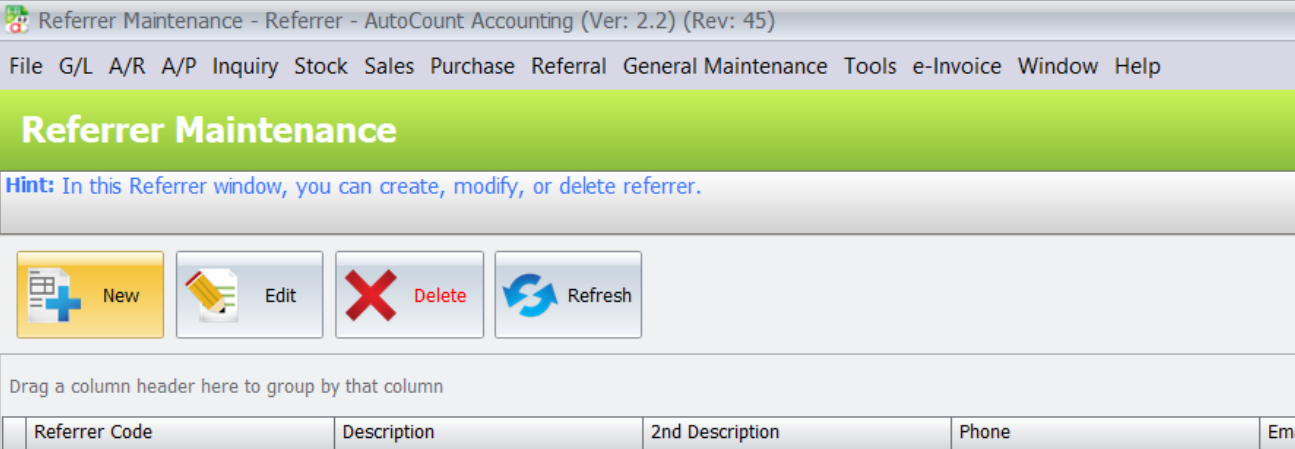
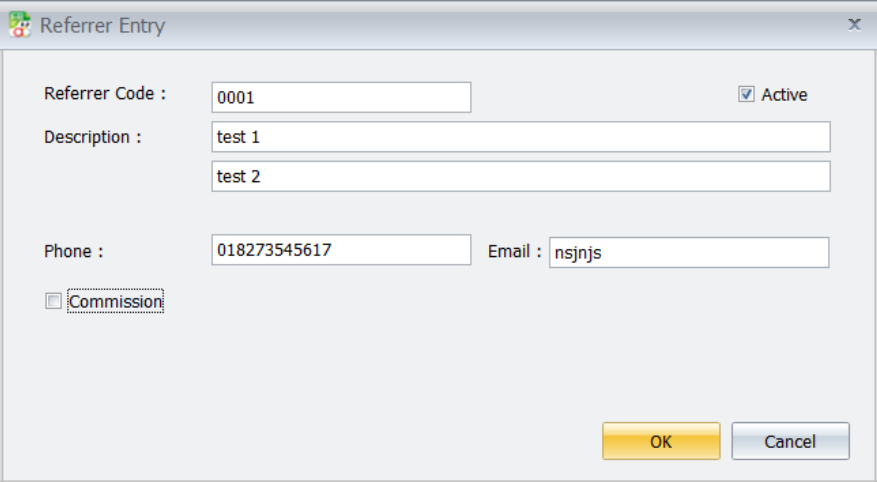
3. Enter Referrer Code, LeadSource, Description, Description 2, Phone, Email, IsActive, and Bank Account as required.
4. Save the referrer. Referrer Code cannot be empty and duplicate codes are rejected.
5. Delete a referrer only when it is not in use by a lead, document, or generated commission.
C. Commission Rate Maintenance
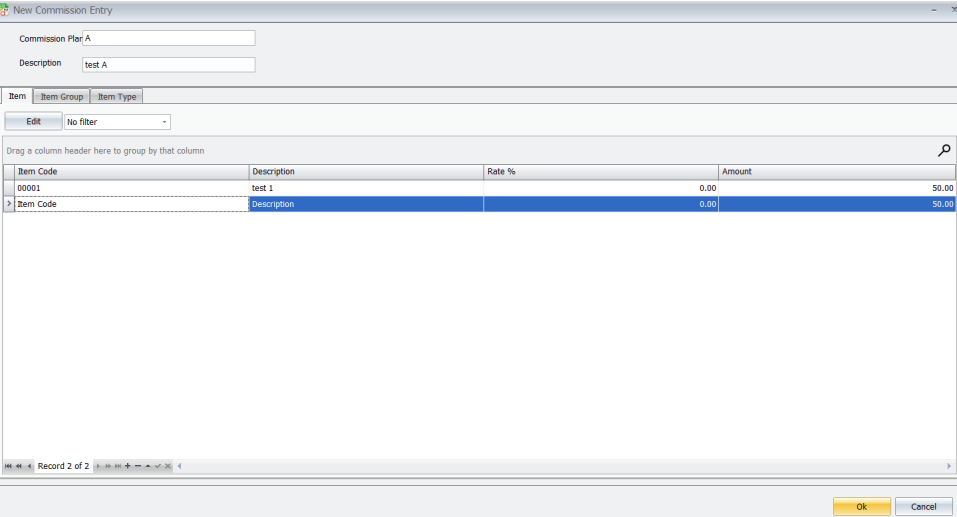
Commission Item Rate Maintenance sets commission rates by Item Group, Item Type, or Item Code.
1. Open Referral > Commission Plan Maintenance.
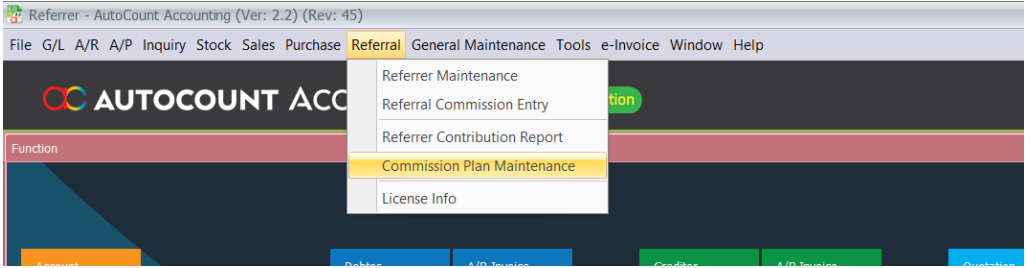
2. Select the required filter type: Item Group, Item Type, or Item Code.
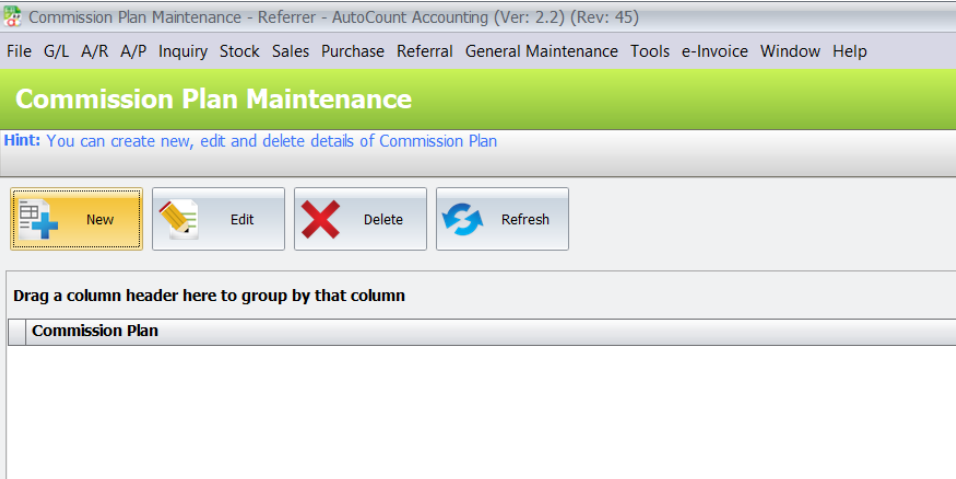
3. Click Edit to create or revise the selected commission item rate.
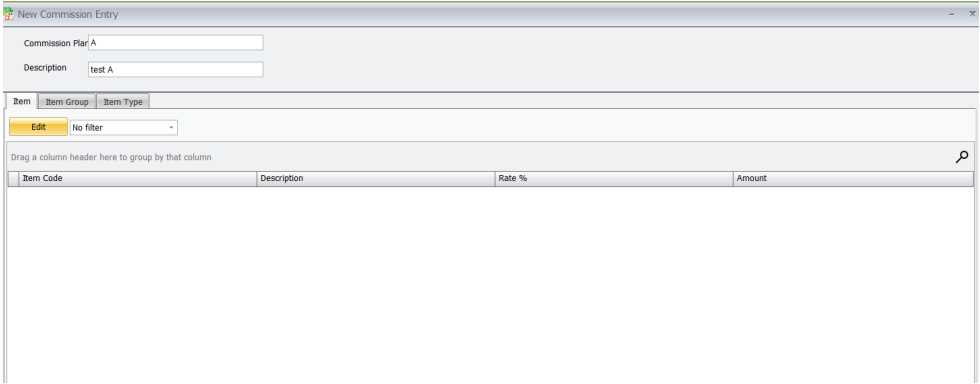
4. Enter the applicable item Code, Description, Rate and Amount.
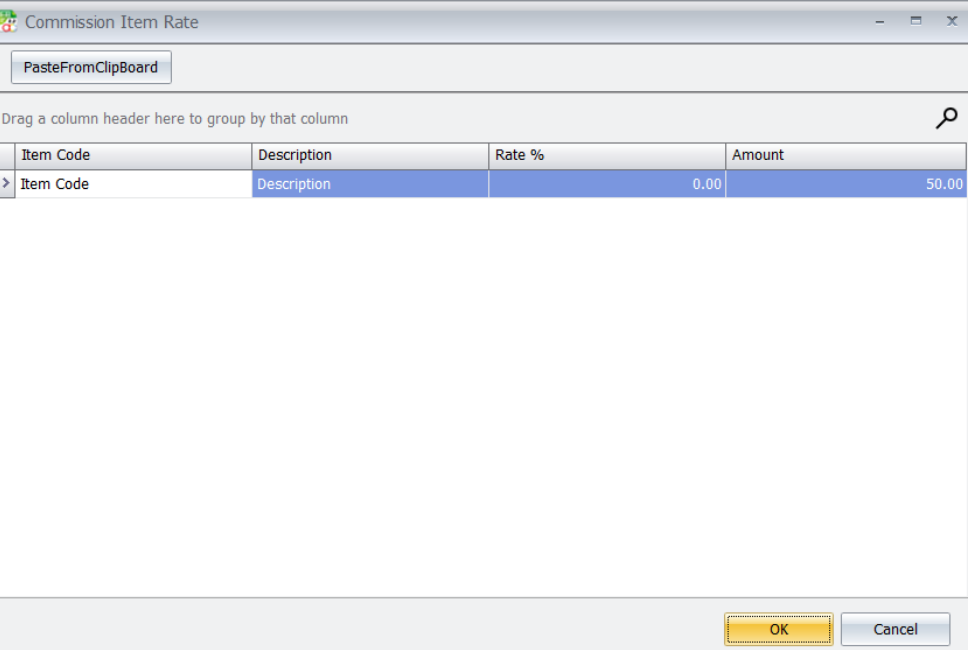
5. Save the rate and click Refresh to review the updated rate list.
D. Referral Commission
Referral Commission records and processes commission details for the selected referrer and source
documents.
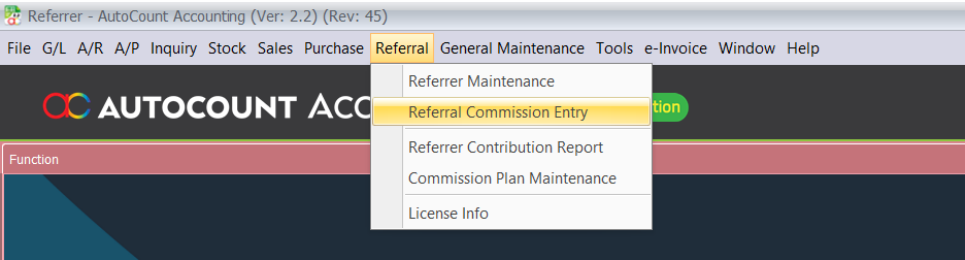
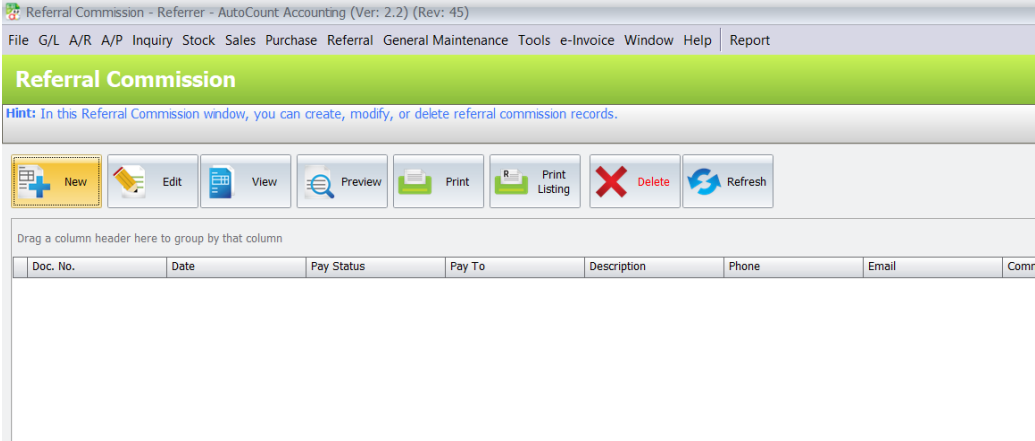
1. Open Referral > Referral Commission.
2. Create a new commission record or open an existing record, according to your assigned rights.
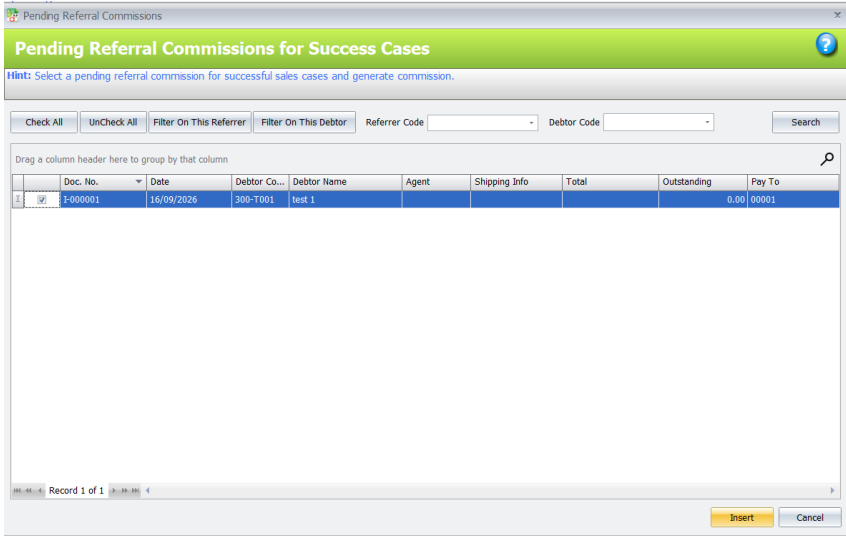
3. In Pending Referral Commissions, select the Referrer Code and click Search. Tick the required
fully-paid Invoice or Cash Sale transaction.
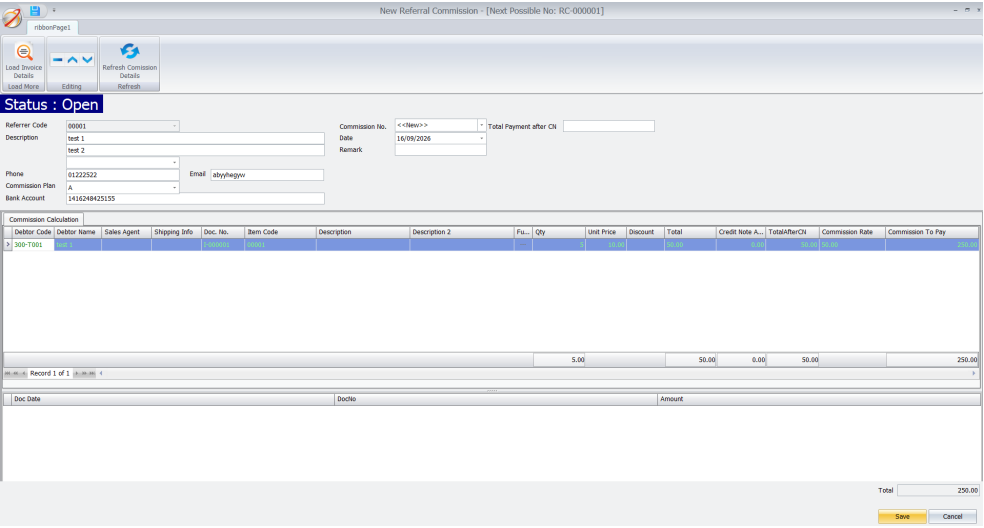
4. Click Insert to create the Referral Commission. Review the imported transaction details, commission
rate and Total Commission, then save the commission.
E. Referrer Contribution Report
Referrer Contribution Report summarizes contribution information for the selected report criteria.
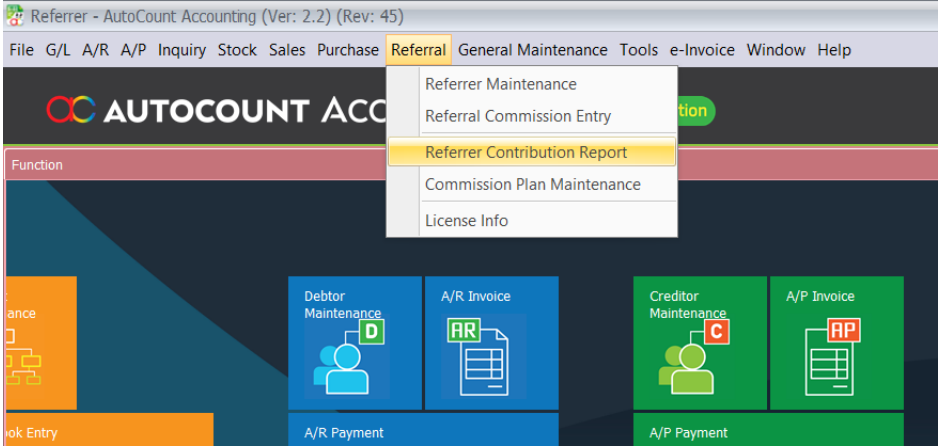
1. Open Referral > Referrer Contribution Report.
2. Select the required report criteria.
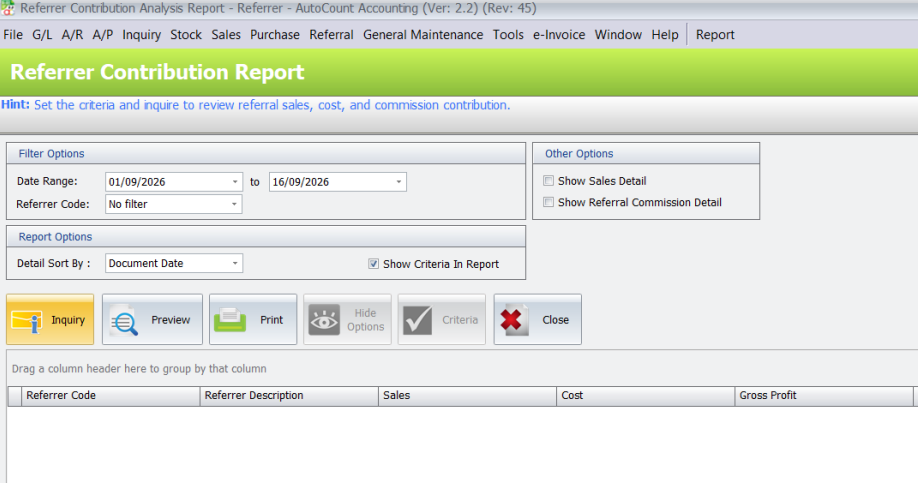
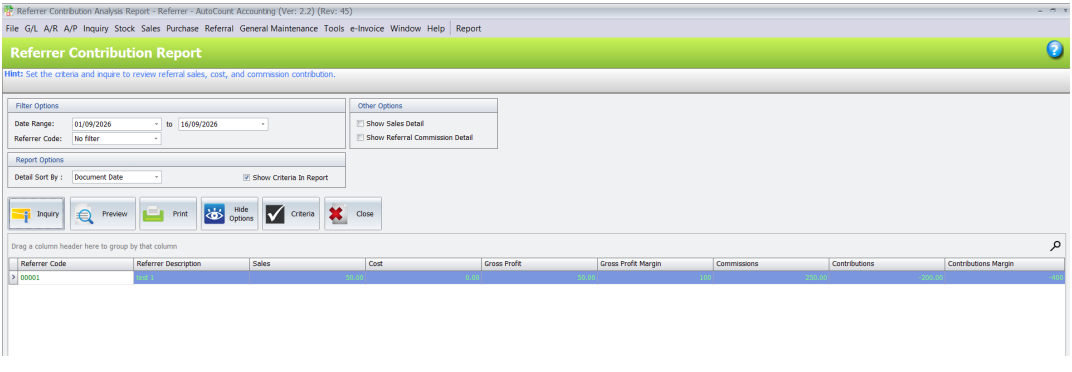
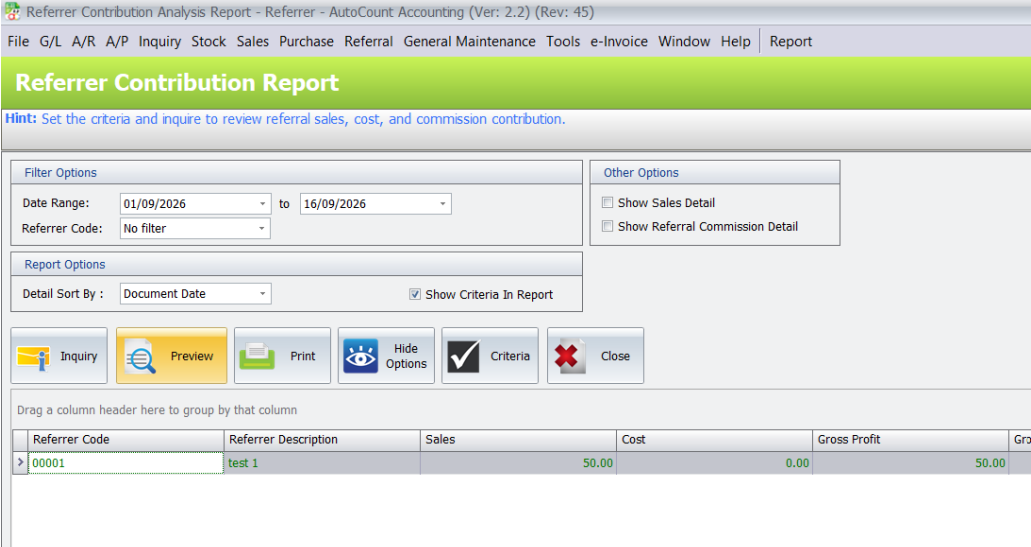
3. Click Preview to review the Referrer Contribution output.
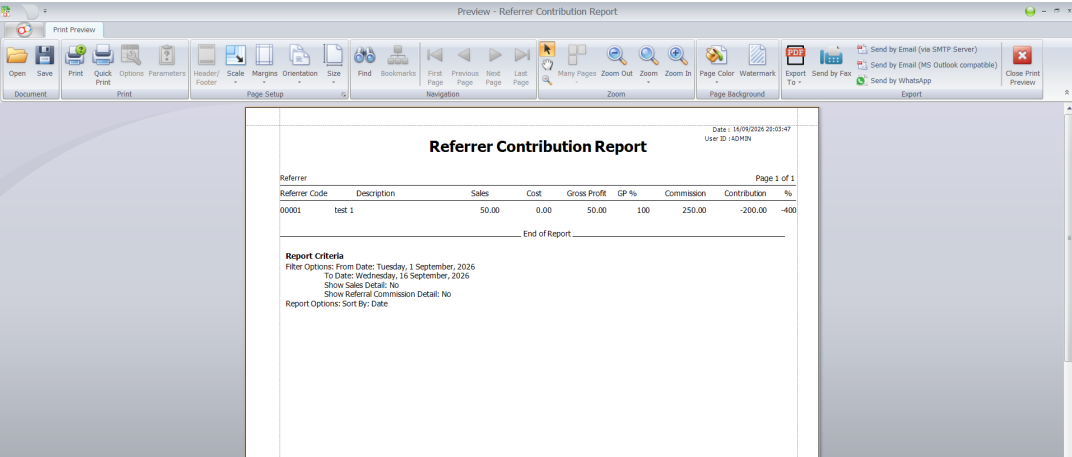
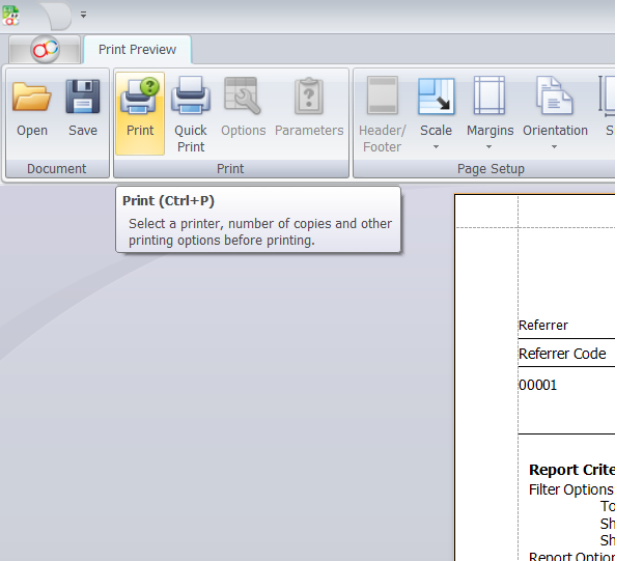
4. Use Print or Export only when the matching report permission is assigned.
Pro Tip:
Compare the Contributions column across referrers to see who still brings in profit after commission is deducted.
Benefits of Autocount Referral Manager Plugin
Centralized Referrer Records
Keep every referrer’s contact details, bank account and commission history within AutoCount, instead of in separate spreadsheets.
Consistent Commission Calculation
Commission follows the rates set in your commission plan, which reduces calculation mistakes and payout disputes.
Clear View of Referrer Performance
The contribution report shows sales, gross profit and commission side by side, so you know which referrers are worth rewarding.
Controlled Access
Separate rights for maintaining referrers, entering commission, confirming payment and printing reports keep sensitive actions with the right staff.
Conclusion
The AutoCount Referral Management Plugin offers an organised way to manage referrers, commission plans and commission payouts. By generating commission from paid sales and reporting each referrer’s contribution, it improves accuracy, saves time and helps you reward the referrers who grow your business.
Frequently Asked Questions
How do I control user permissions for the Referral plugin?
Administrators can configure permissions under General Maintenance > Access Right Maintenance > Referral Management Plugin to assign specific rights—such as maintaining referrers, entering commissions, or viewing and printing reports—only to authorized user roles.
Can I delete an existing referrer from the system?
A referrer can only be deleted if the code is not currently in use by a lead, document, or previously generated referral commission.
Can duplicate Referrer Codes be used?
No, the Referrer Code cannot be left blank and duplicate codes will be rejected by the system upon saving.
How are commission rates configured?
Commission rates are set under Referral > Commission Plan Maintenance, where you can define payout amounts or percentage rates filtered by Item Group, Item Type, or specific Item Code.
Which sales transactions qualify for referral commission generation?
In the Pending Referral Commissions screen, only fully-paid Invoice or Cash Sale transactions associated with the selected referrer can be converted into commission claims.
Can referral contribution reports be printed or exported by all users?
No, users can only preview, print, or export the Referrer Contribution Report if the matching report permissions have been assigned in Access Right Maintenance.
Interested in Getting AutoCount for your Business?
Contact our sales team today to explore pricing options and get started with the perfect solution for you.