
-
AutoCount Accounting Features
-
- Approval Workflow
- Audit Trail
- Auto Save in Draft Folder
- AutoCount Contra Account
- AutoCount License Setting Guide
- Deposit Tracking & Management
- Documents Numbering Format
- Full Transfer and Partial Transfer
- Import Data to AutoCount Accounting Using Excel
- Informative Charts and Analytical Data
- Layout Customization
- Multi Pricing
- Sales and Services Tax
- Schedule Backup
- Search Lookup Edit
- View Documents Flow
- AutoCount Feature Stock Take
- Column Chooser
- Show Remaining (3) Collapse
-
AutoCount Cloud Accounting
-
AutoCount E-Invoice
-
AutoCount HRMS User Guide
-
AutoCount Modules
-
- Activity Stream
- Advanced Financial Report
- Advanced Item
- Advanced Multi-UOM
- Advanced Quotation Module
- Basic Multi-UOM
- Budget Module
- Consignment
- Filter By Salesman
- FOC Quantity
- Formula
- Item Batch
- Item Package
- Landing Cost
- Multi-Currency
- Multi-Dimensional Analysis
- Multi-Location
- Project Account
- Recurrence
- Remote Credit Control Module
- Stock Assembly
- User Defined Fields (UDF)
- AutoCount SST Hidden Functions
- AutoCount SST Submission - Service Tax
- AutoCount Scripting Module User Guide
- AutoCount Bonus Point Module User Guide
- AutoCount Service Management Plugin User Guide
- Show Remaining (12) Collapse
-
AutoCount Plugins
-
- Fixed Assets Management
- Goldsmith
- TD Ordering Mobile Apps
- TD Stock Mobile Apps
- Universal Import Plugin
- DMS Import Plugin
- AutoCount Pick List Plugin User Guide
- AutoCount Credit Memo Plugin User Guide
- AutoCount Lock Price Plugin
- AutoCount Progressive Billing
- AutoCount Easy Recurrence Plugin
- Batch Update Unit Price Plugin
- AutoCount Production order
- AutoCount Car Tint Film Plugin
-
- Event Management System
- AutoCount To-Do List Plugin
- AutoCount AutoBank Reconciliation Plugin
- Intercompany Billing Plugin User Guide
- Lead Management 2.0 Plugin
- AutoCount Service Contract Plugin User Guide
- AutoCount Optical Plugin
- AutoCount Integrator Plugin
- AutoCount Procurement Planning Plugin
- Cage Management Plugin
- AutoCount Vehicle Plugin
- AutoCount Agent Validation Plugin User Guide
- AutoCount Barcode Generator Plugin User Guide
- AutoCount Easy Batch Number Entry Plugin User Guide
- Warranty 2.0 Plugin
- AutoCount Easy Photo 2.0 User Guide
- AutoCount Recurring Invoice Plugin User Guide
- AutoCount Scale Barcode Plugin User Guide
- AutoCount Recurrence Late Interest Plugin
- AutoCount Item Visibility Control
- AutoCount Bill Remark Plugin User Guide
- AutoCount Pain Tracker User Guide
- AutoCount Easy Payment
- AutoCount Easy Deposit Plugin
- AutoCount Easy Knock Off Plugin
- AutoCount Daily Collection Summary Plugin
- Timber Log Plugins
- Batch Transfer SODO Plugin
- AutoCount Vege Basket Plugin Guide
- AutoCount Fruit Basket Plugin Guide
- Referral Management Plugin
- AutoCount Migrator Plugin
- AutoCount Email & WhatsApp Plugin
- AutoCount Multi Company Knock Off Plugin
- AutoCount Advance Aging Format Plugin
- AutoCount Payment Request Plugin
- AutoCount Vehicle Master Plugin
- AutoCount Advance Deposit Plugin
- AutoCount IC Checker Plugin
- AutoCount RMA Plugin
- AutoCount Historical Outstanding DO Listing Plugin
- AutoCount Project Department Visibility Control Plugin
- AutoCount MRP Order Plugin
- AutoCount GridToExcel Plugin
- AutoCount Stock Availability Report Plugin
- AutoCount Batch Transfer SO DO Plugin
- AutoCount Centralized Kitchen Management Plugin
- SL AutoCount API
- AutoCount InterCompany Billing Plugin
- AutoCount Sales Commission Plugin
- AutoCount Advanced Credit Term Plugin
- AutoCount Advanced Stock Assembly Plugin
- AutoCount Shipment Plugin
- AutoCount Tour Plugin
- AutoCount Smart Analysis
- AutoCount Rental Management
- Show Remaining (41) Collapse
-
-
Form Template
-
Report Template
-
- Advance Quotation
- Cash Sale
- Consignment
- Consignment Movement
- Credit Note
- Debit Note
- Delivery Order
- FOC Quantity Analysis By Document Report
- Invoice
- Item Package Sales Report
- Monthly Sales Analysis
- Outstanding Sales Order Listing
- Profit And Loss Of Documents
- Quotation
- Sales Agent Contribution Report
- Sales Order
- Top/Bottom Sales Ranking
- Show Remaining (2) Collapse
-
- Available Stock Status Report
- Expired Item Batch Listing
- Inventory Physical Worksheet
- Stock Adjustment
- Stock Aging Report
- Stock Assembly
- Stock Assembly Order
- Stock Balance By Location
- Stock Balance Report
- Stock Card Report
- Stock Disassembly
- Stock Issue
- Stock Item Profit Margin
- Stock Movement Report
- Stock Receive
- Stock Take
- Stock Transfer
- Stock Write Off
- Show Remaining (3) Collapse
-
B2B ORDERING
-
AutoCount AI Agent
AutoCount Tour Plugin User Guide
What is AutoCount Tour Plugin?
The AutoCount Tour Plugin is designed to help travel agencies and tour operators manage traveller information, booking deposits, customer and supplier payments, and daily collections within AutoCount Accounting. Managing tour-related transactions manually can be challenging, especially when businesses need to track multiple travellers, collect deposits, process refunds, and reconcile payments across different locations. With features such as Traveller Information Management, Minimum Deposit Control, Payment and Refund Processing, Daily Collection Reporting, and Automatic Payment Knock-Off, the AutoCount Tour Plugin helps businesses streamline financial and operational workflows. By connecting essential travel business processes with accounting transactions, the tour plugin enables businesses to improve record accuracy, reduce administrative work, and maintain better control over their financial operations.
(EN) AutoCount Tour Video Guide
Why Use AutoCount Tour Plugin?
Travel agencies and tour operators frequently manage customer bookings, traveller details, deposits, payments, and refunds.
Without an organized system, these processes can become difficult to monitor and may increase the risk of payment discrepancies.
The AutoCount Tour Plugin helps businesses overcome these challenges through better financial and booking management.
Prevent Under-Collected Bookings
Apply minimum deposit checks to Sales Orders and Purchase Orders to help businesses ensure required payments are recorded before transactions proceed.
Keep Traveller Information Organized
Maintain traveller names, passport details, and other important information directly within Sales Orders for easier reference and record management.
Simplify Payment and Refund Handling
Manage customer and supplier payments, refunds, and outstanding balances through organized transaction records.
Improve Daily Collection Tracking
Monitor daily collections by date and location to improve financial visibility and simplify outlet-level reconciliation.
Key Features of AutoCount Tour Plugin
Traveller Information Management
Record traveller names, passport information, and additional details within Sales Orders to maintain organized customer travel records.
Minimum Deposit Control
Apply minimum payment validation to Sales Orders and Purchase Orders to help maintain better control over booking-related deposits.
Payment & Refund Processing
Manage customer receipts, supplier payments, and related refunds while keeping transaction balances visible.
Daily Collection & Payment Knock-Off
Review daily collections and allocate available unapplied payments against invoices to simplify payment reconciliation.
Who Should Use AutoCount Tour Plugin?
Travel Agencies
Ideal for travel agencies handling customer bookings, traveller information, deposits, and payment transactions.
Tour Operators
Suitable for tour operators managing travel-related Sales Orders, supplier payments, customer collections, and refunds.
Multi-Outlet Travel Businesses
Useful for travel businesses operating across multiple locations that require clearer daily collection reporting and financial monitoring.
Finance & Collection Teams
Helps accounting and finance personnel manage booking deposits, refunds, outstanding payments, and transaction reconciliation more systematically.
How AutoCount Tour Plugin Works
The AutoCount Tour Plugin helps travel businesses manage traveller records, deposit requirements, payment transactions, and daily collections through a more organized workflow.
The following features demonstrate how the tour plugin supports travel-related financial operations.
Feature 1 — Organized Traveller & Passport Information
Managing traveller details accurately is important for businesses handling tour bookings and travel arrangements.
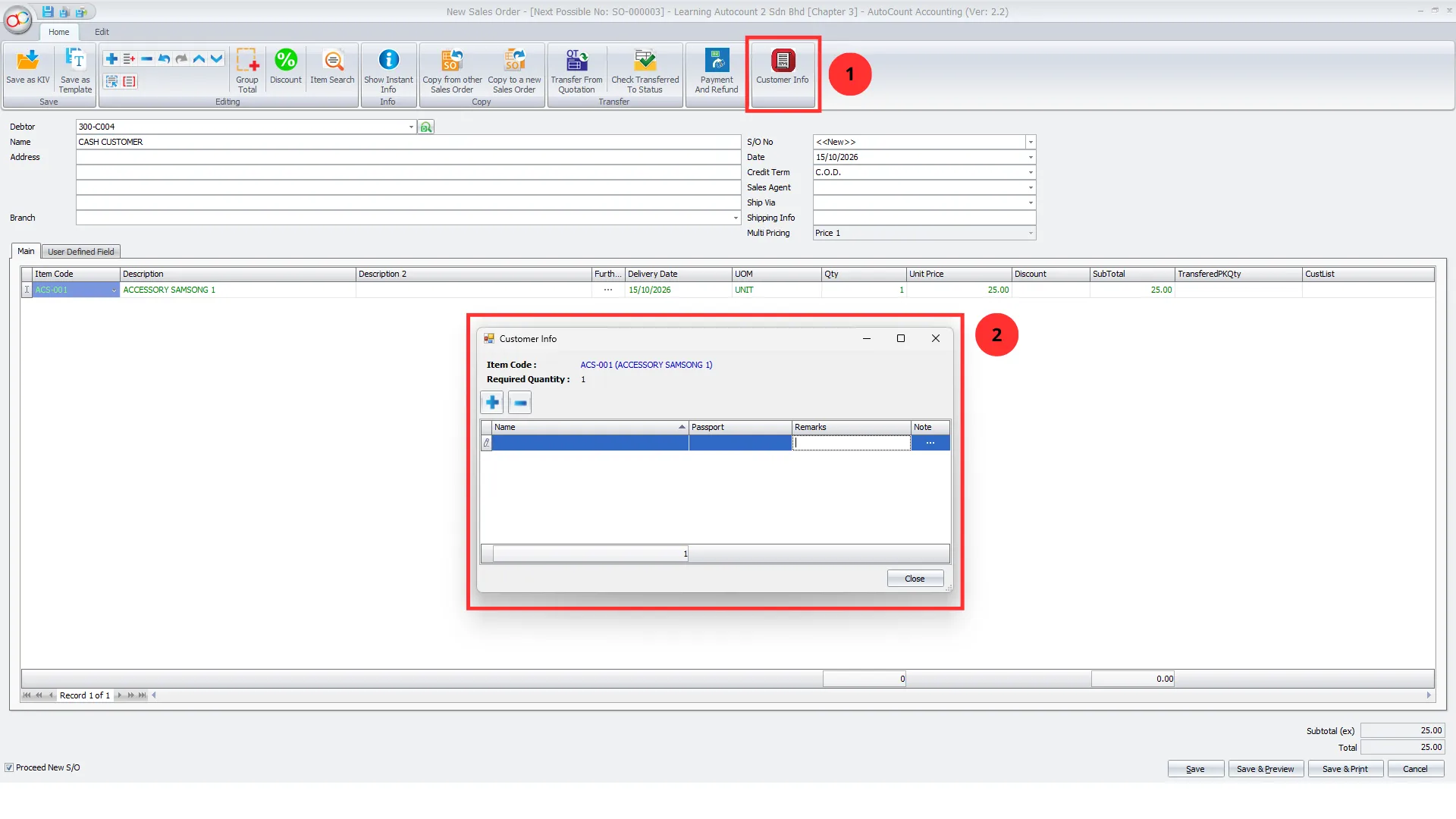
The AutoCount Tour Plugin allows businesses to maintain traveller information directly within Sales Orders through its Customer Info function.
Users can record important details such as traveller names, passport information, remarks, and additional notes according to the relevant Sales Order items.
The system also displays the required quantity for the selected item, helping businesses organize the traveller information associated with each order.
This reduces the need to maintain separate traveller records and provides easier access to important customer travel information.
Pro Tip:Ensure traveller information is reviewed and updated before finalizing travel arrangements to reduce documentation errors.
Feature 2 — Sales Order Minimum Deposit Control
Travel businesses often require customers to pay a deposit before confirming their bookings.
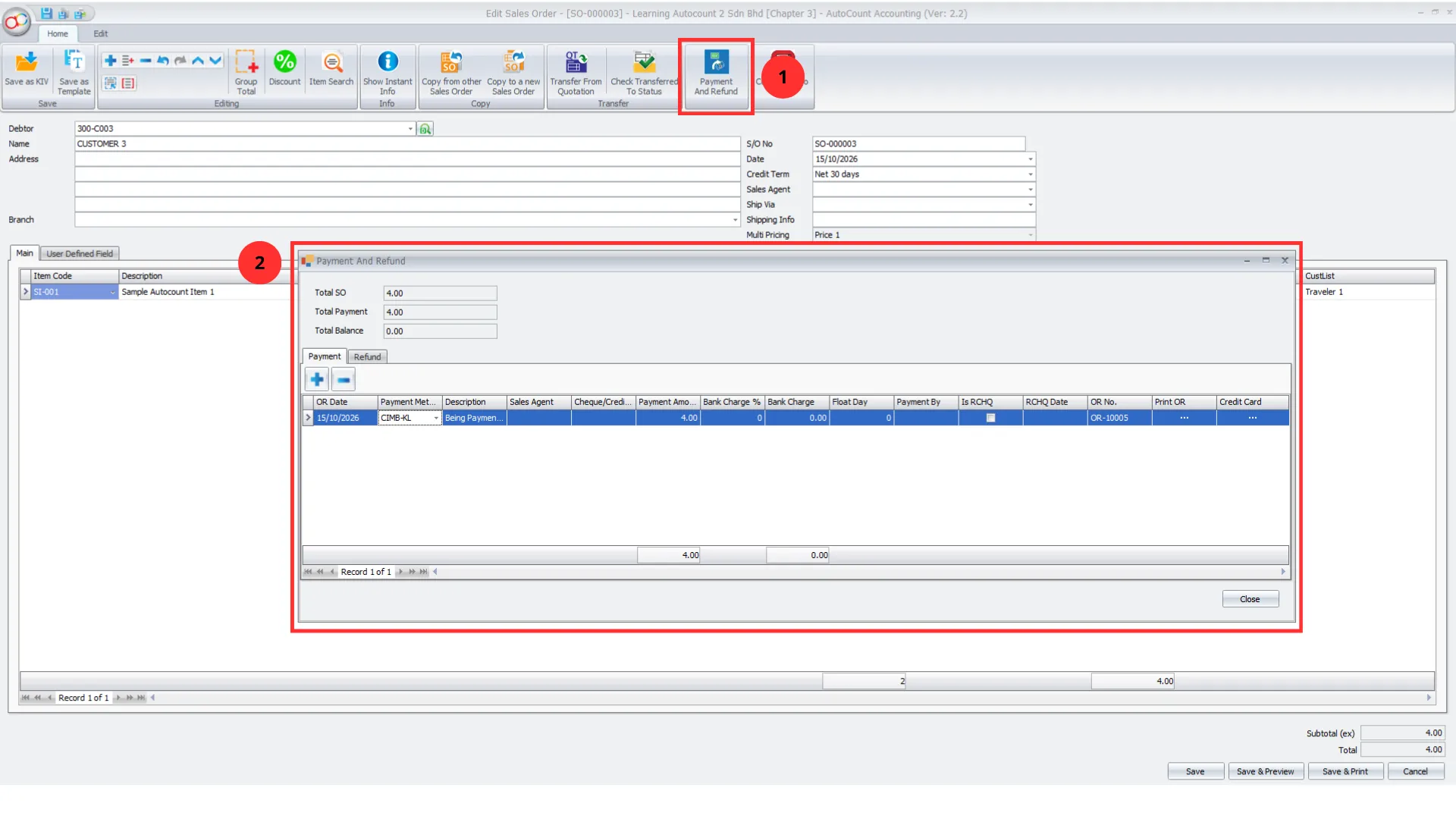
The AutoCount Tour Plugin supports minimum payment validation on Sales Orders, helping businesses maintain better control over required customer deposits.
The plugin displays Payment Amount and Balance Amount information, allowing staff to review recorded payments and outstanding balances.
When minimum payment checking is enabled, the system evaluates the required payment conditions before allowing the Sales Order to be saved.
The workflow also supports generating an Official Receipt for a recorded customer payment.
This helps businesses reduce the risk of processing bookings without the required deposit.
Pro Tip:
Establish clear customer deposit policies so booking staff can follow consistent payment requirements.
Feature 3 — Purchase Order Deposit Control
Travel agencies and tour operators may need to pay deposits to hotels, transport providers, and other suppliers before travel arrangements are confirmed.
The AutoCount Tour Plugin supports minimum payment checking on Purchase Orders to help businesses manage these supplier-related commitments.
Users can review payment and balance information directly within Purchase Orders.
When Purchase Order minimum payment checking is enabled, the system validates the configured payment requirements before saving the relevant transaction.
This improves visibility of supplier payment commitments and supports more consistent financial control.
Pro Tip:
Monitor supplier deposit requirements carefully to avoid payment discrepancies and delays in travel arrangements.
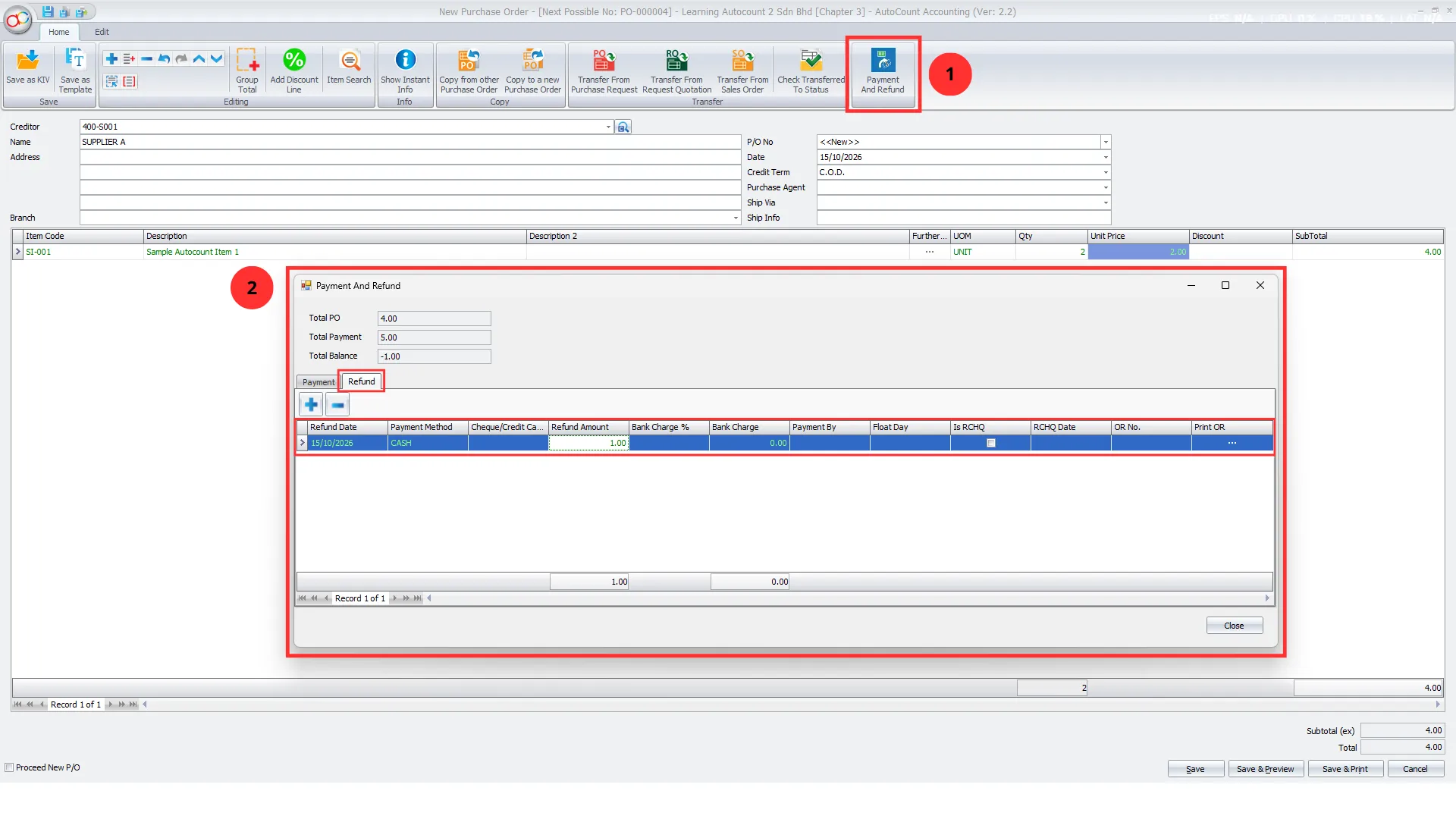
Feature 4 — Integrated Customer & Supplier Payment and Refund Management
Travel businesses regularly handle customer deposits, supplier payments, cancellations, and refunds.
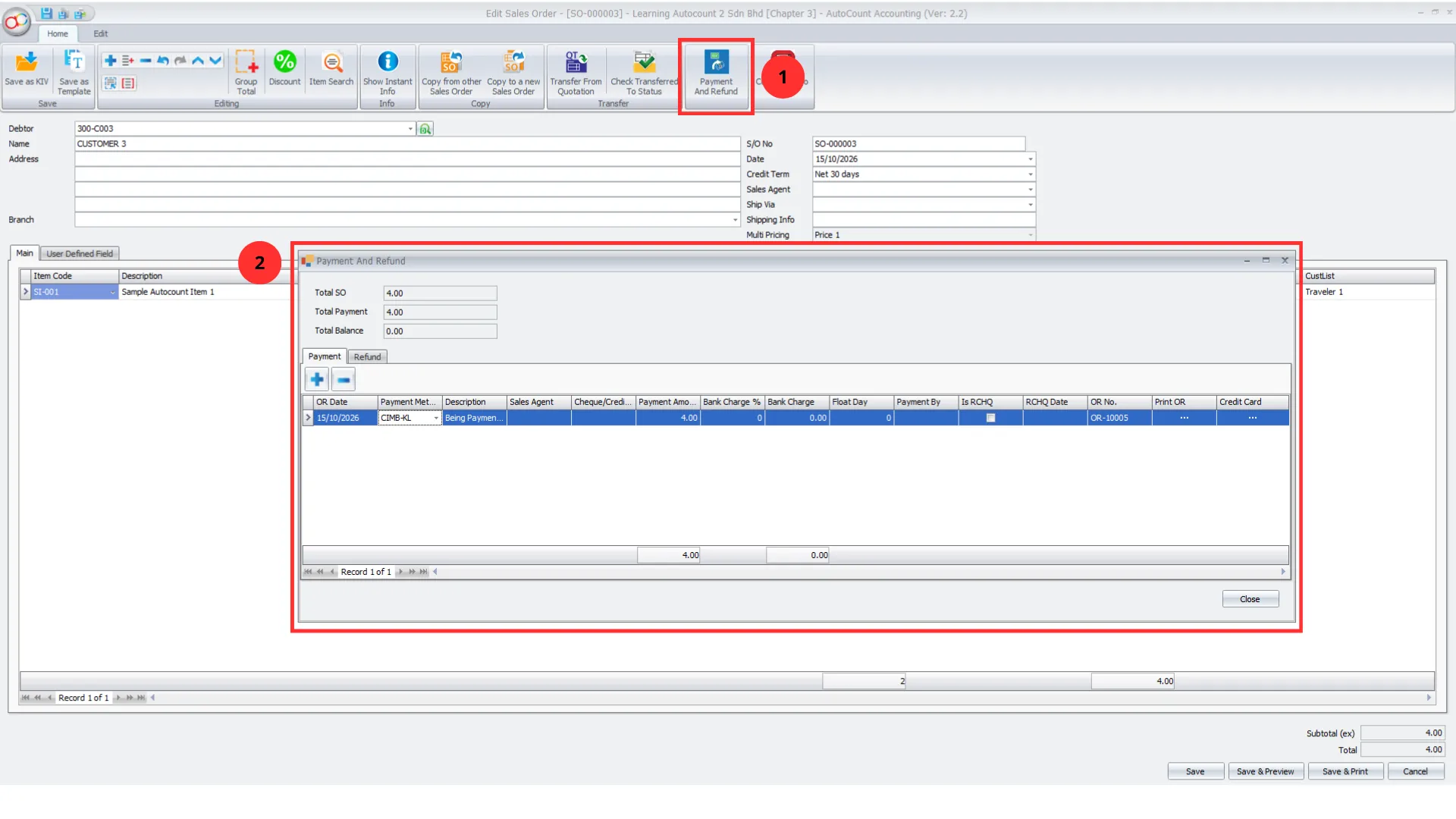
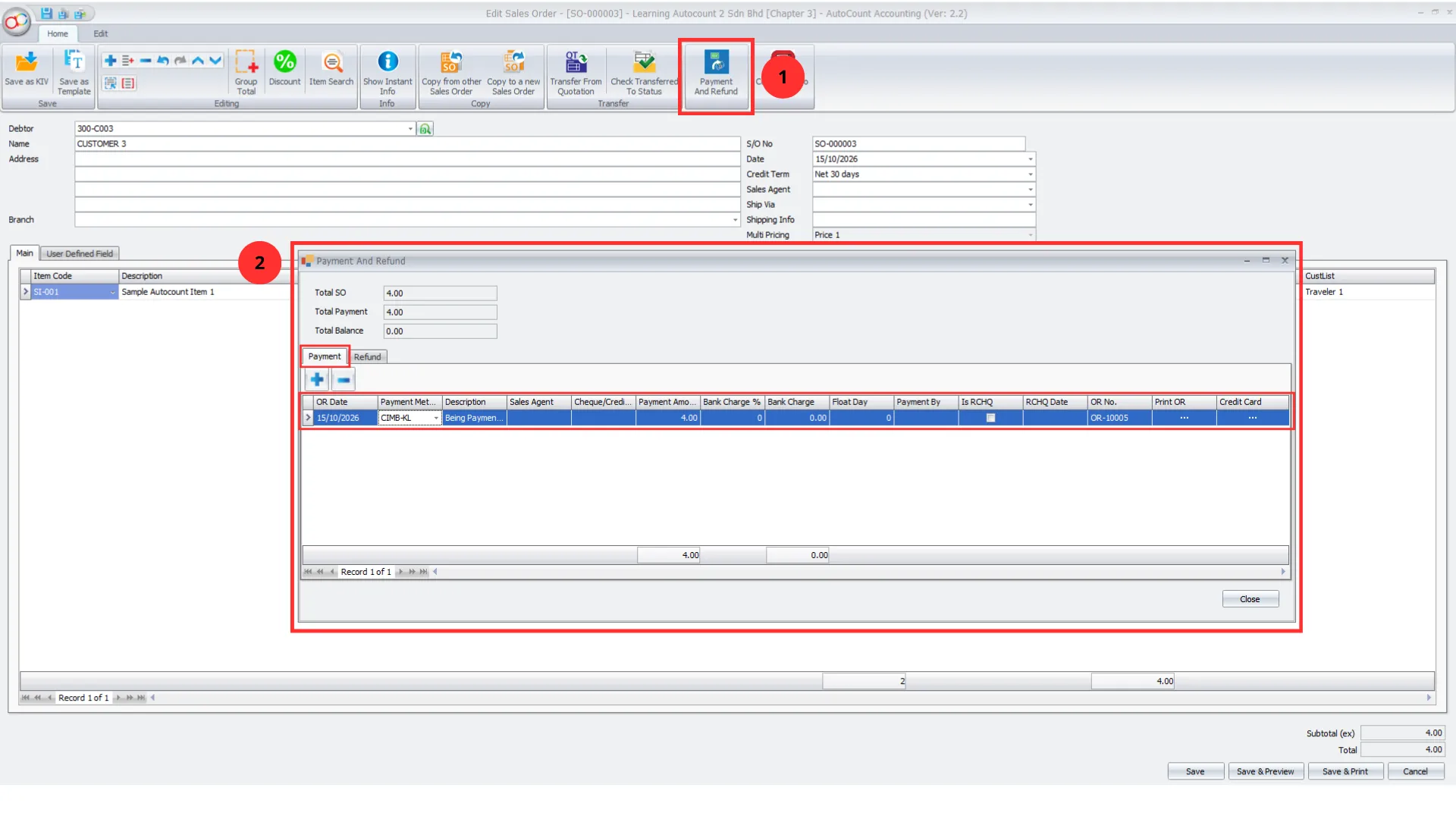
The AutoCount Tour Plugin provides Payment and Refund functions within Sales Orders and Purchase Orders.
For customer-related transactions, businesses can maintain payment and refund records associated with Sales Orders.
For supplier-related transactions, the plugin supports payment and refund handling associated with Purchase Orders.
The payment screens provide visibility into relevant order totals, payment amounts, and outstanding balances.
This allows businesses to manage financial activities more systematically while maintaining clearer connections between orders and their payment records.
Pro Tip:
Record refunds against the relevant transaction to maintain accurate financial records and simplify reconciliation.
Feature 5 — Daily Collection Reporting by Location
Monitoring customer collections is essential for travel businesses handling multiple transactions and operating across different outlets.
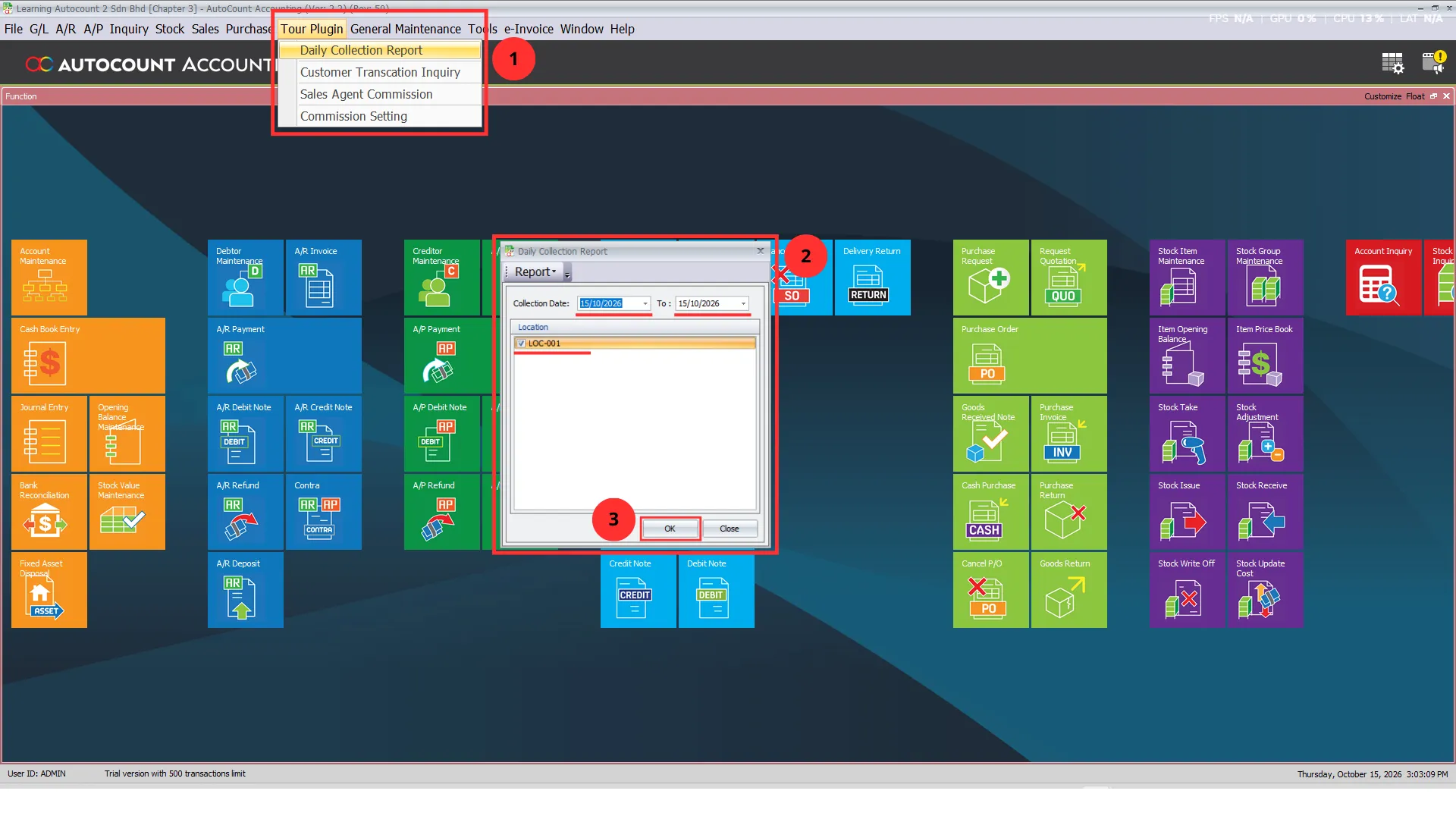
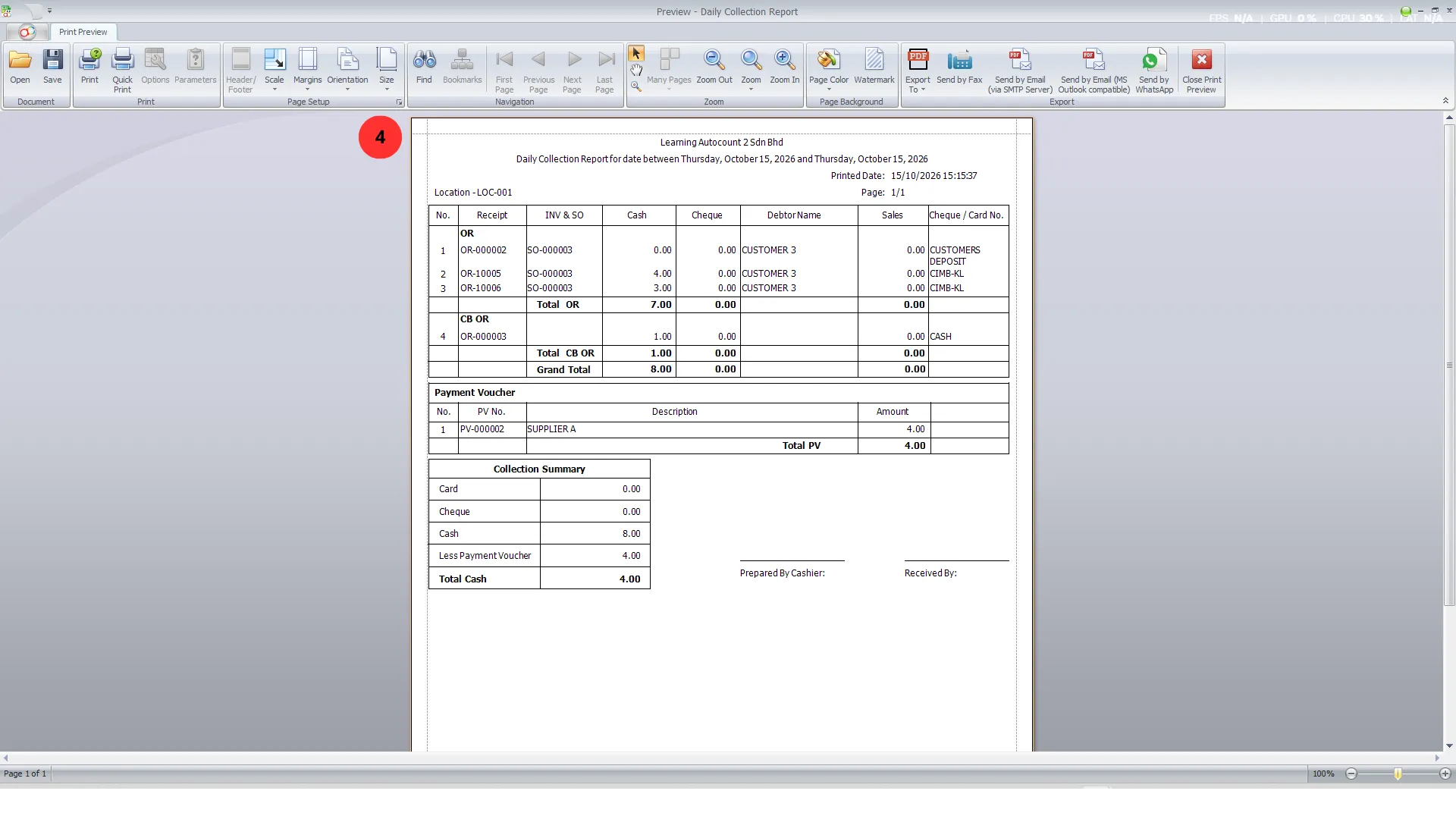
The AutoCount Tour Plugin includes a Daily Collection Report that helps businesses review collection activities within a selected date range.
The report supports location-based filtering, allowing businesses to examine collections associated with individual branches or outlets.
Where available, businesses can also use report formats that include outlet information for clearer collection analysis.
This helps finance teams and management monitor collection records and identify transactions that require further checking.
Pro Tip:
Assign access rights based on employee responsibilities and review permissions when staff roles change.
Feature 6 — Automatic Unapplied Payment Knock-Off
Travel businesses may receive customer deposits or make supplier payments before the corresponding invoices are finalized.
Without proper payment allocation, businesses can face difficulties identifying which payments remain unapplied.
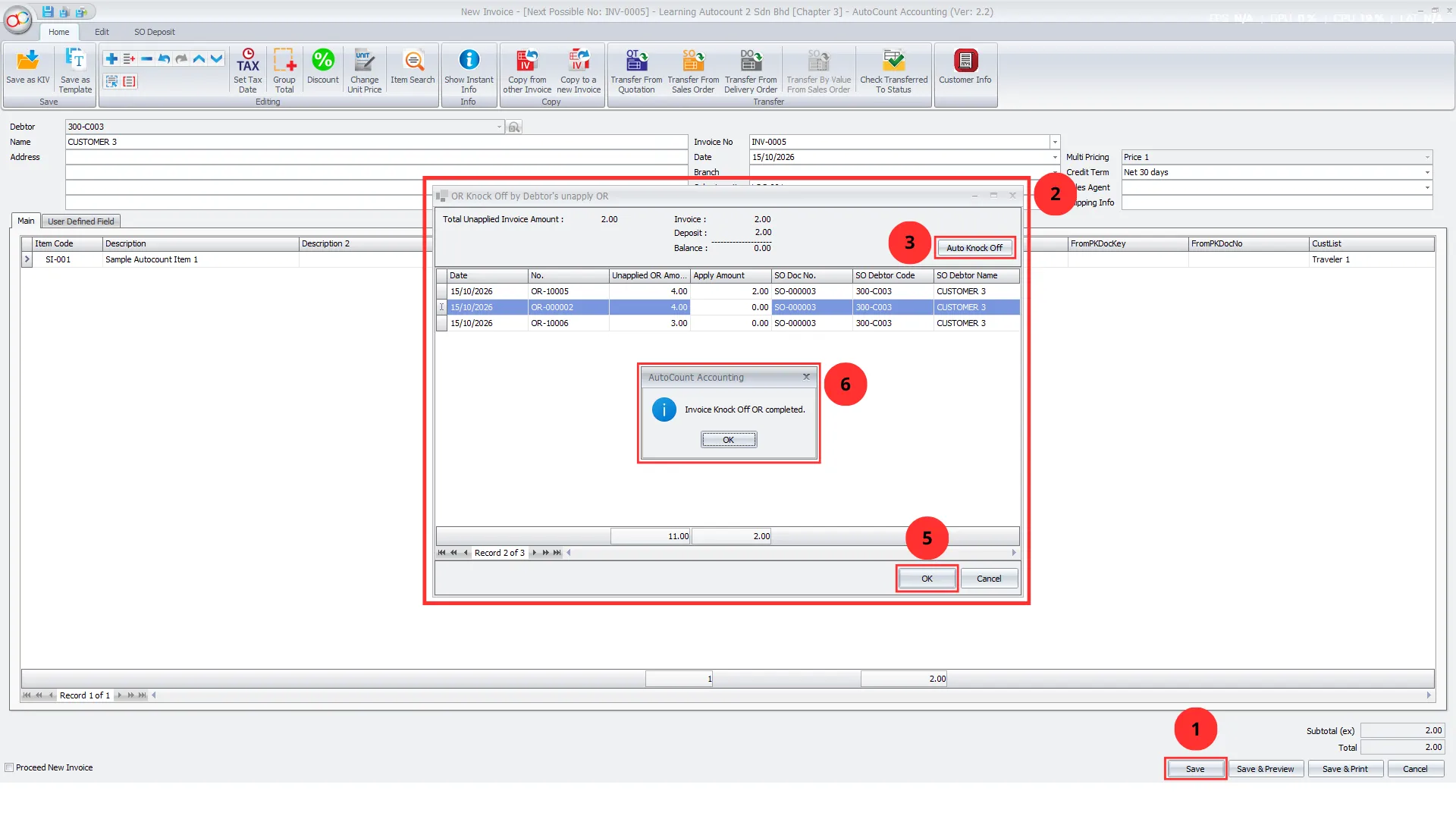
The AutoCount Tour Plugin supports allocating available unapplied receipts or payment vouchers against relevant invoices.
Users can review invoice amounts, available unapplied payments, and outstanding balances before allocating payments.
The Auto Knock Off function helps automatically allocate available amounts according to the applicable invoice and payment balances.
The system also prevents the applied amount from exceeding the available unapplied amount or invoice balance.
This reduces manual matching work and helps businesses maintain clearer payment allocation records.
Pro Tip:
Review unapplied payments regularly to ensure customer and supplier deposits are allocated to the correct invoices.
Feature 7— Role-Based Access and Financial Control
Travel businesses often have different employees responsible for bookings, payments, refunds, and financial reporting.
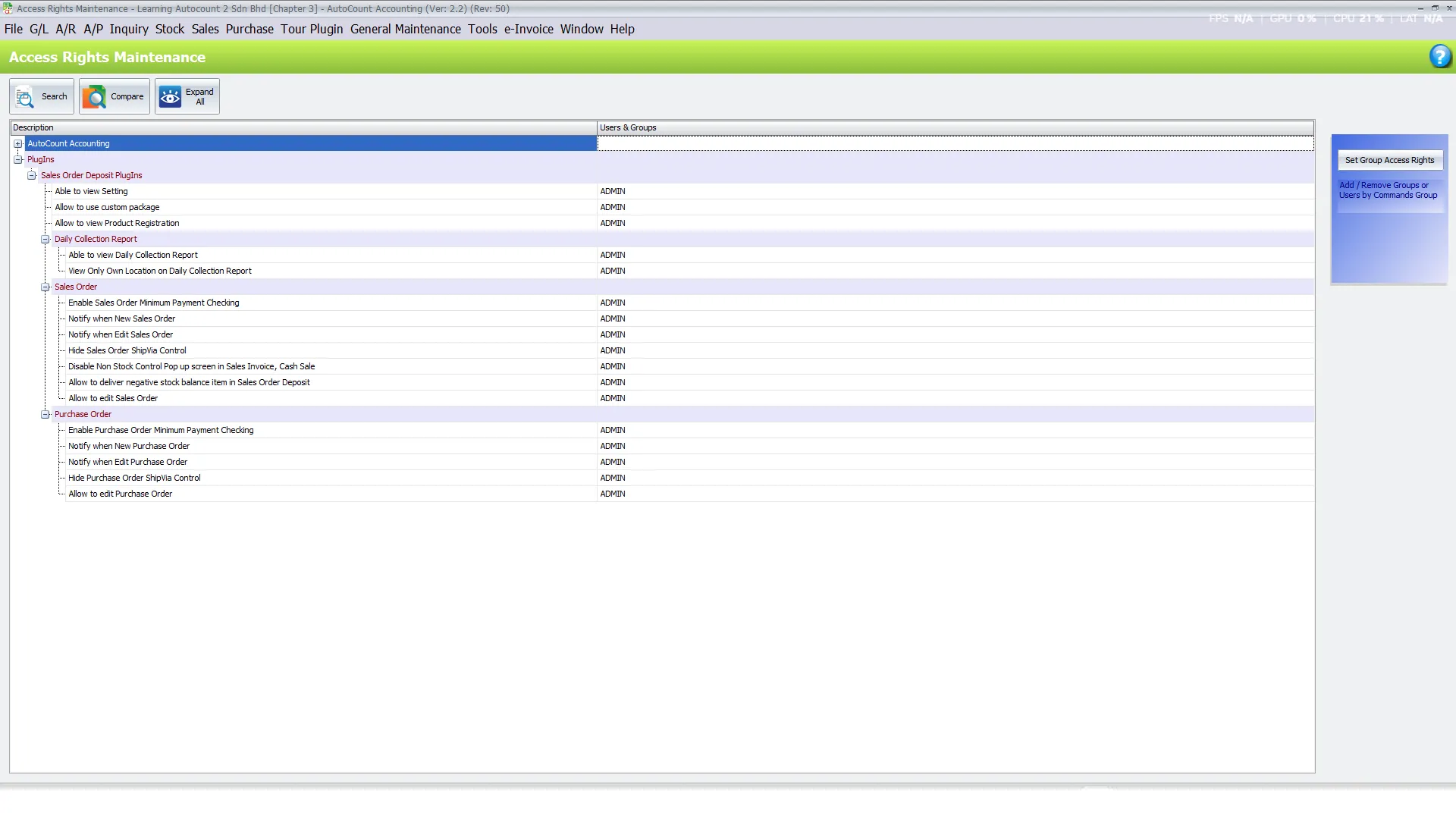
The AutoCount Tour Plugin supports access-right management to control which employees can use specific functions.
Businesses can manage permissions for Sales Order and Purchase Order activities, payment and refund functions, and Daily Collection Reports.
For organizations operating multiple branches, authorized users can also be restricted to viewing Daily Collection Reports associated with their assigned location.
This helps businesses maintain better control over sensitive financial information and reduces unauthorized access to important transaction functions.
Pro Tip:
Assign permissions according to each employee’s responsibilities and regularly review access rights as business roles change.
Benefits of AutoCount Tour Plugin
Better Traveller Record Management
Maintain traveller and passport information within Sales Orders to improve record organization and reduce scattered documentation.
Improved Deposit Control
Apply minimum payment checks to help ensure customer and supplier deposit requirements are reviewed before transactions proceed.
Easier Payment & Refund Management
Manage receipts, supplier payments, refunds, and unapplied payment allocations more systematically.
Clearer Financial Visibility
Review outlet collections, payment balances, and financial transactions to support better reconciliation and operational monitoring.
Conclusion
The AutoCount Tour Plugin provides travel agencies and tour operators with a practical solution for managing traveller information, deposits, payments, refunds, and daily collections within AutoCount Accounting.By combining traveller record management, minimum deposit validation, payment and refund processing, location-based collection reporting, and automatic payment knock-off, businesses can streamline their financial operations and reduce manual administrative work.For travel agencies, tour operators, and multi-outlet travel businesses, the AutoCount Tour Plugin helps establish a more organized and controlled approach to managing travel-related transactions.
Frequently Asked Questions
What is the AutoCount Tour Plugin?
The AutoCount Tour Plugin is an add-on for AutoCount Accounting that helps travel agencies and tour operators manage traveller information, booking-related deposits, customer and supplier payments, refunds, and daily collection reporting.
How does the Tour Plugin help travel agencies?
The tour plugin helps businesses organize traveller information, monitor deposit requirements, manage payment records, and review collections through integrated accounting workflows.
Can the AutoCount Tour Plugin record traveller passport information?
Yes. Businesses can record traveller names, passport details, remarks, and additional notes through the Customer Info function associated with Sales Orders.
Does the Tour Plugin support minimum deposit checking?
Yes. The plugin supports minimum payment validation on Sales Orders and Purchase Orders when the applicable checking functions are enabled.
Can the Tour Plugin manage payments and refunds?
Yes. The plugin supports payment and refund processing associated with Sales Orders and Purchase Orders, subject to the relevant user access rights.
Does the Tour Plugin support automatic payment knock-off?
Yes. The Auto Knock Off function helps allocate available unapplied payment amounts against relevant invoices while respecting available balances.
Simplify Your Travel Business Operations Today!
Managing traveller information, booking deposits, payments, and daily collections should not require unnecessary manual work.
With the AutoCount Tour Plugin, your business can organize travel-related transactions, improve deposit control, streamline payment processing, and maintain better financial visibility.
Looking for a more efficient way to manage your travel agency’s accounting operations?
Contact SL Software Solutions Sdn. Bhd. to learn how the AutoCount Tour Plugin can support your business.