
-
AutoCount Accounting Features
-
- Approval Workflow
- Audit Trail
- Auto Save in Draft Folder
- AutoCount Contra Account
- AutoCount License Setting Guide
- Deposit Tracking & Management
- Documents Numbering Format
- Full Transfer and Partial Transfer
- Import Data to AutoCount Accounting Using Excel
- Informative Charts and Analytical Data
- Layout Customization
- Multi Pricing
- Sales and Services Tax
- Schedule Backup
- Search Lookup Edit
- View Documents Flow
- AutoCount Feature Stock Take
- Column Chooser
- Show Remaining (3) Collapse
-
AutoCount Cloud Accounting
-
AutoCount E-Invoice
-
AutoCount HRMS User Guide
-
AutoCount Modules
-
- Activity Stream
- Advanced Financial Report
- Advanced Item
- Advanced Multi-UOM
- Advanced Quotation Module
- Basic Multi-UOM
- Budget Module
- Consignment
- Filter By Salesman
- FOC Quantity
- Formula
- Item Batch
- Item Package
- Landing Cost
- Multi-Currency
- Multi-Dimensional Analysis
- Multi-Location
- Project Account
- Recurrence
- Remote Credit Control Module
- Stock Assembly
- User Defined Fields (UDF)
- AutoCount SST Hidden Functions
- AutoCount SST Submission - Service Tax
- AutoCount Scripting Module User Guide
- AutoCount Bonus Point Module User Guide
- AutoCount Service Management Plugin User Guide
- Show Remaining (12) Collapse
-
AutoCount Plugins
-
- Fixed Assets Management
- Goldsmith
- TD Ordering Mobile Apps
- TD Stock Mobile Apps
- Universal Import Plugin
- DMS Import Plugin
- AutoCount Pick List Plugin User Guide
- AutoCount Credit Memo Plugin User Guide
- AutoCount Lock Price Plugin
- AutoCount Progressive Billing
- AutoCount Easy Recurrence Plugin
- Batch Update Unit Price Plugin
- AutoCount Production order
- AutoCount Car Tint Film Plugin
-
- Event Management System
- AutoCount To-Do List Plugin
- AutoCount AutoBank Reconciliation Plugin
- Intercompany Billing Plugin User Guide
- Lead Management 2.0 Plugin
- AutoCount Service Contract Plugin User Guide
- AutoCount Optical Plugin
- AutoCount Integrator Plugin
- AutoCount Procurement Planning Plugin
- Cage Management Plugin
- AutoCount Vehicle Plugin
- AutoCount Agent Validation Plugin User Guide
- AutoCount Barcode Generator Plugin User Guide
- AutoCount Easy Batch Number Entry Plugin User Guide
- Warranty 2.0 Plugin
- AutoCount Easy Photo 2.0 User Guide
- AutoCount Recurring Invoice Plugin User Guide
- AutoCount Scale Barcode Plugin User Guide
- AutoCount Recurrence Late Interest Plugin
- AutoCount Item Visibility Control
- AutoCount Bill Remark Plugin User Guide
- AutoCount Pain Tracker User Guide
- AutoCount Easy Payment
- AutoCount Easy Deposit Plugin
- AutoCount Easy Knock Off Plugin
- AutoCount Daily Collection Summary Plugin
- Timber Log Plugins
- Batch Transfer SODO Plugin
- AutoCount Vege Basket Plugin Guide
- AutoCount Fruit Basket Plugin Guide
- Referral Management Plugin
- AutoCount Migrator Plugin
- AutoCount Email & WhatsApp Plugin
- AutoCount Multi Company Knock Off Plugin
- AutoCount Advance Aging Format Plugin
- AutoCount Payment Request Plugin
- AutoCount Vehicle Master Plugin
- AutoCount Advance Deposit Plugin
- AutoCount IC Checker Plugin
- AutoCount RMA Plugin
- AutoCount Historical Outstanding DO Listing Plugin
- AutoCount Project Department Visibility Control Plugin
- AutoCount MRP Order Plugin
- AutoCount GridToExcel Plugin
- AutoCount Stock Availability Report Plugin
- AutoCount Batch Transfer SO DO Plugin
- AutoCount Centralized Kitchen Management Plugin
- SL AutoCount API
- AutoCount InterCompany Billing Plugin
- AutoCount Sales Commission Plugin
- Advanced Credit Term Management Software for AutoCount
- AutoCount Advanced Stock Assembly Plugin
- AutoCount Shipment Plugin
- AutoCount Tour Plugin
- AutoCount Smart Analysis
- AutoCount Rental Management
- Show Remaining (41) Collapse
-
-
Form Template
-
Report Template
-
- Advance Quotation
- Cash Sale
- Consignment
- Consignment Movement
- Credit Note
- Debit Note
- Delivery Order
- FOC Quantity Analysis By Document Report
- Invoice
- Item Package Sales Report
- Monthly Sales Analysis
- Outstanding Sales Order Listing
- Profit And Loss Of Documents
- Quotation
- Sales Agent Contribution Report
- Sales Order
- Top/Bottom Sales Ranking
- Show Remaining (2) Collapse
-
- Available Stock Status Report
- Expired Item Batch Listing
- Inventory Physical Worksheet
- Stock Adjustment
- Stock Aging Report
- Stock Assembly
- Stock Assembly Order
- Stock Balance By Location
- Stock Balance Report
- Stock Card Report
- Stock Disassembly
- Stock Issue
- Stock Item Profit Margin
- Stock Movement Report
- Stock Receive
- Stock Take
- Stock Transfer
- Stock Write Off
- Show Remaining (3) Collapse
-
B2B ORDERING
-
AutoCount AI Agent
- AutoCount Accounting Add-On
Advanced Credit Term Management Software For Better Payment Control
Encourage earlier customer payments, apply agreed overdue interest and keep credit adjustments connected to AutoCount Accounting — without relying on separate manual calculations.
Designed for businesses managing customer credit terms and A/R Payments in AutoCount.
(EN) AutoCount Advanced Credit Term Video
- THE SOLUTION
Beyond a standard invoice due date
When customers pay at different times, finance teams need more than a due date. AutoCount Advanced Credit Term Plugin extends existing credit terms with rules for early-payment discounts and overdue interest.
Qualifying adjustments can be evaluated during customer payment processing, with related accounting documents prepared through the linked workflow.
Manage payment policies with greater consistency
- Define discount periods and corresponding rates.
- Configure late-interest thresholds and percentages.
- Support Credit Note, A/R Debit Note or Sales Invoice adjustments.
- Keep references to adjustment documents with payments.
- THE EVERYDAY CHALLENGES
Customer Credit Management Can Become Complicated
Manual checks add work whenever payment dates, discount eligibility and overdue charges vary.
01 / CASH COLLECTION
Slow Settlements
Without an early-payment incentive, customers may have little reason to pay ahead of their due date.
02 / MANUAL WORK
Repeated Calculations
Staff manually review dates, percentages and invoice conditions for every adjustment.
03/ CONSISTENCY
Different Interpretations
Overdue interest policies may be harder to apply consistently without defined rules.
04 / DOCUMENTATION
Disconnected Records
Separate adjustments can make reconciliation and later transaction review more difficult.
- CORE CAPABILITIES
Practical Features For Better Customer Payment Control
Built around real credit-term rules and connected accounting adjustments, rather than extra manual procedures.
FEATURE 01
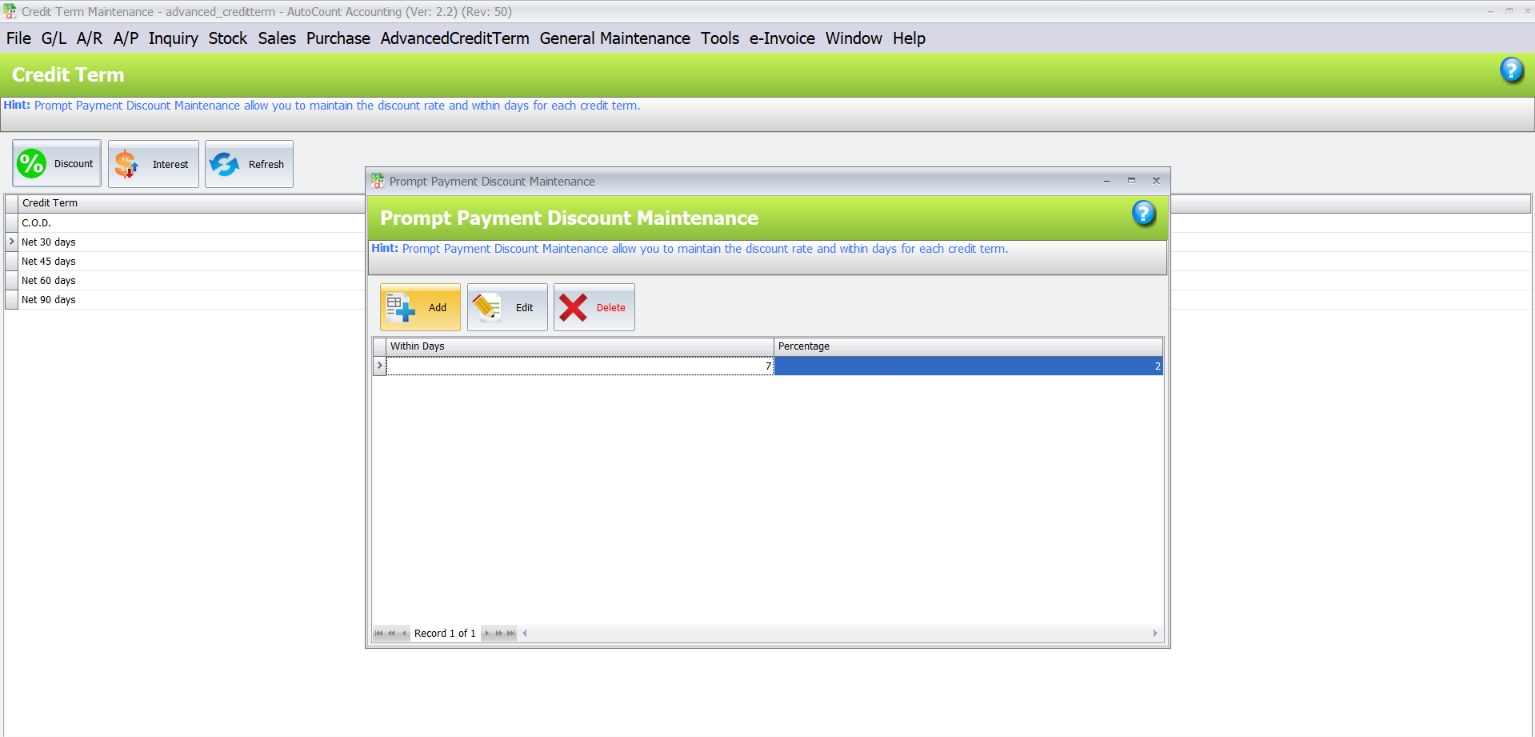
Tiered Early-Payment Discounts
Create different discount levels based on when a customer settles an eligible invoice. A clearly defined incentive policy can encourage earlier settlement without repeated spreadsheet calculations.
FEATURE 02
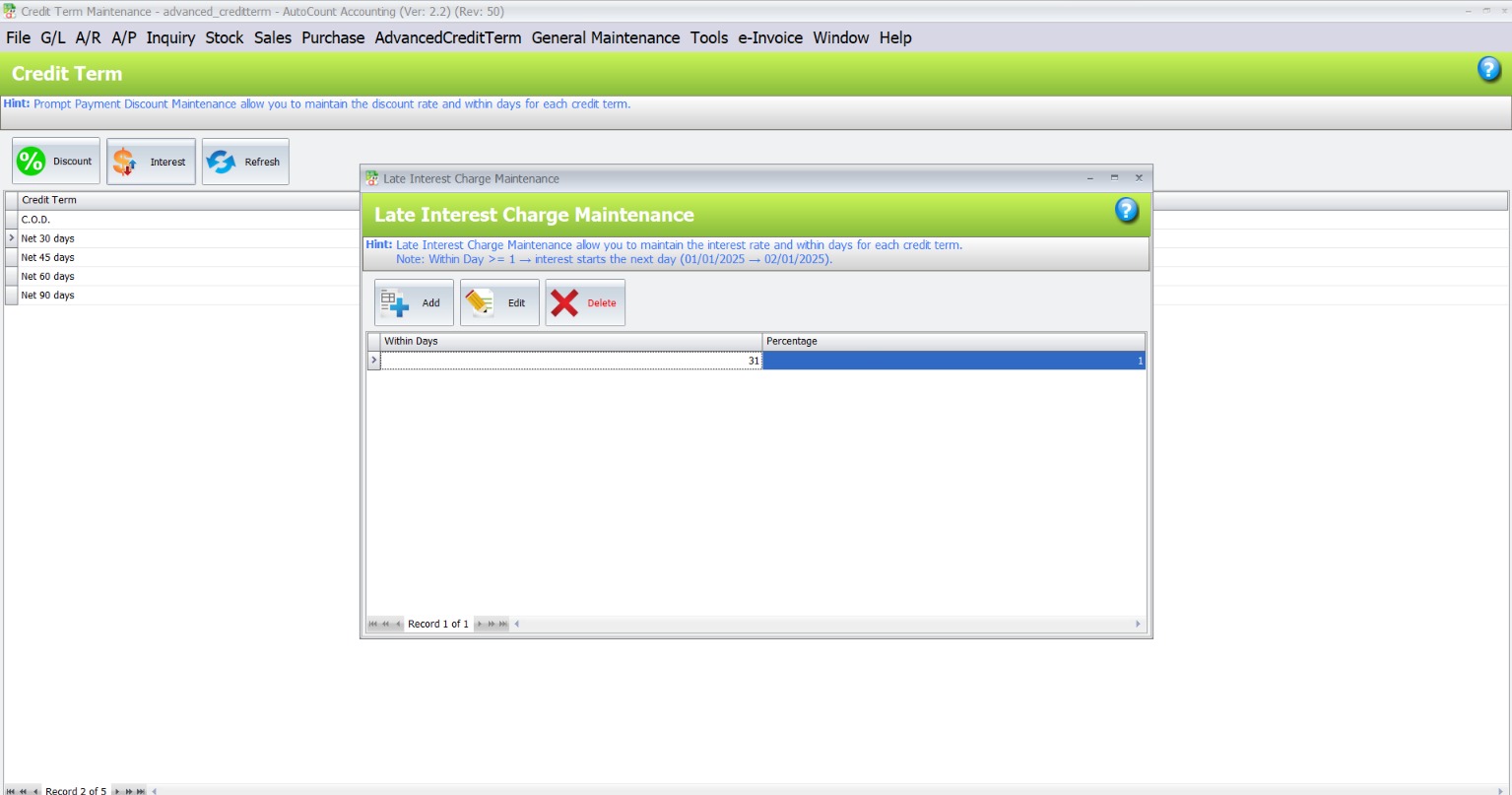
Configurable Late-Payment Interest
Apply defined day thresholds and interest percentages to qualifying overdue settlements. Staff can evaluate relevant charges according to agreed credit policies.
FEATURE 03
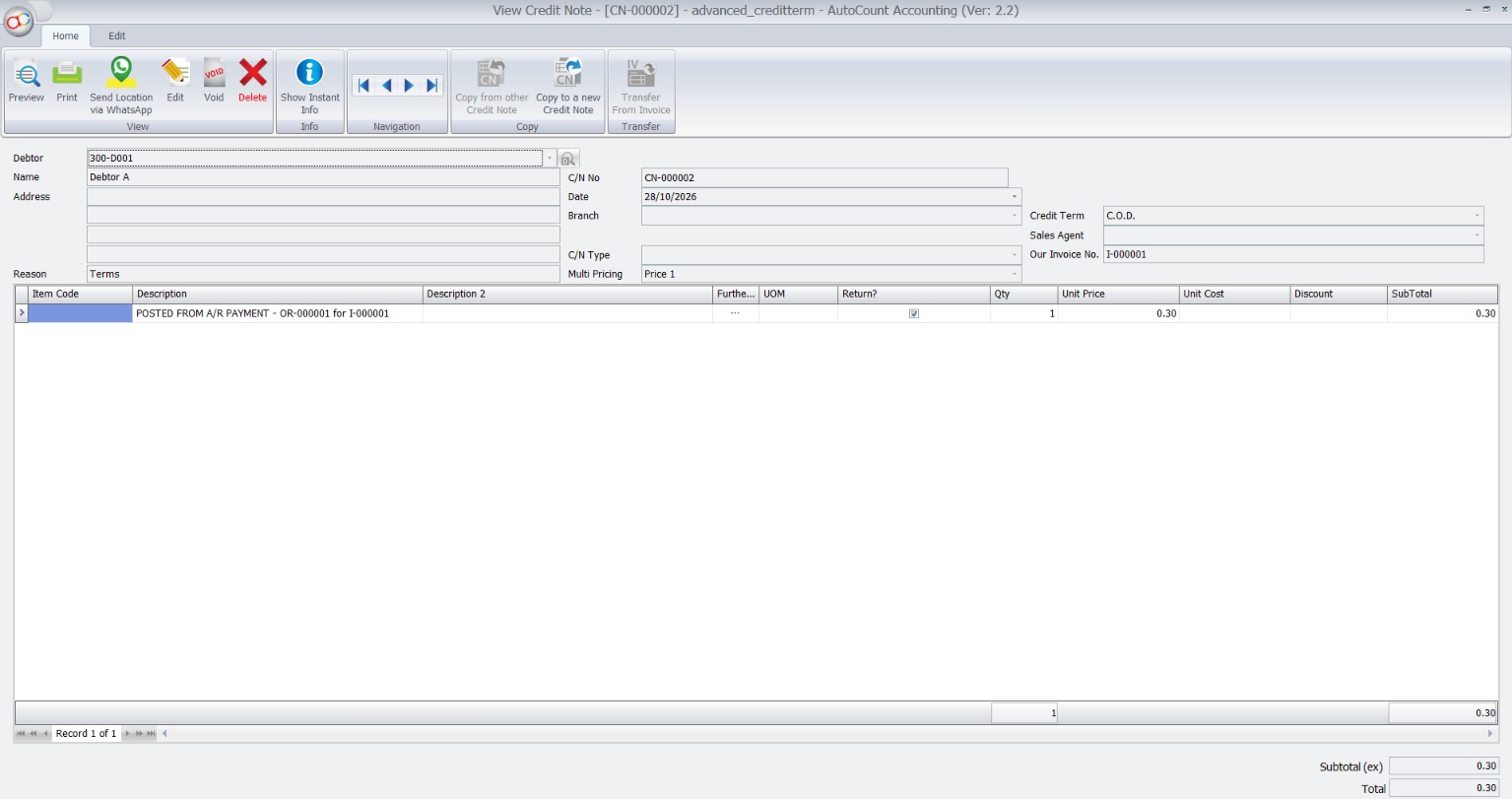
Related Adjustment Documents
Support Credit Notes for eligible early-payment discounts, and A/R Debit Notes or Sales Invoices for late-interest charges, according to selected posting methods.
FEATURE 04
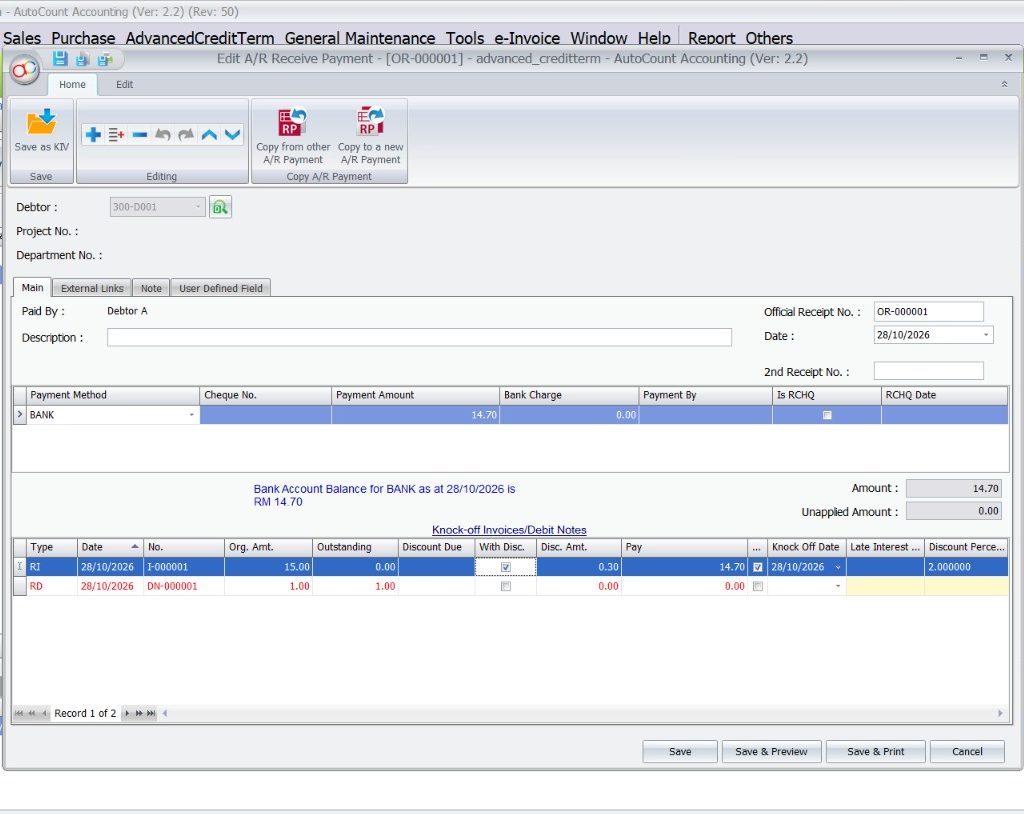
Connected A/R Payment Workflow
Evaluate relevant conditions when eligible A/R Payments are saved, so settlement adjustments are handled alongside customer payment activity.
FEATURE 05
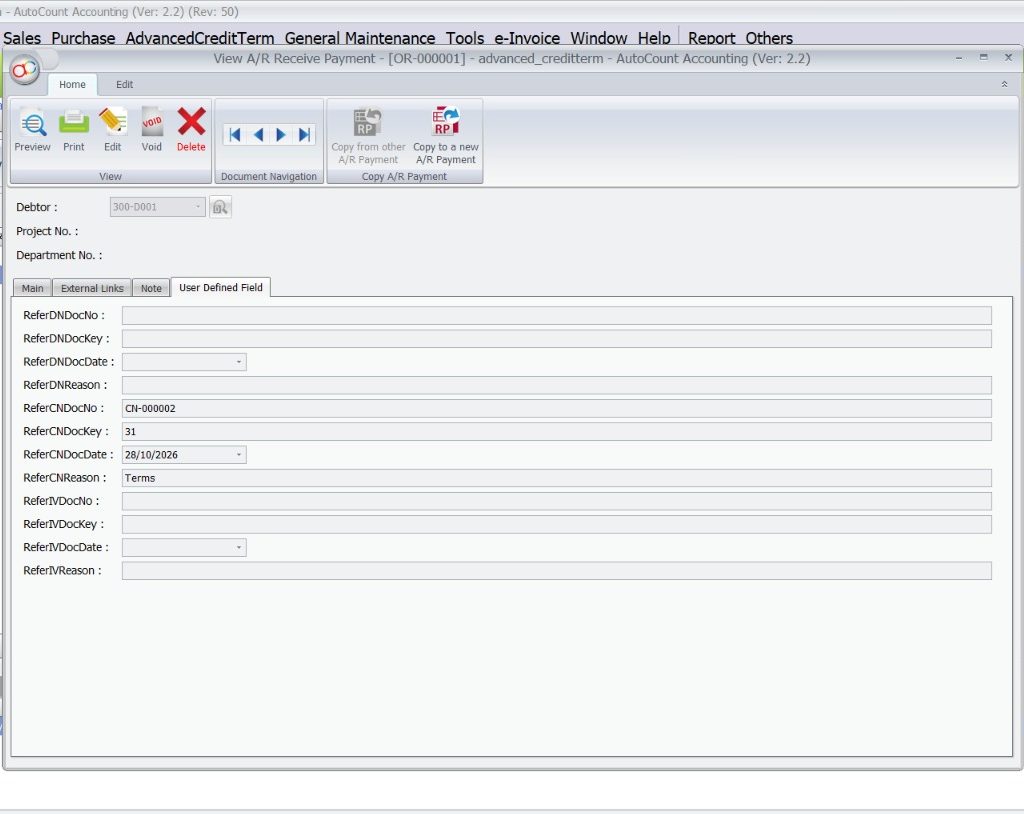
Linked Document References
Keep relevant adjustment document numbers and references associated with the original A/R Payment, making transaction reviews more straightforward.
FEATURE 06
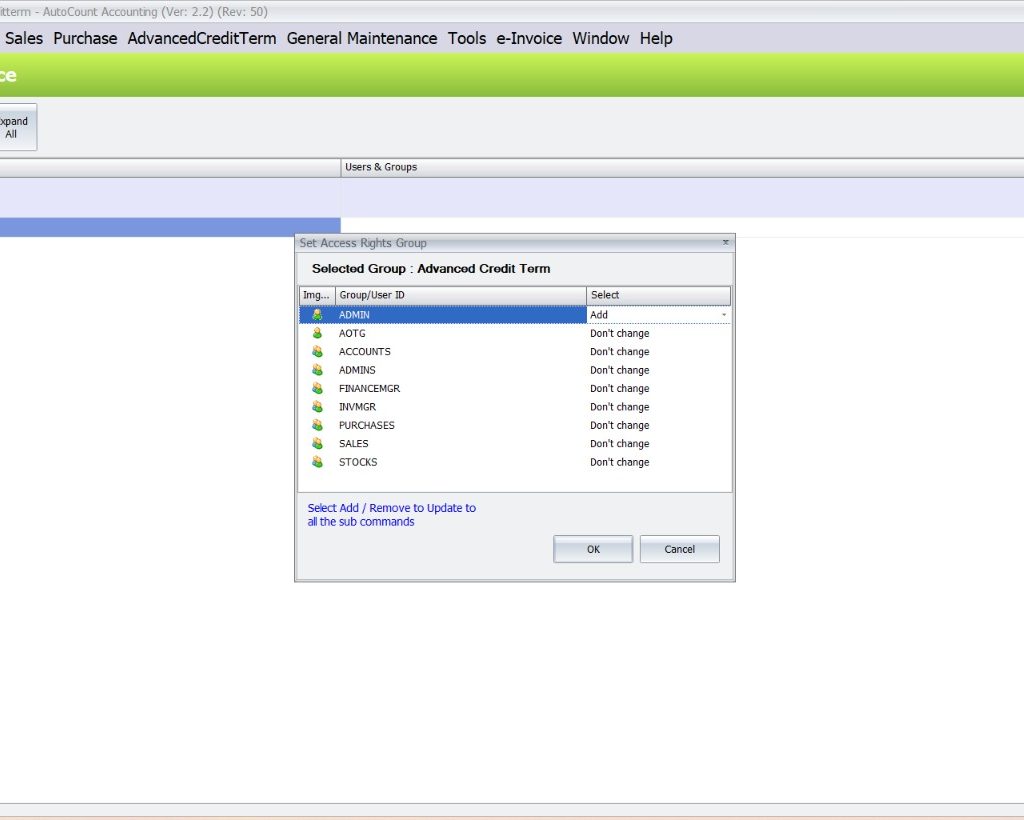
Controlled Access to Credit Rules
Use AutoCount access rights to limit who can maintain applicable credit-term and posting settings.
Are Your Credit-Term Rules Creating Extra Work?
Discuss your payment policies and accounting adjustment requirements with SL Software.
- ILLUSTRATIVE BUSINESS SCENARIO
One Wholesale Business. Different Settlement Dates.
A Malaysian distributor sells on credit and wants to reward early payments while applying agreed interest to qualifying overdue settlements.
-
1
Set the policy
Discount and interest conditions are defined against existing credit terms.
-
2
Process a qualifying payment
The relevant payment timing and eligible invoice conditions are evaluated.
-
3
Record an adjustment
Related Credit Note, A/R Debit Note or Sales Invoice handling follows the chosen posting method.
-
4
Review the connection
Associated document references help the team understand the payment adjustment.
- BETTER OPERATIONAL CLARITY
Less Repetitive Calculation. More Consistent Payment Treatment.
Instead of checking every settlement in separate files, staff can work with defined policies and linked accounting records.
- WHO IT IS FOR
Suitable For Businesses Selling On Credit
Wholesale & Distribution
Handle different retailer settlement patterns with defined discount and interest terms.
Manufacturing & Trading
Maintain more consistent customer credit arrangements and related adjustments.
High-Volume A/R Teams
Reduce repeated checking when processing qualifying customer settlements.
Finance Managers
Establish clearer policies and access controls for credit-term adjustments.
- UNDERSTAND THE DIFFERENCE
Standard Credit Terms vs. Advanced Credit Terms
Existing credit terms remain the foundation; the plugin adds settlement-adjustment rules.
| Capability | Standard credit terms | With Advanced Credit Term Plugin |
|---|---|---|
| Payment deadline | Defines expected invoice settlement period | Uses existing credit terms as the base |
| Early-payment discounts | Separate handling may be needed | Configurable tiered discount rules |
| Overdue interest | Separate calculation may be needed | Configurable interest thresholds and rates |
| Adjustment documents | Normal accounting workflow | Related CN / A/R DN / Sales Invoice processing |
| Document references | Standard accounting records | Relevant adjustment references linked to A/R Payment |
- WHY SL SOFTWARE SOLUTIONS
Choose A Solution That Fits Your Actual Credit Policy
SL Software Solutions Sdn Bhd helps Malaysian businesses explore AutoCount software solutions according to their operational needs.
Discuss your customer agreements, discount structures, overdue interest policy, accounting document treatment and existing AutoCount environment before choosing a plugin workflow.
What To Prepare For A Consultation
- Your Existing Customer Credit Terms
- Early-Payment Incentive Policy, If Any
- Late-Interest Clauses and Thresholds
- How Your Team Handles Partial Payments
- Your AutoCount Version and Accounting Document Requirements
- FREQUENTLY ASKED QUESTIONS
Questions Before Choosing The Plugin
What is Advanced Credit Term Management Software?
It helps businesses manage additional customer settlement rules such as early-payment discounts and late-interest charges. The AutoCount plugin extends existing credit terms and connects qualifying calculations with A/R Payment processing.
Can AutoCount Calculate Early-Payment Discounts?
With the Advanced Credit Term Plugin, businesses can define payment-day discount tiers. Eligible A/R Payments are evaluated using the relevant credit-term rules.
How Are Overdue Interest Charges Handled?
Businesses can configure late-interest thresholds and percentages. Depending on configured posting options, qualifying interest adjustments can be handled through A/R Debit Notes or Sales Invoices.
Does It Automatically Send Payment Reminders?
Automated customer reminder delivery is not part of the documented core functionality. This plugin focuses on qualifying discount and interest adjustments tied to customer payments.
Does It Support Every Partial-Payment Situation?
Not necessarily. The documented eligibility logic includes the condition that an invoice must have no other payment. Complex or installment-payment scenarios should be reviewed before purchase.
Will It Work With My AutoCount Version?
The plugin extends AutoCount Accounting, but version, module and licensing requirements should be checked against your existing environment before implementation.
How Do I Find Out The Current Price?
Contact SL Software Solutions for current licensing and implementation options based on your environment and requirements.
- START WITH YOUR CREDIT POLICY
Make Customer Payment Terms Easier To Manage
Explore how tiered discounts, late-interest rules and linked accounting adjustments could fit your business.
SL Software Solutions Sdn Bhd · autocountsystem.com