
-
AutoCount Accounting Features
-
- Approval Workflow
- Audit Trail
- Auto Save in Draft Folder
- AutoCount Contra Account
- AutoCount License Setting Guide
- Deposit Tracking & Management
- Documents Numbering Format
- Full Transfer and Partial Transfer
- Import Data to AutoCount Accounting Using Excel
- Informative Charts and Analytical Data
- Layout Customization
- Multi Pricing
- Sales and Services Tax
- Schedule Backup
- Search Lookup Edit
- View Documents Flow
- AutoCount Feature Stock Take
- Column Chooser
- Show Remaining (3) Collapse
-
AutoCount Cloud Accounting
-
AutoCount E-Invoice
-
AutoCount HRMS User Guide
-
AutoCount Modules
-
- Activity Stream
- Advanced Financial Report
- Advanced Item
- Advanced Multi-UOM
- Advanced Quotation Module
- Basic Multi-UOM
- Budget Module
- Consignment
- Filter By Salesman
- FOC Quantity
- Formula
- Item Batch
- Item Package
- Landing Cost
- Multi-Currency
- Multi-Dimensional Analysis
- Multi-Location
- Project Account
- Recurrence
- Remote Credit Control Module
- Stock Assembly
- User Defined Fields (UDF)
- AutoCount SST Hidden Functions
- AutoCount SST Submission - Service Tax
- AutoCount Scripting Module User Guide
- AutoCount Bonus Point Module User Guide
- AutoCount Service Management Plugin User Guide
- Show Remaining (12) Collapse
-
AutoCount Plugins
-
- Fixed Assets Management
- Goldsmith
- TD Ordering Mobile Apps
- TD Stock Mobile Apps
- Universal Import Plugin
- DMS Import Plugin
- AutoCount Pick List Plugin User Guide
- AutoCount Credit Memo Plugin User Guide
- AutoCount Lock Price Plugin
- AutoCount Progressive Billing
- AutoCount Easy Recurrence Plugin
- Batch Update Unit Price Plugin
- AutoCount Production order
- AutoCount Car Tint Film Plugin
-
- Event Management System
- AutoCount To-Do List Plugin
- AutoCount AutoBank Reconciliation Plugin
- Intercompany Billing Plugin User Guide
- Lead Management 2.0 Plugin
- AutoCount Service Contract Plugin User Guide
- AutoCount Optical Plugin
- AutoCount Integrator Plugin
- AutoCount Procurement Planning Plugin
- Cage Management Plugin
- AutoCount Vehicle Plugin
- AutoCount Agent Validation Plugin User Guide
- AutoCount Barcode Generator Plugin User Guide
- AutoCount Easy Batch Number Entry Plugin User Guide
- Warranty 2.0 Plugin
- AutoCount Easy Photo 2.0 User Guide
- AutoCount Recurring Invoice Plugin User Guide
- AutoCount Scale Barcode Plugin User Guide
- AutoCount Recurrence Late Interest Plugin
- AutoCount Item Visibility Control
- AutoCount Bill Remark Plugin User Guide
- AutoCount Pain Tracker User Guide
- AutoCount Easy Payment
- AutoCount Easy Deposit Plugin
- AutoCount Easy Knock Off Plugin
- AutoCount Daily Collection Summary Plugin
- Timber Log Plugins
- Batch Transfer SODO Plugin
- AutoCount Vege Basket Plugin Guide
- AutoCount Fruit Basket Plugin Guide
- Referral Management Plugin
- AutoCount Migrator Plugin
- AutoCount Email & WhatsApp Plugin
- AutoCount Multi Company Knock Off Plugin
- AutoCount Advance Aging Format Plugin
- AutoCount Payment Request Plugin
- AutoCount Vehicle Master Plugin
- AutoCount Advance Deposit Plugin
- AutoCount IC Checker Plugin
- AutoCount RMA Plugin
- AutoCount Historical Outstanding DO Listing Plugin
- AutoCount Project Department Visibility Control Plugin
- AutoCount MRP Order Plugin
- AutoCount GridToExcel Plugin
- AutoCount Stock Availability Report Plugin
- AutoCount Batch Transfer SO DO Plugin
- AutoCount Centralized Kitchen Management Plugin
- SL AutoCount API
- AutoCount InterCompany Billing Plugin
- AutoCount Sales Commission Plugin
- AutoCount Advanced Credit Term Plugin
- AutoCount Advanced Stock Assembly Plugin
- AutoCount Shipment Plugin
- AutoCount Tour Plugin
- AutoCount Smart Analysis
- AutoCount Rental Management
- Show Remaining (41) Collapse
-
-
Form Template
-
Report Template
-
- Advance Quotation
- Cash Sale
- Consignment
- Consignment Movement
- Credit Note
- Debit Note
- Delivery Order
- FOC Quantity Analysis By Document Report
- Invoice
- Item Package Sales Report
- Monthly Sales Analysis
- Outstanding Sales Order Listing
- Profit And Loss Of Documents
- Quotation
- Sales Agent Contribution Report
- Sales Order
- Top/Bottom Sales Ranking
- Show Remaining (2) Collapse
-
- Available Stock Status Report
- Expired Item Batch Listing
- Inventory Physical Worksheet
- Stock Adjustment
- Stock Aging Report
- Stock Assembly
- Stock Assembly Order
- Stock Balance By Location
- Stock Balance Report
- Stock Card Report
- Stock Disassembly
- Stock Issue
- Stock Item Profit Margin
- Stock Movement Report
- Stock Receive
- Stock Take
- Stock Transfer
- Stock Write Off
- Show Remaining (3) Collapse
-
B2B ORDERING
-
AutoCount AI Agent
AutoCount Daily Collection Summary Plugin
What Is The AutoCount Daily Collection Summary Plugin?
The AutoCount Daily Collection Summary Plugin is a tool designed to help businesses simplify and automate daily cash and payment collection reporting. Instead of manually pulling multiple reports from different modules (POS, Sales, Receipts, etc.), this plugin consolidates daily collection data into a single summary report that can be reviewed, exported, and used for reconciliation.
AutoCount Daily Collection Summary Plugin Video Guide
Why You Should Use Daily Collection Summary Plugin?
This plugin offers significant benefits by automating the daily collection tracking process, which can:
Increase Efficiency
Automatically generate daily collection reports, saving time spent on manual tracking.
Enhance Accuracy
Reduces errors related to manual data entry and ensures all collection types are accurately summarized.
Save Time
Automation means you can focus on more important tasks while the system handles daily collection summaries.
Key Features & Capabilities
Real‑time Visibility
Quickly see what was collected today — cash, card, deposits, and other payment types.
Simplified Daily Close
Helps end‑of‑day reconciliation by summarizing all collection data in one place.
Accurate Reporting
Reduces manual errors from switching between multiple screens.
Exportable Reports
Reports can usually be saved or printed for audit and bookkeeping purposes.
Benefits of Using Daily Collection Summary Plugin
This plugin provides various advantages for businesses managing daily collections, including:
Streamline Operations
Effortlessly track daily collections from multiple payment sources in one place, reducing manual effort.
Real-time Insights
Instant access to up-to-date collection data for quicker financial analysis and decision-making.
Improve Accuracy
Minimize errors by consolidating payment types and reducing manual entries for improved report reliability.
Simplified Reconciliation
Automates the process of matching collected payments with financial records, making end-of-day reconciliation faster and easier.
How AutoCount Daily Collection Summary Plugin works
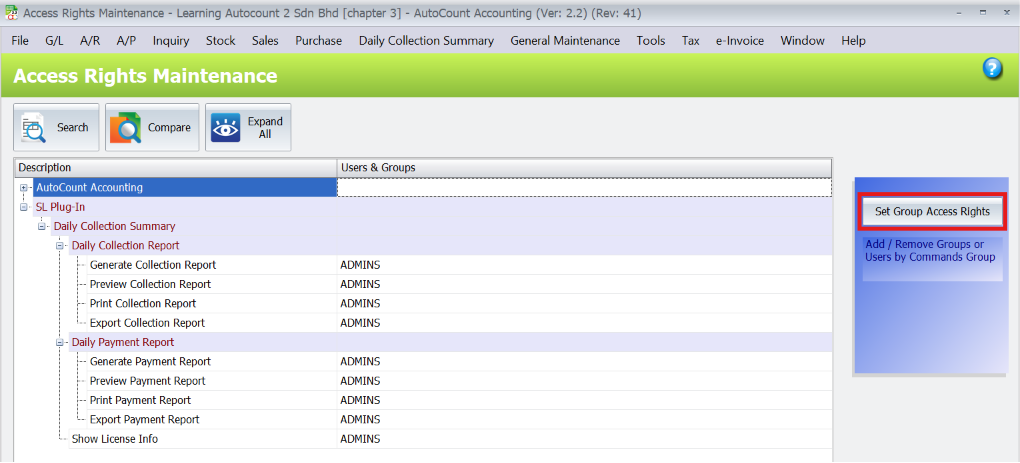
1. Set Access Rights
- Configure the access rights in the system first to control exactly who can view the report and who cannot.
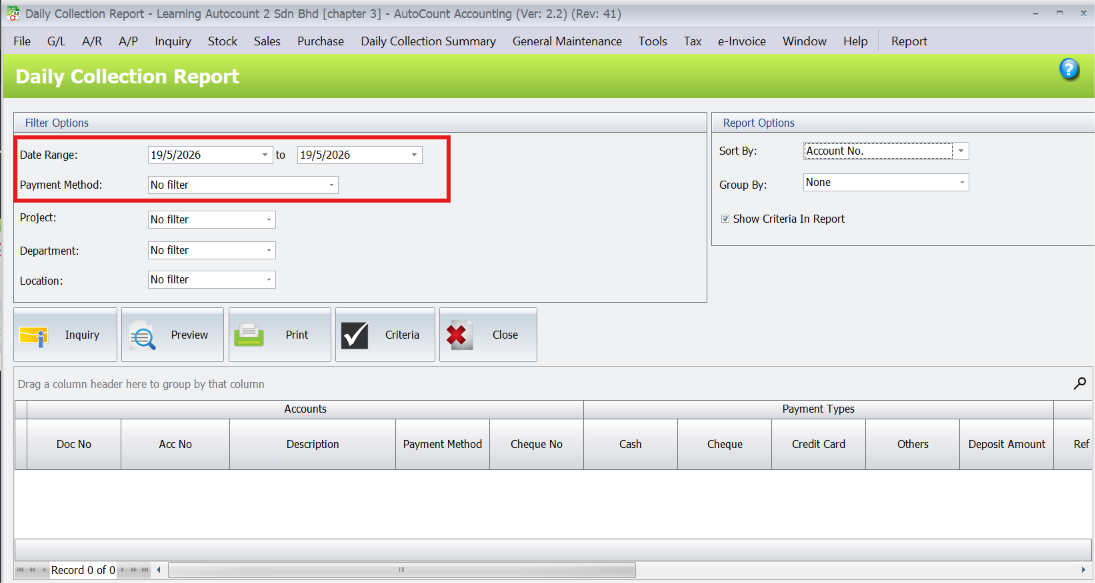
2. Filter and Analyze Data
Once access is granted, users can view the report and filter data using multiple criteria:
Date Range: Defaults to today’s date, but can be adjusted to show collections over an entire month or custom period.
Payment Method: Filter by Cash, Check, Credit Card, etc., to see specific breakdowns.
- Analytical Dimensions: Filter by Project, Department, and Location (e.g., to see exactly how much money a specific branch collected today).
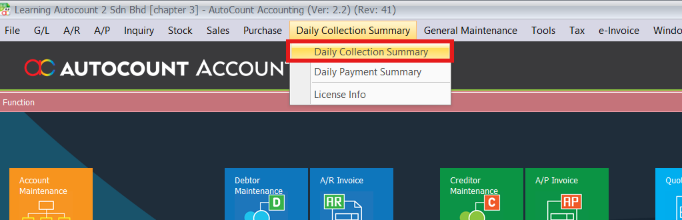
Pro Tip:
Customize your dashboard by adding shortcuts to the Daily Collection Summary screen for quicker access. This will save you time navigating through menus each day.
3. Interactive Grid Manipulation
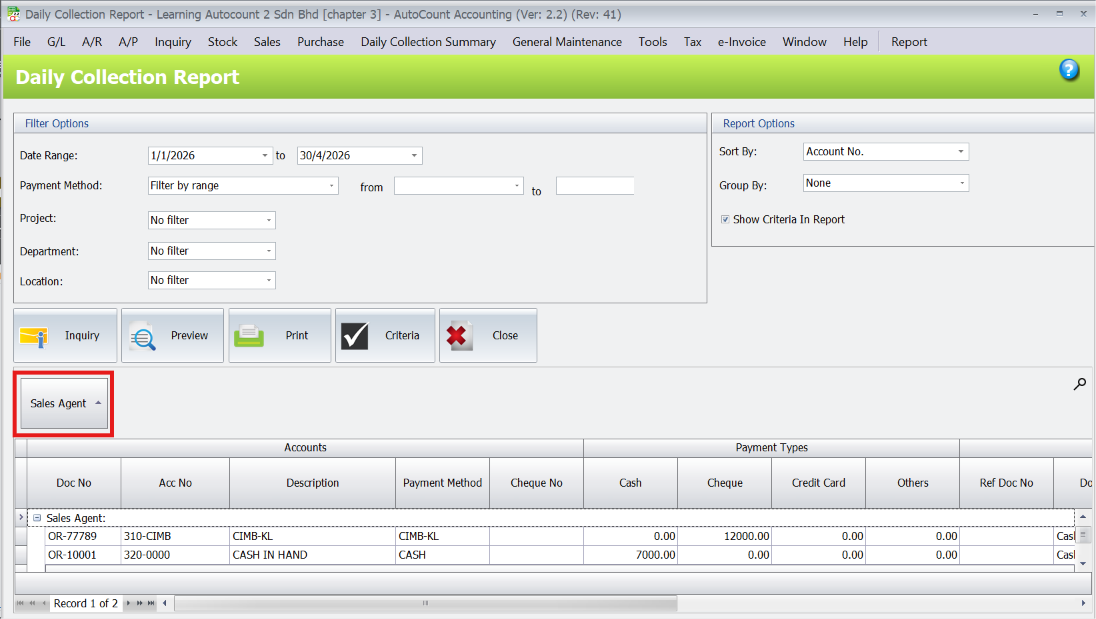
The preview grid is highly interactive and allows for advanced data grouping:
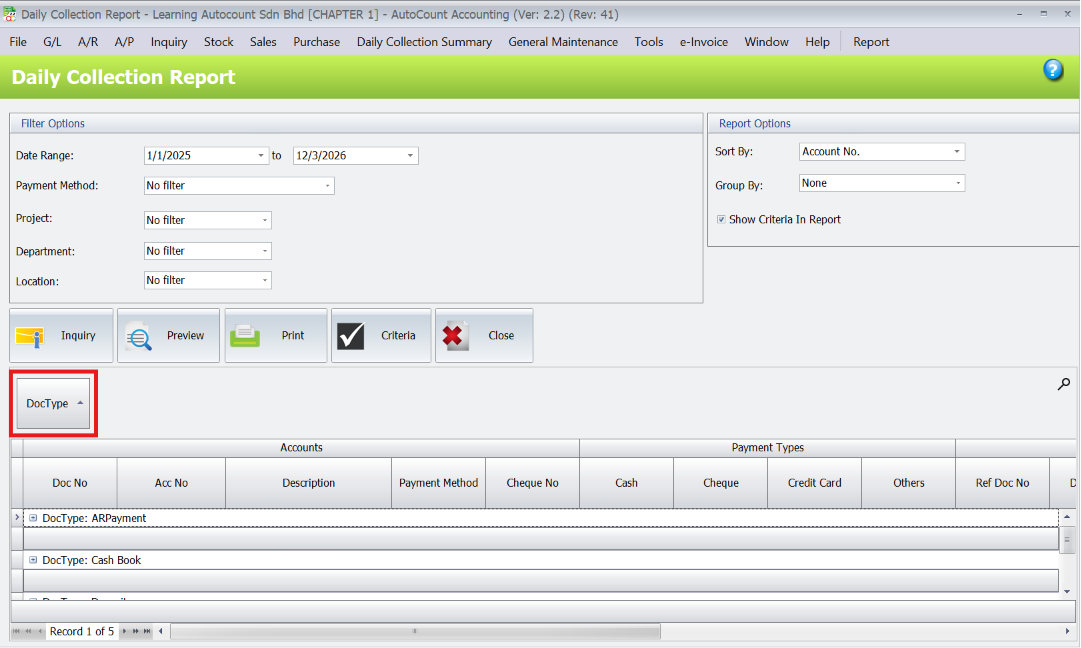
- Group by Sales Agent: Users can drag and drop columns (like Sales Agent) to the top bar to instantly group the data. For example, you can see exactly how much cash a specific sales agent collected today (e.g., RM 2,516) to verify if the counter handover amount matches.
- Deep Details: Shows exact customer details, invoice matches, sales agents, and total amounts.
- Group by Document Type: View detailed breakdowns by AR Payment, AR Deposit, Cash Book, or AR Refund.
Pro Tip:
Use the date range filter to generate summary reports for any period, not just daily. This is useful for weekly or monthly collection reviews, which will help with better financial planning and forecasting.
4. Export & Report Generation
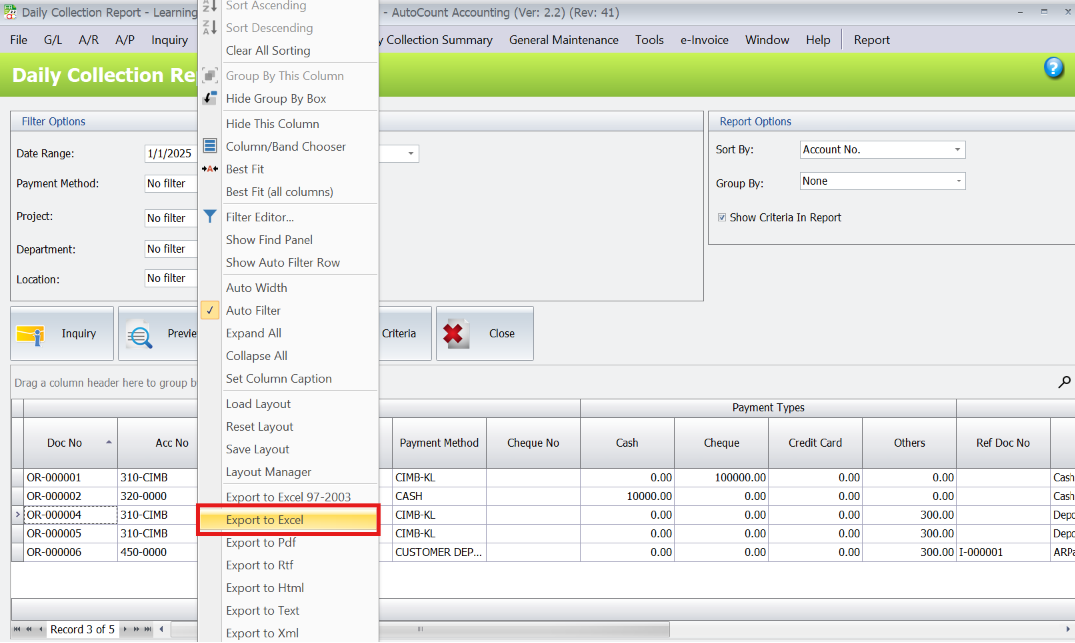
- Excel Export: The entire grid data can be exported to Excel with a single click for further reporting.
- Built-in Reports: The plugin includes three types of formatted reports that users can view and print out.
- You can save templates to re‑use filters.
- Some versions allow email sending directly to management or accounting teams.
Pro Tip:
Export the summary to Excel or PDF for easy sharing with your accountant or management team. Use the email export feature to directly send the summary to relevant stakeholders at the end of each day or week.
5. Export & Report Generation
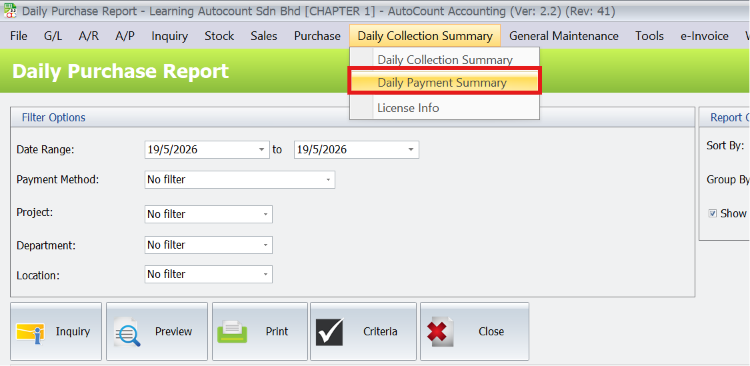
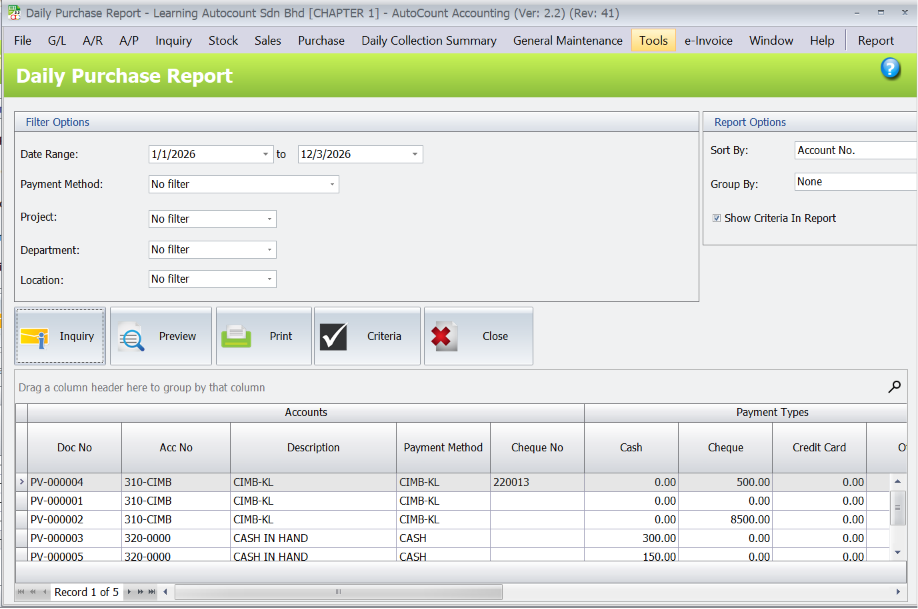
- The plugin features a complete dual-module layout handling both incoming collections (Sales side) and outgoing payments (Purchase side). The functions, grid behaviors, and reporting options are identical for both sides.
Conclusion
The AutoCount Daily Collection Summary Plugin simplifies daily collection tracking and reconciliation. By consolidating payments into a single summary report, it saves time, improves accuracy, and ensures smoother end-of-day reconciliations. Ideal for businesses of all sizes, this plugin enhances efficiency, reduces errors, and supports better financial control and audits. A must-have for seamless cash flow management.
Frequently Asked Questions
What is the AutoCount Daily Collection Summary Plugin?
The plugin automates daily collection tracking by consolidating data from various payment channels (cash, card, transfers, receipts) into a single, easy-to-read summary report for quick reconciliation and analysis.
Can I filter the daily collection summary by date or branch?
Yes, you can filter by date, branch, and cashier to customize the report for your needs.
What types of collections does the plugin track?
The plugin tracks cash, card payments, bank transfers, QR payments, and receipts, summarizing them in one report.
Does this plugin integrate with other AutoCount modules?
Yes, it integrates with POS, Sales, and Receipts, automatically capturing data from these modules.
Get Started with the AutoCount Daily Collection Summary Plugin Today!
Take control of your business’s cash flow management and simplify your daily reconciliation process. Install the AutoCount Daily Collection Summary Plugin now and enjoy the benefits of automated, accurate, and efficient reporting!