
-
AutoCount Accounting Features
-
- Approval Workflow
- Audit Trail
- Auto Save in Draft Folder
- AutoCount Contra Account
- AutoCount License Setting Guide
- Deposit Tracking & Management
- Documents Numbering Format
- Full Transfer and Partial Transfer
- Import Data to AutoCount Accounting Using Excel
- Informative Charts and Analytical Data
- Layout Customization
- Multi Pricing
- Sales and Services Tax
- Schedule Backup
- Search Lookup Edit
- View Documents Flow
- AutoCount Feature Stock Take
- Column Chooser
- Show Remaining (3) Collapse
-
AutoCount Cloud Accounting
-
AutoCount E-Invoice
-
AutoCount HRMS User Guide
-
AutoCount Modules
-
- Activity Stream
- Advanced Financial Report
- Advanced Item
- Advanced Multi-UOM
- Advanced Quotation Module
- Basic Multi-UOM
- Budget Module
- Consignment
- Filter By Salesman
- FOC Quantity
- Formula
- Item Batch
- Item Package
- Landing Cost
- Multi-Currency
- Multi-Dimensional Analysis
- Multi-Location
- Project Account
- Recurrence
- Remote Credit Control Module
- Stock Assembly
- User Defined Fields (UDF)
- AutoCount SST Hidden Functions
- AutoCount SST Submission - Service Tax
- AutoCount Scripting Module User Guide
- AutoCount Bonus Point Module User Guide
- AutoCount Service Management Plugin User Guide
- Show Remaining (12) Collapse
-
AutoCount Plugins
-
- Fixed Assets Management
- Goldsmith
- TD Ordering Mobile Apps
- TD Stock Mobile Apps
- Universal Import Plugin
- DMS Import Plugin
- AutoCount Pick List Plugin User Guide
- AutoCount Credit Memo Plugin User Guide
- AutoCount Lock Price Plugin
- AutoCount Progressive Billing
- AutoCount Easy Recurrence Plugin
- Batch Update Unit Price Plugin
- AutoCount Production order
- AutoCount Car Tint Film Plugin
-
- Event Management System
- AutoCount To-Do List Plugin
- AutoCount AutoBank Reconciliation Plugin
- Intercompany Billing Plugin User Guide
- Lead Management 2.0 Plugin
- AutoCount Service Contract Plugin User Guide
- AutoCount Optical Plugin
- AutoCount Integrator Plugin
- AutoCount Procurement Planning Plugin
- Cage Management Plugin
- AutoCount Vehicle Plugin
- AutoCount Agent Validation Plugin User Guide
- AutoCount Barcode Generator Plugin User Guide
- AutoCount Easy Batch Number Entry Plugin User Guide
- Warranty 2.0 Plugin
- AutoCount Easy Photo 2.0 User Guide
- AutoCount Recurring Invoice Plugin User Guide
- AutoCount Scale Barcode Plugin User Guide
- AutoCount Recurrence Late Interest Plugin
- AutoCount Item Visibility Control
- AutoCount Bill Remark Plugin User Guide
- AutoCount Pain Tracker User Guide
- AutoCount Easy Payment
- AutoCount Easy Deposit Plugin
- AutoCount Easy Knock Off Plugin
- AutoCount Daily Collection Summary Plugin
- Timber Log Plugins
- Batch Transfer SODO Plugin
- AutoCount Vege Basket Plugin Guide
- AutoCount Fruit Basket Plugin Guide
- Referral Management Plugin
- AutoCount Migrator Plugin
- AutoCount Email & WhatsApp Plugin
- AutoCount Multi Company Knock Off Plugin
- AutoCount Advance Aging Format Plugin
- AutoCount Payment Request Plugin
- AutoCount Vehicle Master Plugin
- AutoCount Advance Deposit Plugin
- AutoCount IC Checker Plugin
- AutoCount RMA Plugin
- AutoCount Historical Outstanding DO Listing Plugin
- AutoCount Project Department Visibility Control Plugin
- AutoCount MRP Order Plugin
- AutoCount GridToExcel Plugin
- AutoCount Stock Availability Report Plugin
- AutoCount Batch Transfer SO DO Plugin
- AutoCount Centralized Kitchen Management Plugin
- SL AutoCount API
- AutoCount InterCompany Billing Plugin
- AutoCount Sales Commission Plugin
- AutoCount Advanced Credit Term Plugin
- AutoCount Advanced Stock Assembly Plugin
- AutoCount Shipment Plugin
- AutoCount Tour Plugin
- AutoCount Smart Analysis
- AutoCount Rental Management
- Show Remaining (41) Collapse
-
-
Form Template
-
Report Template
-
- Advance Quotation
- Cash Sale
- Consignment
- Consignment Movement
- Credit Note
- Debit Note
- Delivery Order
- FOC Quantity Analysis By Document Report
- Invoice
- Item Package Sales Report
- Monthly Sales Analysis
- Outstanding Sales Order Listing
- Profit And Loss Of Documents
- Quotation
- Sales Agent Contribution Report
- Sales Order
- Top/Bottom Sales Ranking
- Show Remaining (2) Collapse
-
- Available Stock Status Report
- Expired Item Batch Listing
- Inventory Physical Worksheet
- Stock Adjustment
- Stock Aging Report
- Stock Assembly
- Stock Assembly Order
- Stock Balance By Location
- Stock Balance Report
- Stock Card Report
- Stock Disassembly
- Stock Issue
- Stock Item Profit Margin
- Stock Movement Report
- Stock Receive
- Stock Take
- Stock Transfer
- Stock Write Off
- Show Remaining (3) Collapse
-
B2B ORDERING
-
AutoCount AI Agent
Managing Charges Recurring Late Interest for Retail Clients Within AutoCount Software System
What This Plugin Does?
The AutoCount Recurrence Late Interest Plugin is designed to help businesses automate the calculation and application of late interest on overdue payments in recurring billing systems. It addresses the challenges of manually tracking overdue invoices and applying the correct interest charges, ensuring that businesses maintain consistent revenue and minimize delays in payment processing.
AutoCount Recurring Late Interest Plugin Video Guide
- AutoCount Recurring Late Interest Plugin (EN)
Recurring Late Interest Plugin Setup
Integration & Recurring Late Interest Setup
- AutoCount Recurring Late Interest Plugin (CN)
循环逾期利息插件设置
集成和循环滞纳金设置
Why You Should Use It?
Let’s be honest — chasing overdue payments is already uncomfortable. Manually calculating late interest makes it worse.
This plugin helps you:
Increase efficiency by automating recurring interest calculations
Improve accuracy with system-generated interest charges
Save time by eliminating manual tracking
Maintain professionalism with consistent interest policies
Improve cash flow by encouraging timely payments
In short: it protects your revenue without adding extra admin work.
Who This Plugin is For?
This plugin is perfect for businesses looking to:
Automate late interest calculation for overdue invoices
Ensure consistent application of late payment charges across customers
Reduce manual workload in managing overdue payments, ideal for accounting teams or billing departments
Key Features of the AutoCount AutoCount Recurrence Late Interest Plugin
Late Interest Calculation
Automatically calculates late interest based on user-defined interest rates and overdue periods. The plugin ensures that all overdue invoices are consistently calculated according to preset rules.
Flexible Interest Rates
Allows businesses to configure different interest rates for different types of customers, invoice amounts, or overdue periods. This flexibility ensures that you can tailor the plugin to your unique needs.
Integration with Recurring Billing
Seamlessly integrates with AutoCount's recurring billing system, ensuring that late interest is applied automatically to recurring invoices without the need for manual intervention.
Invoice Updates with Late Interest
The plugin integrates smoothly with other AutoCount modules, such as sales and stock management, ensuring that all processes are connected and data is synchronized across systems.
Reporting
Generate reports that show late interest applied on overdue invoices, helping you track interest accumulation and ensure your billing is transparent and accurate.
How AutoCount AutoCount Recurrence Late Interest Plugin Works
1. Install Plugin (If Not Installed)
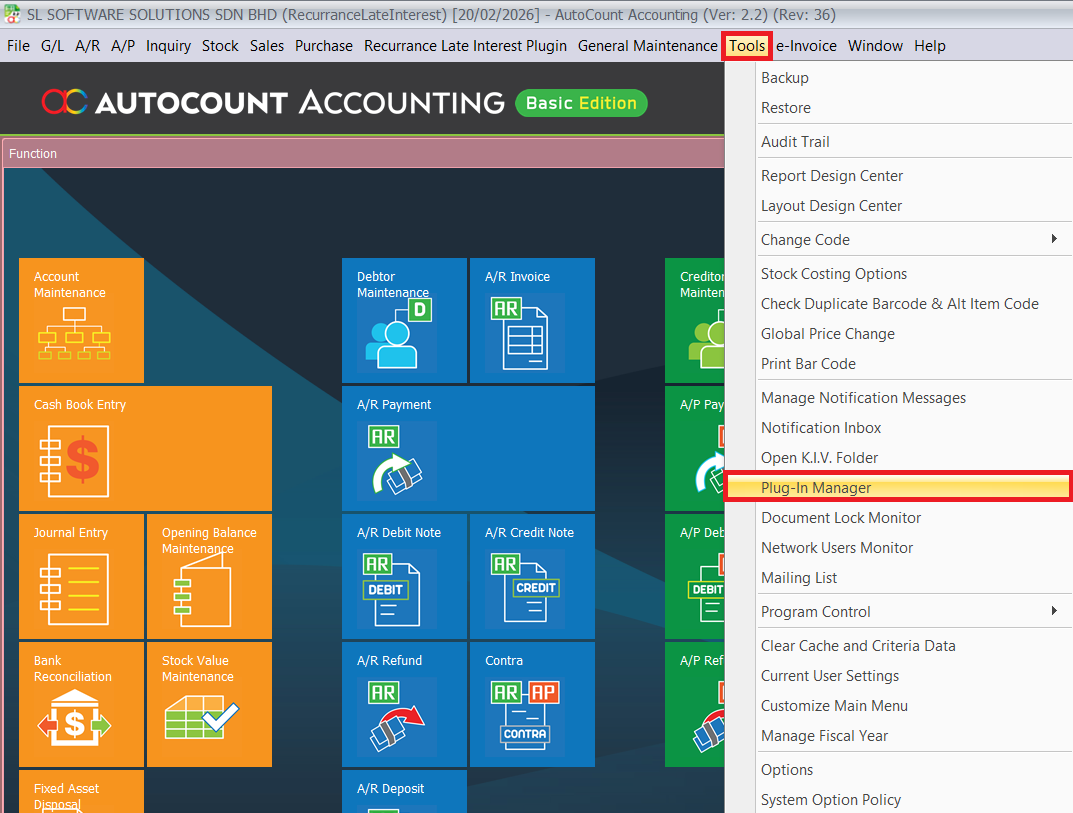
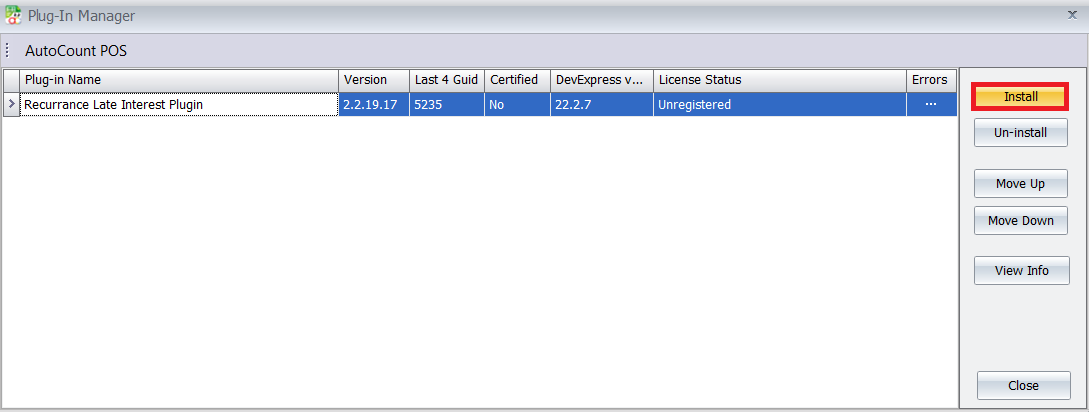
Go to Tools > Plug-In Manager in AutoCount.
Click Install Plug-In.
Browse and select the AutoCount Recurring Late Interest Plugin file.
Click Install and wait for confirmation.
Pro Tip: Always install plugins during non-peak hours. Some installations may require system refresh or restart, and you don’t want users processing invoices halfway through.
2. Recurring Late Interest Configuration
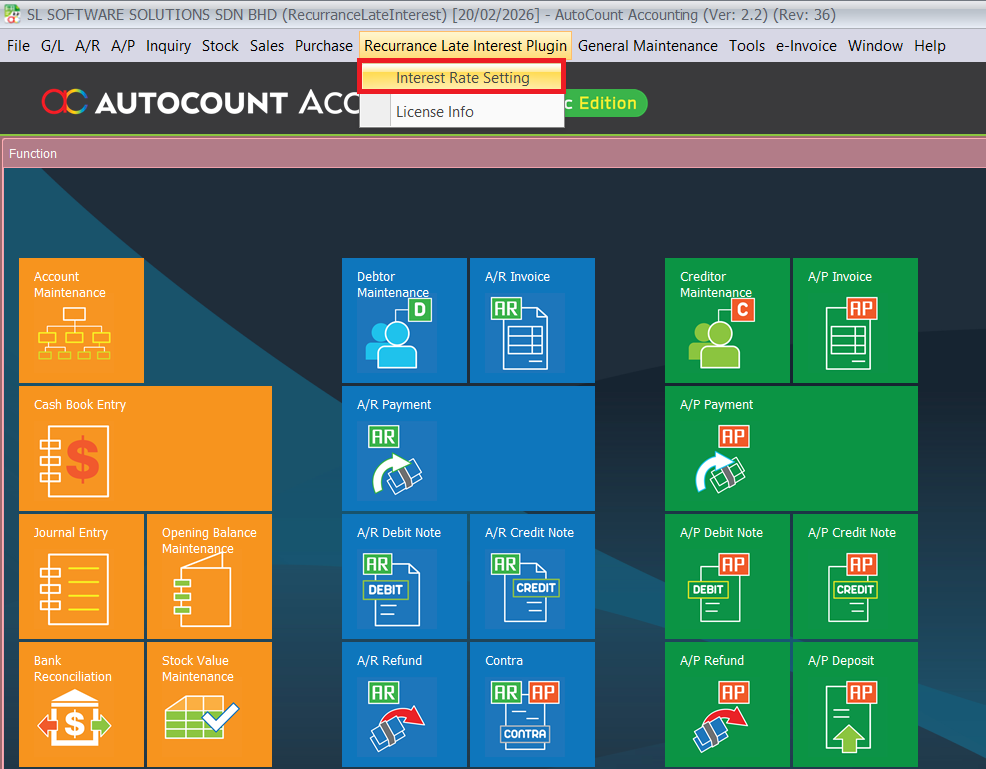
Navigate to Recurring Late Interest Plugin > Interest Rate Setting
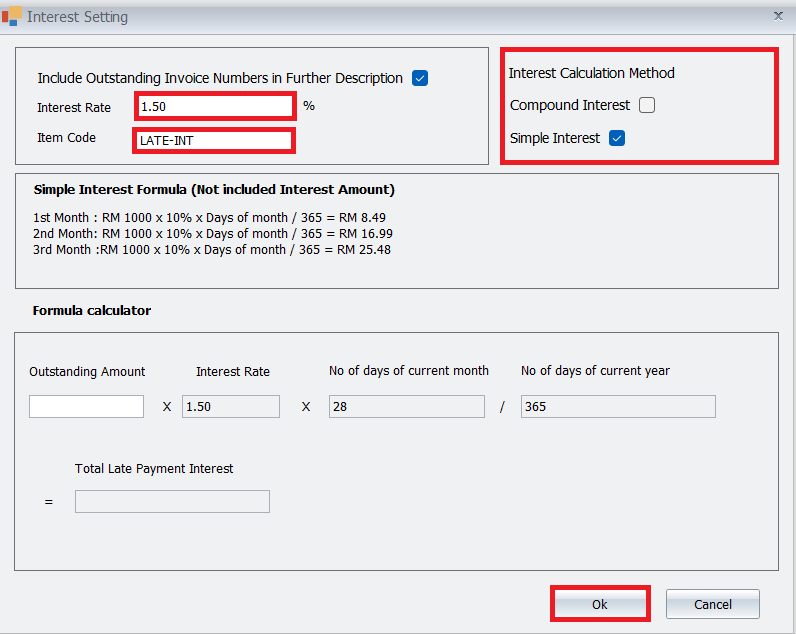
Set the Default Interest Rate (e.g., 1.5% per month).
Choose the Calculation Method (e.g., Simple Interest (Not Include Interest Amount))
Select the Interest Item Code for posting.
Click Ok to save.
Pro Tip: Before saving, confirm your interest rate aligns with your company’s official credit terms or sales agreement. Changing it later can create inconsistencies in customer disputes.
3. Create a Recurring Entry
Set up the automated billing cycle:
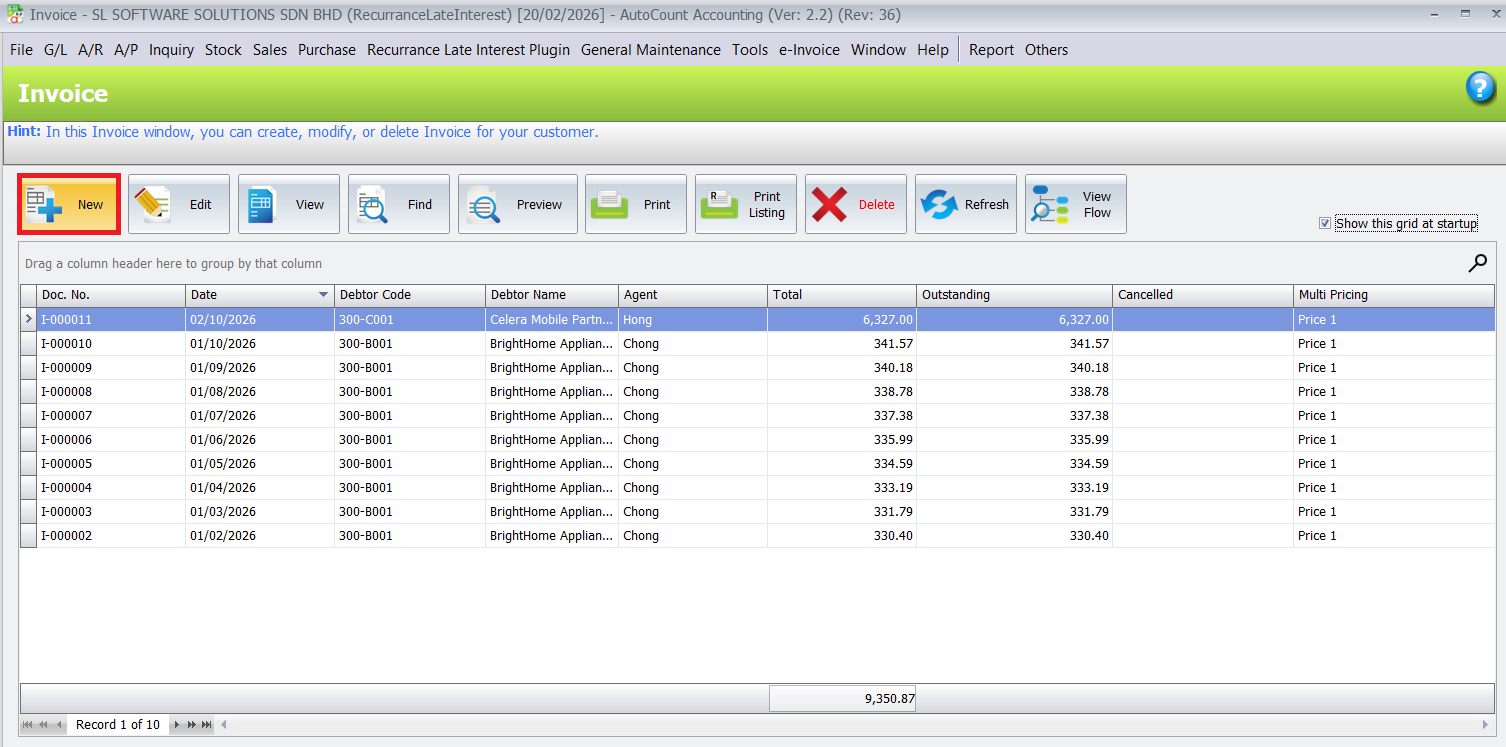
Open the Sales > Invoice > New
Select the Debtor and the relevant Rental Information (item codes for rent, etc.)
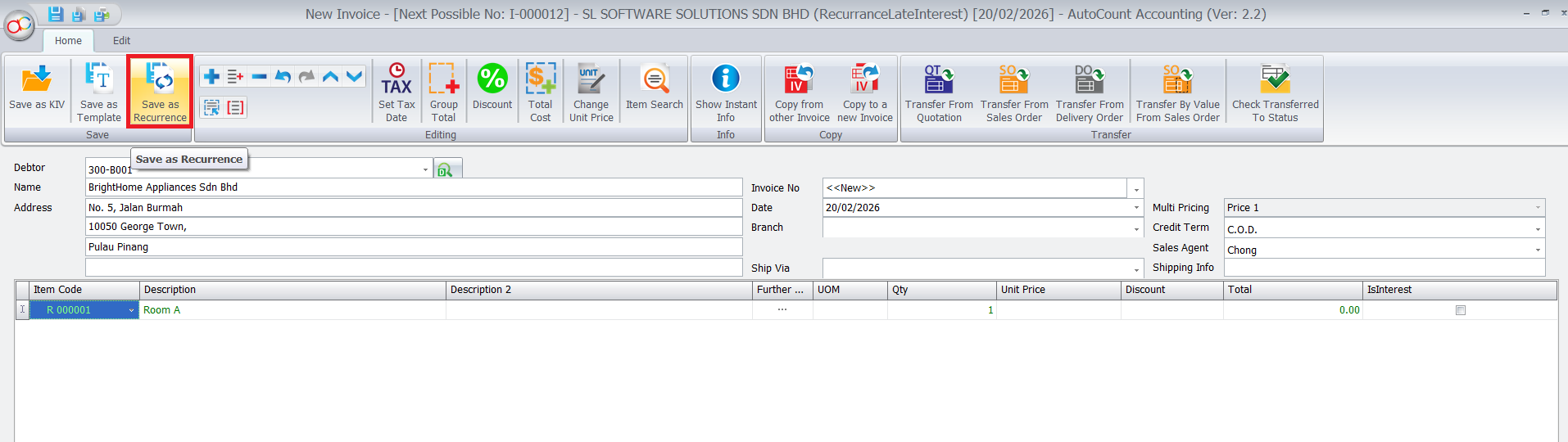
Save the entry as a Recurrence and give it a name.
Pro Tip: You do not need to manually add the late interest item code; the plugin automatically includes it in the recurrence.
4. Schedule and Execute
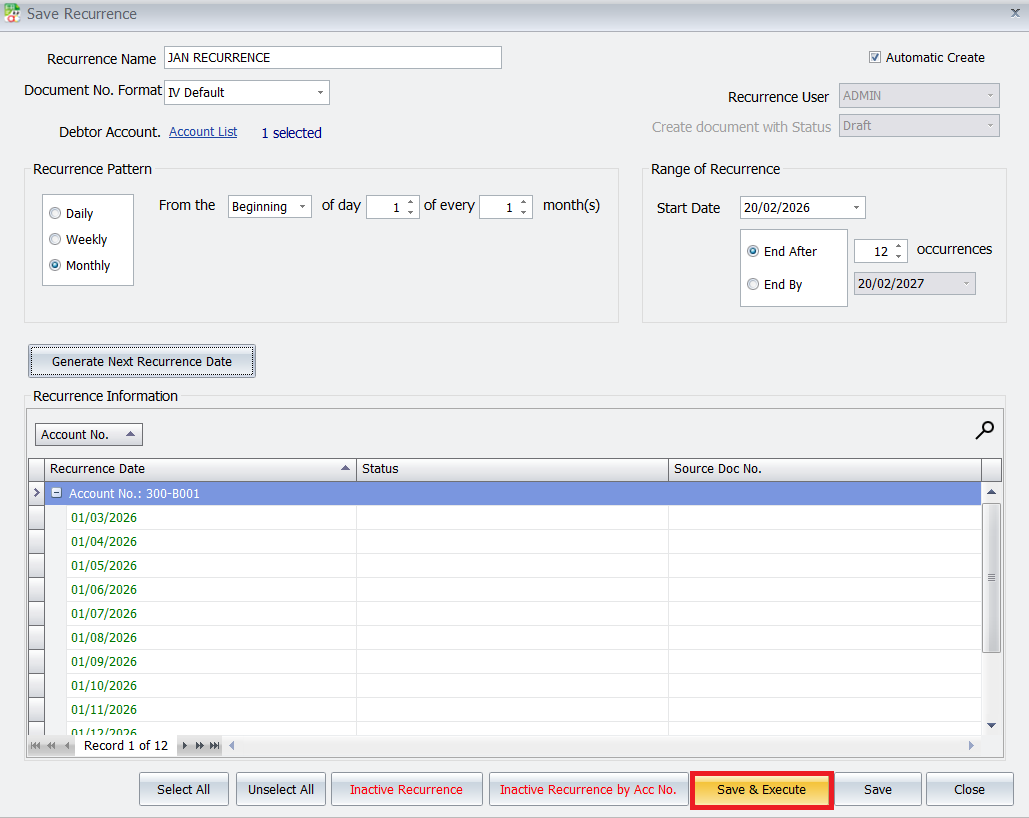
- Choose the frequency (Daily, Weekly, or Monthly). For a standard 30-day interest cycle, select Monthly.
Once saved and executed, the system will automatically generate a new invoice every month.
The plugin will automatically calculate and add the appropriate interest rate line item to these generated invoices if there is an outstanding balance.
Pro Tip: If you want the interest to sync perfectly with a standard monthly billing cycle, set the frequency to Monthly rather than daily or weekly. This ensures the 30-day calculation aligns with your standard rental invoices
5. Reviewing Calculations
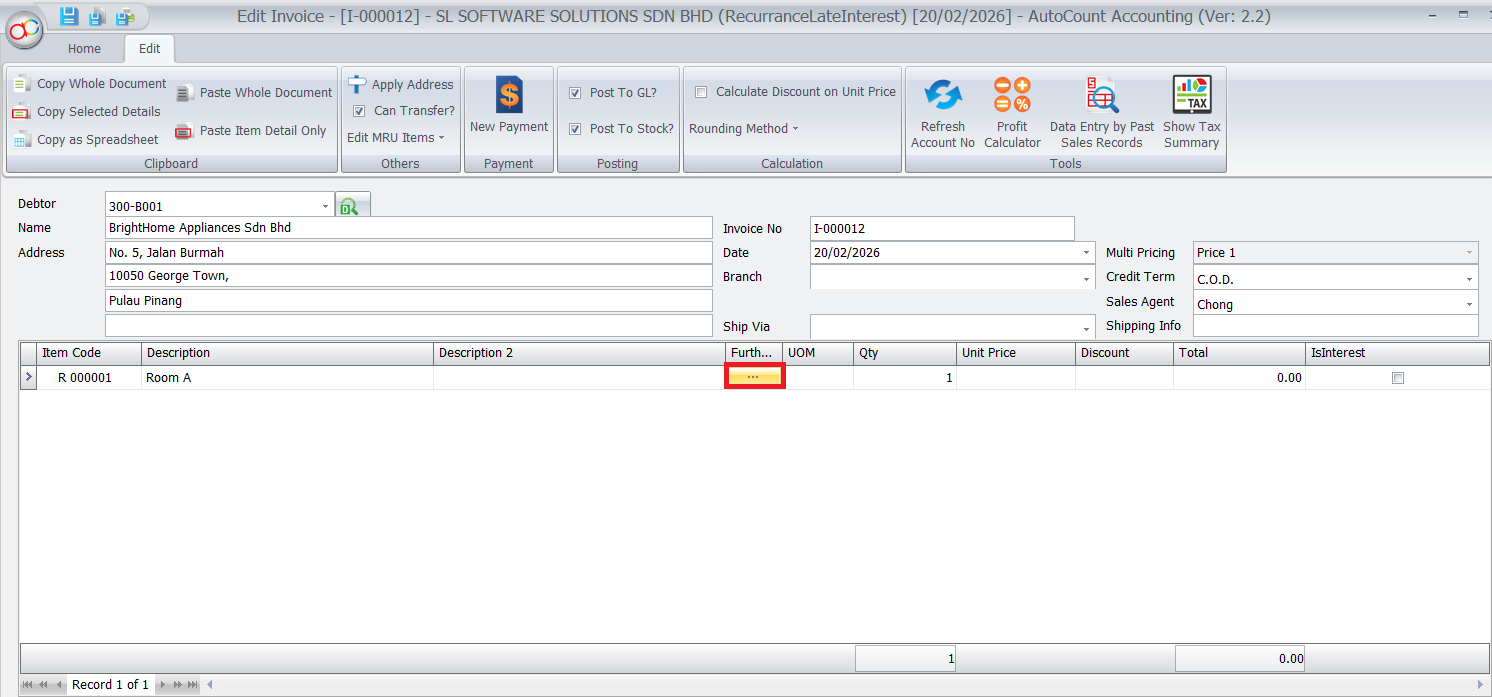
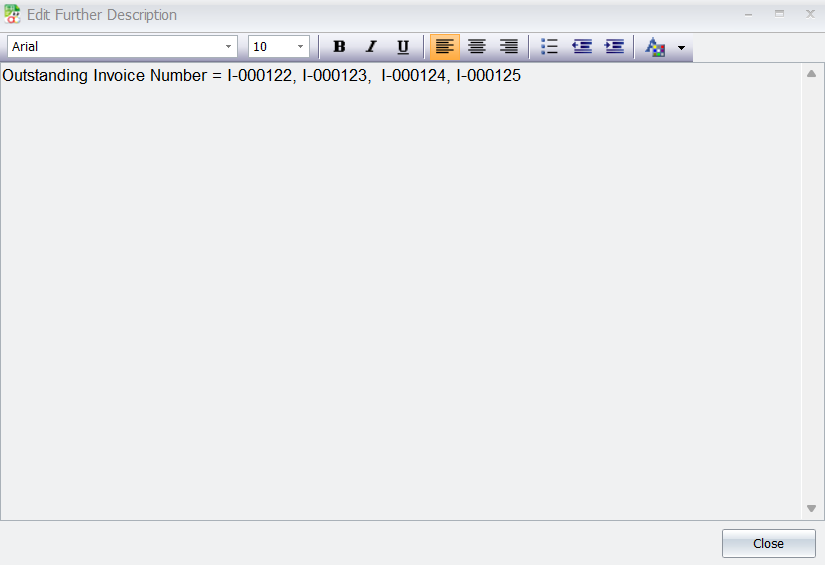
- You can verify how the interest was calculated by looking at the Full Description on the generated invoice. It will detail which outstanding invoices and amounts were included in the calculation
Pro Tip: If a customer disputes a charge, check the Full Description on the generated invoice. It provides a transparent breakdown of exactly which outstanding invoices were used to calculate that specific interest amount, making it easier to explain to clients
Benefits of Using AutoCount AutoCount Recurrence Late Interest Plugin
Accuracy
System-based calculations eliminate human error and inconsistent percentages.
Professional Credit Management
Establishes clear and enforceable credit policies.
Seamless Integration
Works directly within AutoCount Accounting — no external software needed.
Better Cash Flow Control
Encourages customers to pay on time when consistent late interest is applied.
Conclusion
The AutoCount Recurrence Late Interest Plugin offers businesses an efficient way to automate the calculation and application of late interest on overdue invoices. It ensures accurate and timely billing, saves time, and reduces the potential for errors.
Frequently Asked Questions
Can I set different late interest rates for different customers?
Yes. You can configure different interest rates based on customer, customer group, or business policy. This gives you flexibility to apply stricter terms to high-risk accounts while offering preferred rates to long-term or VIP customers.
When will the late interest be triggered?
Late interest is triggered based on the overdue period you define (for example, 7 days, 14 days, or 30 days after invoice due date). Once the invoice exceeds the grace period, the system automatically calculates and applies the interest according to your configuration.
Will late interest be added automatically to recurring invoices?
Yes. Once enabled, the plugin can automatically add late interest charges into the next recurring billing cycle or generate a separate charge entry, depending on how your workflow is configured. No manual calculation needed.
What happens if a customer makes a partial payment?
The system calculates interest based on the remaining outstanding balance. This ensures fairness — customers are only charged late interest on the unpaid portion, not the full original invoice amount.
A Better Way to Handle Stock Starts Here
The AutoCount Pick List Plugin streamlines inventory picking, automates stock transfers, and integrates pick lists into sales invoicing — resulting in faster, more accurate warehouse operations with less manual work.